

Your laptop is a world-class radio station. You just don't know it yet. Or maybe you do, but the fear of a "buffer wheel of death" or a 4:00 AM server crash keeps your mic turned off. It's a common hurdle. You want to reach global ears, but the technical gap between hitting record and going live feels like a massive canyon. Most creators get stuck choosing between software that's too complex and live radio stream hosting that's too shaky.
Sound familiar? You aren't alone in the struggle to balance professional audio with 24/7 reliability. This guide is your 2026 roadmap to total airwave domination. We're cutting through the static to show you how to build a station that broadcasts from your desktop to smartphones, Alexa, and even big-screen TVs. You'll master the tools needed for a lag-free experience and learn how to keep your stream running even when your PC is off. It's time to stop worrying about the tech and start talking to the world. Let's get you on the air.
Key Takeaways
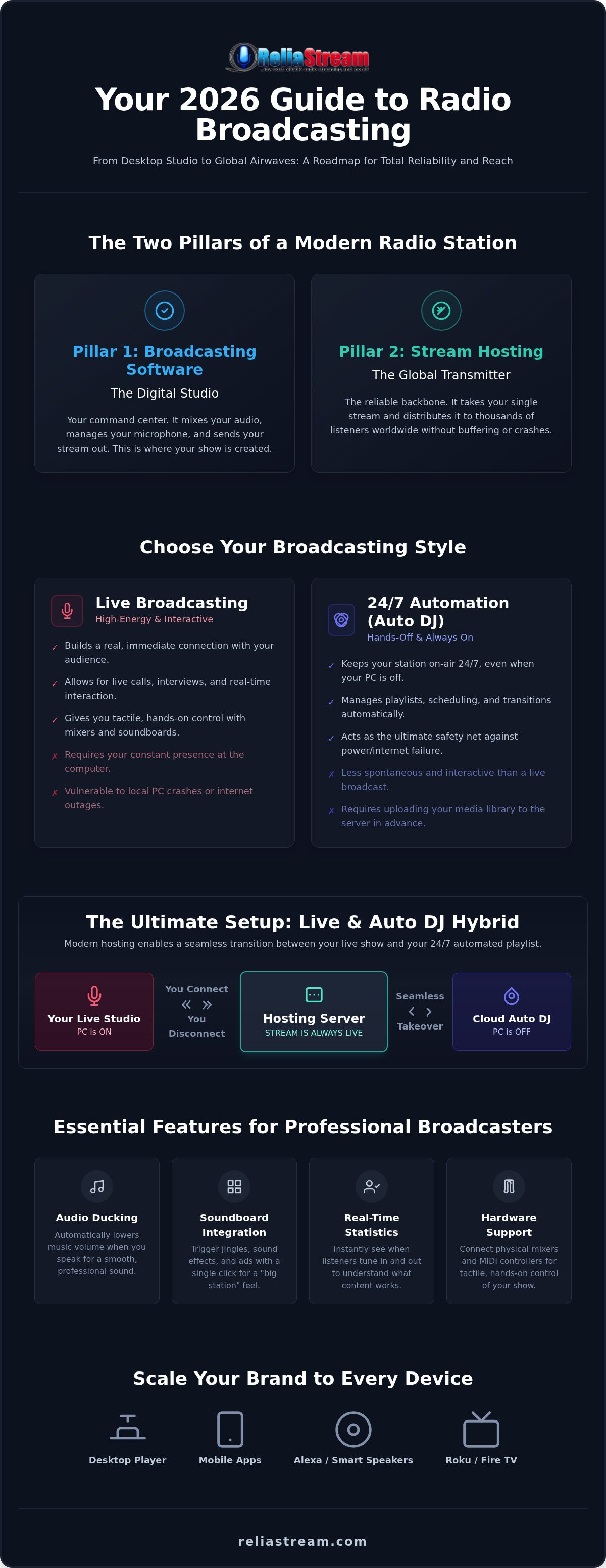
- Your broadcasting software is the digital heart of your station. It manages your audio, microphone inputs, and the metadata that tells the world what you're playing.
- Choose your style: high-energy live broadcasting or hands-off 24/7 automation. Use Auto DJ features to keep your station running even when your computer is off.
- Software is the studio, but professional live radio stream hosting is the transmitter. You need a reliable backbone to reach thousands of listeners simultaneously without buffering.
- Master the technical setup. Follow a clear roadmap to configure your encoder and connect your desktop to global servers with total confidence.
- Scale your brand to the living room. Move beyond the browser by launching custom apps for Roku, Fire TV, and Alexa to dominate every device.
What is Live Radio Broadcasting Software?
Broadcasting software is the digital heart of your radio station. It is the command center where you mix your music, trigger your jingles, and open your mic. But don't get it twisted. The software creates the stream; the host distributes it. You can have the most expensive software in the world, but without professional live radio stream hosting, your broadcast stops at your front door. In 2026, your software needs to do more than just play files. It must support VST plugins for professional audio processing and integrate remote calls seamlessly for global interviews.
The Bridge Between Mic and Listener
How does your voice travel across the globe? It starts with the encoder. This is the piece of tech inside your software that converts raw audio into a digital format. For live talk shows, low-latency processing is non-negotiable. You can't have a five-second delay when you're trying to interact with a live audience. This process is part of the broader evolution of what is webcasting, turning a local studio into a global transmitter. Your software also handles the metadata. This is the invisible data that tells your listeners exactly what song is playing. Without accurate metadata, you're just a nameless voice in the digital void. Professionalism lives in the details.
Standalone Software vs. Cloud-Based Managers
Should you run your station from a local PC or the cloud? Standalone software gives you the ultimate "hands-on" experience. You get to use professional plugins and custom soundboards. You have total control over the faders. But there is a catch. It requires your computer to be powered on and connected at all times. If your internet blinks, your station goes dark. That is a risk you can't afford.
Cloud-based managers solve this problem. They act as a reliable backbone, keeping your station on-air 24/7 via an Auto DJ even when your studio is offline. Choosing a flexible setup prevents platform lock-in. It gives you the freedom to evolve your sound without rebuilding your infrastructure from scratch. Whether you're a live-only DJ or a programmed station, you need a setup that scales with your ambition. Don't settle for a system that limits your growth. You need a live radio stream hosting partner that supports whatever software you choose to drive your station.
Automation vs. Live Studio: Choosing Your Broadcasting Style
Your station. Your schedule. Are you a live-only DJ? Or a 24/7 programmed powerhouse? You need to decide now. Live broadcasting brings the raw energy. It builds a real connection with your audience. But you can't sit at the desk forever. Radio automation software handles the heavy lifting when you need to sleep. It keeps the signal strong while you're away. Choosing the right live radio stream hosting is about more than just bandwidth; it's about supporting your specific broadcasting style. Professionalism requires ducking features. This automatically lowers the music volume the moment you speak. No more fumbling with faders while you're trying to deliver a punchy intro. Managing multi-host handoffs is another hurdle. You need a setup that allows for smooth transitions without a single second of dead air. Dead air is the enemy. It kills your momentum.
Must-Have Features for Live Broadcasters
You need tools that react as fast as you do. Soundboard integration is vital. It lets you trigger drops, jingles, and transitions with a single click. It adds that professional "big station" feel to your bedroom studio. Want to know if your show is hitting the mark? Real-time listener statistics are your best friend. They show you exactly when people tune in or drop off. Don't limit yourself to a mouse and keyboard. Look for software that supports external hardware mixers and MIDI controllers. This gives you tactile control over your sound. It's about the feel of the broadcast. You want to slide those faders, not click them. This physical connection to your gear translates to a better show.
The Power of Auto DJ and Remote Management
What happens when your internet goes down? Or your laptop decides to update in the middle of a set? Without a backup, your station dies. That's why Auto DJ radio hosting is the ultimate safety net. You upload your library directly to the server. The automation takes over server-side. It doesn't care if your home power is out. It keeps the music playing 24/7. Switching from Auto DJ to your live stream should be seamless. Modern live radio stream hosting makes this transition invisible to the listener. You just connect your encoder and take over the airwaves. No clunky restarts. No silence. Just pure, uninterrupted sound. It gives you the freedom to broadcast on your terms. If you're ready to build that foundation, check out the hosting plans that provide the backbone for your creative vision.
The Hidden Bridge: Why Software Needs Professional Hosting
Software is your studio. Hosting is your transmitter. You can mix the perfect set on your laptop, but without a server, nobody hears it. Your home internet connection simply cannot handle 500 simultaneous listeners. It will buckle. It will lag. This is the reality of the digital airwaves. Professional live radio stream hosting acts as the powerhouse that takes your single digital feed and replicates it for thousands of ears across the globe. It is the difference between a hobby and a brand. Choosing the right live radio stream hosting partner means you never have to worry about your signal dropping when your audience peaks.
In 2026, this bridge also handles your security. SSL-secured links are no longer a "nice-to-have" feature. They are mandatory. Modern browsers like Chrome and Safari will flat-out block your stream if it isn't served over a secure HTTPS link. Imagine spending months building an audience only for them to see a "Not Secure" warning. That is a station-killer. We include SSL links in our setups because your credibility is on the line. Don't let outdated tech silence your voice. You need a backbone that works with any software you choose.
ShoutCast vs. IceCast: The Breakdown
Which engine drives your station? ShoutCast is the veteran authority. It offers rock-solid compatibility for legacy players and global directories. It is the name that defined the industry. IceCast is the open-source alternative. It provides incredible flexibility for those who want custom mount points and complex setups. Both are titans. Both work seamlessly with the right backbone. Want to know which one fits your specific goals? Read our full ShoutCast vs IceCast comparison for a deep dive into the technical specs. Your choice here dictates how you manage your listeners and your data.
Bitrates and Audio Quality Standards
Quality matters. But so does accessibility. You need to pick the right bitrate for your content. Talk radio doesn't need massive fidelity. A 32 Kbps or 64 Kbps stream works perfectly and keeps your bandwidth usage lean. Music stations are different. You want that 128 Kbps or 320 Kbps "CD quality" sound to keep your audience hooked. Higher bitrates demand more from your server. This is exactly why reliable internet radio hosting is the non-negotiable foundation for your brand. If your host can't maintain the throughput, your high-quality stream will stutter and buffer. Your listeners won't wait for a fix. They will just leave. Match your bitrate to your mission and ensure your host can actually deliver the goods.
Step-by-Step: Connecting Your Software to a Global Audience
The studio is ready. The mic is hot. Now it's time to flip the switch. Connecting your desktop to the world is the final hurdle in your journey. First, select your weapon. Whether you prefer the open-source power of Mixxx, the automation depth of RadioDJ, or the professional interface of VirtualDJ, the process remains the same. You need to bridge the gap between your local setup and your live radio stream hosting server. It's about precision. It's about getting the data from point A to point B without a glitch.
Grab your server IP and Port from your welcome email. These are your digital coordinates. Enter them into your software's encoder settings along with your source password. This is the handshake that starts the broadcast. But which dashboard will you use to manage the chaos? You need to choose between Centova Cast vs MediaCP. One is a classic powerhouse; the other is a modern visual marvel. Don't forget the lock icon. Secure your stream with an SSL radio link to ensure your listeners don't get blocked by aggressive browser filters. Ready to go? Pick your hosting plan and get your station live today.
Setting Up Your Control Panel
Your control panel is your mission control. If you're using Centova Cast, focus on the library management tools. It's built for those who love a logical, organized workflow. MediaCP users should look at mount points and listener limits. It's the best way to handle multiple streams from one account. Both panels give you a goldmine of data. You can see real-time listener counts and geographical locations. This isn't just vanity. It's intelligence. Knowing where your audience lives helps you tailor your content and your time slots for maximum impact.
Testing Your Stream Performance
Never go live without a dry run. Buffer bloat is the silent killer of great radio. Check your stream stability on a second device. Use a smartphone. Use a tablet. Use a laptop on a different network. You need to hear what your listeners hear. Is the audio crisp? Is there lag? This is also the time to verify your failover. Ensure your Auto DJ takes over the second your local connection drops. A professional station never goes silent. If you can't trust your connection, you can't build a brand. Test until it's perfect. Then test it again.
Scaling Beyond the Desktop: Apps, Alexa, and Smart TV Integration
The desktop is just the beginning. The living room is the new frontier. Most broadcasters stop at a web player. That is a mistake. A massive one. You need to be where the ears are. In 2026, that means smart TVs and voice-activated speakers. Your live radio stream hosting provider should be the launchpad for this expansion. It's not just about audio anymore. It's about presence. It's about being a household name. Why settle for a browser tab when you can own the home theater?
Why settle for a generic directory listing? You're just a number there. Custom radio streaming app development is essential for brand authority. It puts your logo on the home screen. It makes your station a destination, not an afterthought. When you own the app, you own the experience. You control the visuals, the interaction, and the connection. It gives you a professional edge that separates the veterans from the amateurs. It's time to stop thinking small.
Dominating the Smart TV Market
Roku is a goldmine for independent radio. It's one of the most accessible streaming platforms for creators today. Having a dedicated Roku Radio App or Amazon Fire TV App changes the game. It moves your station from a background tab to the center of the home theater. Listener retention skyrockets when your station is as easy to access as Netflix. Dedicated apps build brand loyalty that a simple link can't touch. Don't forget the Google TV App market either. These platforms are where your audience spends their evenings. Be there. Be the voice that fills the room.
Voice Search and Smart Speakers
"Alexa, play my station." That's the goal. That's the standard for 2026. You need an Alexa Streaming App that works every time. The shift toward voice-activated content is real. It's happening now. If you aren't integrated into smart home ecosystems, you're invisible. Your live radio stream hosting needs to support these endpoints seamlessly. It's about 24/7 presence. It's about being the first thing a listener hears when they wake up. Developing these skills isn't just a luxury; it's a requirement for growth. Don't let your voice get lost in the noise. Get on the speakers. Get in the living room. Dominate the space.
Claim Your Space on the Global Airwaves
You have the vision. You have the software. Now you need the power to reach the world. Professional live radio stream hosting is the engine that transforms your local studio into a global brand. We've mapped out the tools and tech you need to broadcast with confidence in 2026. From mastering automation to scaling onto smart TVs, the roadmap is clear. Don't let technical hurdles or server lag keep your mic off. It's time to take control of your broadcast.
Since 2008, we have acted as the reliable backbone for independent creators. We offer rock-solid ShoutCast and IceCast hosting backed by professional Centova Cast and MediaCP control panels. Ready to dominate the living room? Our custom app development for Roku, Fire TV, and Alexa puts your station exactly where your listeners are. The tech is ready. The audience is waiting. You just need to flip the switch.
Launch your professional radio station today with ReliaStream hosting! It's time to stop dreaming and start broadcasting. Let's get you on the air.
Frequently Asked Questions
What is the best free live radio broadcasting software for beginners?
Mixxx and RadioDJ are the top choices for beginners who want professional features without a price tag. Mixxx is a fantastic open-source tool for live DJs who need tactile control and low-latency performance. RadioDJ is a powerhouse for those focusing on complex automation and scheduling. Both tools integrate seamlessly with your hosting provider. They allow you to manage your audio library and microphone inputs from a single, user-friendly desktop interface.
Do I need a powerful computer to run radio broadcasting software?
You don't need a high-end gaming rig to broadcast. Most modern laptops or desktop computers have enough processing power to run encoding software and manage audio playback. The real heavy lifting happens on the server side. Professional live radio stream hosting handles the massive bandwidth required to reach thousands of listeners simultaneously. This setup ensures your local machine stays cool while your station reaches a global audience without any lag.
How do I get my radio station on Alexa and smart speakers?
Reaching smart speakers requires a dedicated voice skill. To get your station on Alexa, you need a custom Alexa Streaming App that connects your stream to the Amazon ecosystem. This allows listeners to simply ask their device to play your station. We specialize in developing these voice-activated tools to ensure your brand is accessible in every living room and kitchen. It's the most effective way to build a 24/7 presence in 2026.
Can I broadcast live and use Auto DJ at the same time?
You can switch between live broadcasting and Auto DJ, but they don't play at the exact same moment on the same stream. Auto DJ acts as your reliable backup. It keeps the music playing 24/7 from the server. When you open your local software and hit "Connect," the system automatically fades out the Auto DJ and hands the "live" mic to you. This transition ensures your station never goes silent during a handoff.
What is the difference between ShoutCast and IceCast for software setup?
ShoutCast is the industry veteran known for its simple setup and global directory integration. It's a "plug and play" choice for many. IceCast is the open-source alternative that offers superior flexibility through the use of multiple mount points. This allows you to run different bitrates or content streams from a single server. Both protocols are fully supported by our Centova Cast and MediaCP plans, giving you total control over your station's technical architecture.
Does my broadcasting software need to support SSL?
Your local software doesn't necessarily need to support SSL, but your streaming link does. Modern web browsers will block audio that isn't served over a secure connection. This is why an SSL Radio Link is mandatory for any serious broadcaster. We include these secure links as standard because your audience shouldn't have to deal with "Not Secure" warnings. It protects your brand authority and ensures your stream works on every modern device.
How much bandwidth do I need for a 320 Kbps high-quality stream?
A 320 Kbps stream provides CD-quality audio but consumes significantly more data than a standard talk stream. For every listener, you'll need a stable output of 320 kilobits per second. This makes choosing the right live radio stream hosting plan critical to prevent buffering. While talk radio thrives at 64 Kbps, music-heavy stations should prioritize these higher bitrates to satisfy audiophiles. Always ensure your host has the infrastructure to support your peak listener numbers.
Can I use my existing music library with Auto DJ software?
Yes, you can easily upload your existing MP3 library directly to the server. Once your files are uploaded to the Centova Cast or MediaCP panel, you can organize them into playlists for the Auto DJ to handle. This allows your station to run autonomously without your home computer being powered on. It's the perfect solution for maintaining a professional, 24/7 broadcast while keeping your local hardware free for other creative tasks or live shows.


