

Why does most "easy" radio software leave you staring at a "Connection Failed" error while your audience hears nothing but dead air? You have the talent and the tracks, but learning how to broadcast to a shoutcast server often feels like hitting a wall of technical jargon. IP addresses. Ports. Mount points. It is frustrating. It is confusing. And honestly, it is a waste of your creative energy.
We get it. You want a stable, 24/7 stream that doesn't buckle under pressure. We are going to tear down that wall. This pro guide breaks down the exact steps to connect your studio software using the latest 2026 standards so you can stop troubleshooting and start talking. No more buffer errors. No more expensive, bloated automation suites. Just professional results and gritty, reliable performance.
By the time you finish this, you'll have a rock-solid handshake between your encoder and your server. We are covering everything from hitting that crystal clear 320 Kbps audio gold standard to ensuring your metadata displays song titles perfectly every single time. It is time to get your station live, loud, and secure. Let's dive in and get you on the air.
Key Takeaways
- Understand why your broadcasting software acts as the essential digital bridge, converting your live audio into a streamable format for the world to hear.
- Master the technical "handshake" to learn exactly how to broadcast to a shoutcast server by correctly entering your IP, Port, and source credentials.
- Identify the must-have software features for 2026, including the ability to push crystal clear 320 Kbps audio and manage multi-server connections.
- Compare the top-rated free and pro-level automation suites to find the right balance between cost and professional playlist management.
- Learn how to scale your station's reach by moving beyond simple browser links and into the world of Roku, Alexa, and Smart TV apps.
What is Internet Radio Broadcasting Software?
Your software is the heart of the operation. It is the digital bridge between your studio microphone and a global audience. Think of it as your station's engine room. Without it, your voice never leaves the room. You need a way to pack up your audio, wrap it in code, and ship it across the web. Learning how to broadcast to a shoutcast server starts with picking the right tool for this job. While some cloud-based competitors claim you can run a station from a browser tab, they often ignore the power and reliability of local desktop encoders. Why settle for a limited web interface when you can have a pro-grade studio setup?
The Role of the Encoder
The encoder is the muscle of your broadcast. It captures sound from your audio interface or mixer in real-time and prepares it for the journey. It handles the heavy lifting of compressing that audio into formats like MP3 or high-efficiency AAC+. An encoder is the translator that sends your studio sound to a server. By using protocols like Shoutcast, the encoder maintains a constant, unwavering connection to your hosting provider. This ensures your stream stays light enough to travel through the internet while maintaining the high-bitrate quality your listeners expect. It is about precision. It is about performance.
Live vs. Automated Broadcasting
Not all software is built for the same mission. You have to choose your weapon based on how you want to run your station.
- Live Encoders: These are built for the heat of the moment. If you are running talk shows, live interviews, or DJ sets where timing is everything, you need a live encoder. It focuses on low latency and real-time interaction.
- Automation Suites: These are your 24/7 workhorses. They manage your station's schedule, fire off station IDs, and keep the music flowing while you sleep.
Your software is a high-performance vehicle, but it needs a road to drive on. Professional hosting is the mandatory partner for your software setup. It provides the backbone that takes your single encoder feed and distributes it to thousands of listeners simultaneously. ReliaStream panels make this handshake seamless. They provide the IP, port, and password credentials that turn your local computer into a global broadcasting powerhouse. Stop playing with amateur tools and start building a radio empire.
Top Internet Radio Software Tiers for 2026
You don't need a massive corporate budget to sound like a global network. In 2026, the barrier to entry has vanished. Whether you are running Windows 11/12 or macOS Sequoia, your desktop is a broadcast powerhouse. The "can-do" spirit of independent radio is alive and well. You just need to pick the right weapon for your station. Ready to learn how to broadcast to a shoutcast server without breaking the bank? It starts with matching your software to your ambition.
Software choice is personal. It depends on your workflow. It depends on your OS. But mostly, it depends on how much control you want over your sound. Understanding How Internet Radio Works shows that your encoder is simply the first link in the chain. You provide the content; the software provides the connection. Let's break down the tiers that are dominating the airwaves this year.
Best Free Tools: BUTT and Mixxx
If you want pure performance with zero bloat, BUTT (Broadcast Using This Tool) is the undisputed king of encoding. It is lightweight. It is fast. It focuses entirely on the "handshake" between your mic and the server. It is the perfect entry point for those learning how to broadcast to a shoutcast server for the first time. For those who need a full DJ console, Mixxx is the open-source answer. It offers full-featured mixing, vinyl control, and built-in ShoutCast support. You can easily pair these tools with low bitrate radio hosting for an ultra-affordable start that sounds like a million bucks.
Professional Powerhouses: SAM Broadcaster and RadioDJ
When you need deep automation, you step up to the heavy hitters. SAM Broadcaster Pro remains the veteran choice for rule-based music rotation. It handles complex scheduling and advanced logic so your station runs flawlessly while you are away. On the Windows side, RadioDJ is a total powerhouse that rivals paid suites despite being free to use. It is a favorite for those who want a pro sound without the pro price tag. Mac users? Audio Hijack is your essential tool. It is perfect for talk radio and complex audio routing. It makes the technical side of broadcasting feel intuitive and reliable. No matter which software you choose, a reliable backbone for your radio station is what keeps your listeners connected and your stream stable.
Comparing Encoders: Which Features Actually Matter?
Not all encoders are created equal. Some competitors will tell you any software works the same, but that is a myth that kills stream quality. If you want to know how to broadcast to a shoutcast server like a professional, you need to look at the technical specs. Does your software support a 320 Kbps bitrate? If your hosting can handle crystal-clear audio, your encoder shouldn't be the bottleneck. High-fidelity sound is the baseline for 2026.
Reliability is non-negotiable. Your encoder needs to be a silent partner that stays out of the way. Low CPU usage is the secret to a 24/7 uninterrupted stream. If your software hogs system resources, your broadcast will stutter, drop, or crash. Look for multi-server capability too. The best tools let you push to ShoutCast and IceCast simultaneously without breaking a sweat. It is about maximum reach with minimum effort.
Don't ignore the built-in sound processing. A gritty, high-energy broadcast needs a little polish. Professional encoders offer limiters and EQs that make your voice "pop" and keep your music levels consistent. It's the difference between a bedroom hobbyist and a broadcast veteran. You want that "big station" sound? You need the right processing tools in your corner.
Audio Format Optimization
Choosing your format is a strategic move. While MP3 is the old guard, AAC+ is the undisputed king of low bitrate radio hosting. Why? Efficiency. Because of its advanced compression algorithms, a 64 Kbps AAC+ stream often sounds better and more vibrant than a 128 Kbps MP3. It saves bandwidth without sacrificing the listener experience. This is crucial when you are figuring out how to broadcast to a shoutcast server on a tight data budget. Just make sure your encoder is transmitting metadata correctly so your "Now Playing" info stays synced across every format.
Metadata and Listener Engagement
Metadata is your station's calling card. It's how your audience knows what they are hearing. Your encoder must transmit song titles and artist info directly to player widgets in real-time. This isn't just a "nice to have" feature; it is essential for engagement. When you integrate this metadata with ssl radio streaming links, you ensure a secure and professional experience for every listener. Modern encoders can even pull "Now Playing" updates from external sources or text files automatically. Set it once. Let it run. Watch your engagement grow.
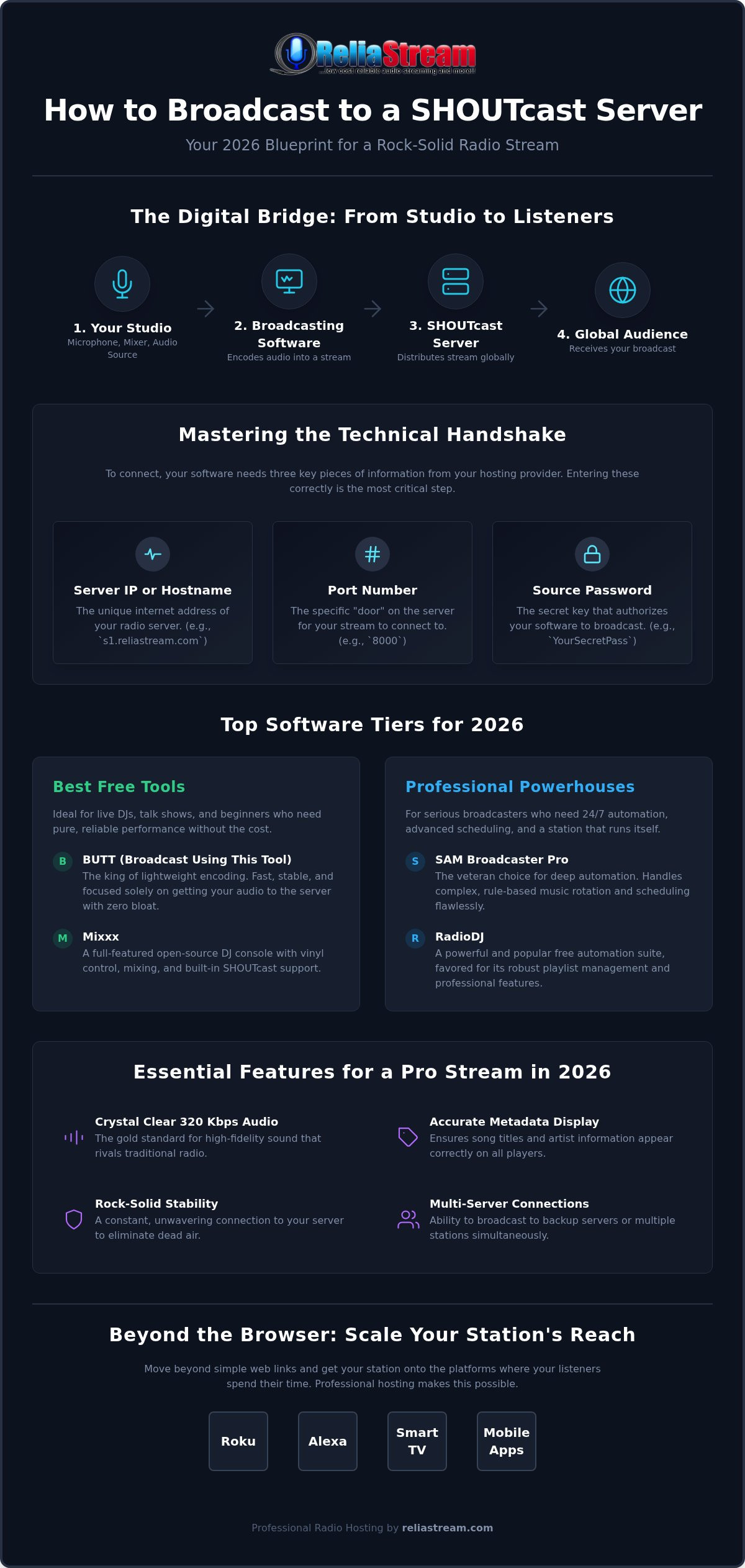
The Handshake: Connecting Software to Your ShoutCast Server
The moment of truth. You have the software. You have the sound. Now, you need the connection. Learning how to broadcast to a shoutcast server is all about the technical handshake. This is where your local studio meets our global backbone. It is precise. It is critical. Get one digit wrong and you are shouting into a void. Get it right and you are live to the world in seconds.
First, you need your coordinates. Log into your ReliaStream control panel and look for your "Source" credentials. You are looking for four specific pieces of data:
- IP Address: The digital location of your server.
- Port: The specific gate your audio enters through.
- Source Password: Your digital key to the airwaves.
- Mount Point: A setting specific to IceCast that beginners often miss.
Centova Cast Integration
Centova Cast makes finding these details easy. Head to the "Quick Links" section in your dashboard. You will see a list of connection parameters designed specifically for your encoder. If you are using Auto DJ, remember that your live software needs to "kick" the Auto DJ off the air or wait for the scheduled transition. It is a seamless handoff when configured correctly. If you are still deciding which panel fits your workflow, check out our Centova Cast vs MediaCP breakdown for the full 2026 comparison. It covers the grit and the glory of both systems.
MediaCP and Secure Connections
Modern broadcasting requires security. MediaCP excels at providing SSL source connections, which are essential for keeping your stream compatible with modern browsers. When configuring your software, pay close attention to the protocol. There are subtle differences in how you enter settings for shoutcast vs icecast. Once you've entered the data, hit "Connect". Check your panel's status. If it says "ON AIR", you've succeeded. You've mastered how to broadcast to a shoutcast server with professional precision. Ready to start your journey? Get your professional radio server from ReliaStream today and get on the air immediately.
Beyond the Desktop: Scaling Your Station with ReliaStream
Your studio software is the steering wheel. Your hosting is the engine. But where is the road? Learning how to broadcast to a shoutcast server is a massive first step, but it is just the foundation of your radio empire. You didn't build this station just to sit on a lonely "Listen Live" link that nobody clicks. You built it to dominate. In 2026, dominance means getting out of the browser and into the living room. It means being everywhere your audience is, from the car to the kitchen.
Scaling requires a shift in mindset. You've mastered the desktop encoder. Now, you need to master the device. Modern listeners don't want to hunt for a URL. They want to press a button on their remote or speak a command to their smart speaker. If you aren't there, you don't exist. It is time to move beyond the basics and start thinking like a network executive.
Custom App Development
The move from desktop to device is where real growth happens. A dedicated Roku Radio App or Amazon Fire TV App builds massive audience loyalty by making your station a permanent fixture in the home. It turns a casual listener into a daily habit. You can also expand your reach with radio streaming app development to ensure your brand is front and center on Google TV and beyond. This isn't just about "being an app." It is about occupying the most valuable real estate in your listener's life: the big screen.
Voice-activated growth is the next frontier. Imagine a listener simply saying, "Alexa, play my station." That is the power of an Alexa Streaming App. It removes every barrier between your content and your fans. It is hands-free, high-impact growth that professional broadcasters use to stay ahead of the curve. When you make it easy to listen, people listen longer. It is that simple.
The ReliaStream Advantage
You need a partner that understands the grit required to stay on air 24/7. ReliaStream has been the veteran backbone for independent creators since 2008. We don't just provide a link; we provide the reach. With professional hosting plans starting at $1.99, there is no excuse to stay small. We offer the reliability you need to focus on your content while we handle the distribution.
- High-bitrate support up to 320 Kbps for elite sound quality.
- SSL-secured radio links included as standard for modern browser compatibility.
- Expert support from veterans who actually know how to broadcast to a shoutcast server and troubleshoot complex encoder settings.
Take the Mic and Own the Airwaves
You have the guide. You have the tools. Now, it is time to flip the switch. Mastering how to broadcast to a shoutcast server is about more than just entering IP addresses; it is about launching your creative vision to a global audience. Whether you are using a lightweight encoder or a pro-level automation suite, the path to a stable, high-quality stream is now wide open. You know how to handle the technical handshake. You know how to push for that crystal clear 320 Kbps audio. There are no more excuses.
Don't let your talent sit on a hard drive. ReliaStream has been the professional backbone for broadcasters since 2008. We provide the high-bitrate SSL-secured links and the expert Roku and Alexa app development you need to scale your station beyond the desktop. No more jargon confusion. No more connection drops. Just pure, high-energy radio that works every single time.
Start your professional radio station for just $1.99 with ReliaStream!
The world is waiting to hear what you have to say. Get on the air today and start building your legacy. You've got this.
Frequently Asked Questions
What is the best free internet radio broadcasting software for beginners in 2026?
BUTT (Broadcast Using This Tool) is the best free option for beginners who want a pure, lightweight encoder. It focuses entirely on the technical handshake between your microphone and the server without any unnecessary bloat. If you need a full mixing console, Mixxx is the open-source powerhouse for 2026. Both are perfect for learning how to broadcast to a shoutcast server without spending a dime on software. They are reliable, fast, and compatible.
Do I need a separate encoder if my hosting plan includes Auto DJ?
You absolutely need a separate encoder if you plan to go live with your own voice or a local mixer. While Auto DJ handles your station's 24/7 rotation from the cloud, the encoder is what captures your live studio sound. It kicks the Auto DJ off the air when you connect and hands control back when you finish. This hybrid setup is the gold standard for professional broadcasters who want total flexibility.
Can I use SAM Broadcaster with an IceCast server instead of ShoutCast?
SAM Broadcaster Pro works perfectly with IceCast servers. While it is often marketed as the industry standard for ShoutCast, its encoding engine is versatile enough to handle both protocols. You simply select the IceCast option in the encoder settings and enter your mount point and credentials. This flexibility makes it a veteran favorite for broadcasters who might want to switch server types without learning an entirely new software suite or workflow.
What software should I use for broadcasting on a Mac with macOS Sequoia?
Audio Hijack is the undisputed champion for broadcasting on a Mac running macOS Sequoia. It allows you to grab audio from any application or input and route it directly to your server. If you prefer something simpler and free, BUTT also runs flawlessly on the latest Mac hardware. Both tools ensure your stream remains stable and high-quality, allowing you to focus on your content rather than fighting with operating system permissions or drivers.
How do I show 'Now Playing' song titles on my radio stream player?
You display Now Playing titles by configuring the metadata settings within your broadcasting software. Most encoders can automatically pull artist and song information from your media player or automation system. This data is then bundled with your audio stream and sent to the server. Once it reaches your ReliaStream panel, the info is distributed to your player widgets and apps, ensuring your listeners always know exactly what track is playing in real-time.
Does internet radio software include the actual streaming server?
No, broadcasting software does not include the streaming server. The software acts as the encoder that prepares and sends your audio, but you still need a professional hosting provider like ReliaStream to distribute that audio to your listeners. The server is the backbone that handles the bandwidth and listener connections. Without a dedicated server, your encoder has nowhere to send the data, and your audience has nothing to tune into globally.
What is the difference between a live encoder and automation software?
A live encoder is a pass-through tool that sends whatever you are currently playing or saying directly to the web. Automation software is a sophisticated manager that handles your station's entire schedule, including song rotations, station IDs, and commercials. Many pros use automation software to organize their content and then route that output through a live encoder to reach the server. It is the difference between a simple microphone and a full station.
How much does professional radio broadcasting software cost in 2026?
Professional software costs range from zero dollars to several hundred, depending on your needs. Tools like RadioDJ and BUTT are free, while suites like SAM Broadcaster Pro use subscription models. You can sound like a major network on a budget by pairing free software with affordable hosting. When learning how to broadcast to a shoutcast server, remember that the real investment is in your content and a reliable server backbone rather than expensive packages.


