

Stop overpaying for "all-in-one" platforms that lock your creativity behind a corporate paywall. Most broadcasters are terrified of dead air. They settle for high monthly fees and zero control because they think the tech is too hard. It's a trap. Getting your internet radio station setup right in 2026 isn't about buying the most expensive gear or suffering through complex server configurations. It's about building a rock-solid, professional backbone that scales with your ambition.
You want a crystal-clear stream without the corporate fluff or the constant fear of buffering. You want to be heard. We get it. This guide delivers the exact technical blueprint you need to launch a scalable, 24/7 station that sounds like a global powerhouse. We are stripping away the academic jargon to show you how to master your stream, dominate the airwaves, and get your voice onto Alexa and Roku with total confidence. No more stagnation. No more missed opportunities. It's time to build something real. Let's get to work.
Key Takeaways
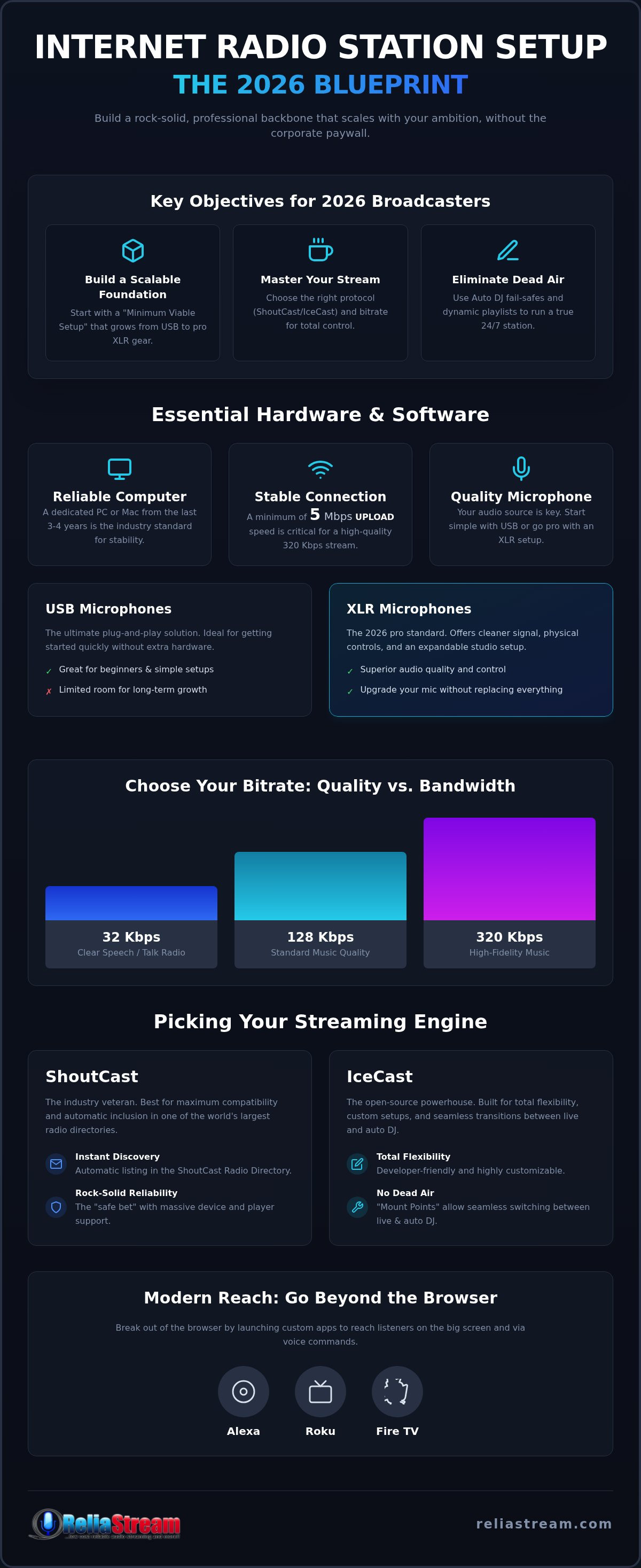
- Build a "Minimum Viable Setup" with professional gear that scales from simple USB mics to advanced XLR configurations.
- Choose between ShoutCast and IceCast to ensure your station has the right protocol and directory presence for maximum discovery.
- Master your internet radio station setup by selecting the perfect bitrate and leveraging Centova Cast or MediaCP for total control.
- Break out of the browser by launching custom apps for Alexa, Roku, and Fire TV to reach listeners on the big screen and via voice.
- Eliminate dead air and keep your stream running 24/7 using professional Auto DJ fail-safes and dynamic playlist management.
Essential Hardware and Software for Your 2026 Radio Setup
Stop overthinking the hardware. You don't need a million-dollar console to sound like a pro. A modern internet radio station setup starts with three core pillars: a reliable computer, a stable connection, and a microphone that doesn't sound like a tin can. If you have a laptop from the last three years, you're already halfway there. The technology behind Internet radio has evolved rapidly, making it possible to broadcast high-fidelity audio from a bedroom studio without the corporate price tag.
USB microphones are the ultimate plug-and-play solution for beginners. They're great for day one. But if you're planning for long-term growth, consider moving toward an XLR setup with a dedicated audio interface. Interfaces give you physical gain control, better preamps, and the ability to upgrade your mic without replacing your entire signal chain. 2026 broadcasters are ditching the simplicity of USB for the professional depth of XLR because it offers a cleaner signal and more room to expand your studio.
Don't let your stream buffer into oblivion. For a professional 320 Kbps stream, you need a minimum of 5 Mbps of dedicated upload bandwidth. Don't confuse download speed with upload speed; it's the upload that pushes your voice to the world. If your connection is shaky, your listeners will bail. It's that simple. Test your speed before you go live to ensure a lag-free experience for your audience.
The 2026 Gear Checklist
- Dynamic vs. Condenser: Dynamic mics are the gold standard for home studios. They ignore your neighbor's lawnmower and focus on your voice. Condenser mics are often too sensitive; they'll pick up every hum from your PC fan or the air conditioner.
- Headphones: Closed-back headphones are non-negotiable. You need to hear exactly what's going over the air without your monitor audio leaking back into the mic and causing a feedback loop.
- Virtual Mixers: Software like Voicemeeter is your secret weapon. Use it to route Discord calls, music players, and your mic into one clean feed for your encoder.
Broadcasting Software Options
For your first live session, stick to free encoders like "butt" (broadcast using this tool). It's lightweight, powerful, and does exactly what the name suggests. Mixxx is another solid open-source option if you want to mix tracks like a club DJ. When you're ready to automate your internet radio station setup and run 24/7, look at professional suites like RadioBOSS or Sam Broadcaster. While you can technically run a station from a tablet or phone, it's a limited experience. For professional reliability and control, a dedicated PC or Mac remains the industry standard.
ShoutCast vs. IceCast: Picking the Engine for Your Stream
Which engine will power your internet radio station setup? ShoutCast and IceCast aren't just technical labels. They are the industrial-grade protocols that carry your audio from your encoder to your listeners' ears. Think of them as your digital transmitter. While both do the heavy lifting of distributing your stream, they offer different paths for growth and discovery. Choosing the right one depends on where you want your station to be found and how much control you need over the listener experience.
Bitrate is your next big decision. It dictates your audio quality and your bandwidth consumption. Running a talk-heavy station? A 32 Kbps stream is often enough for clear speech. Broadcasting high-fidelity music? You'll want to push for a 320 Kbps stream to capture every detail. Choosing the right engine is easier when you have a partner who supports both. You can explore flexible ShoutCast and IceCast hosting plans that fit your specific bitrate needs without breaking the bank.
The Case for ShoutCast
ShoutCast is the industry veteran. It has been around since the late 90s for a reason. Its biggest selling point is the ShoutCast Radio Directory. When you broadcast using ShoutCast, your station is automatically listed in one of the most recognized directories on the planet. This means instant exposure to thousands of potential listeners. Compatibility is another massive win. Almost every third-party web player, mobile app, and hardware device supports ShoutCast links natively. It is the "safe bet" for professional reliability in 2026, especially with the stability of version 2.6.
The Case for IceCast
IceCast is the open-source powerhouse. It is built for broadcasters who want total flexibility. The secret weapon here is "mount point" management. IceCast allows you to switch seamlessly between a live DJ and your Auto DJ without the listener ever losing the connection. There is no dead air. There are no disconnects. Developers love IceCast because it's easier to integrate into custom web players and modern SSL-secured environments. If you want a secure, customizable internet radio station setup that handles complex transitions with ease, IceCast version 2.5.0 is your best friend. It supports more audio formats and gives you the freedom to build a unique streaming environment from the ground up.
Step-by-Step: Configuring Your Server and Control Panel
You have the gear. You have the vision. Now you need the brain of your operation. Your internet radio station setup lives or dies by how you configure your server. This isn't about being a coder; it's about being a pilot. Why settle for a "black box" proprietary system when you can have the keys to the engine? Let's get your station off the ground with a professional backbone that actually works.
Step 1: Select Your Plan. Don't just pick a random number. Match your plan to your content. Are you running a talk show? A 32 Kbps or 64 Kbps Hosting Plan is plenty. Pushing high-fidelity music? Go for the 320 Kbps Hosting Plan to ensure your listeners hear every beat. Step 2: Access the Panel. This is where the magic happens. You'll choose between Centova Cast or MediaCP. Both are industry leaders, but they offer different workflows. Step 3: Define Mount Points. For IceCast users, mount points are the technical "sockets" where your audio connects. For ShoutCast, you are setting up your station ID. Step 4: Secure the Stream. This is non-negotiable. Modern browsers will block your audio if it isn't secure. Use an SSL Radio Link to prevent "Insecure Content" warnings and keep your player active on every device.
Mastering Centova Cast
Centova Cast is the most popular management interface in the world for a reason. It is reliable. It is deep. The dashboard gives you an immediate snapshot of your station's health. Want to know when your audience peaks? The listener statistics are gold. Use this data to schedule your heavy-hitting content when the most ears are tuned in. The "Quick Links" section is your best friend; it provides the exact URLs you need for player integration and directory listings without the guesswork.
The Power of MediaCP
MediaCP is the modern choice for broadcasters who want a sleek, intuitive UI. It feels fast. It looks professional. While it handles audio flawlessly, MediaCP is a beast for those looking to expand into video streams later. Compliance is also easier here. The automated reporting tools generate detailed play logs, helping you stay organized with your royalty requirements. It is a streamlined, all-in-one solution for the broadcaster who wants to manage a complex internet radio station setup with a few simple clicks.
Modern Reach: Alexa, Roku, and Fire TV Integration
A website is a digital business card. It's not a broadcasting strategy. To truly dominate your internet radio station setup, you must go where the ears actually are. In 2026, that means the kitchen counter and the living room sofa. Most listeners have ditched the desktop for the Amazon Echo and the smart TV. If your station isn't accessible via a simple voice command or a TV remote, you are leaving thousands of potential listeners on the table. This isn't just about being "online." It's about being omnipresent.
Voice assistants and smart TV apps are the frontline of modern radio. By integrating these platforms, you turn your station into a household name. You aren't just a URL anymore. You are a global channel sitting right next to Netflix and Spotify. This is the ultimate growth hack for independent broadcasters who want to compete with the big networks without a corporate budget. Most independent broadcasters ignore the power of a professional internet radio station setup on smart devices, giving you a massive head start in your niche.
Voice Assistant Setup
- What is an Alexa Skill? Think of it as the bridge between your stream and the Amazon Echo. It's a custom command that tells Alexa exactly where to find your audio.
- Configuration: You'll link your secure SSL stream URL directly to the voice command. This ensures the stream starts instantly when the user asks for it. No lag. No errors.
- User Experience: Your station name needs to be unique. If it's too generic, AI will struggle to "hear" it. Keep it punchy. Keep it memorable so Alexa never misses a beat.
Smart TV Broadcasting
Smart TV apps are the "Big Screen" experience for your audio. A Roku Radio App or an Amazon Fire TV App allows you to design a visual interface that accompanies your music or talk show. You can display track metadata, station logos, and even upcoming schedules. This taps into millions of Fire Stick and Roku users who use their TVs as the primary sound system for their homes. Don't forget Google TV. Completing this "Triple Threat" ensures you are visible on every major screen in the house.
Building these apps from scratch is a technical nightmare for most creators. That's the ReliaStream advantage. We handle the heavy lifting of development so you can focus on the content. You can get your station on the world's biggest platforms with our custom Alexa and Roku app development services. Stop being invisible. Start being a household name.
Pro Launch Checklist: Auto DJ, SSL, and Going Live
Dead air is the ultimate station killer. You can't be at your microphone 24 hours a day, and you shouldn't have to be. This is where the final piece of your internet radio station setup comes into play: the Auto DJ. It is your silent partner. It keeps the music flowing and the listeners engaged while you sleep, eat, or plan your next big show. Don't believe the myths that you need to be live every second to succeed. You just need to be smart with your automation. A cloud-based Auto DJ ensures that even if your home internet flickers, your station stays online.
Before you hit that "Go Live" button, verify your security. SSL isn't just a technical detail; it's a trust signal. Double-check your secure links. If a listener clicks your player and gets a "Not Secure" warning from their browser, they're gone. Once the SSL is locked in, perform the final test. Tune in from multiple devices. Open the stream on your phone, check it on your laptop, and ask Alexa to play it. If it sounds crystal clear on every platform, your internet radio station setup is officially professional grade.
Auto DJ Configuration
Managing your media library happens directly on the server. Upload your tracks, but don't just dump them into one folder. Organize your music into weighted playlists to create a "General Rotation" that feels fresh and unpredictable. Use the scheduling tools to automate your station IDs, ads, and pre-recorded shows at specific times. To get that polished, big-market sound, configure your transitions. A tight three-second crossfade eliminates awkward silences and ensures a seamless flow between every track in your library.
The "Go-Live" Marketing Blitz
Now, it's time to tell the world. Your station belongs in every major directory to maximize your reach. Go beyond the standard ShoutCast listing. Submit your stream to TuneIn, GetMeRadio, and Streema. The more directories you hit, the faster your audience grows. Leverage your control panel to integrate social media; auto-posting "Now Playing" updates is a proven way to keep your followers engaged and drive traffic back to your stream. You have the blueprint. You have the tools. The airwaves are yours for the taking.
The technical hurdles are gone. The audience is waiting. Ready to dominate the airwaves? Start your station with ReliaStream for just $1.99!
Own the Future of Digital Broadcasting
Your internet radio station setup is no longer a mystery. It's a technical blueprint for total audio dominance. We've stripped away the corporate fluff. You have the hardware list, the engine choice between ShoutCast and IceCast, and the roadmap to smart device integration. No more excuses. No more fear of dead air or buffering. You're ready to deliver high-fidelity audio to every corner of the globe. This isn't just about being a hobbyist; it's about building a professional presence that commands respect on every device.
Why wait for a "someday" that never comes? ReliaStream has been an industry leader since 2008. We know what it takes to stay on air. We provide high-fidelity 320 Kbps streaming that makes your content shine. Our no-contract, scalable hosting plans mean you're never locked in. You get the freedom to grow. You get the reliability of a veteran partner. It's time to stop dreaming and start streaming.
Launch Your Professional Station for $1.99 - Get Started Now!
The airwaves are wide open. Go make some noise.
Frequently Asked Questions
Do I need a license to start an internet radio station?
Yes, you absolutely need a license if you plan to stream copyrighted music. For 2026, the SoundExchange rate for commercial webcasters is $0.0025 per performance, while noncommercial stations pay a minimum annual fee of $800. You also need to secure licenses from Performance Rights Organizations like BMI, whose digital licenses start at $350 per year. Don't skip this step. Operating without the right paperwork can lead to heavy fines and a permanent shutdown of your stream.
What is the difference between 128 Kbps and 320 Kbps streaming?
Can I broadcast live from my phone or tablet?
You can broadcast live from a mobile device using specific encoding apps, but it shouldn't be your primary internet radio station setup. Phones are perfect for remote reporting or "on-the-street" segments. However, for a professional station, you need the stability of a dedicated computer. Mobile connections are too unpredictable for long-term, high-quality streams. Use your phone as a mobile tool, not the entire backbone of your studio.
How does Auto DJ work if my computer is turned off?
Auto DJ lives on the hosting server, not your local machine. Once you upload your music library and schedule your playlists through your control panel, the server takes over. You can turn your computer off and walk away. Your station keeps running. This is why cloud-based automation is the secret to a professional 24/7 presence. It eliminates the risk of dead air caused by home power outages or hardware crashes.
What is an SSL radio link and why is it mandatory in 2026?
An SSL Radio Link provides a secure, encrypted connection for your stream. In 2026, modern browsers like Chrome and Firefox block "mixed content" by default. If your website is secure but your radio stream isn't, the player simply won't load for your listeners. It is a hard block that kills your audience numbers. You need SSL to ensure every listener can hear you without seeing a "Not Secure" warning in their browser.
How much does it actually cost to run a professional radio station?
You can launch a professional-sounding station with a total hardware cost under $500 if you already own a computer. This covers a quality USB microphone and headphones. Your recurring costs include your hosting plan and music licensing fees. Hosting is incredibly affordable, with entry-level plans starting at very low monthly rates. It is a scalable model. You can start small and upgrade your bitrate and listener slots as your station grows.
Can I get my station on Alexa and Roku at the same time?
You can and you definitely should. Being on multiple platforms is the fastest way to grow a massive audience in the modern landscape. We specialize in developing a custom Alexa Streaming App and a Roku Radio App simultaneously. This puts your internet radio station setup in the kitchen and the living room at the same time. Reach your listeners wherever they are instead of hoping they find your website.
What is the best control panel for beginners: Centova Cast or MediaCP?
Both are excellent, but they offer different experiences. Centova Cast Plans are perfect for those who want a battle-tested, data-heavy interface with deep listener statistics. It is the industry veteran for a reason. MediaCP Plans offer a more modern, intuitive UI that feels like a contemporary web app. If you want a sleek, visual experience, go with MediaCP. If you want classic reliability and granular data, Centova is your winner.


