

Your radio station is effectively invisible if it isn't secured with SSL. Dead air. Total silence. That's the sound of a station without a secure radio stream link in 2026. Chrome and Firefox have drawn a line in the sand. If your website is secure but your stream isn't, they'll block your audio without a second thought. It's that simple. You've worked too hard to let a technicality kill your reach. It's time to adapt or disappear from the digital dial.
Are you losing listeners to "broken" players and browser warnings? It's incredibly frustrating to watch your traffic dip because of a "mixed content" error you didn't see coming. You want to focus on great content; you shouldn't be fighting with browser security blocks or confusing port numbers. Discover why secure links are the backbone of modern broadcasting and how to fix the errors killing your station's growth. We'll walk you through the reality of modern browser requirements and show you how to achieve total compatibility and higher trust from your listeners. Let's get your station back on the air for everyone.
Key Takeaways
- Browsers mean business. In 2026, Chrome and Firefox block any non-secure audio on HTTPS websites, leaving your station silent.
- Universal compatibility is the goal. Implementing a secure radio stream link ensures your music plays perfectly on every modern browser and mobile device.
- Don't get left behind by smart tech. SSL encryption is a mandatory requirement for streaming on platforms like Alexa and Google Home.
- Kill the "mixed content" headache for good. Learn how to identify your current stream status and fix broken players with simple SSL proxy options.
- High quality meets high security. Professional hosting plans now include SSL as a standard feature, keeping your 320 Kbps stream crisp and fully accessible.
What is a Secure Radio Stream Link?
It's the difference between a broadcast and a black hole. A secure radio stream link is an audio stream delivered over HTTPS using SSL/TLS encryption. It's the modern way to get your sound to the world. Gone are the days of simple HTTP streams that browsers now treat like toxic waste. If your URL starts with "http" instead of "https", you're already behind the curve. In 2026, unencrypted streams aren't just old fashioned; they're obsolete.
We've moved away from clunky port-based links. You remember them: that long IP address followed by a colon and a random four-digit number. Modern listeners expect a clean, secure URL. Stream proxies now act as the secure bridge between your raw server output and the listener's ear. This shift is vital for protocols like HTTP Live Streaming (HLS), which relies on secure handshakes to deliver content reliably across all devices. If you want to be heard, you need to play by the new rules of the web.
HTTP vs. HTTPS: The Broadcaster's Perspective
Encryption isn't just for bank logins anymore. It's for your station's integrity. When a listener sees that "Padlock" icon in their address bar, they know your site is safe. It builds immediate trust. Without it, browsers throw up red flags and "Not Secure" warnings that scare away your audience. Old ShoutCast V1 links are failing modern security audits because they simply can't handle these encrypted handshakes. They were built for a different era. An era that's over. You can't afford to look like a relic from 2005.
How SSL Works for ShoutCast and IceCast
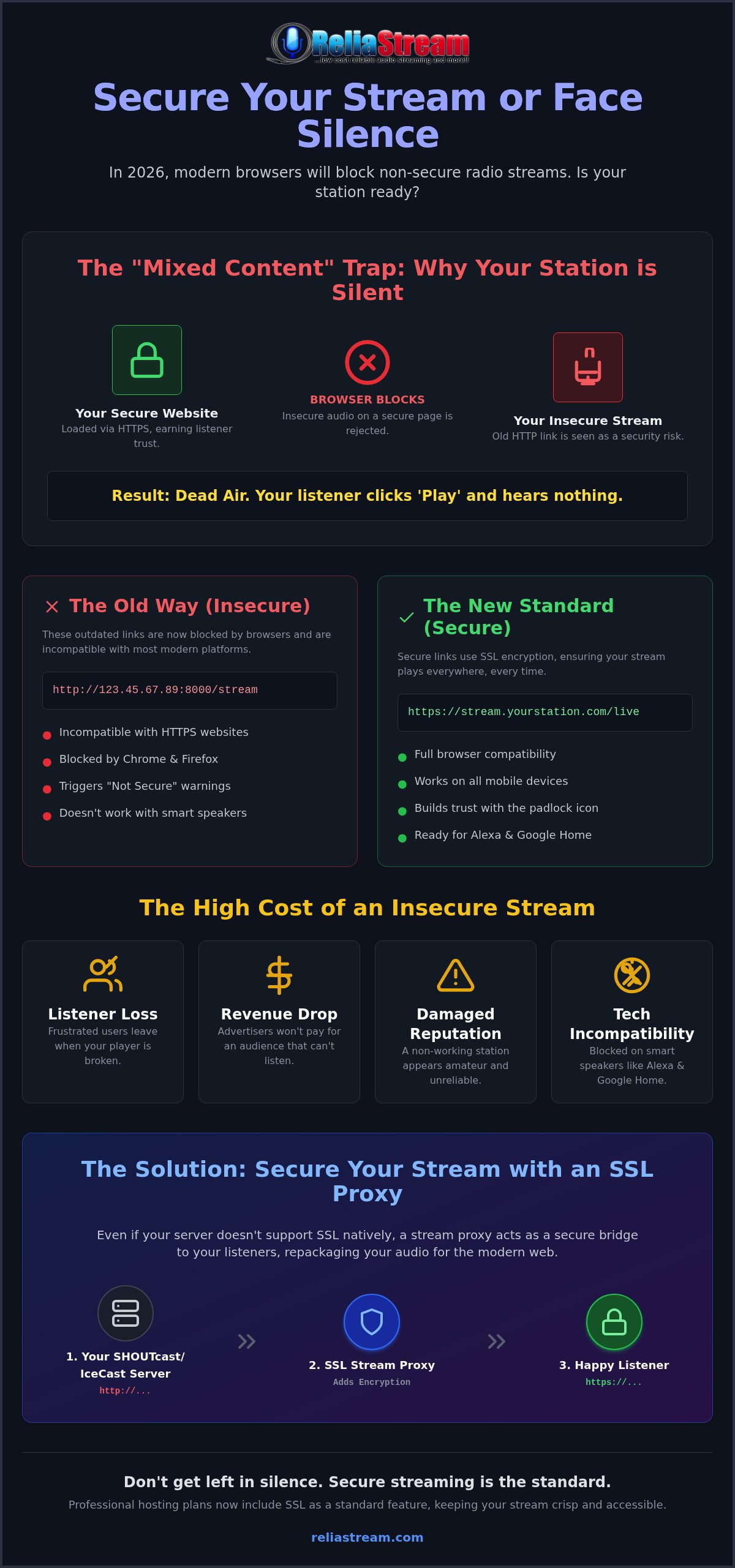
Your streaming server needs an SSL certificate to prove its identity. Think of it as a digital passport. Many legacy servers can't handle SSL natively on their broadcast ports, which creates a massive technical hurdle. That's where stream proxies come in. They take your non-secure stream and re-package it into a secure radio stream link that browsers actually accept. It bridges the gap between your hardware and the listener's software. It's the ultimate fix for the modern age. An SSL radio link is the industry standard for 2026.
Don't let technical debt silence your voice. The transition to secure links is about more than just a padlock; it's about staying relevant in a world that demands security. If your stream is silent, your station is dead. Fix the link, save the station, and keep the music playing for everyone, everywhere.
The Mixed Content Trap: Why Your Stream is Silent
You have a secure website. You have the green padlock. You think your station is safe. You're wrong. If you are using an old, unencrypted URL for your broadcast, you have walked straight into the mixed content trap. This is the number one reason for broken players in 2026. Your website might be secure, but your music isn't. When these two worlds collide, the browser always chooses security over your audio. It's a brutal reality for broadcasters who haven't updated to a secure radio stream link.
Modern browsers like Chrome, Firefox, and Safari now give your station the silent treatment. They don't show a big "Error" sign. They don't warn the listener that something is wrong. They simply block the HTTP audio stream from loading on your HTTPS page. To the listener, your player looks functional, but clicking 'Play' results in nothing but dead air. This invisible killer destroys your bounce rate. Listeners don't troubleshoot; they leave. They assume your station is down and they move on to a competitor who actually works.
The technical term for this failure is mixed content. It happens because browsers refuse to let an insecure resource compromise a secure page. Since July 21, 2026, major browsers have strictly enforced these media playback rules. There is no middle ground anymore. If you want to keep your audience, your stream must match the security level of your site.
Browser Security Policies in 2026
Strict enforcement is the new normal. In the past, you might have found a workaround or a browser setting to "Allow Insecure Content." Those days are gone. Expecting a listener to dive into their advanced browser settings just to hear your station is a fantasy. They won't do it. The "Mixed Content" workaround is dead. If your stream isn't encrypted, it isn't playing. It's that simple. You need a secure radio stream link to bypass these digital gatekeepers and reach your audience's ears.
The Cost of Insecurity
The financial impact is real. Dropping listener counts lead directly to a loss in ad revenue. Sponsors don't pay for silence. Beyond the money, the damage to your professional reputation can be permanent. A broken player makes your station look amateur and neglected. At this stage, the debate of shoutcast vs icecast doesn't even matter if the link is blocked by the browser. Both protocols fail equally without SSL. If you're tired of fighting the browser, it might be time to switch to a provider that handles the security for you.
Benefits of a Secure Radio Stream Link
Security isn't just a shield; it's a launchpad. When you implement a secure radio stream link, you aren't just fixing a "mixed content" bug. You're unlocking every major platform on the planet. Universal compatibility is the immediate reward. Your listeners move between laptops, tablets, and phones without a single hiccup. No more tech support emails from fans who can't get the player to load. It just works. Everywhere. Every time. That's the power of a modern broadcast setup.
Think bigger than just a web player. The real growth is in the ears of the millions of people listening to online audio every single day in 2026. If you want to be part of that massive audience, you need to be where they are. That means smart speakers and mobile apps. These platforms have zero tolerance for insecure data. They demand SSL. Without it, your station is locked out of the most lucrative listening environments in the world. You're leaving listeners on the table if you're still clinging to HTTP.
Mobile and Smart Speaker Accessibility
Apple and Google aren't playing games. Their app stores enforce strict security protocols for all audio data. If you're building a dedicated mobile app, a secure stream is the entry fee. The same goes for smart speakers. Want to get your station on Alexa? No SSL, no skill. It's a hard requirement. By securing your link now, you're future-proofing your reach on platforms like Roku and Fire TV. You're making sure that as technology evolves, your station stays right there in the mix. Don't get left behind because of a missing 'S' in your URL.
Building Listener Trust
Perception is everything in broadcasting. When a listener sees a "Not Secure" warning next to your station's name, they don't see a technical glitch. They see a risk. They see a station that doesn't care about their digital safety. There's a massive psychological impact to that little padlock icon. It signals professional reliability. You can achieve this level of professionalism even on a budget internet radio hosting plan. It's about looking like a major network without the major network overhead. It's about respect for your audience.
Security also boosts your visibility. Search engines prioritize secure content across the board. The Benefits of HTTPS extend far beyond just encryption; they include faster load times and better SEO rankings. A secure radio stream link tells Google that your station is a high-quality, trustworthy destination. Protecting listener privacy isn't just the right thing to do; it's a smart business move that keeps your station at the top of the search results and at the front of your listeners' minds. Get secure. Get heard.
How to Secure Your Stream Link Today
Stop guessing. Start checking. The first step to fixing your silence is identifying exactly what's broken. Look at your current stream URL. Does it start with http://? If it does, you've found the culprit. In 2026, that extra 'S' isn't optional. It's the difference between a thriving station and an empty player. You need a secure radio stream link to satisfy modern browser requirements and get your music back to your fans.
Once you've identified the problem, it's time for the solution. Contact your hosting provider immediately. Ask them about SSL proxy options. Most legacy ShoutCast and IceCast servers weren't built for encryption, so a proxy acts as the essential bridge. It takes your raw audio and wraps it in a secure layer that browsers trust. After you get your new URL, update your web player code. Don't just change the link; test it. Open your site on a phone, a tablet, and a different browser. Look for that padlock. If it's there, you're back in business.
Working with Centova Cast and MediaCP
Most professional broadcasters use Centova Cast or MediaCP. These panels make finding your secure radio stream link relatively simple. Look for the "Quick Links" or "Stream Links" section in your dashboard. You're looking for a URL that uses port 443 or a specific SSL proxy address. If you're using Auto DJ, ensure your mount points are configured to support secure delivery. Avoiding port conflicts between 80 and 443 is crucial for a stable connection. It's about clean routing and zero interruptions.
Manual SSL vs. Managed SSL
You have two choices: do it yourself or let the experts handle it. Manual SSL is a headache you don't need. As of 2026, the maximum validity for public SSL certificates is just 199 days. That means you're constantly renewing, installing, and troubleshooting every few months. One mistake and your station goes dark again. Managed SSL is the "no-nonsense" choice. It's set-and-forget security. Your provider handles the renewals and the technical heavy lifting while you focus on the music. If you want a setup that just works, you can get your SSL Radio Link today and stop worrying about browser blocks.
- Log in to your WordPress dashboard and locate your radio player plugin settings.
- Find the "Stream URL" or "Server Address" field.
- Replace your old
http://link with your newhttps://secure link. - Save your changes and clear any site-wide caching plugins you have active.
- Open your website in an Incognito or Private window to verify the player loads without "Mixed Content" warnings.
It's a five-minute fix that can save your entire listenership. Don't let a simple URL update be the reason you lose your audience. Get secure, stay compatible, and keep the broadcast moving forward.
ReliaStream: Professional SSL Hosting That Just Works
Stop fighting the browsers. Start broadcasting. Every ReliaStream plan comes with ssl radio streaming as standard. No hidden "security fees". No upsells for basic safety. Just a professional secure radio stream link that works the moment you go live. We believe security is a fundamental right for every broadcaster. That's why our scalable plans start at just $1.99. You get the protection you need at a price that makes sense.
Quality is never an afterthought. Our high-bitrate 320 Kbps plans ensure your music stays crisp while staying fully secure. You don't have to choose between sounding great and being heard. We provide the infrastructure that handles both. It's about professional reliability for independent creators. We know the frustration of opening a bill and seeing extra charges for SSL. Many providers treat security like a premium add-on. We don't. At ReliaStream, we bake it into the foundation. High-bitrate audio that stays secure and crisp. That's our promise to you.
The ReliaStream Advantage
Experience matters. We have over 18 years of experience in the professional radio hosting space. Since 2008, we've been the reliable backbone for thousands of stations. We understand the "Mixed Content" headache better than anyone else. Our support is bold, direct, and gritty. We don't do corporate fluff. We provide proactive monitoring to keep your secure links active 24/7. We're the partner you need to stay ahead of modern trends. Our veteran support team has seen it all. We know why Chrome is blocking your old links. We know how to fix it in minutes. Our proactive monitoring isn't just a buzzword; it's a commitment. We watch the servers so you don't have to. If a certificate needs updating or a proxy needs a tweak, we're already on it. It's about results. It's about expansion.
Ready to Go Secure?
Migration is simple. Moving your existing station to a secure ReliaStream server is a fast, no-nonsense process. We handle the technical heavy lifting so you can get back to your show. Want to expand your reach? We offer custom app development for Alexa, Roku, and Google TV. It's time to modernize your station. It's time to look like the major network you are. Get your secure radio stream link now! and join the future of broadcasting. Your audience is waiting. Don't let silence be the final word for your station.
Claim Your Space on the Digital Dial
The era of "maybe" security is over. You've seen the damage a broken player does to your listener counts. You know that browsers won't wait for you to catch up. A secure radio stream link is the only way to guarantee your voice is heard across every device, from the latest smartphone to the kitchen Alexa. It's about more than just technical compliance. It's about future-proofing your creative legacy and ensuring your station remains relevant in a browser-locked world. Don't let a technicality silence your passion.
Since 2008, we've helped broadcasters stay ahead of the curve. We don't just provide hosting; we provide a reliable backbone for your dreams. With a 99.9% Uptime Guarantee and SSL links included in every single plan, we handle the technical "SSL headache" so you can focus on the music. You have the content. We have the connection. It's time to act. It's time to grow. There's no reason to wait while your audience tries to find you through the static.
Ready to kill the silence for good? Secure your stream and reach more listeners with ReliaStream! Let's get your station back where it belongs: in the ears of your fans. Your audience is waiting, and we're ready to help you reach them.
Frequently Asked Questions
What exactly is a secure radio stream link?
It is an audio stream delivered via HTTPS instead of standard HTTP. This means the connection between your server and the listener is fully encrypted using SSL/TLS protocols. It is the modern standard for digital broadcasting. Without a secure radio stream link, modern browsers will block your audio to protect user security. It is about staying audible in a browser-locked world.
Why does my browser say 'Not Secure' when I listen to my station?
Your browser flags any connection that lacks SSL encryption. If your stream URL starts with http://, the browser identifies it as a vulnerability. It is a direct warning to your listeners that their data is not encrypted. This warning kills trust and makes your station look amateur. Switching to a secure link removes this red flag and replaces it with the padlock icon.
Do I need a separate SSL certificate for my radio stream?
Not necessarily. While the server delivering your music needs a certificate, you don't usually have to buy one yourself. Most professional hosting plans include SSL as a standard feature. A managed proxy service can also handle the encryption for you. This approach saves you the technical headache of manual installation and the constant cycle of certificate renewals.
Will a secure link work with my existing ShoutCast or IceCast server?
Yes, typically through the use of an SSL proxy. Many legacy ShoutCast V1 or older IceCast servers don't support SSL natively. A proxy acts as a secure bridge. It takes your standard stream and re-broadcasts it over a secure HTTPS connection. This allows you to keep your current hardware or software setup while becoming fully compatible with 2026 security standards.
Does using an SSL stream link affect audio quality or latency?
No, it does not. Encryption happens at the connection layer, not the audio layer itself. Your high-bitrate 320 Kbps stream will sound just as crisp and clear as it did before the upgrade. Latency differences are negligible and won't be noticed by your audience. You get all the security benefits without sacrificing a single bit of your station's high-fidelity sound.
How do I fix the 'Mixed Content' error on my radio station website?
You fix it by ensuring your stream URL matches your website's security level. If your site is HTTPS, your stream must be HTTPS too. Replace your old http:// link with a secure radio stream link. Once the protocols match, the browser will stop blocking the audio. It is a simple, effective fix that restores your station's voice across all modern web browsers.
Is a secure link required for my station to work on Alexa or Roku?
Absolutely. Platforms like Amazon Alexa, Google Home, and Roku enforce strict security requirements. They refuse to load any stream that isn't delivered via an encrypted HTTPS connection. If you want to reach listeners on smart speakers or dedicated TV apps, SSL is a mandatory requirement. It is the entry fee for modern digital distribution and audience expansion.
How much does it cost to upgrade to a secure radio stream link?
Costs depend on your provider, but many veteran hosts now include it in their standard packages. Some services might charge a small monthly fee for a standalone SSL proxy link. We believe security shouldn't be a luxury add-on. Check with your current hosting provider to see if they offer SSL as part of your existing plan or if an upgrade is required.


