

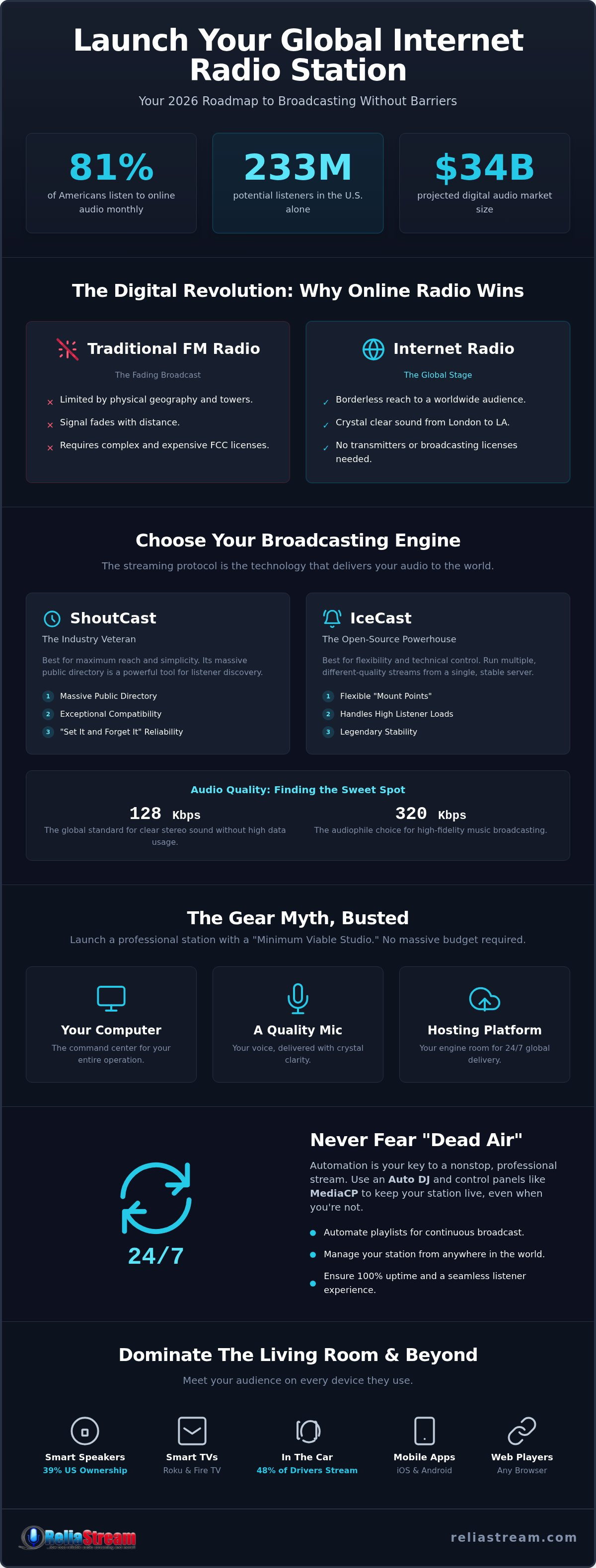
Did you know that 81% of Americans aged 12 and older are tuning into online audio every single month? That is a staggering 233 million people. The audience is massive. The technology is ready. So, why are you still sitting on the sidelines? You probably think launching a professional internet radio broadcast platform requires a massive studio and a degree in sound engineering. You're worried about technical meltdowns or the dreaded "dead air" when you step away from the mic. It feels like a mountain of complex setup and mounting monthly costs. We get it. Most people overcomplicate the process.
We're here to tear down those barriers. This is your no-nonsense roadmap to building a station that scales without breaking the bank. You'll go from zero to on-air with a setup that rivals the big networks. We're covering the essential gear list, showing you how to pick a rock-solid hosting partner, and getting your stream onto smart speakers and TVs worldwide. No fluff. No expensive mistakes. Just a clear path to global distribution. Let's get you on the air.
Key Takeaways
- FM is fading and digital is exploding. 2026 is your year to claim your space in the audio world without the headache of FCC licenses or transmitters.
- Pick the right engine. We break down how to choose an internet radio broadcast platform that scales with your growth and never lets your listeners down.
- Forget the gear myth. You can launch a pro-grade station today with a "Minimum Viable Studio", no massive hardware budget required.
- Automate or die. Learn how Auto DJ and pro control panels like MediaCP keep your stream alive 24/7 so you never have to fear dead air again.
- Dominate the living room. Expand your reach beyond the browser and get your station on Alexa, Roku, and Fire TV to meet your audience where they live.
Why 2026 is the Year to Launch Your Internet Radio Station
Traditional FM radio is losing its grip. It's tethered to physical towers and restricted by local borders. 2026 is the year independent creators take over. Why? Because the audience has already moved. Verified data shows that 81% of Americans aged 12 and older now listen to online audio monthly. That is over 230 million potential listeners waiting for something better than corporate-curated playlists. They want niche authority. They want your specific voice. By choosing a modern internet radio broadcast platform, you bypass the gatekeepers entirely.
You don't need a million-dollar transmitter or a complex FCC license to reach a global audience. The technical wall has crumbled. If you're curious about what is internet radio at its core, it's simply the delivery of audio content over the web via streaming protocols. It's borderless. It's immediate. It's yours to control. The digital audio market is projected to hit $34 billion this year. There's plenty of room for your station to claim its piece of that pie.
The Shift from FM to Digital
FM is limited by geography; internet radio is limited only by your imagination. When you broadcast online, your signal doesn't fade when a listener drives ten miles away. It stays crystal clear from London to Los Angeles. This shift is fueled by the rise of connected devices. With smart speaker ownership hitting 39% in the US and 48% of drivers now streaming audio in their cars, the "radio" is no longer just a box on a shelf. It's an app, a voice command, and a dashboard icon. Internet radio is a borderless broadcasting medium that puts you exactly where your audience lives.
Your Voice, Your Rules
Independent broadcasting offers a level of creative freedom that big networks can't touch. You own the format. You own the schedule. While podcasts are "lean-forward" media that require a listener to search and select, radio is the ultimate "lean-back" experience. Listeners tune in to be led. They want a curated vibe they can trust. Best of all, you can launch this professional presence without a massive upfront investment. You can start today with budget internet radio hosting and scale your bitrate and listener slots as your community grows. The tools are ready. Are you?
Choosing Your Engine: ShoutCast vs. IceCast Explained
Think of your station like a car. Your microphone is the steering wheel, your content is the fuel, but the streaming protocol? That is the engine. It is the technology that takes your audio signal and delivers it to thousands of listeners simultaneously. Choosing the right internet radio broadcast platform depends entirely on which engine you put under the hood. Don't let proprietary, "black box" tech from some providers lock you in. You need industry-standard protocols that work everywhere.
Before you choose, you need to understand bitrates. This is your audio's resolution. A 128 Kbps stream is the global sweet spot. It provides crystal-clear stereo sound without eating up all your listener's mobile data. However, if you are catering to audiophiles or broadcasting high-fidelity music, you might want to push for a 320 Kbps stream. The higher the bitrate, the more professional you sound. It is about matching your quality to your audience's expectations.
ShoutCast: The Classic Choice
ShoutCast is the industry veteran. It has been around since the late 90s for a reason. Its biggest draw is the ShoutCast Directory. When you broadcast using ShoutCast v2, your station can be listed in a massive public database that millions of listeners use to discover new content. It is built for reach. Compatibility is another huge win. Because it has been the standard for so long, almost every media player, mobile app, and web directory on the planet knows how to talk to it. If you want a "set it and forget it" solution with built-in discovery, this is your play. Dig deeper into the specifics with our ShoutCast vs IceCast guide to see which version fits your vision.
IceCast: The Modern Alternative
IceCast is the open-source powerhouse. While ShoutCast is great for directories, IceCast wins on pure flexibility. The "secret sauce" here is mount points. This allows you to run multiple streams of different quality from a single server. You could have a 64 Kbps mount for listeners on slow connections and a 320 Kbps mount for the home theater crowd. It is incredibly robust and handles high listener loads with legendary stability. We support both protocols across all our plans because we believe in giving you the best tools for the job. If you are ready to power up your station, check out our pro-grade radio hosting plans and pick the engine that fits your style.
The Gear Myth: What You Actually Need to Broadcast
Are you waiting for a lottery win to buy gear? Stop. One of the biggest lies in the industry is that you need a $5,000 studio to sound professional. It's just not true. Your internet radio broadcast platform handles the massive technical burden of distribution, which means your local setup can stay lean and mean. You need three things to start: a reliable computer, a stable internet connection, and a microphone. That is your "Minimum Viable Studio."
Why fight with complex mixers and XLR cables in your first year? A high-quality USB microphone is plenty for most broadcasters. It's plug-and-play. It's affordable. It eliminates the need for an expensive audio interface. While internal soundcards matter for processing your local audio, the real "magic" happens once your signal hits the server. Don't let gear-lust stall your launch. Start small. Scale later.
The Beginner Setup
Simplicity is your best friend when you're just starting out. Grab a high-quality USB microphone and a pair of closed-back headphones. Why closed-back? They prevent your broadcast audio from leaking out and hitting the mic, which stops nasty feedback loops before they start. Remember, your local computer isn't the one serving audio to thousands of people. The server does the heavy lifting. Your RAM isn't the bottleneck; your creativity is. Focus on the content and let the hosting environment manage the load.
Software for Every Budget
You don't need a subscription-based professional suite to get on the air. Free encoders like Butt (Broadcast Using This Tool) are industry favorites for a reason. They are lightweight, stable, and get your audio to the server without any fuss. For recorded segments or promos, a basic audio editor like Audacity is all you need to trim clips and normalize volume levels.
One technical detail you cannot ignore is security. Modern browsers are strict about what they play. If your stream isn't secure, many listeners won't even be able to click "play." This is why SSL radio streaming is a non-negotiable requirement in 2026. It ensures your internet radio broadcast platform remains compatible with every major browser and mobile device. Keep it secure, keep it simple, and get your voice out there.
Automation and Management: Keeping Your Station On-Air 24/7
Dead air is a death sentence for your audience growth. If a listener tunes in and hears nothing but silence, they are gone forever. You can't sit behind a microphone 24 hours a day; seven days a week. You need a internet radio broadcast platform that works while you sleep. This is where automation takes over. It's the silent partner that keeps the music flowing, the station IDs playing, and the signal strong even when you're miles away from your studio.
The "robot" in this scenario is called Auto DJ. It is a server-side system that stores your media and broadcasts it according to your specific rules. It is not just a shuffle button. It is a sophisticated scheduling engine. When you decide to go live, the system recognizes your connection and seamlessly fades out the Auto DJ to make room for your voice. When you're done, it takes back the reins without missing a beat. This is professional broadcasting without the burnout.
Mastering the Control Panel
Your control panel is the cockpit of your station. This is where you manage your library, track your listeners, and schedule your content. Most broadcasters find themselves choosing between two industry giants. We've put together a deep dive on Centova Cast vs MediaCP to help you decide. Centova is the reliable veteran with a classic interface. MediaCP is the sleek, modern challenger with a focus on visual flow. Both offer drag-and-drop simplicity for managing your media library. You can see real-time listener statistics, geographical data, and even which tracks are the most popular. Knowledge is power. Use it to grow your reach.
The Power of Auto DJ
Setting up your 24/7 stream is simpler than you think. Follow these four steps to get moving:
- Step 1: Upload your audio tracks directly to the server using the built-in file manager or FTP.
- Step 2: Create a general rotation playlist. This ensures there is always music playing in the background.
- Step 3: Set up scheduled events. Use these for timed station IDs, daily talk shows, or sponsored advertisements.
- Step 4: Enable the Auto DJ. Check your public stream URL to verify your station is officially on the air.
Ready to put your station on autopilot? Explore our MediaCP and Centova Cast plans to find your perfect fit and start broadcasting today.
Beyond the Browser: Reaching Listeners on Roku, Alexa, and Fire TV
Think a web player on your site is enough? Think again. Most audio consumption happens while people are doing something else. They're cooking. They're cleaning. They're relaxing. They aren't staring at a browser tab. They are talking to their kitchen counter or sitting on the couch. To truly dominate as a modern internet radio broadcast platform, you must occupy the "Living Room" real estate. You need to be where the ears are.
The game has changed. Listeners want frictionless access. If they have to hunt for your URL on a mobile browser, you've already lost them. You want your station to be a household name? Then you need to be a household presence. This means moving beyond the desktop and into the devices that power the modern home. It is about building a brand that is as easy to access as a light switch.
Dominating Smart Speakers
Smart speakers have officially replaced the bedside clock radio. With 39% of the US population owning one in 2026, voice-first discovery is the new frontier. This is the "new FM." Custom Alexa Skills allow your audience to launch your stream with a simple voice command. "Alexa, play my station." No searching. No clicking. Just instant audio. It is a "voice-first" future, and you cannot afford to be silent. We specialize in radio streaming app development that puts your station on every Amazon Echo and Google Home device.
The Big Screen Strategy
Why stop at audio? Roku, Amazon Fire TV, and Google TV have turned the biggest screen in the house into a high-fidelity radio tuner. When you launch a dedicated app on these platforms, you aren't just a voice in the dark. You have a visual presence. We're talking about high-resolution album art, station logos, and scrolling metadata that keeps eyes on the screen while ears are tuned to your frequency. It provides a level of professional polish that rivals major global networks.
This is the ReliaStream advantage. We don't just host your audio; we expand your reach. Whether it's a Roku Radio App or a custom Alexa Streaming App, we build the tools that make you look like an industry titan. Ready to go pro? Check out ReliaStream’s hosting plans starting at $1.99 and let’s get your station on the big screen today. Your audience is waiting. Don't keep them hanging.
Claim Your Frequency in the Digital Age
The digital audio explosion isn't waiting. 2026 is the year listeners are ditching the limits of FM for the borderless reach of the web. You've seen the roadmap. You know that you don't need a massive studio or a complex technical degree to sound like a pro. What you actually need is a rock-solid internet radio broadcast platform that handles the heavy lifting while you focus on the content. From mastering your Auto DJ to dominating the living room via Alexa and Roku; the tools for global distribution are finally within your reach.
ReliaStream has provided no-nonsense hosting since 2008. We know what it takes to keep your stream alive and your audience growing. Every plan includes Auto DJ to kill dead air anxiety once and for all. We even offer custom Roku and Alexa app development to get your station on the big screen. Stop overthinking the gear. Stop waiting for the perfect moment. The audience is already there. Give them something worth listening to.
Launch Your Station for Just $1.99 - View Plans
Your voice deserves a global stage. Let's build it together.
Frequently Asked Questions
Do I need a license to start an internet radio station?
You don't need an FCC license to broadcast online because you aren't using the public airwaves. However; if you plan to play copyrighted music, you are responsible for securing royalty licenses from organizations like SoundExchange or PRS. ReliaStream provides the technical hosting but does not provide music licensing services. Always verify the specific legal requirements for your country and content type before you go live to avoid copyright strikes.
How much does it cost to run an internet radio station per month?
Monthly costs are surprisingly low for independent creators. Professional hosting plans at ReliaStream start at just $1.99 per month. Your total investment depends on the bitrate you choose and whether you want custom apps for platforms like Roku or Alexa. You don't need a massive budget for hardware or frequencies. This makes it possible to launch a professional station for less than the price of a daily coffee.
Can I broadcast my internet radio station from my laptop?
Yes, your laptop is a perfectly capable broadcasting hub. You simply need a stable internet connection and encoding software to send your audio to the server. Whether you are using a Mac or a PC; you can broadcast live shows or upload tracks to your control panel for automation. This flexibility allows you to run your station from a home office, a dedicated studio, or even a hotel room. No expensive hardware required.
What is the difference between ShoutCast and IceCast?
ShoutCast is the industry veteran known for its integrated station directory which helps new listeners find your stream. IceCast is an open-source alternative that offers more flexibility with mount points, allowing you to run multiple bitrates from one server. Both are powerful engines for any internet radio broadcast platform. The choice usually comes down to whether you prioritize the ShoutCast directory or the technical versatility of the IceCast protocol.
How do I get my radio station on Amazon Alexa?
You reach smart speaker listeners by developing a custom Alexa Streaming App, also known as a Skill. Once your Skill is live, listeners can trigger your stream with a simple voice command like "Alexa, play my station." This bypasses the need for a web browser and puts your audio directly into the listener's kitchen or bedroom. ReliaStream handles the development of these custom skills to ensure your station is accessible everywhere.
What bitrate should I use for my radio stream?
For most broadcasters, 128 Kbps is the industry standard for a clear stereo sound that won't lag on mobile connections. If you are targeting audiophiles with high-fidelity music, you might prefer a 320 Kbps Hosting Plan for maximum quality. Lower bitrates like 64 Kbps are useful if your target audience is in regions with slower internet speeds. Choosing the right bitrate balances audio quality with listener accessibility.
Can I make money with an internet radio station?
You can monetize your station through several proven channels. Many broadcasters sell ad spots to local businesses—such as Onsite Car Body Repairs Ltd—or use their internet radio broadcast platform to promote their own products and services. Other options include setting up a listener donation page or securing corporate sponsorships for specific shows. Because the overhead costs are so low, it doesn't take a massive audience to turn your creative passion into a self-sustaining business.
If your local internet connection drops, the Auto DJ system takes over immediately. This feature stores your music and station IDs on the server so your stream never goes silent. Your listeners will continue to hear your scheduled playlists while you work on getting back online. This fail-safe is essential for maintaining a professional image. It ensures you never have to worry about the dead air that kills audience growth.


