

Broadcasting muddy, low-bitrate audio is the fastest way to kill your station's growth. When listeners tune in on premium headphones or smart sound systems, standard 128 Kbps streams wash out cymbals, crush bass response, and flatten vocal dynamics. Investing in professional 320 kbps radio hosting isn't just an optional technical tweak; it's a direct commitment to studio-grade quality that separates amateur webcasters from serious audio brands.
You already know that today's audiophile-minded listeners expect flawless sound. Yet, the fear of endless buffering, server dropouts, and complex stream configurations often keeps broadcasters stuck on tinny, outdated feeds. You shouldn't have to trade bulletproof network reliability just to deliver crisp, uncompromised audio.
This guide breaks down why 320 kbps remains the ultimate gold standard for high-fidelity sound, and how to host a rock-solid ShoutCast or IceCast stream without buffering nightmares. We will cover server bandwidth realities, encoder requirements, and the exact setup you need to sound pristine and attract top-tier sponsors.
Key Takeaways
- Learn why 320 kbps is the undisputed benchmark for high-fidelity MP3 broadcasting, preserving acoustic clarity without compression artifacts.
- Discover how dedicated 320 kbps radio hosting with high-speed server ports prevents listener buffering during sudden traffic spikes.
- Master the bandwidth math between 128 Kbps and 320 Kbps to accurately forecast your monthly data consumption.
- Determine the exact studio upload speed and audio processing chain needed to send a clean feed to your ingest server.
- Explore how to deploy a rock-solid ShoutCast or IceCast infrastructure that seamlessly scales to smart TV and Alexa apps.
The 320 Kbps Gold Standard: Why High-Fidelity Radio Hosting Matters
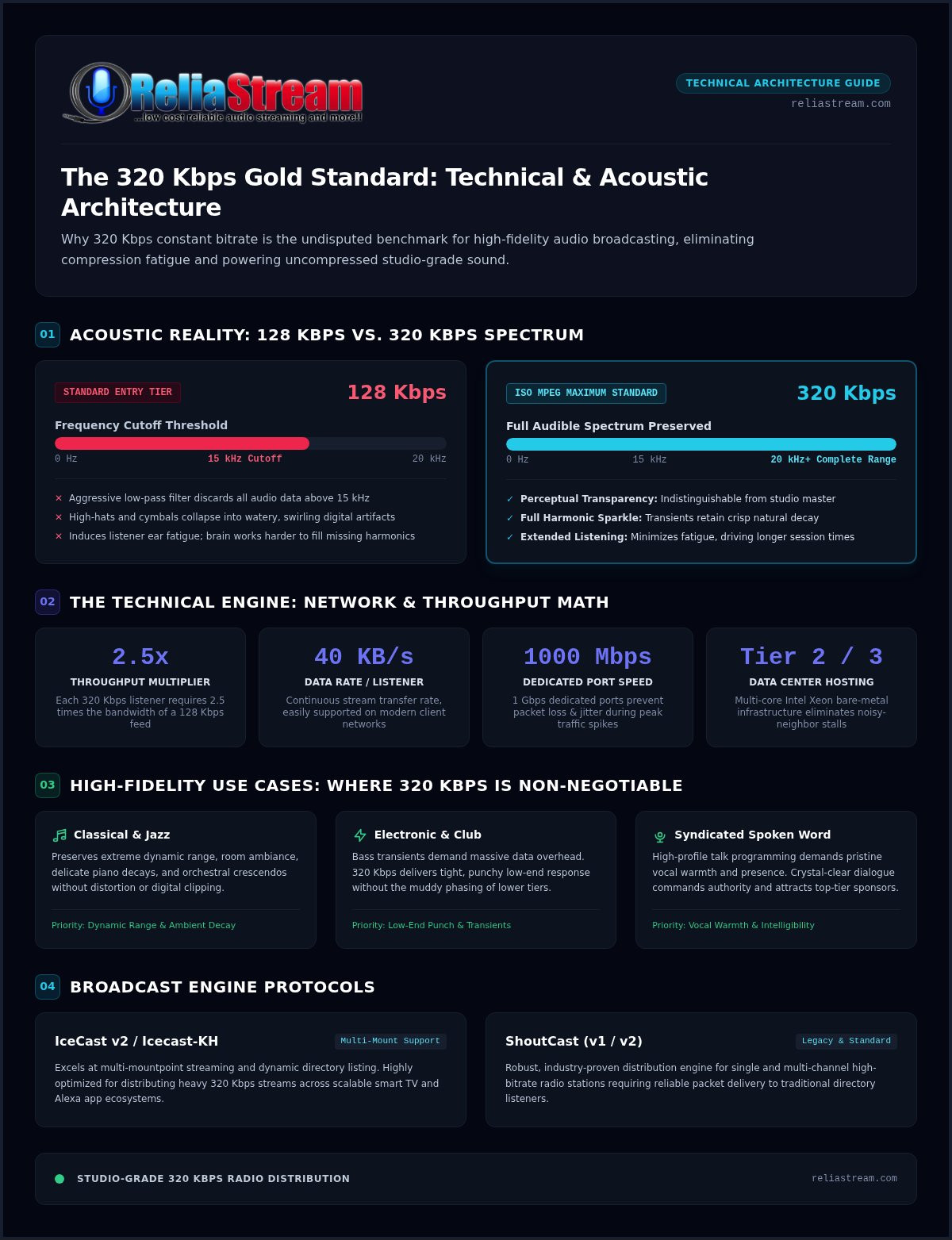
Most hosting providers treat bitrates as arbitrary pricing tiers. They slap a label on a package, charge a fee, and never explain the acoustic reality. Audio fidelity isn't marketing fluff; it is physics. Under ISO MPEG specifications, 320 kbps is the absolute maximum standard constant bitrate available for MP3 audio. While entry-level 128 Kbps streams aggressively slap a low-pass filter over your audio, cutting off frequencies above 15 kHz, broadcasting at 320 kbps preserves the entire audible spectrum up to 20 kHz and beyond.
When analyzing digital audio bit rates, 320 kbps hits what audio engineers call perceptual transparency. At this density, the human ear cannot reliably tell the difference between the compressed broadcast and an uncompressed studio master. Professional broadcasters are leaving 128 kbps behind because listener standards have changed. With high-resolution streaming standard across consumer devices, a muddy web feed immediately signals amateur hour. Deploying dedicated 320 kbps radio hosting gives your station the sonic weight and clarity needed to hold an audience.
The Audiophile Experience: Why Your Listeners Care
Muddy audio creates real physical ear fatigue. Low-bitrate compression algorithms ruthlessly discard acoustic data, forcing the listener's brain to work harder to fill in missing harmonics. After twenty minutes of listening to a tinny feed, people simply click away. High-fidelity streams solve that problem instantly.
- Full Harmonic Sparkle: High-hats and cymbals retain their natural transient decay instead of collapsing into watery, swirling digital artifacts.
- Longer Session Times: Clean, transparent audio prevents listener fatigue, dramatically increasing average time spent listening.
- Professional Distinction: Your stream delivers punch and depth, immediately outclassing hobbyist stations running low-bitrate feeds.
Professional Use Cases for 320 Kbps Hosting
Certain genres and formats collapse under heavy compression. If your station broadcasts demanding material, reliable 320 kbps radio hosting is non-negotiable.
- Classical and Jazz: These genres depend on subtle dynamic range and room ambiance. High-bitrate streams preserve delicate piano decays and thunderous orchestral crescendos without distortion.
- Electronic and Club Music: Bass transients require massive data overhead. A 320 kbps stream maintains tight, punchy low-end punch without the muddy phasing common on lower tiers.
- Syndicated Spoken Word: High-profile talk programming demands pristine vocal warmth and presence. Crystal-clear dialogue commands authority and attracts premium commercial sponsors.
The Technical Engine: What Powering a 320 Kbps Stream Actually Requires
A common myth in digital broadcasting claims that high-bitrate streams inherently cause listener buffering. That simply isn't true. Modern consumer networks handle 4K video streams without breaking a sweat, so a continuous 40 KB/s audio stream is negligible on the listener's end. When audio stutters or drops out, the bottleneck almost always sits on an underpowered ingest server or a choked host port. Powering pristine 320 kbps radio hosting demands serious server infrastructure, dedicated network capacity, and purpose-built broadcast engines.
Every listener pulling a 320 kbps feed requires 2.5 times the throughput of a standard 128 Kbps stream. If your broadcast server runs on a generic virtual private server (VPS) sharing network cards with noisy neighbors, peak listening spikes will crush playback. Professional audio distribution requires high-capacity network links. ReliaStream deploys its streaming network across multi-core Intel Xeon servers provisioned with dedicated 1000 Mbps (1 Gbps) network ports in Tier 2 and Tier 3 data centers. This dedicated pipe guarantees that when your concurrent listener count jumps, every audio packet delivers in sequence without packet loss or jitter.
ShoutCast vs. IceCast for 320 Kbps Audio
Choosing the right distribution protocol is crucial for heavy data throughput. Both SHOUTcast (v1/v2) and Icecast v2 (including Icecast-KH) handle high-fidelity streams effectively, but each serves distinct needs. When deciding on ShoutCast vs IceCast, consider your playback ecosystem. Icecast excels at multi-mountpoint streaming and dynamic directory listing, while SHOUTcast remains the historical workhorse with deep compatibility across legacy directory platforms. Both engines deliver flawless fidelity verified against the ITU-R BS.1534 MUSHRA testing standard for perceptual clarity, passing rich artist and track metadata alongside the heavy audio feed.
The Auto DJ Advantage
Broadcasting live from a studio setup is rewarding, but local internet drops can instantly knock a live feed offline. Cloud-based Auto DJ systems solve this vulnerability permanently. By uploading lossless source files directly to the server via Centova Cast or MediaCP, Liquidsoap-powered automation takes over playout 24/7. Your high-fidelity broadcast stays running from the data center without relying on your residential upstream connection. If you want pristine audio without the technical headaches, exploring dedicated 320 kbps radio hosting from ReliaStream gives you immediate access to reliable servers and rock-solid Auto DJ automation.
128 Kbps vs. 320 Kbps: Decoding the Real-World Audio Quality Gap
Some hosting providers tell you that standard streams sound good enough for internet radio. That claim is woefully outdated. When audio is forced through low-bitrate encoding, the psychoacoustic algorithms mercilessly throw away audio data to shrink packet sizes. The result? You get phase cancellation, flattened stereo imaging, and the classic "underwater" swirling effect on complex acoustic passages. Analyzing the audible artifacts of data compression reveals how lower bitrates destroy acoustic separation, smearing the spatial placement of instruments across the soundstage.
High-bitrate streams eliminate these structural compromises. Stepping up to 320 kbps radio hosting preserves precise stereo width, delivers punchy transients, and keeps the high end open and airy. Whether your audience tunes in via desktop studio monitors, premium noise-canceling headphones, or modern connected car stereos, the difference is night and day.
Data Consumption Comparison
While a standard 128 Kbps stream burns roughly 57.6 MB per listener-hour, running a full 320 kbps broadcast consumes 144 MB per listener-hour, representing an exact 2.5-fold increase in data throughput.
Does that heavier footprint scare away modern listeners? In an era dominated by ubiquitous 5G mobile networks and uncapped residential broadband, consuming 144 MB in an hour is trivial. Listeners routinely stream HD video on mobile plans without second thought. The historical fear of eating through mobile data caps with high-bitrate audio no longer applies to the vast majority of your audience.
The Myth of 'Good Enough' Audio
Audiophile expectations have shifted permanently. Major streaming platforms have made lossless listening mainstream, training everyday ears to recognize muddy sound immediately. Squeezing your audio through a heavily compressed feed sends the wrong psychological signal to your listeners.
- Loss of Sonic Depth: At 128 kbps, reverb tails disappear abruptly and vocal resonance loses its natural chest warmth.
- Brand Credibility: Clear, polished audio immediately communicates authority, establishing your station as a serious operation rather than a basement hobbyist setup.
- Sponsor Magnet: Commercial advertisers and high-profile sponsors prefer partnering with professional broadcasters whose audio matches pristine commercial production standards.
Quality represents your brand identity. Delivering your programming through uncompromised 320 kbps radio hosting ensures that your sonic presence matches your ambition, building instant trust and listener loyalty every time someone hits play.
Critical Resources for High-Bitrate Broadcasting: Equipment and Connectivity
Garbage in, garbage out. A pristine broadcast server cannot fix a degraded source signal. If you feed low-quality MP3s or distorted microphone audio into an encoder, your stream simply transmits those flaws with crystal clarity. The myth of upscaling audio is dead. Running true 320 kbps radio hosting requires an uncompromised audio chain right from your studio source, starting with 24-bit lossless FLAC or uncompressed 16-bit/44.1 kHz WAV files. Pair those clean files with software-based multiband processing, such as Stereo Tool, to control dynamics and ensure punchy loudness without digital clipping.
Your studio internet upload capacity matters just as much. While the server distributes audio to thousands of listeners, your studio encoder must maintain a rock-solid, uninterrupted connection to the ingest port. Network engineering standards require an upload buffer of 1.5 to 2 times the broadcast bitrate. That means your studio network needs an unthrottled, dedicated upload speed of 600 Kbps to 1.0 Mbps strictly allocated to your live stream. Anything less risks TCP packet loss, buffer underruns, and silent stream drops.
Browser security rules dictate how listeners access that stream. Chrome, Safari, and Firefox block plain HTTP streams on encrypted web pages by default. To monitor and deliver your stream without browser errors, you must use a secure radio stream link delivering valid TLS/SSL certificates over port 443.
The Local Studio Checklist
A professional broadcast requires stable local hardware and dependable encoding tools.
- Dedicated Connectivity: Hardwired Ethernet on a stable fiber or cable connection beats erratic Wi-Fi every time.
- Production Encoders: Tools like BUTT, Rocket Broadcaster, RadioDJ, or Mixxx offer direct ShoutCast and Icecast streaming hooks.
- Balanced Audio Interfaces: Use balanced XLR microphones paired with dedicated interfaces to eliminate electrical hum and maximize your signal-to-noise ratio.
Optimizing Your Control Panel
Your control panel acts as mission control for your high-bitrate output. When comparing Centova Cast vs MediaCP, ensure your mount points are explicitly configured to pass 320 kbps without server-side transcoding. Inside your Auto DJ settings, enable smart crossfading and loudness normalization to prevent abrupt volume shifts between tracks. Use real-time listener analytics to track geographic spikes and audience growth.
Ready to upgrade your station's signal chain? Deploy a dedicated 320 Kbps Hosting Plan with ReliaStream and broadcast uncompromised audio to the world today.
Launching Your Studio-Grade Station with ReliaStream’s 320 Kbps Hosting
Great sound means nothing if your stream cuts out the second your listener count surges. Since 2008, ReliaStream has built its reputation on rock-solid, no-nonsense audio delivery. Instead of packing thousands of accounts onto overloaded generic hosts, ReliaStream runs a high-performance network engineered specifically for demanding ShoutCast and IceCast workloads. When you step into dedicated 320 kbps radio hosting, you get the dedicated processing muscle and unthrottled bandwidth needed to broadcast studio-grade audio worldwide.
Growth shouldn't force you into a painful server migration. If you are just starting out, launch with low bitrate radio hosting on a 64 Kbps or 128 Kbps plan. When your programming matures and your audience demands uncompromised acoustic fidelity, upgrading to a full 320 Kbps Hosting Plan happens seamlessly without losing track playlists, listener statistics, or server configurations.
High-fidelity web audio is just step one. Modern audiences consume sound across diverse living room hardware and voice-activated devices. Through professional radio streaming app development, ReliaStream can bridge your high-bitrate stream directly into custom Roku Radio, Apple TV, Amazon Fire TV, and Alexa Streaming apps. Dominate connected living rooms with pristine sound right where modern audiences listen most.
Why ReliaStream for High-Fidelity?
Running high-bandwidth audio requires infrastructure that never flinches under heavy demand.
- Optimized Routing: Multi-homed Tier 2 and Tier 3 data center connections deliver your stream with absolute minimal latency.
- Included SSL Radio Link: Every account features built-in port 443 SSL streaming endpoints, ensuring effortless playback across modern HTTPS web players.
- Industry Veteran Support: Talk directly to broadcast engineers who understand encoders, server routing, and streaming architecture inside out.
Next Steps: Go Live at 320 Kbps Today
Getting your high-fidelity broadcast on the air takes just minutes with our guided onboarding workflow.
- Choose Your Architecture: Pick between Centova Cast Plans or MediaCP Plans running your preferred ShoutCast or IceCast engine.
- Populate Your Cloud Library: Upload lossless audio directly into your Liquidsoap Auto DJ for automated, around-the-clock playback.
- Broadcast Everywhere: Connect your studio live encoder, drop your SSL player onto your website, and publish to connected apps for an expansive global reach.
Take Your Broadcast to True Studio Fidelity
Settling for thin, low-bitrate audio is no longer an option if you want to build a loyal audience. Stepping up to dedicated 320 kbps radio hosting gives your station the full acoustic spectrum, eliminating ear-fatiguing artifacts and delivering the dynamic punch your mix deserves. Backed by high-capacity server bandwidth and rock-solid ShoutCast or IceCast delivery, high-fidelity streaming turns your station into a premium broadcast brand that commands respect and wins over audiophiles.
Serving passionate broadcasters since 2008, ReliaStream delivers the no-nonsense infrastructure you need to stream studio-grade audio around the clock. With advanced Centova Cast and MediaCP control panel integration alongside flexible tiered plans for every growth stage, scaling your station has never been simpler. Your programming deserves to be heard with absolute clarity. Upgrade to Professional 320 Kbps Hosting Now and broadcast the pristine sound your listeners have been waiting for.
Frequently Asked Questions
What is the difference between 128 kbps and 320 kbps radio hosting?
The primary difference lies in audio fidelity and bandwidth throughput. A standard 128 Kbps stream cuts audio frequencies above 15 kHz to save bits, introducing audible compression artifacts and phase distortion. In contrast, 320 kbps radio hosting preserves the full acoustic spectrum up to 20 kHz, delivering studio-grade transparency. While 320 kbps requires 2.5 times more data per listener-hour, it provides the pristine depth modern audiences expect.
Does 320 kbps radio streaming cause more buffering for listeners?
No, not on modern consumer internet connections. A 320 kbps audio stream only requires roughly 40 KB/s of continuous download throughput, which modern cellular networks and broadband lines deliver effortlessly. When buffering occurs on a high-bitrate stream, the root cause is almost always an underpowered host server, a congested server port, or an unstable studio upload connection rather than the listener's playback device.
How much upload speed do I need to broadcast at 320 kbps?
You need a continuous, unthrottled upload speed of at least 600 Kbps to 1.0 Mbps dedicated exclusively to your live broadcast encoder. Network engineering standards require an upload buffer between 1.5 and 2 times your streaming bitrate. This overhead prevents TCP packet drops, jitter, and buffer underruns during live feeds. For best stability, always broadcast over a hardwired studio Ethernet connection instead of Wi-Fi.
Can I use Auto DJ with 320 kbps files on ReliaStream?
Yes. ReliaStream fully supports full-fidelity Auto DJ media across both Centova Cast Plans and MediaCP Plans. You can upload high-resolution MP3 tracks directly to your server storage through FTP or your browser panel. The server-side Liquidsoap automation engine will broadcast your library at a constant 320 kbps around the clock, keeping your station on air with zero reliance on your local internet connection.
Is 320 kbps necessary for talk radio stations?
While voice programming does not feature the complex harmonics of orchestral music, 320 kbps radio hosting provides noticeable voice warmth, presence, and dynamic detail. Low-bitrate streams can make dialogue sound boxy, raspy, or metallic, accelerating listener ear fatigue during multi-hour broadcasts. If your station syndicates talk shows, uses high-end studio microphones, or airs commercial sponsorships, broadcasting at 320 kbps maintains a commanding, broadcast-quality standard.
What happens if a listener has a slow internet connection?
If a listener's data reception drops below the necessary 40 KB/s transfer rate, their player buffer will empty and playback will stutter. Standard ShoutCast and Icecast streams broadcast at a fixed constant bitrate without dynamic downsampling. Fortunately, because contemporary 4G, 5G, and home Wi-Fi networks far exceed 40 KB/s, stream interruptions are exceptionally rare for anyone with a functional, stable signal.
Do I need a special license to stream at 320 kbps?
No specific transmission license exists just for high bitrates, but you must still handle proper copyright compliance if you broadcast recorded music. Broadcasters typically secure statutory webcasting licenses through performance rights organizations such as SoundExchange, BMI, or ASCAP. ReliaStream provides server hardware, stream links, and control panel infrastructure; the platform does not sell music royalty licensing or AM/FM frequency allocations.
Can I upgrade my current ReliaStream plan to 320 kbps?
Yes, you can upgrade your service level seamlessly at any point. If you started out with a 64 Kbps or 128 Kbps Hosting Plan, switching to a 320 Kbps Hosting Plan happens without downtime or service disruption. Your existing Auto DJ audio library, saved playlists, station configurations, and historical analytics carry forward completely, allowing you to boost your broadcast fidelity instantly.

![Centova Cast Login: Pro Broadcaster's Guide [2026]](https://getautoseo.com/storage/hero_images/centova-cast-login-pro-broadcasters-guide-2026.jpg?v=bbcae8778692)
