
![Centova Cast Login: Pro Broadcaster's Guide [2026]](https://getautoseo.com/storage/hero_images/centova-cast-login-pro-broadcasters-guide-2026.jpg?v=bbcae8778692)
A radio station you can't access isn't a station; it's a digital ghost town. Whether you're a veteran broadcaster or just starting out, nothing kills the momentum like a centova cast login error. We know exactly how it feels. You're staring at a locked screen, worried about station downtime or confused by the technical gap between Centova and MediaCP. It's frustrating. It's stressful. And frankly, you've got better things to do than fight with a password field.
We're here to end that headache right now. This guide is your professional master key. You'll get instant access to your radio station and master the centova cast login process with our expert troubleshooting and setup guide. No more guesswork. No more "invalid password" loops. Just pure, uninterrupted broadcasting power. Since 2008, we've seen every login glitch in the book, and we know how to fix them fast.
We're diving into the essential port 2199 configurations for 2026, quick fixes for credential issues, and a walkthrough of the dashboard once you're inside. Let's get you back in the cockpit and on the air where you belong.
Key Takeaways
- Stop searching for the right page. Your unique login URL is waiting in your ReliaStream welcome email.
- Nail the centova cast login every time by using your station username. Remember; it's not your email address.
- Recover from lockouts fast. Use the "Forgot Password" tool to reset access without losing a single track in your AutoDJ.
- Lock down your station. Use Staff Accounts to give guest DJs control without handing over your master keys.
- Trust the veterans. ReliaStream has kept broadcasters on the air since 2008 with rock-solid 320 Kbps streaming plans.
Finding Your Centova Cast Login: Where Does the Magic Happen?
Centova Cast is the undisputed industry standard for managing ShoutCast and IceCast streams. It's the cockpit where you schedule tracks, manage your AutoDJ, and track your listener stats in real time. But here's the cold, hard truth: there is no universal login page. Your centova cast login is tied directly to the specific server hosting your station. If you try to log in at a generic site, you're just spinning your wheels.
Dig out your Welcome Email from ReliaStream. It's the most important document in your broadcasting career. It contains your unique hostname, which is the digital address of your station's control panel. We provide secure SSL login links for every client. Why? Because managing Internet radio broadcasting protocols requires top-tier security. Without SSL, your password travels across the web in plain text. We don't play games with your security, and neither should you.
The Anatomy of a Login URL
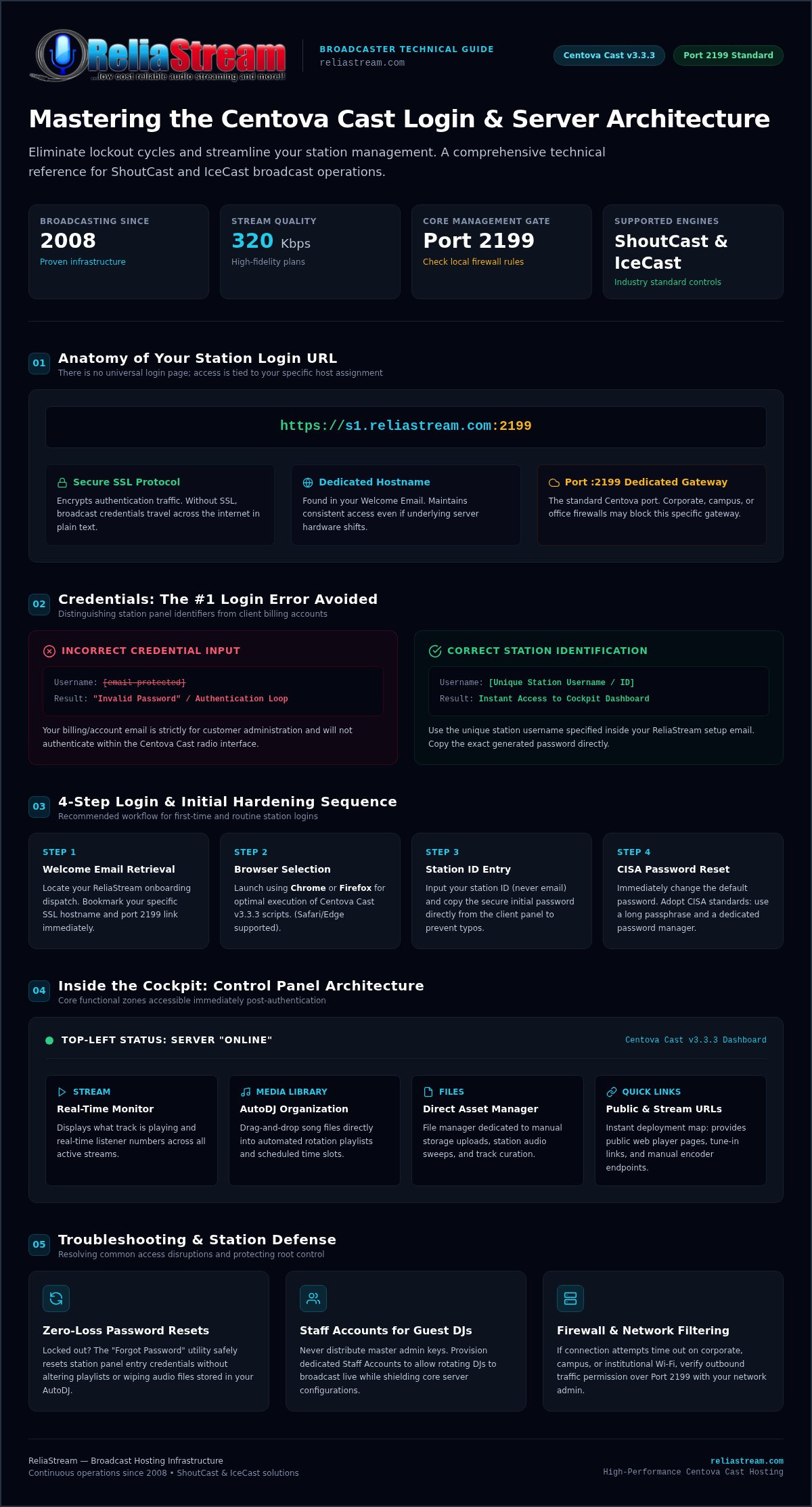
Understanding your URL is the first step toward total control. Most login links follow a specific pattern: a hostname followed by a port number. For example, it usually looks like https://s1.reliastream.com:2199. That :2199 is the standard port for Centova Cast access. It's the dedicated channel for your management interface.
- Hostname vs. IP: A hostname like 's1.reliastream.com' is easier to remember than a string of numbers. Both work, but hostnames look professional and stay consistent even if underlying hardware shifts.
- The Port: Port 2199 is your primary gate. If you're broadcasting from a corporate office or school, check if they block this port. It's a common hurdle for new DJs who find themselves locked out by strict firewalls.
- Bookmark it: Do it now. Save that URL to your browser's toolbar. You'll thank us later when you're in a rush to update a live playlist or swap out a sponsor spot.
ReliaStream vs. Generic Logins
Why settle for a standard setup? Our Centova Cast Plans are tuned for high-performance broadcasting. We've been a reliable backbone for creators since 2008. While generic providers might give you a bare-bones interface, we offer a portal designed for speed and reliability. Our infrastructure supports the latest stable builds, like v3.3.3, ensuring your station stays ahead of the curve.
Don't guess your credentials. Use the exact username and password found in your setup email. A frequent mistake is trying to use your billing email to log in. It won't work. Your station username is a unique identifier created specifically for your control panel. Keep it safe, keep it secret, and get back to what matters: the music.
Step-by-Step: Logging Into Your Centova Cast Panel Like a Pro
Ready to take control? You've got your URL. Now let's crack the door open. Use Chrome or Firefox for the best experience. These browsers handle the modern scripts of Centova Cast v3.3.3 without breaking a sweat. Safari and Edge work too, but the industry standard is Chrome for a reason. It's fast. It's reliable. It just works. Don't let a sluggish browser stand between you and your audience.
Type in your username. Stop. Is it your email? No. It's the specific station ID provided by ReliaStream. Now, copy that secure password from your client dashboard. Don't try to guess it. Precision is key here. Hit the login button. This is your centova cast login moment. The dashboard initializes. Your global broadcast is seconds away. If you're still looking for a setup that just works, check out our Centova Cast Plans to see how we simplify the process.
First-Time Login Configuration
You're in. Now what? First, kill the vulnerability. Change that default password immediately. Follow the CISA password security recommendations to ensure your station isn't an easy target for hijackers. Use a long passphrase. Use a manager. Stay safe. A secure station is a successful station.
Next, fire up your Auto DJ. Upload a few tracks and start a rotation. Check the "Quick Links" section. It's your map to everything else. You'll find your public player page, tune-in links, and manual links right there. It's the most useful corner of the panel. Use it often. It's the easiest way to verify your centova cast login was successful and your stream is live.
Centova Cast Interface Overview
The sidebar is your command center. "Stream" shows you what's playing and who's listening. "Media" is where the library lives; this is where you drag and drop tracks into playlists. "Files" is your file manager for manual uploads. Look at the top left. See that green "Online" light? That's the goal. If it's red, your Auto DJ or live source is down. Don't panic. Check your playlist weights or server logs. It's usually a simple fix.
Need to go live with BUTT or Mixxx? Look for "Source Connection" details in the sidebar. It lists your server IP, port, and mount point. It also shows your source password. This is different from your panel password. Don't mix them up. Everything you need for a professional broadcast is right there. It's simple. It's direct. It's how you win in the radio game.
Troubleshooting 101: What to Do When Locked Out
Staring at an "Invalid Username or Password" error is enough to make any broadcaster sweat. It's the most common hurdle in the radio world. Usually, it's a simple fix. Is your caps lock on? Did your browser's autofill insert an old password from three months ago? These tiny glitches cause the vast majority of centova cast login failures. If you've triple-checked and still can't get in, it's time to move to the next level of troubleshooting. Don't let a simple credential mismatch keep your station silent.
Sometimes a refresh just isn't enough. Browser cache issues can trap you in a loop of failed attempts. Try opening your login URL in an Incognito or Private window. If it works there, your browser is holding onto corrupt data. Clear your cache and try again. If you're broadcasting from a corporate office or a school, you might be facing a firewall block. Research shows that port 2199 is blocked on an estimated 25% to 35% of institutional guest Wi-Fi networks. Switch to a different connection or a mobile hotspot to verify if your local network is the culprit.
Resetting Your Credentials
Hit that "Forgot Password" link on the login screen. It's your fastest way back into the cockpit. Enter your account email and wait for the reset token. If it doesn't show up in two minutes, check your spam folder. Still nothing? Your email provider might be greylisting the message. We follow strict NIST digital authentication guidelines to ensure your reset process is secure and your station remains protected from unauthorized access. If the automated system hits a wall, our no-nonsense support team can manually intervene to restore your access.
Connection and Timeout Errors
Is the server down or is it just your login? Distinguishing between the two is vital. Check the ReliaStream status page first. We post all scheduled maintenance and real-time network updates there. If the server is green but you're still timing out, it's a connection issue. Apply the 5-minute rule. Digital lag happens. Sometimes a quick wait allows the server daemon to catch up after a brief network blip. If a refresh doesn't work after five minutes, reach out to us. We've been solving these centova cast login issues since 2008; we'll get you back on the air fast.
Security First: Protecting Your Centova Cast Access
Your master login is the keys to the kingdom. If a guest DJ messes up your AutoDJ or accidentally wipes a playlist, that's on you. Never share it. Just don't. Use the Staff Accounts feature instead. It's the only way to maintain total control while growing your team. Your station. Your rules. Your security.
Session hijacking is a real threat in 2026. If you're logging in over an unencrypted connection, you're leaving the door wide open. We provide secure links as a standard feature. Read our guide on SSL Radio Streaming to understand how we encrypt your admin session. It keeps your credentials safe from prying eyes. Rotate your passwords every 90 days. Use long passphrases. It's not just a suggestion; it's a necessity for professional broadcasting.
Managing Multiple Users
Create accounts with limited permissions. It's simple. Maybe your morning host can upload music but can't change the server port. Maybe your intern can view listener stats but can't stop the stream. This granular control is built into the panel. If a team member leaves, you can revoke their access in one click. It's instant. It's painless. It's necessary. You won't have to reset your own master centova cast login every time someone moves on to a new gig.
Mobile Access & Security
You're on the move. You need to check the stream from your phone. Centova Cast's interface is responsive, but your connection might not be. Avoid public Wi-Fi at airports or coffee shops. Use your mobile data. Public networks are playgrounds for packet sniffers looking for an easy centova cast login to hijack. If your plan supports it, enable 2FA. It adds that extra layer of "you" to the process. It's the ultimate shield for your station's cockpit. Ready for a secure, professional setup? Upgrade to our Centova Cast Plans today and broadcast with confidence.
Why ReliaStream is the Ultimate Centova Cast Hosting Partner
Success in internet radio isn't just about having a great voice. It's about having a backbone that never snaps. We've provided rock-solid uptime since 2008. That's nearly two decades of keeping independent broadcasters on the air. When you choose us, you aren't just getting a server; you're getting a partner that ensures your centova cast login works every single time you need it. No excuses. No "server not found" errors during your prime-time slot. Just pure, reliable performance.
Sound quality matters. Your audience can tell the difference between a muddy feed and a crystal-clear broadcast. We support high-bitrate streaming up to 320 Kbps. This isn't just a number; it's the professional standard for high-fidelity audio. Whether you're playing underground techno or high-definition talk radio, we give you the bandwidth to shine. We don't just host your station; we help you dominate the airwaves. This includes seamless integration with Roku and Alexa apps to put your station in every living room.
Our "Can-Do" Support Philosophy
Generic support tickets are where dreams go to die. We don't do that here. You get real humans with real answers. Our team has deep expertise in both Centova Cast and MediaCP management. We've seen every configuration glitch and password error possible since we started in 2008. If you're struggling with a centova cast login or a complex AutoDJ schedule, we jump in with a "can-do" attitude to get it fixed. Independent creators trust us because we speak their language. We're gritty, we're experienced, and we're ready to help you grow.
Get Started with a Pro Plan
Scaling your station shouldn't be a headache. We offer a range of plans that grow with your audience. Start small with a 32 Kbps Hosting Plan or go full professional with a 320 Kbps Hosting Plan. The ReliaStream difference is our high-energy approach to hosting. We provide the tools, the speed, and the security to make your station a global success. Stop fighting with unreliable providers and join the veterans who know how to keep you streaming. Ready to take control? Start your station for just $1.99 today!
Take the Mic: Your Station Awaits
You've got the map. Now it's time to drive. Mastering your centova cast login isn't just about entering a password; it's about securing your digital legacy and ensuring your voice reaches every corner of the globe. We've covered everything from finding your unique hostname to locking down your panel with SSL encryption. You know how to bypass firewall blocks and how to delegate power to your team without risking your master account.
Don't let technical hurdles dim your broadcast. You need a partner that understands the grit and passion of independent radio. ReliaStream has been the backbone for broadcasters since 2008, offering a 99.9% Uptime Guarantee and SSL-secured streams as standard. We keep the servers running so you can focus on the content. The airwaves are waiting for you.
Master your broadcast with ReliaStream Centova Cast Plans!
It's your time to shine. Build your audience, share your sound, and let us handle the technical heavy lifting. You've got the tools; now go make some noise.
Frequently Asked Questions
Where do I find my Centova Cast login URL?
Your unique login URL is located in the "Welcome Email" sent immediately after you signed up for your ReliaStream account. It typically follows a format like https://s1.reliastream.com:2199. Because every station lives on a specific high-performance server, there is no universal entry point. Bookmark this specific link on your desktop and mobile devices. It's your direct line to the cockpit of your global radio station.
What should I do if I forgot my Centova Cast password?
Use the "Forgot Password" link located directly on your centova cast login screen to trigger an automated reset token. This token arrives in your registered account email within minutes. If the email doesn't show up, check your spam folder or verify if your provider is greylisting our server. Still stuck? Our no-nonsense support team can manually intervene to restore your access and get you back on the air fast.
Can I change my Centova Cast username?
Centova Cast usernames are generally fixed at the time of account creation to maintain database integrity across our network. While you cannot change the master account username, you can easily create custom "Staff Accounts" or "DJ Accounts" with unique names. This allows your team to log in with their own credentials while you maintain total control over the master station settings. It's about flexibility and security.
Is there a Centova Cast mobile app for logging in?
There isn't a dedicated mobile app in the app stores, but the Centova Cast interface is fully responsive. You can manage your station from any smartphone browser like Chrome or Firefox. Just navigate to your unique URL and log in as usual. It's perfect for emergency playlist swaps or checking listener stats on the move. Just remember to avoid public Wi-Fi to keep your session secure.
Why does it say "Login Failed" even with the correct password?
Failed logins often stem from browser cache issues or local network firewalls blocking port 2199. Research indicates that roughly 25% to 35% of corporate and school networks block this port by default. Try switching to a mobile hotspot or using an Incognito window to bypass corrupt local data. Also, ensure you're using your station username and not your billing email address. Small details make the difference.
What is the difference between the Centova Cast login and the ShoutCast DNAS login?
Your centova cast login grants access to the management panel where you handle AutoDJ, media libraries, and playlists. The ShoutCast DNAS login is for the raw server status page, which is much more limited. Think of Centova as the entire cockpit and the DNAS as just the speedometer. Most broadcasters spend 99% of their time inside the Centova interface because that's where the real power lives.
How do I create a separate login for my guest DJs?
Navigate to the "DJ Management" or "Staff Accounts" section within your control panel to set up unique credentials for your team. You can define specific permissions, such as allowing a DJ to start the stream but preventing them from deleting files. This keeps your master password private while giving your talent the tools they need. If a DJ leaves your station, you can revoke their access instantly.
Does ReliaStream provide SSL for my Centova Cast login page?
Yes, we include SSL-secured links as a standard feature for all our Centova Cast Plans. Protecting your administrative session is a top priority for us. Since 2008, we've focused on providing professional, secure infrastructure that prevents password hijacking. When you log in through our secured portal, your credentials are encrypted. It's the gritty, reliable security you need to run a professional internet radio station without fear.


