

A branded app gives your internet radio station a dedicated place on listeners’ phones, making it easier to find and play your stream. Building a mobile app for an internet radio station can also give your broadcast a more recognizable home than a stream link alone.
It makes sense to weigh the effort against the payoff. The right approach depends on what you want the app to do, how much control you need, and how you plan to manage development and publishing accounts.
This guide covers the practical benefits of a station app, the streaming formats it can support, and the trade-offs between custom development, template platforms, and AI builders. It also explains how Apple and Google developer accounts fit into the decision, helping you choose an approach that suits your station without overbuilding.
Key Takeaways
- Decide what listeners need from a branded app before choosing how to build it, so its features serve your station rather than add complexity.
- Compare custom development, template platforms, and AI builders by the control, flexibility, and ongoing upkeep each requires.
- Plan for app-store developer accounts as well as the costs of building and maintaining the app; these are separate parts of your budget.
- Match the app’s streaming setup to your station’s source and supported audio formats to make listening straightforward for your audience.
Developer account fees
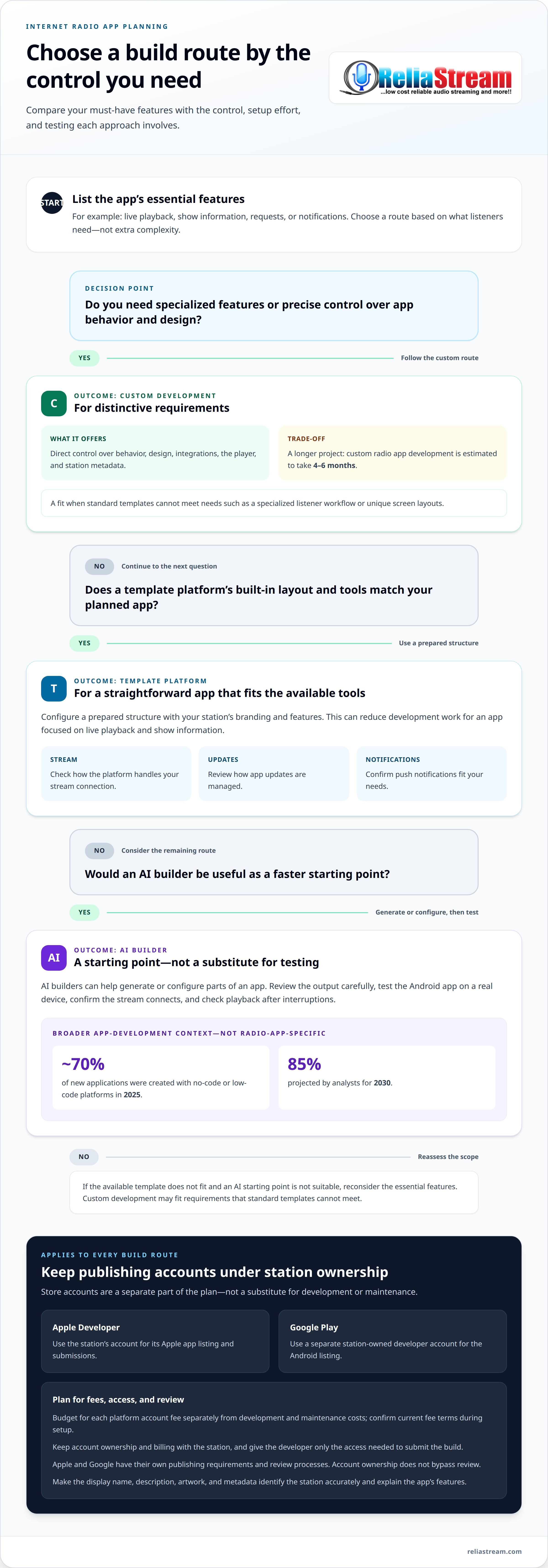
Budget for publishing accounts separately from app development. Stations publishing through their own apps use their own Apple Developer and Google Play developer accounts. This keeps each store listing connected to the station rather than a developer’s account. Treat the platform accounts as separate budget items and confirm their current fee terms during setup.
Apple and Google review apps according to their own publishing requirements. Owning the account does not bypass that review. The app’s display name, description, artwork, and metadata should identify the station accurately and explain its features. When changing an app listing, plan around the relevant store’s submission and review process.
Set up the accounts in the station’s name, then give the app developer the access needed to submit the build. Keep account ownership and billing with the station to simplify future maintenance, developer changes, and store communications. The developer can prepare the app package while the station retains control of its publishing account.
- Apple Developer: Use the station’s account for its Apple app listing and submissions.
- Google Play: Use a separate station-owned developer account for the Android listing.
- Fees: Include each account’s platform fee in the app budget, separate from development and maintenance costs.
Decide whether the app needs listener accounts. A stream-only app may not need profiles, but accounts can support features such as chat. If listeners can post messages, define moderation roles and permissions before launch. OAuth can manage sign-in, while JWT sessions can maintain authenticated access.
Keep access roles focused. For example, a moderator may manage chat without receiving developer-account access. If Android Auto matters to your audience, treat in-car playback as a separate product requirement, not a store-account feature. Clear account ownership, listing metadata, and access roles make publishing easier to manage.
Benefits of a branded radio app
Building a mobile app for an internet radio station gives listeners a recognizable way to find and play your broadcast. Its value comes from a focused listening experience, clear station identity, and features chosen for your audience.
Branded iPhone and Android Apps
An iPhone app and an Android app place your station in familiar app-store environments. Listeners can open the station directly instead of searching for a saved stream link. A key decision when building a mobile app for an internet radio station is which devices and platforms your audience uses. If your station serves listeners on both systems, plan for each.
Keep the main action simple: open the app, find the station, and start listening. Consider how requests, notifications, and other options fit your station’s format. A talk station might prioritize show information, while a music station may emphasize the live stream. These choices clarify what the app needs to deliver.
Branding, Design, and App Setup
Use your station name, logo, and colors consistently across the app icon, opening screen, and player. Listeners should recognize the station before playback begins. Keep labels readable and controls, especially play and volume, easy to find. A clean design makes the app feel like an extension of your broadcast, not a generic player.
Prepare the stream connection, station details, and store listing materials together. Match the station name and artwork across the app and its store page. Then test the listening flow on a real device: open the app, start the stream, pause it, and resume playback. This can reveal confusing screens before launch.
Think beyond phones, too. Listeners may use tablets or connected televisions, so choose features that suit their habits. Notifications can announce a new show or schedule change, but should offer useful updates. An SSL-secured radio link can support the stream connection behind the branded experience.
Custom development, template platforms, and AI builders
Choose a build route by balancing control with setup effort. A station that needs a distinctive playback screen may need different tools from one launching a simple Android app. Custom development, template platforms, and AI builders handle this trade-off in different ways.
Custom development gives a team direct control over app behavior, design, and integrations. A developer can tailor the player, connect station metadata, and build features around a specific audience. The trade-off is a longer project: custom radio app development is estimated to take 4-6 months. This route suits stations with requirements that standard templates cannot meet, such as a specialized listener workflow or unique screen layouts.
A template platform provides a prepared structure that a station can configure with its branding and features. It can reduce development work for a straightforward app focused on live playback and show information. Compare each platform’s controls with your must-have list, and check how it handles stream connections, app updates, and push notifications before choosing a template.
AI builders can help generate or configure parts of an app, but their output still needs testing. Around 70% of new applications were created with no-code or low-code platforms in 2025, and analysts project 85% by 2030. Those figures describe broader application development, not radio apps specifically. For a station, test the generated Android app on a real device, confirm the stream connects, and check playback after interruptions.
Use a simple decision process:
- Choose custom development when your station needs specialized features or precise control.
- Choose a template platform when its built-in layout and tools match your planned app.
- Consider an AI builder for a faster starting point, then review the output carefully.
Choose the route that supports your actual launch scope. List essential features first, such as live playback, show details, or notifications. Then compare each approach against that list. Avoid building extra screens or tools before listeners need them.
How much does it cost to build and maintain a radio station app?
That range is a broad planning reference, not a fixed quote. The final budget depends on the app’s scope, design, features, and technical requirements.
A basic station player has a narrower scope than an app with listener accounts, chat, show schedules, and personalized features. Each additional screen or integration adds design, development, and testing work. For instance, live playback and now-playing information have different requirements from user profiles and moderated discussions.
Build a budget around the full lifecycle, not just launch. Maintenance can include fixing bugs, adapting the app as operating systems change, updating stream connections, and preparing new versions. Store reviews can also affect release timing: app review may take up to 28 days during busy periods. Factor that possibility into plans for launches and major updates.
Ongoing costs depend on the app’s technical setup and how often the station changes it. A custom feature that needs frequent updates may require more maintenance than a stable, simple player. Plan to test after changes, too. For example, check a stream update on supported devices before the next app release.
To estimate the scope, list the features listeners need at launch, then separate essential work from later additions. Include:
- Build scope: screens, branding, playback, and integrations.
- Publishing: store account fees and submission preparation.
- Maintenance: technical updates, testing, and future feature changes.
Keep the first release focused. Add more only when it solves a clear audience need. For the streaming side of your plan, review your radio streaming setup alongside app requirements, so the player’s connection is included in your project planning.
ReliaStream
ReliaStream provides internet radio broadcasters with the streaming side of a branded app. The app needs a reliable connection to the station’s live stream, and hosting provides the stream its player connects to. Once you have chosen an app approach and defined playback requirements, ReliaStream’s ShoutCast and IceCast hosting can support that connection.
Choose a hosting bitrate that fits your stream and audience. Available options include the 32 Kbps Hosting Plan, 64 Kbps Hosting Plan, 128 Kbps Hosting Plan, and 320 Kbps Hosting Plan. These hosting plans support the broadcast behind your app, while app design and development remain separate decisions.
If you’re planning a station app and need hosting for its stream, contact ReliaStream to discuss your setup.
Set Your Station App in Motion
Give your app project a practical next step: define how its player will connect to your live broadcast. Building a mobile app for an internet radio station means coordinating the listener experience with the stream that powers it. A clear plan keeps those pieces aligned as development moves forward.
ReliaStream offers hosting options including the 32 Kbps Hosting Plan, 64 Kbps Hosting Plan, and 128 Kbps Hosting Plan. These can support the streaming side of a station app, while your chosen development approach shapes the app itself. Match the stream setup to your broadcast needs and the listening experience you’re creating.
Ready to discuss how streaming fits your app plans? Talk with ReliaStream about your station’s streaming setup. Take the next step with a focused plan, then bring your station’s sound to listeners through an app experience that feels unmistakably yours.
Frequently Asked Questions
Why Should I Make a Radio App?
A radio app gives listeners a direct route to your station and a dedicated place to return. It keeps your broadcast identity beside its programming instead of relying on a browser bookmark. For example, a community station can make local show schedules easy to find, while a music station can highlight current programming. The main benefit is a station-focused listening destination shaped around your audience.
Do I need a special license to stream audio in an app?
Yes. Stations that broadcast copyrighted music need a music broadcasting licence. An app delivers the stream; it does not grant permission to use the music. Before launch, consider what the station broadcasts and where listeners can access it, since licensing arrangements may vary by territory. App-store approval and a working stream do not replace the required music permissions.
Does audio play in the background?
It can, if the app is configured to continue audio playback when listeners switch screens or lock their device. Make this behavior an app requirement rather than assuming it happens automatically. Test a realistic listening session: start a broadcast, lock the phone, open another app, then return to the player. Also check how playback responds to interruptions.
How does app store submission work?
Submit the app build and store listing for review through the relevant publishing accounts. Prepare the app package, station name, description, artwork, and other listing details, then submit them to Apple or Google. Each store has its own review requirements. If a submission needs changes, update the build or listing and submit it again before release.
What features should an internet radio station mobile app include?
Start with a dependable live player and clear play, pause, and volume controls. Then choose features suited to the station: a show schedule for a talk station or current-track information for a music format. A request option can encourage audience participation, while a sleep timer may suit listeners who tune in before bed. Tie each addition to a real listening need.
How do you stream live internet radio in an iOS and Android app?
Connect the app’s player to the station’s Icecast or SHOUTcast stream source. The app can deliver audio through HLS or DASH and support formats such as AAC, MP3, or Opus. Serve streams over HTTPS with correct CORS configuration. Then test playback on both iOS and Android, including starting the stream, reconnecting after a dropped connection, and checking audio output.


