

Submitting a radio station to online directories can be free: all eight directories covered in this guide allow free station listings. You don’t need a paid listing to get started. The main challenge is meeting each directory’s eligibility rules and providing accurate station details.
It’s reasonable to want a clear answer before spending time on applications. Directories review stations differently, and approval can take anywhere from a day to several weeks. Preparing your information in advance can make submissions smoother.
Here’s what to expect: how costs and review times vary, which information and assets to prepare, and how to submit to major radio directories. You’ll also learn how to choose a starting point and organize your stream details before applying.
Key Takeaways
- Find out whether directory listings require payment and why keeping station details and stream information consistent can help avoid preventable submission issues.
- Understand how eligibility rules differ and why directory review may take from a few days to several weeks.
- Prepare your station description, logo, and stream details before you start submitting applications.
- Explore major directory routes and choose a practical set of places to begin building your station’s online visibility.
Is it free to submit a radio station to directories?
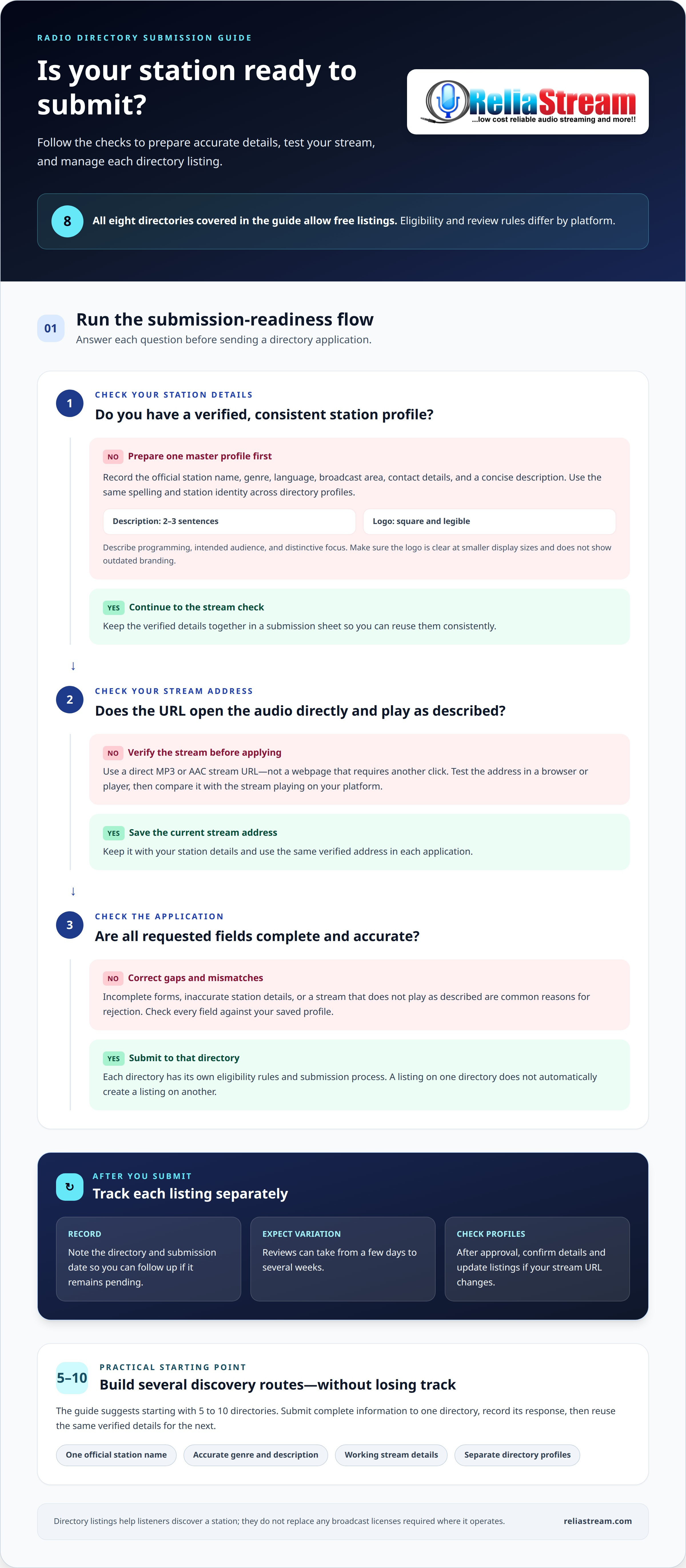
Submitting a radio station to online directories doesn’t have to cost anything. All eight directories covered in this guide allow free listings, though eligibility and review rules vary by platform. Keep a record of your station’s details so you can use the same name, genre, description, and contact information in each submission.
Consistency matters after approval, too. Use one official station name rather than shortened versions across profiles, and match the genre and description to your actual programming. If your stream URL changes, update listings that still use the old address so listeners can reach the live stream. Use the same logo and station identity across mobile listings and other devices to help listeners recognize your station.
A streaming platform may include directory tools or submission options. Use its control panel to find your current stream address and station metadata. If it provides a directory submission feature, review the information before sending it. Keeping a central record of your station details also makes manual submissions easier. Directories may request different fields, but consistent core information helps prevent mismatched listings.
Prepare a direct MP3 or AAC stream URL, the recommended safe formats for directory submissions. A stream link should open the audio itself, rather than a webpage that requires another click. Test the address in a browser or player before using it. Then compare the submitted stream with the one playing on your own platform. Directories can make a station easier to find, but a listing doesn’t cover music licensing. Stations remain responsible for obtaining any licenses required in the countries where they broadcast. Keep that separate from directory fees, station metadata, and stream setup. A listing is a route to listeners, not a replacement for broadcast permissions.
Listing review times and eligibility
Radio directory reviews can take from a few days to several weeks. Timing depends on the directory’s process and whether your submission provides clear, usable station information. Treat each application separately and record when you submitted it. If a listing remains pending, this makes it easier to follow up through the same directory.
What rules and content standards must radio stations meet for listing? Each directory sets its own eligibility rules, so read the submission form and provide the information it requests. Keep your station name, genre, description, and streaming details accurate and consistent. Internet-Radio.com and Online Radio Box are separate destinations, so a listing on one does not automatically create a listing on the other.
Common reasons for rejection include incomplete forms, inaccurate station details, or a stream that doesn’t play as described. A mismatch between the station profile and its actual programming can also make a submission harder to assess. Before applying, review every field and test the listed stream. Clear, working information helps reviewers understand what your internet radio station offers listeners.
Treat each online radio directory listing as a separate profile, not a universal internet listing. Internet-Radio.com helps listeners browsing internet radio discover stations, while Online Radio Box offers another destination for finding stations. Neither listing replaces the other. Keep details aligned across both and check each profile after approval. This helps listeners recognize your station, whether they find it through a directory or another online platform.
For a practical workflow, submit complete information to one directory, record its response, then use the same verified details for the next. Don’t change your station name or description between forms unless your programming has genuinely changed. Consistent profiles help listeners identify your station across directories and make submissions easier to review.
Information and assets to prepare before submitting
Build a submission folder before opening a myTuner, TuneIn, or other directory form. Keeping everything in one place helps maintain consistent profiles and reduces repeated data entry. Save your final text and logo with clear filenames, such as “station-description” and “station-logo,” and keep your current stream address in the same folder.
Start with your station’s public identity. Record its official name, genre, language, broadcast area, and contact details. Use the same spelling and description across internet radio directories. If your station uses a shorter on-air name, note how it relates to the official listing name. This helps keep profiles recognizable wherever listeners discover your station.
Prepare a concise description of two or three sentences. Explain the station’s programming, intended audience, and distinctive focus. For example, a community station might describe its local news, interviews, and music programming. Keep the wording factual and easy to scan, and avoid slogans that don’t explain what the station broadcasts.
Choose a square station logo that remains clear at smaller display sizes. Save a clean, legible image that remains recognizable at smaller display sizes. Check that the file shows the station name clearly and doesn’t include outdated branding. A consistent logo helps listeners connect your directory listing with the station’s other profiles.
Keep a simple submission sheet for myTuner, TuneIn, and other services. Include your station name, description, genre, logo file, contact information, and stream address. Add a column for each directory’s requested fields, then copy details from your approved master profile. Register or sign in only through each directory’s own submission process, and follow any field-specific instructions. Before sending, compare every entry with your saved details. This catches mismatched names, outdated contact information, and copy errors before they appear in a public listing.
Major online radio directories and submission routes
A practical starting point is submitting your station to 5 to 10 directories. That gives you several discovery routes without turning listing management into a full-time task. Choose a mix of general radio directories and services your intended audience already uses. Then record each portal, submission date, and listing status in one tracker.
How do radio directories compare in audience reach and discoverability? Each directory gives listeners a separate way to find internet radio, but its reach depends on who uses the platform and how they search. Listing your station in several directories creates more discovery routes, not a guaranteed number of listeners.
Use each directory’s own station-submission route. Find its “add your station” page or submission portal, then follow the fields and instructions provided. Internet-Radio.com and Online Radio Box, for example, have separate station listings. Listing your station on one does not automatically register it on the other.
- myTuner: Prepare your station information for its submission route and keep the profile details consistent with your other listings.
- TuneIn: Use its station submission process as a separate route for listeners discovering stations through TuneIn.
- Streema: Consider its directory listing as another place where listeners can find your station.
- iHeartRadio: Treat this as its own platform and follow its station submission requirements.
These directory names are starting points, not a ranking. Before submitting, check each directory’s current portal, eligibility instructions, and requested information. Record the stream address and profile details you used. This makes it easier to update listings if your station changes its branding or stream address.
Pick 5 to 10 directories that fit your station’s audience, country, and discovery goals. A stable stream address supports every listing. If you’re preparing a reliable stream for directory submissions, explore radio streaming options.
ReliaStream
ReliaStream provides internet radio hosting for broadcasters preparing station listings. A reliable stream is the foundation of a directory profile: listeners need a working audio link when they press play. If your current setup makes it difficult to maintain a usable stream address, hosting can be a practical step before submitting to more directories.
ReliaStream offers 32 Kbps, 64 Kbps, 128 Kbps, and 320 Kbps Hosting Plans. Choose a plan that fits your station’s streaming needs, then use its stream details when completing directory forms. Directory submissions remain separate, so hosting doesn’t replace each platform’s application or eligibility review.
Ready to discuss hosting for your station? Contact ReliaStream.
Make Your Next Listing Easier to Maintain
Think beyond initial approval. A directory profile works best as part of a consistent station presence, with a stream listeners can return to and details that stay aligned as your programming evolves. As you continue submitting a radio station to online directories, establish a simple routine for keeping profiles current. Clear responsibility for updates helps prevent outdated details from lingering across listings.
If your station needs hosting to support its streaming setup, ReliaStream offers 32 Kbps Hosting Plan, 64 Kbps Hosting Plan, and 128 Kbps Hosting Plan options. The right next step is the one that supports your station’s current needs, not a promise of directory placement or audience growth.
Contact ReliaStream for radio support to discuss your station’s hosting needs. Keep building, keep refining, and make it easier for listeners to find your broadcast.
Frequently Asked Questions
Can an online-only station be listed?
Yes, an online-only station can submit to directories that accept internet radio listings. These listings focus on online streams rather than terrestrial frequencies. Prepare a station profile and a playable stream address, then review the directory’s eligibility requirements, since each platform sets its own criteria.
How long does approval take?
Approval can take from a few days to several weeks, depending on the directory’s review process. A submission that clearly identifies the station and includes a working stream is easier to assess than one with missing or mismatched details. Track the submission date and status so you have a clear reference if you need to follow up.
How long does it take to get listed?
The time from submission to a public listing varies by directory. Some reviews take a few days, while others can take several weeks. Approval and publication may be separate steps, so look for a status update or a live station profile. Track each directory independently: a listing on one platform doesn’t mean another has completed its review.
What stream format do directories accept?
Direct MP3 and AAC stream URLs are recommended formats for directory submissions. Use a link that opens the audio stream itself, not a station webpage that requires extra navigation. Test it in a player before submitting, then make sure the audio plays as expected. If you change streaming endpoints later, update the directory profiles that use the old address.
Which online radio directories accept station submissions?
Online radio directories may offer station-submission options, but availability and requirements vary by platform. Each has its own submission route and listing process, so apply separately rather than assuming directories share listings. Choose platforms that suit your station’s audience and discovery goals, then record where you applied and which details you used for each profile.
How do you submit a radio station to online directories?
Prepare your station name, genre, short description, logo, contact details, and direct stream URL. Use each directory’s station submission portal, complete its requested fields, and test the stream before applying. Save the submission date and status. After approval, check the public profile for errors and update it if your station details or stream address changes.


