

A directory listing isn’t the only way to make your station easy to hear on a smart speaker. Getting listed on smart speaker radio services can also mean giving listeners a direct voice command through a custom Alexa Skill.
That’s useful when your station has a clear identity and you want listeners to find it without guessing which service or phrase to use. A Skill can provide a station-specific route to your stream, but it isn’t the same as joining a radio directory. It also takes planning to make the listening experience smooth.
This guide covers the key steps: defining the Skill’s purpose, preparing your stream and station details, and choosing an invocation listeners can remember. You’ll also learn when a directory listing may be the better route, how to explain voice commands to your audience, and why promotional messages inside a Skill need careful thought if they could raise pay-for-play concerns. Prioritize clarity, then make it easy to press play.
Key Takeaways
- Choose between a directory listing and a station-specific Skill based on how listeners will find and access your broadcast.
- Prepare consistent station details and a reliable stream before starting a platform submission or Skill setup.
- Make voice requests memorable, and teach listeners the exact phrasing needed to play your station on each platform.
- Understand which parts of listing may affect costs, and consider pay-for-play concerns before adding promotional messages.
Which smart speaker radio directories and platforms are available to broadcasters?
- Map the main routes listeners use. TuneIn and iHeartRadio are radio services that may make a station available through smart speakers. Alexa, Apple Siri, and Google Assistant are voice platforms, not radio directories. You can pursue a directory presence, a custom voice experience, or both. First identify where your stream is already available, then decide which gap you want to address.
- Distinguish directory access from a custom Alexa Skill. A directory can let listeners request your station through a supported service. A Skill gives Alexa a station-specific interaction, such as playing your stream or sharing useful station content. Community stations can also use an Alexa Flash Briefing Skill for daily material, including local news or regional updates. Choose the route that best supports what you want listeners to do.
- Make station identity easy to recognize. Voice assistants can confuse stations with similar names, so give listeners precise requests. Use your station’s call letters and frequency where those details apply. For example, KNOW 91.1 and WCCO 830 illustrate how a local station can be identified by both. Add a city, format, or service name when it helps distinguish the station from another result.
- Account for default-service behavior on Google speakers and displays. A Google device uses the selected default music service first when possible and supports one account per streaming service. If your station is listed on TuneIn or iHeartRadio, listeners may need to name that service in their request. Include the platform name in your examples instead of assuming the station name alone will work.
- Teach listeners the exact command for each route. Give separate examples for Alexa, Google Assistant, and Siri, using the relevant invocation or service name. Don’t assume listeners will discover the right wording themselves. Explain, too, that internet streams don’t carry emergency broadcast alerts; WPR recommends multiple ways to receive emergency broadcasts. Clear instructions improve access without confusing streaming with emergency reception.
What information and audio stream formats are required to submit a radio station?
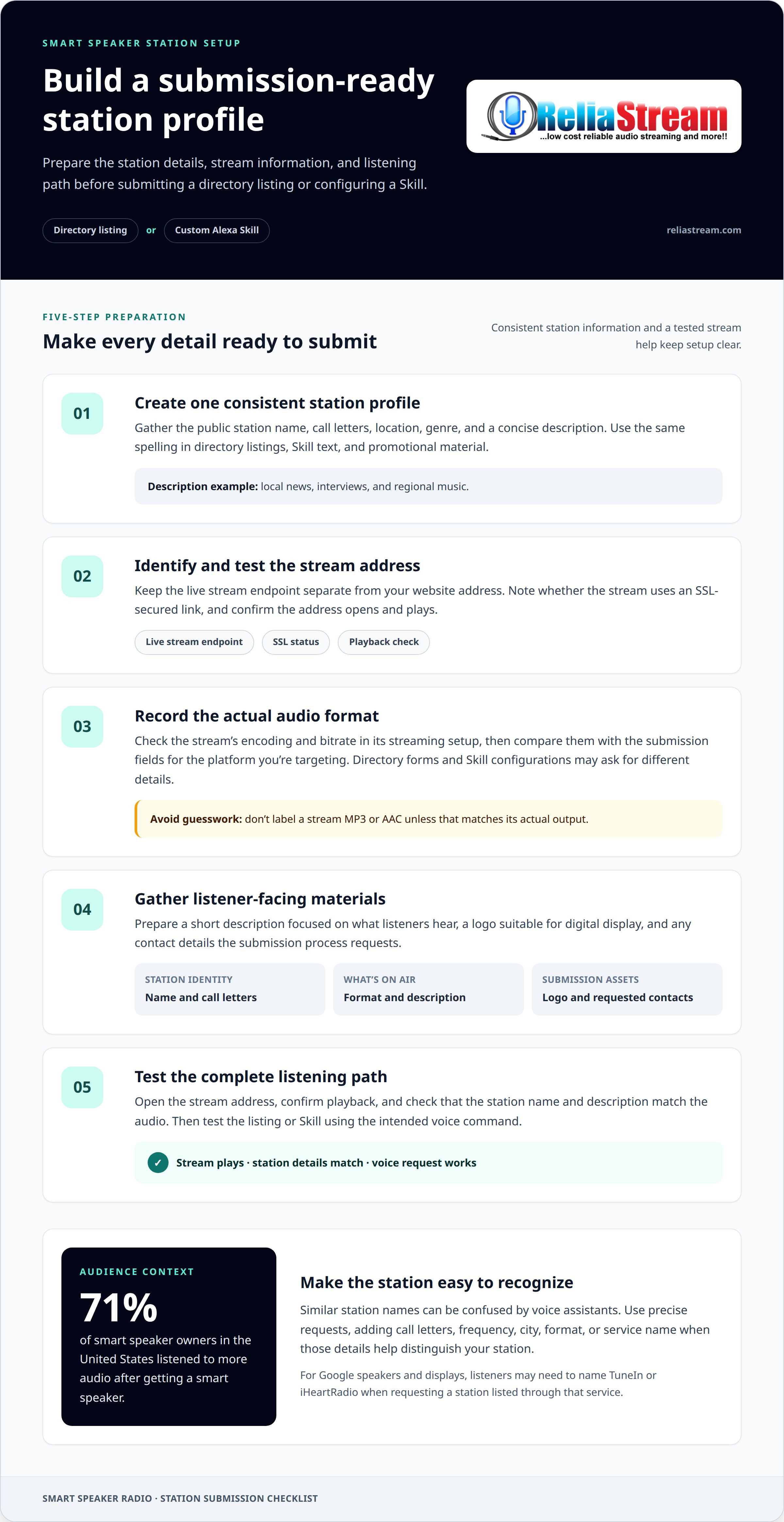
- Prepare a consistent station profile before opening a submission form. Use the station’s public name, call letters, location, genre, and a concise description. For example, a community station might describe its programming as local news, interviews, and regional music. Use the same spelling in directory listings, Alexa Skill text, and the station’s promotional material.
- Make the stream address easy to identify and test. A directory or custom Skill needs a stream source to play, so keep the live stream endpoint separate from your website address. Note whether the stream uses an SSL-secured link. This helps you provide the right address and troubleshoot playback if a smart speaker can’t connect.
- Describe the audio format accurately, rather than choosing a codec by guesswork. Record the stream’s encoding and bitrate from its streaming setup, then compare those details with the submission fields for the platform you’re targeting. Directory forms and Skill configurations can ask for different technical details. Don’t label a stream as MP3 or AAC unless that matches its actual output.
- Gather the material that helps listeners recognize your station. Prepare a short description, a logo suitable for digital display, and any contact details the submission process requests. Focus the description on what listeners hear. A talk station should identify its news or interview focus; a music station should describe its format without adding unrelated keywords.
- Test the complete listening path before submitting. Open the stream address, confirm that it plays, and check that the station name and description match the audio. Then test the listing or Skill with the intended voice command. A stable radio streaming setup supports this process, while the platform’s own submission fields determine the final format and metadata.
In the United States, 71 percent of smart speaker owners listened to more audio after getting a smart speaker, underscoring the potential audience for a clear station listing.
How do I make a radio station available on Apple Siri, Google Assistant, and Alexa
- Choose a route for each assistant before building anything. Getting listed on smart speaker radio services can mean a directory presence, a custom Skill, or both. Apple Siri, Google Assistant, and Alexa handle voice requests differently, so identify where your station is already accessible. Then decide whether a custom Alexa Skill fills a specific gap. Keep the goal practical: listeners should be able to start your station with a clear request.
- For Apple Siri, make the station name and spoken request straightforward. Give listeners an example using the station’s actual name, then add a city or format if similar names could cause confusion. Test the wording on a Siri-enabled device and adjust your instructions if the request needs more detail. Don’t promise a direct Siri listing unless your chosen route supports it.
- For Google Assistant, account for the selected default music service. Google smart speakers and displays use that service first when possible and support one account per streaming service. If your station is available through TuneIn or iHeartRadio, show listeners how to include the service name in their request. Pair the station name with the service rather than relying on the station name alone.
- For Alexa, decide whether a directory route or custom Skill best serves your audience. A Skill can give your station a memorable invocation and a direct listening experience. Community stations can also use an Alexa Flash Briefing Skill for daily content, such as local news or regional updates. If a third-party developer builds the Skill, provide the stream, station identity, and intended listener interaction.
- Test each spoken instruction on a real device, then publish the exact command. A clear plan for getting listed on smart speaker radio services includes an invocation that matches your on-air branding. Put it in promos, on your website, and in social posts. If Siri, Google Assistant, or Alexa returns another result, refine the wording and explain any service name listeners need to reach your stream.
What does it cost to list a radio station on smart speaker services?
- Separate directory access from Skill development when planning your budget. A station already available through a radio directory may have a different path from one building a custom Alexa Skill. The total depends on the route, the work involved, and any ongoing support. There isn’t one cost that applies to every station and platform.
- Identify what the directory route requires. List the platforms you want to reach, such as TuneIn or iHeartRadio, and review each submission process. Budget considerations may include preparing station details, artwork, and a stream endpoint. Don’t assume a directory submission and a custom Skill involve the same work or charges.
- Scope a custom Alexa Skill in practical terms. A Skill that simply starts your station differs from one with briefings, menus, or other listener interactions. If a third-party developer builds it, the project cost depends on the requested features and work involved. Before requesting a quote, write down the intended voice command and listener experience.
- Include stream readiness and ongoing upkeep in your estimate. The price depends on the project and is provided after a quote request. Relevant factors include the chosen listing route, Skill features, stream setup, and maintenance needs. A working stream address and consistent station information can reduce avoidable preparation and troubleshooting.
- Review promotional plans separately from technical costs. A message inside a Skill may raise pay-for-play concerns, so consider its purpose and placement before adding it. Keep promotional content distinct from the station’s ordinary programming, and avoid assuming a listing fee covers advertising or development. To prepare the broadcast stream for smart-speaker access, set up your radio stream.
Cost planning also has a listener-facing side: stations should teach listeners how to connect to the station on a smart speaker, rather than assuming they will find it themselves. When explaining what to say, recommend requesting stations by call letters and frequency, and adding detail to a request when someone is looking for a specific station. The presentation’s examples for Twin Cities stations are Cities 97.1 and KS95 94.5.
Alongside those steps, prepare your stream for listening: aim for high-quality sound and a good listener experience, including avoiding repetitive ads. This won’t replace directory or development costs, but it can give listeners clearer instructions and a better experience once they reach your station.
ReliaStream
ReliaStream helps internet broadcasters prepare the streaming foundation behind a directory listing or custom Alexa Skill. A smart speaker route still needs a station stream listeners can access, so reliable hosting is part of the setup. ReliaStream offers hosting plans including the 32 Kbps Hosting Plan, 64 Kbps Hosting Plan, 128 Kbps Hosting Plan, and 320 Kbps Hosting Plan. Choose based on your station’s streaming needs, then use the stream link when configuring your chosen listener access route.
Hosting supports delivery of your broadcast; it doesn’t replace submitting a station to a directory or building a custom Skill. If your stream is ready and you need hosting for your internet radio station, contact ReliaStream to discuss your needs.
Make the listening experience part of your launch plan
A custom Alexa Skill is more than a setup task. It gives your station another way to help listeners discover and start your stream. Treat the invocation, first response, and any promotional message as parts of one experience. Keep your station’s identity clear, and make sure promotional content doesn’t distract from why someone asked to hear you. A thoughtful approach to getting listed on smart speaker radio services starts with a listener experience you can explain in one simple voice command.
Before launch, rehearse the request and response aloud. Does the command sound natural? Does the Skill make clear what happens next? Small refinements can make the experience easier to understand and promote.
If streaming is the next piece to put in place, talk with ReliaStream about your station. Build the foundation, then bring your station’s voice to the speaker.
Frequently Asked Questions
How do radio stations get listed on Amazon Alexa and other smart speaker services?
Stations use a directory listing, a custom Alexa Skill, or both, depending on how they want listeners to find them. For example, a station with a distinctive brand might create a Skill with a memorable invocation, while one focused on broad discovery may prioritize directory distribution. Before launch, test the listener journey from spoken request to playback, including what happens if Alexa misunderstands the station name.


