

Did you know that switching your station to HE-AAC can slash your server bandwidth costs by 50% while delivering better audio than a standard MP3? It sounds impossible, but the data is clear. In 2026, the aac vs mp3 internet radio streaming debate isn't just about technical specs. It's about your bottom line. You've likely felt the sting of high bandwidth bills or heard from listeners frustrated by constant buffering on mobile data. It's a constant battle to keep your stream professional without breaking the bank.
We get it. You want your station to sound like a million bucks without actually spending it. This guide settles the codec showdown once and for all. We'll show you how to deliver CRISP, professional audio at lower bitrates that work everywhere. From Alexa and Roku to the latest mobile apps, your listeners deserve a seamless experience. We are diving deep into how you can modernize your reach, reduce your overhead, and finally stop compromising on quality. It's time to grow. Let's get your station sounding its best.
Key Takeaways
- Learn how HE-AAC turns a budget 64 Kbps Hosting Plan into a premium sounding experience. Stop paying for bandwidth you don't need.
- Settle the aac vs mp3 internet radio streaming debate for 2026. Get the facts on browser compatibility and mobile performance.
- Secure your stream with an SSL Radio Link. Modern browsers demand security, so don't let a lack of encryption kill your listener count.
- Expand your reach to the living room with custom apps for Roku and Alexa. See why codec choice is the secret to flawless smart home playback.
- Compare MediaCP and Centova Cast plans to find the right dashboard for your station. Professional management makes multi-format streaming easy.
The Great Debate: AAC vs MP3 in the 2026 Streaming Landscape
Why are we still debating audio formats in 2026? Because your choice dictates your profit. The aac vs mp3 internet radio streaming showdown is about one thing: efficiency. Digital audio has evolved. Broadcasters haven't always followed suit. Many are still clinging to outdated standards. Lossy compression is the magic trick of the streaming world. It strips away data your ears won't miss to keep the stream moving. But doing it poorly leads to artifacts and listener fatigue. Every kilobit per second is a line item on your hosting bill. Kilobits cost cash. Simple as that. Why pay for 128 Kbps when you can get the same fidelity at 64? Your audience doesn't check the file extension. They just want the music to sound professional. They want it to work. No excuses.
Why MP3 Refuses to Die
It's the "it just works" factor. MP3 has universal compatibility. From ancient car stereos to 20-year-old hardware tuners, everything speaks MP3. It requires minimal CPU overhead. This makes it easy for old-school broadcasters to set and forget. Beginners often fall into the ubiquity trap. They use it because it's familiar. But familiarity can be expensive. Staying stuck in the 90s means you're overpaying for bandwidth. It's a massive drain on mobile-first audiences. Your listeners on limited mobile data will suffer from buffering while your bill skyrockets. It's a legacy format for a legacy mindset.
The Rise of AAC as the Professional Choice
AAC is the modern engine of the internet. The Advanced Audio Coding standard was designed by experts at Bell Labs and Fraunhofer to fix the flaws of its predecessor. It's the reason YouTube and Spotify sound as good as they do. The efficiency gains are massive. This is why top-tier stations have already made the switch. They know that AAC is the secret to making a budget 64 Kbps Hosting Plan sound like a premium 128 Kbps stream. It's not just a trend; it's the professional standard. If you want to expand your reach, you need the tools the pros use. AAC delivers better sound at lower bitrates. That's the secret sauce for 2026. It's about sounding like a million bucks without the overhead.
- Better Fidelity: High-frequency retention that MP3 simply can't match.
- Mobile Optimization: Fewer drops on weak data connections.
- Cost Efficiency: Half the bandwidth for the same subjective quality.
Decoding the Tech: Why AAC Wins on Quality and Efficiency
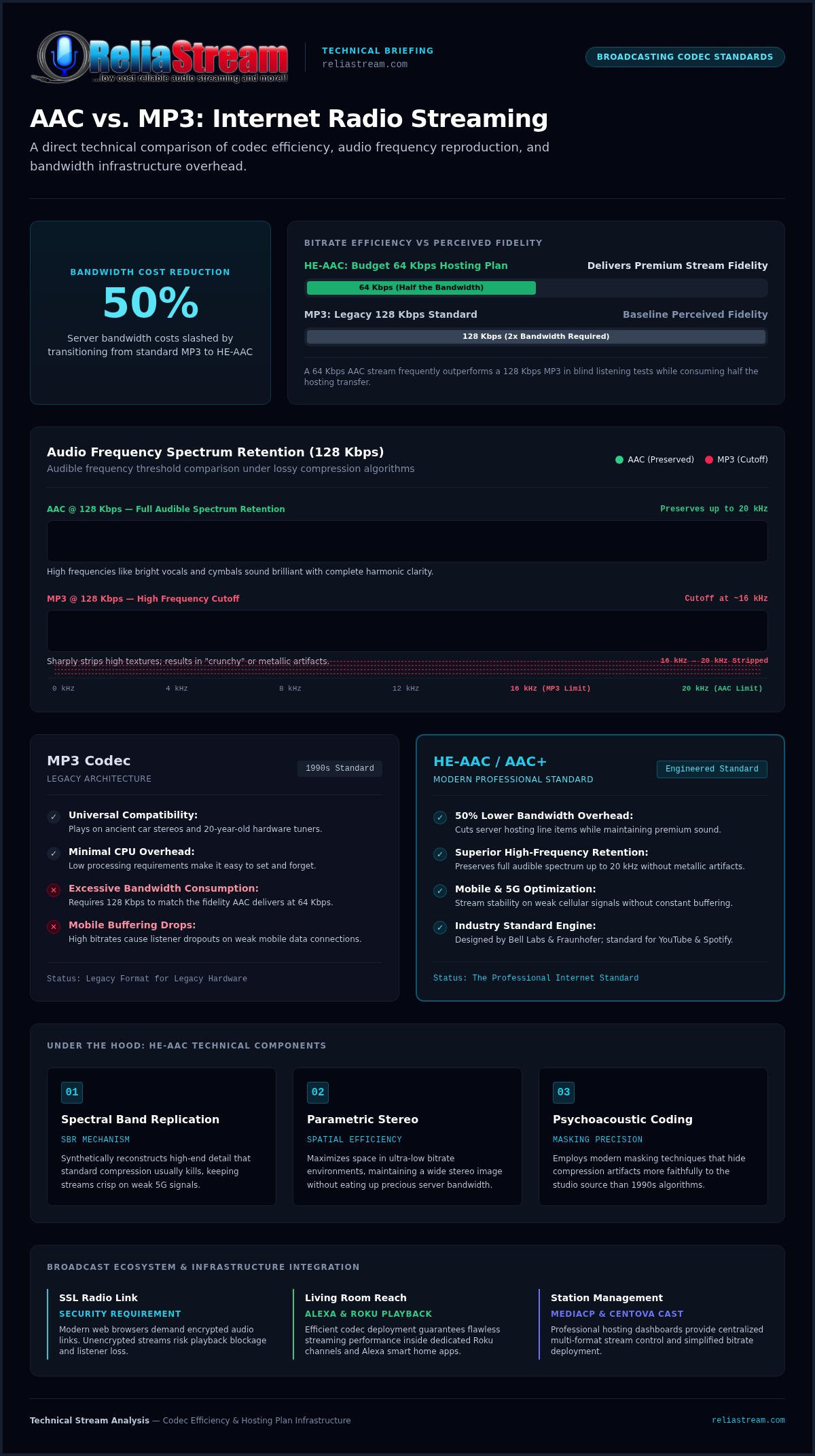
Is 128 Kbps really the "gold standard" for internet radio? In 2026, that benchmark is a myth. For years, broadcasters treated 128 Kbps MP3 as the baseline for CD quality. It's time for a reality check. When you compare aac vs mp3 internet radio streaming, the numbers don't tell the whole story. The algorithm does. MP3 is a legacy format. It struggles with complex textures. MP3 at 128 Kbps often cuts off audio frequencies sharply at approximately 16 kHz. AAC at that same bitrate preserves the full audible spectrum up to 20 kHz. High frequencies like cymbals or bright vocals sound brilliant. AAC handles these with clarity while MP3 makes them sound "crunchy" or metallic.
Efficiency at low bitrates is where the real magic happens. A 64 Kbps AAC stream frequently outperforms a 128 Kbps MP3 in blind listening tests. It's smoother. It's fuller. For broadcasters on a budget, this is a game-changer. You can deliver a professional sound on a 64 Kbps Hosting Plan that rivals the "premium" streams of yesterday. It's about working smarter. Choosing the winner in the aac vs mp3 internet radio streaming battle depends on your goals for quality and reach.
Understanding HE-AAC and AAC+
High-Efficiency AAC (HE-AAC) is the true hero for mobile listeners on weak signals. It uses Spectral Band Replication (SBR) to synthetically reconstruct high-end detail that compression usually kills. Think of it as a high-fidelity reconstruction tool. It keeps your stream sounding crisp even when your listener is on a weak 5G signal. Parametric Stereo takes it further by maximizing space in ultra-low bitrate environments. It's efficiency at its peak. It allows you to maintain a stereo image without eating up your precious bandwidth.
The Psychoacoustic Advantage
AAC wins because it understands the human ear better. It uses superior masking techniques to hide compression artifacts. While the psychoacoustic perceptual coding in MP3 was revolutionary in the 90s, it lacks the precision of modern standards. AAC is more "faithful" to your studio source. It offers better sample rate handling and higher precision. It simply makes better choices about which data to discard.
Transient response is the codec's ability to accurately capture the sharp, immediate peak of a sound, like a snare hit or a guitar pluck, without blurring the edges. This is why drum-heavy tracks sound punchy on AAC but muddy on MP3. If you want that punch, you need the right tech. Ready to hear the difference? Check out our MediaCP Plans to see how easy it is to deploy these modern codecs.
The Compatibility Reality Check: Does MP3 Still Own the Crown?
Is MP3 still the king of compatibility? Not anymore. In 2026, the aac vs mp3 internet radio streaming debate has a clear winner for modern devices. While MP3 once held the throne, AAC is now the native language of the mobile empire. iOS and Android devices prioritize AAC for its efficiency and lower battery drain. Major browsers like Chrome, Safari, and Firefox offer ubiquitous support. According to the web audio codec compatibility guide, modern HTML5 players handle both formats seamlessly. Global browser support for MP3 sits at roughly 96.7 percent, but AAC has caught up. It is the standard for the web. It is the standard for your phone. Why settle for less?
Don't throw away your MP3 stream just yet, though. Legacy hardware still exists. If your audience uses 20 year old standalone hardware tuners or vintage automotive receivers, they might need that MP3 fallback. Stations often maintain a secondary 128 Kbps MP3 mountpoint for these specific cases. It's a safety net. But for 99 percent of your listeners, AAC is the future. It's about reaching the most people with the best possible sound. Don't let legacy tech dictate your entire strategy. Balance is the key to growth.
Streaming to Roku and Amazon Fire TV
Winning the living room requires rock solid stability. Codec choice is a massive factor in radio streaming app development. Standardized AAC streams reduce app crashes on platforms like Roku and Amazon Fire TV. These devices are built for high performance media. They expect modern codecs. In the "Living Room" test, AAC shines. It delivers a full, rich sound on high end soundbars that MP3 simply can't match. It sounds professional. It sounds expensive. Your listeners will notice the difference when they're listening through their home theater systems. Don't give them a reason to switch stations.
Alexa and Google TV Integration
Smart speakers are the new kitchen radios. Ensuring your stream starts every time a listener uses a voice command is critical. AAC is the preferred format for Alexa and Google TV because it handles bandwidth throttling better than MP3. If a listener's home network gets crowded, AAC keeps the music playing while MP3 might stutter. Reliability is everything. Also, remember that ssl radio streaming is mandatory for these platforms. Without a secure link, your station won't even load. Modern streaming is a package deal. You need the right codec, the right security, and the right host. We provide the backbone. You provide the hits.
Bitrate Strategy: Choosing the Right Hosting Plan for Your Format
Bitrate is the speed of your data delivery. It’s the heartbeat of your station. In the aac vs mp3 internet radio streaming world, your bitrate choice is a direct reflection of your monthly budget. High bitrates sound incredible but consume bandwidth like a beast. Low bitrates save cash but can sound thin if you use the wrong codec. Here is the math that matters: switching to AAC can cut your data usage in half. By using HE-AAC at 64 Kbps, you get the same fidelity as a 128 Kbps MP3 stream. You double your capacity instantly. That is a massive win for any independent broadcaster.
The 64 Kbps sweet spot is the king of budget broadcasting. It’s the professional’s secret. While 128 Kbps remains the MP3 standard for maximum reach, it’s often inefficient. For those chasing absolute perfection, the 320 Kbps audiophile tier exists. Is it overkill? For a listener on the bus with standard earbuds, yes. But for a home theater setup, it’s a statement. Most mobile listeners simply cannot hear the difference between 192 and 320 on standard hardware. Don't waste money on bits your audience can't hear.
Budget Broadcasting: The 32 Kbps and 64 Kbps Strategy
Learning how to use low bitrate radio hosting effectively is about matching the codec to the content. Talk radio is the 32 Kbps champion. The human voice doesn’t need massive frequency ranges to sound clear. Music needs more breathing room. If you are running a Top 40 or Indie station, 64 Kbps HE-AAC delivers the punch you need without the high bill. It’s about being smart with your resources. You can sound like a premium station on a shoestring budget if you choose the right tech.
High-Fidelity Goals: 192 Kbps to 320 Kbps
When "good enough" isn't enough, you move up the ladder. Classical and Jazz stations often demand 192 Kbps or higher to capture every nuance of a live performance. However, high bitrates demand a lot from your audience. If your listeners have weak mobile signals, a 320 Kbps stream will buffer and die. This directly impacts your radio hosting starting at $1.99 plan limits. You want a growing audience, not a frustrated one. Choose a bitrate that fits your listeners' reality. Ready to find your perfect balance? Check out our 64 Kbps Hosting Plan to start sounding like a pro today.
Future-Proof Your Station with ReliaStream’s Multi-Format Support
ReliaStream is built for the modern broadcaster. We don't just give you a server. We give you a platform that evolves. The aac vs mp3 internet radio streaming choice shouldn't be a headache for your station. That’s why we support both ShoutCast and IceCast. You get the flexibility to reach legacy hardware while embracing the efficiency of AAC. It’s about coverage. It’s about power. Our Auto DJ is a "set it and forget it" powerhouse. You can mix AAC and MP3 files in a single library without a second thought. The system handles the heavy lifting. You focus on the hits.
Security is non-negotiable. In 2026, a non-secure stream is a dead stream. Browsers will block it. Every ReliaStream plan includes an SSL Radio Link. This ensures your station plays on every modern browser and smart device without being flagged as mixed content. We protect your brand. We protect your listeners. It’s professional broadcasting made simple. No technical jargon. Just results.
Mastering Your Control Panel
Control is everything for a growing station. Whether you prefer the classic layout of Centova Cast or the modern features of MediaCP, we have you covered. Deciding between centova cast vs mediacp comes down to your personal workflow. Both allow you to switch formats in a few clicks. You can monitor listener stats across different bitrates in real time. See exactly where your audience is tuning in. Use professional Auto DJ features to automate your schedule. Keep the music flowing 24/7 without being tied to a desk. It's fast. It's reliable. It's yours.
Ready to Launch Your Professional Stream?
Stop waiting for the "perfect" moment. Perfection is the enemy of on-air. Your audience is out there. They are waiting for your voice. ReliaStream delivers the ultimate advantage: unshakeable reliability, aggressive pricing, and the power to grow. We specialize in the tech so you can specialize in the talent. From our 32 Kbps Hosting Plan to our 320 Kbps Hosting Plan, we have a tier for every station size and every budget.
The aac vs mp3 internet radio streaming showdown is over. You have the facts. You have the tools. Now, you just need to start. Modernize your reach. Expand your audience. Build your legacy on a backbone that won't let you down. Start your professional broadcast today.
Take Control of Your Sound and Your Budget
The winner is clear. In the aac vs mp3 internet radio streaming battle, AAC delivers the professional edge your station needs to dominate in 2026. You don't have to choose between quality and cost. You can have both. By leveraging HE-AAC, you're slashing bandwidth bills while sounding like a million bucks. It's about being smart. It's about being heard. We've spent over 15 years perfecting the backbone for broadcasters like you. With Tier 1 bandwidth and custom apps for Roku and Alexa, your reach is limitless. Don't let outdated tech hold you back. Modernize your station. Secure your stream with SSL. Give your listeners the stutter-free experience they deserve.
The future of radio is high-fidelity and high-efficiency. Are you ready to lead? Success isn't just about the music. It's about the delivery. You need a partner that knows the ropes and keeps you ahead of the curve. Stop settling for mediocre sound. Launch your station on ReliaStream for just $1.99! We provide the power. You provide the passion. Let's get you on the air. Your audience is waiting.
Frequently Asked Questions
Is AAC better than MP3 for internet radio?
AAC is absolutely superior for modern broadcasting. It delivers significantly better sound quality than MP3 when you compare them at the same bitrate. This makes the aac vs mp3 internet radio streaming choice easy for those wanting professional results. While MP3 is a classic legacy format, its aging algorithm can't match the clarity and high-frequency retention of AAC. It is the professional standard for a reason. Stop compromising and start modernizing your sound today.
Will my listeners need a special player to hear an AAC stream?
No, your listeners are ready to go right now. Modern browsers like Chrome, Firefox, and Safari have built-in native support for AAC audio. This also applies to modern mobile apps and smart devices across the globe. If you are using our Roku Radio App or Alexa Streaming App, the integration is completely seamless. You won't need to ask your audience to download anything extra. They just hit play and enjoy the professional sound.
Can I stream in both AAC and MP3 at the same time?
Yes, and you definitely should consider this strategy. Most professional broadcasters use multiple mountpoints to cover all bases. You can run a high-quality AAC stream for mobile apps and a secondary MP3 stream for legacy hardware tuners. Our MediaCP Plans make this management incredibly simple. It ensures you reach every listener regardless of their device. It is the best way to maximize your station's reach without compromising on modern audio quality.
What is the best bitrate for an AAC radio stream?
The 64 Kbps Hosting Plan is the absolute sweet spot for most stations. It provides FM-like quality while keeping your bandwidth costs low and manageable. If you want to push for audiophile standards, 128 Kbps is excellent for music. Anything higher than 192 Kbps is usually overkill for the average mobile listener. Stick to 64 Kbps for the best balance of performance and budget. It is the smart, professional play for 2026.
Does ShoutCast or IceCast support AAC better?
Both platforms handle AAC efficiently in a modern environment. ShoutCast v2 and IceCast 2.5 are fully compatible with these modern codecs. IceCast is often favored by professional broadcasters for its flexible mountpoint system. This allows you to serve different formats from one single server. Regardless of your choice, our hosting ensures your stream stays stable and clear. We support both platforms to give you the ultimate flexibility in your broadcasting journey.
Why does my MP3 stream sound distorted at low bitrates?
MP3 was never designed to work well at low bitrates. Its algorithm strips away too much essential data when you drop below 128 Kbps. This creates that "underwater" or metallic sound you've likely noticed on budget streams. If you want to stay at a lower bitrate to save money, you must switch to AAC. It handles the aac vs mp3 internet radio streaming efficiency battle by using better psychoacoustic models to hide compression artifacts.
Do I need an SSL link for my AAC stream to work on my website?
Yes, an SSL link is absolutely mandatory. Modern browsers strictly block non-secure audio streams on secure HTTPS websites as a safety measure. If your site has that lock icon, your stream needs one too. We include an SSL Radio Link with our hosting plans to prevent this issue. Without it, your player simply won't load for most users. It is a security standard that you cannot afford to ignore today.
How much bandwidth does a 128 Kbps stream use per month?
Bandwidth usage depends entirely on your listener count. A single 128 Kbps stream running 24/7 uses approximately 42 GB of data per month for just one listener. If you have 100 listeners, that is 4,200 GB. This is why efficiency matters so much. Switching to a 64 Kbps AAC stream halves that consumption immediately. You can double your audience on the same budget. It is pure math that helps your station grow.


