

Your radio station is invisible if it isn't secure. It's that simple. In 2026, an insecure stream isn't just a "warning" in a browser; it's a total dead end for your listeners. If you're still hunting for icecast hosting with ssl, you already know the frustration of seeing your hard work blocked by Chrome or rejected by Alexa. Modern broadcasting demands more than just great audio. It requires a bulletproof HTTPS link that works everywhere, every time.
You've spent years building your sound, and it's exhausting to watch technical jargon and expiring certificates stand in your way. We get it. You want to reach those 233 million monthly online audio listeners without becoming a full-time IT expert. This guide breaks down exactly why SSL is the backbone of your 2026 distribution strategy. We'll show you how to secure your stream, satisfy the latest FCC security requirements, and get your station onto Roku, Fire TV, and smart speakers with zero stress. It's time to stop fighting the browsers and start growing your audience.
Key Takeaways
- Secure your future. Understand why modern browsers and smart speakers flat-out reject insecure streams, and how SSL keeps your signal alive.
- Quality meets security. Discover how to pick the perfect icecast hosting with ssl plan, balancing crystal-clear 320 Kbps audio with pro-grade encryption.
- Control your sound. Compare industry-leading panels like Centova Cast and MediaCP to find the easiest way to manage your secure stream.
- Technical setup made easy. Get a step-by-step breakdown for configuring popular encoders like BUTT and Mixxx to broadcast via HTTPS without the headache.
- Stay compliant. Learn how to navigate the 2026 FCC security requirements and the new, shorter SSL certificate lifecycles with ease.
Why Your Radio Station Needs SSL in 2026
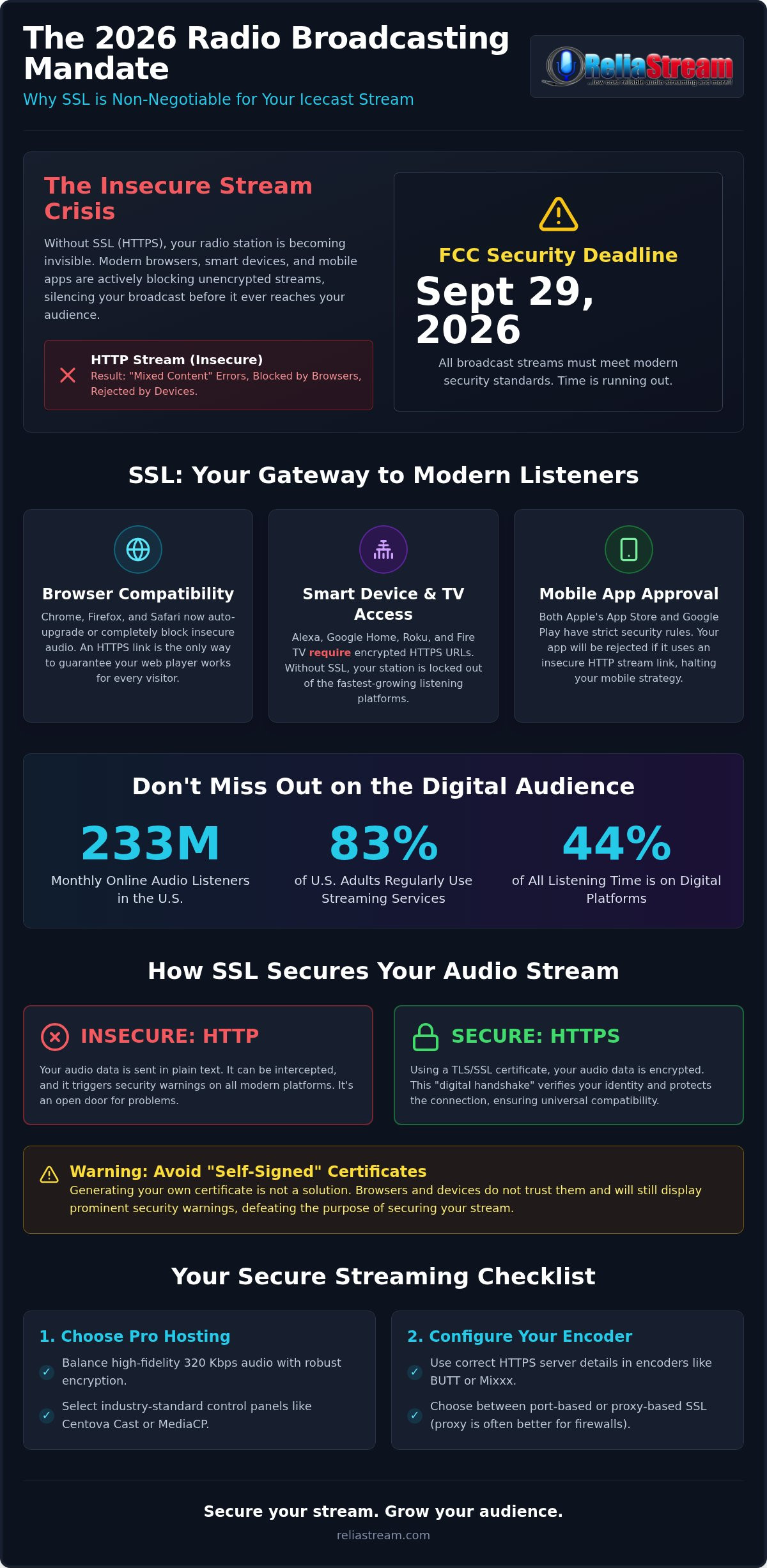
Is your station ready for the September 29, 2026, FCC security deadline? If not, you're on borrowed time. Security isn't a luxury anymore; it's the fundamental requirement for staying on the air. If you're still using unencrypted links, you're fighting a losing battle against the very platforms you need to survive. Investing in icecast hosting with ssl isn't just about checking a box. It's about ensuring your voice actually reaches the people who want to hear it. Without icecast hosting with ssl, your station is effectively invisible to the world's most popular browsers.
The Browser Blockage Reality
Chrome, Safari, and Firefox have stopped playing nice with insecure media. It's called the "Mixed Content" death sentence. Chrome 80 and all subsequent versions handle insecure media by attempting to auto-upgrade the request to HTTPS, blocking it entirely if a secure version isn't available. What happens when a listener clicks "Play" on an insecure link today? They don't hear your latest set. They see a broken player and a "Not Secure" warning that screams "unreliable." With 83% of U.S. adults regularly using streaming services, expectations are sky-high. A single security warning is all it takes for a listener to bounce to a competitor who took the time to secure their signal.
SSL as a Gateway to Smart Devices
Thinking about an Alexa Skill? Dreaming of a Roku app? You won't get past the front door without a secure HTTPS link. Smart speakers and modern TV platforms like Google TV require encrypted stream URLs to function. They won't even attempt to connect to a standard HTTP Icecast mount point. Securing your link opens the door to:
- Voice Assistants: Native support for Amazon Alexa and Google Home.
- Smart TVs: Reach listeners on Roku, Amazon Fire TV, and Google TV.
- Mobile Apps: Guaranteed compatibility with iOS and Android security standards.
Mobile app development also hits a brick wall without encryption. Apple's App Store and Google Play have strict security requirements for media. If your stream link isn't secure, your app will be rejected before it even reaches the review stage. This is where ssl radio streaming becomes your ultimate growth engine. To tap into the 233 million monthly online audio listeners in America, your stream must be compatible with the devices they use every day. You're building for a future where digital platforms account for 44% of all listening time. You need a backbone that supports that growth. Don't let outdated tech silence your station. Secure your stream and keep your audience growing.
What is Icecast with SSL? Understanding the Tech
What exactly is Icecast with SSL? It's not magic. It's audio data wrapped in a secure layer using TLS (Transport Layer Security) protocols. When you use icecast hosting with ssl, your server and the listener's device perform a digital handshake before a single note of music plays. This verifies your identity and encrypts the stream. It's the standard for 2026. If you aren't using it, you aren't broadcasting; you're just shouting into a void that browsers have already muted.
Think of HTTPS as a VIP pass. A standard HTTP link is a wide-open door where anyone can peek in. HTTPS is a private, guarded entrance. For professional broadcasters, the Certificate Authority (CA) acts as the bouncer. They verify that your station is who it claims to be. This is why the importance of SSL certificates cannot be overstated. It's the difference between a "Trusted" badge and a "Warning" flag that sends listeners running.
Avoid the "Self-Signed" trap. It's tempting to generate your own certificate to save a few bucks. Don't do it. Browsers hate them. They'll still throw a security warning because no trusted third party has vouched for you. If you want a pro stream, you need a pro certificate. If you're ready to skip the technical headaches, check out the SSL Radio Link options that keep your station online and trusted by every device.
How SSL Encryption Works for Audio
Does encryption slow down your stream? No. Does it ruin your audio quality? Absolutely not. Modern hardware handles the handshake in milliseconds. Once the connection is established, the audio flows at your chosen bitrate without extra latency. You'll often choose between port-based SSL and proxy-based SSL. Port-based uses a dedicated secure port like 8443. Proxy-based uses a standard web port (443) to route traffic. Both provide the security you need, but proxy-based setups are often easier for listeners behind strict corporate firewalls.
Certificates: Let’s Encrypt vs. Managed SSL
Let’s Encrypt has changed the game with free certificates. They're great, but they come with a catch: they expire fast. As of early 2026, the maximum validity for new certificates has dropped to just 199 days. That's less than seven months. If you forget to renew, your station goes dark instantly. This is where managed icecast hosting with ssl shines. When you choose a partner that handles the heavy lifting, your certificates auto-renew in the background. No manual updates. No calendar alerts. Just a permanent, secure link that never expires.
Choosing the Right Icecast Hosting with SSL
Finding the right icecast hosting with ssl shouldn't feel like a guessing game. It's about matching your creative vision to a delivery system that won't let you down. You need more than just a server; you need a partner that understands the 2026 broadcasting landscape. When you're scouting for a provider, look for a balance of power, security, and ease of use. Don't settle for a host that makes you jump through hoops to get a secure link. You need a turnkey solution that lets you focus on your playlist while the backend handles the Hypertext Transfer Protocol Secure (HTTPS) handshake automatically.
Bitrate and Audio Quality Standards
Quality is non-negotiable. While 128 Kbps is the industry standard for talk radio and general music, it's really just the baseline. If you're running a station focused on high-fidelity audio or complex soundscapes, your listeners will notice the compression. That's when you need to step up to high quality radio stream hosting at 320 Kbps. This provides crystal-clear fidelity that rivals your original studio files. Does SSL eat up your bandwidth? Technically, there's a tiny overhead for the encryption headers; however, it's so small you won't even see it on your bill. It's a microscopic price to pay for a stream that actually works in modern browsers and apps.
Centova Cast vs. MediaCP for SSL
The control panel is your cockpit. Centova Cast is the reliable veteran of the industry. It's robust and gets the job done, but managing SSL mount points can sometimes feel a bit manual if the host hasn't automated the process. On the other side, MediaCP offers a sleek, modern interface designed with HTTPS as a priority. It makes generating secure links feel like second nature. If you're torn between these two powerhouses, check out our centova cast vs mediacp guide to see which one fits your specific workflow better.
Your hosting model matters too. Are you paying for listener slots or unlimited bandwidth? For most independent stations, listener slots provide a predictable monthly cost. No surprises if a show goes viral. And don't forget the Auto DJ. A professional icecast hosting with ssl plan includes a secure Auto DJ that keeps your HTTPS stream alive even when your home studio is powered down. It ensures that 24/7 presence without you having to stay awake for every transition. Reliable. Secure. Always on. That's the 2026 standard for any serious broadcaster.
Step-by-Step: Setting Up Your Secure Icecast Stream
Ready to flip the switch? Moving to a secure broadcast isn't just a technical upgrade; it's a survival move. Let's get your station into the secure era without the headache. The process is straightforward when you have the right icecast hosting with ssl foundation. Follow these steps to ensure your signal is locked, loaded, and visible to every modern device on the planet.
First, pick your power level. Selecting your bitrate and listener capacity is the bedrock of your station. Whether you're pushing a 128 Kbps Hosting Plan for a balanced sound or going full audiophile with a 320 Kbps Hosting Plan, your choice dictates your bandwidth needs. Don't overbuy listener slots you won't use, but leave enough room for your audience to grow. Once your plan is active, your host should provide a dedicated secure server address and port. This is your golden ticket to the HTTPS world.
Encoder Configuration for HTTPS
This is where the magic happens. Most modern encoders like BUTT, Mixxx, and RadioBoss are built for the secure era, but you have to tell them to use it. In your encoder settings, look for the "SSL/TLS" or "Use HTTPS" checkbox. It's often hidden in the advanced or server connection tab. Input your secure server address and the specific secure port provided by your host. Standard Icecast often uses port 8000, but secure links frequently move to 443 or 8443. If you see a "Connection Failed" error, don't panic. It's usually one of three things: a typo in the server address, the wrong port number, or your local firewall blocking the secure handshake. Double-check your credentials and try again. Still stuck? Our team provides the SSL Radio Link support you need to get over the finish line.
Updating Your Online Presence
Your stream is secure, but is your website? If you embed an `http://` stream link on an `https://` website, browsers will kill the audio instantly. This is the dreaded "Mixed Content" warning. You must find every instance of your old stream link and replace it with the new HTTPS version. This includes your embedded web player, "Listen Live" buttons, and pop-up players. Don't stop at your own site. You need to notify the big players. Reach out to radio directories like TuneIn, Streema, and Radio Garden. Provide them with your new secure URL to ensure your station stays listed and playable on their mobile apps and smart speaker skills. A secure link is only useful if people can find it. Do the legwork now so you don't lose listeners later.
ReliaStream: Professional SSL Hosting That Just Works
Why waste your time wrestling with server certificates? You're a broadcaster, not a systems administrator. At ReliaStream, we believe icecast hosting with ssl should be a turnkey experience. We take the technical burden off your shoulders so you can focus on the one thing that matters: your content. Whether you're a bedroom hobbyist starting with a 32 Kbps Hosting Plan or a professional network demanding the crystal-clear fidelity of a 320 Kbps Hosting Plan, we have the infrastructure to keep your signal strong and secure. We handle the heavy lifting. You handle the hits.
Your secure link is just the beginning. It's the key that unlocks the biggest screens in the house. With your SSL link ready to go, we help you bridge the gap between a simple web player and a global media presence. We don't just host; we expand. From custom Alexa Streaming App development to getting your station on the Amazon Fire TV App store, we make sure you're where the listeners are. Our SSL Radio Link ensures your station is compatible with every modern platform from day one.
Expand Your Reach with Custom Apps
Modern radio happens in the living room. Our radio streaming app development services take your secure stream and put it on Roku, Fire TV, and Google TV. Why settle for a browser tab when you can have a dedicated icon on a listener's television? Independent stations choose us because we handle the complex API requirements and security protocols for Alexa Streaming App skills. We turn your icecast hosting with ssl into a multi-platform powerhouse. We dominate the living room so you don't have to.
No-Nonsense Reliability
Broadcasting since 2008. That isn't just a number. It's a track record of stability through every major shift in digital audio. We've seen browsers change and security standards evolve; we've stayed ahead of the curve every step of the way. Our commitment to 99.9% uptime means your listeners never hit a dead link. You get high-energy support from a team that actually knows the industry. No scripts. No corporate fluff. Just real solutions for real broadcasters with a gritty, can-do attitude. We are the backbone of independent radio. Are you ready to join us? Start your secure broadcast with a professional SSL Radio Link today.
Secure Your Sound. Own the Future.
The digital radio landscape doesn't wait for anyone. By now, you know the score. Without a secure link, your station is just a ghost in the machine. We've covered how encryption bypasses browser blocks and opens the massive doors to the Alexa and Roku ecosystems. It's time to stop fighting the technology and start using it to amplify your voice. You've built the content. Now, give it the secure platform it deserves.
Professional icecast hosting with ssl is your ticket to a bigger audience and a more professional brand. Don't get bogged down in technical jargon or 199 day certificate cycles. You have hits to play and listeners to reach. We've been the reliable backbone for thousands of broadcasters since 2008. We handle the turnkey SSL integration so you don't have to. Plus, our expert support is ready to help you dominate Roku and Alexa apps with ease.
Ready to go secure? Get professional Icecast hosting with SSL from ReliaStream today!
The 2026 broadcasting era is here. Don't let your station get left behind in the insecure past. Take control of your stream, secure your link, and start growing your audience across every modern device. Your listeners are waiting. Let's make sure they can hear you.
Frequently Asked Questions
Is SSL included for free with Icecast hosting plans?
Yes, at ReliaStream, we include a secure link with every plan. You don't have to pay extra for basic security. As of early 2026, the maximum validity for new certificates is just 199 days. This means manual renewals are a nightmare for busy broadcasters. Our icecast hosting with ssl automates this process entirely. We handle the certificate renewals and server configurations so you can stay focused on your broadcast without your stream going dark.
Does using SSL/HTTPS slow down my radio stream or cause buffering?
No, SSL does not cause buffering or audio lag. The encryption handshake happens only once when the listener first connects. After that, the data flows at your chosen bitrate, whether that's a 32 Kbps talk stream or a high-fidelity 320 Kbps music broadcast. Buffering is almost always caused by internet congestion or choosing a bitrate higher than your listener's connection can handle, not the encryption layer. Your audio stays crisp and immediate.
Can I use my existing Icecast link and just add "s" to the HTTP?
No, simply adding an "s" won't work. Secure streams operate on different ports and require a valid certificate to be installed on the server. If you just change the URL, the connection will fail because the server isn't listening for encrypted traffic on that specific link. You need a dedicated SSL Radio Link provided by your host to ensure the handshake completes and your audio actually plays in the browser without errors.
Why does Chrome block my radio player if I do not have SSL?
Chrome blocks insecure media to prevent security holes. If your website uses HTTPS but your radio stream uses HTTP, the browser sees it as a risk. Since Chrome 80, the browser automatically blocks these insecure audio requests. With 81% of Americans listening to online audio monthly, you can't afford to be blocked. You must meet the security standards enforced by modern browsers to keep your audience from seeing a "Not Secure" warning.
Do I need a separate SSL certificate for my radio website and my stream?
Yes, you typically need both. Your website needs a certificate for your domain, and your radio stream needs one for the streaming server. These are usually two different systems. Your web host handles the site, but ReliaStream handles the heavy lifting for your stream link. We provide the SSL Radio Link automatically, so you don't have to worry about the technical clash between your site and your audio stream.
Will my older listeners with legacy players still be able to hear my SSL stream?
Most modern devices and players handle SSL perfectly. While a tiny fraction of ancient hardware might have issues with modern TLS protocols, the trade-off is worth it. With nearly 219 million Americans listening to online audio weekly, the vast majority are on modern smartphones, computers, and smart speakers. These devices demand security. Providing an insecure link just to support a few legacy players will cost you thousands of modern listeners.
Can I switch from ShoutCast to Icecast SSL easily?
Yes, switching is a breeze. Icecast 2.5.0 offers incredible flexibility and is the industry standard for secure web broadcasting. You can easily move your station and keep your Auto DJ running while upgrading to a secure link. Our team specializes in these transitions, helping you move from ShoutCast to a secure Icecast setup without losing your audience or your sanity. It's the fastest way to modernize your station's technical backbone.
How do I get my SSL Icecast stream to work on Amazon Alexa?
Alexa has a strict requirement: your stream URL must be HTTPS. You can't get a custom skill approved without a secure link. Once you have your icecast hosting with ssl set up, you can integrate that link into a custom Alexa Streaming App. This allows your listeners to tune in with a simple voice command. Without SSL, your station stays off the world's most popular smart speakers and mobile platforms.


