

Is your station a professional broadcast or just a glorified shuffle button? Most independent broadcasters are working way too hard for way too little impact. You know the grind. Manual song selection is exhausting. One missed cue leads to the soul-crushing silence of dead air. Suddenly, your listener count flatlines. It's frustrating. It's time-consuming. And those "simple" proprietary tools? They're either too expensive or too basic to get the job done.
Effective internet radio playlist management is the strategic weapon that turns a hobby into a global brand. We're here to show you how to leverage professional Auto DJ tools to build a 24/7 automated station that sounds exactly like a live studio production. No more manual clicking. No more dead air. Just pure, professional flow. This playbook breaks down how to schedule ads, station IDs, and music rotations using industry-standard panels like Centova Cast and MediaCP. We're diving into the latest 2026 automation workflows to ensure your stream stays rock solid. It's time to automate your growth. Let's build something loud.
Key Takeaways
- Stop the manual grind. Learn why a strategic automation plan is the only way to scale your station without burning out.
- Master internet radio playlist management using weighted rotations. It's the secret to keeping your sound fresh and your listener retention high.
- Compare the heavy hitters. See how Centova Cast and MediaCP handle your media library differently to find your perfect fit.
- Technical specs matter. Discover why standardizing bitrates and using SSL links is mandatory for reaching modern audiences in 2026.
Why Your Radio Playlist Management Strategy Defines Your Station’s Success
Think of your station as a living, breathing entity. If the music stops, the heart stops. In the early history of internet radio, hobbyists could get away with sporadic streams and messy queues. Not anymore. Today, internet radio playlist management isn't just about picking songs. It's the strategic orchestration of every single audio asset you own. It's the difference between a random shuffle and a professional broadcast brand.
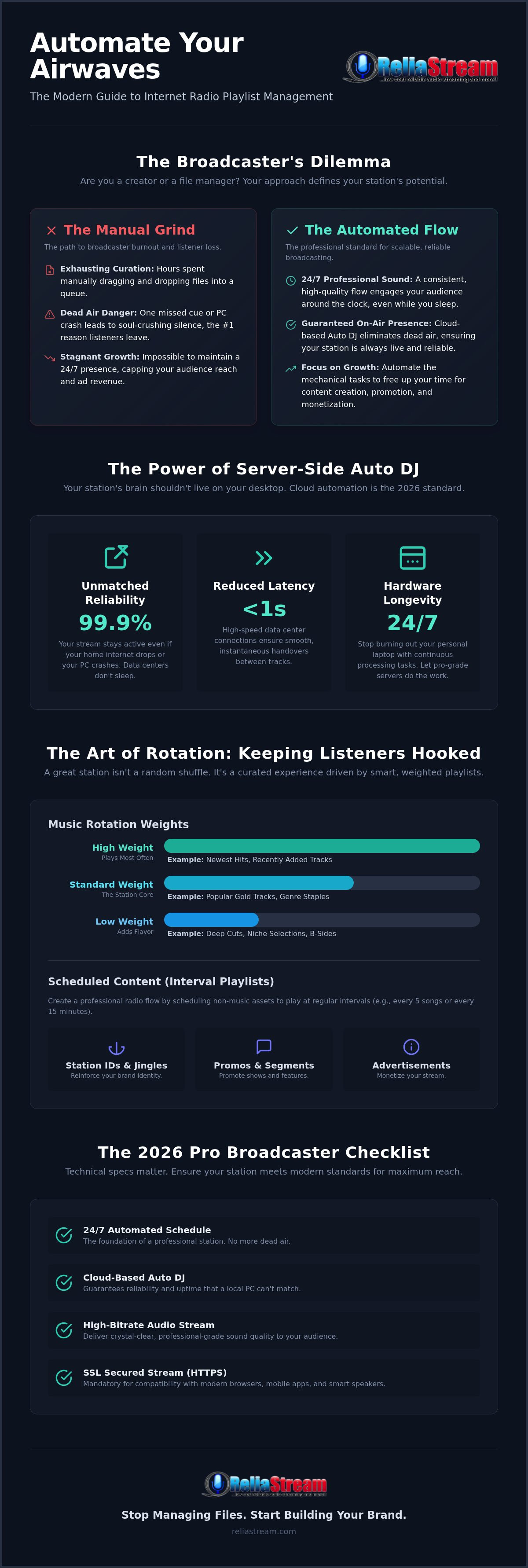
Why does a strategy matter so much? Because manual, "live-only" broadcasting is a massive growth killer. You can't stay behind the mic 24/7. When you step away without a plan, you risk the ultimate broadcast sin: dead air. Dead air is the #1 reason listeners tune out and never come back. It signals that your station is broken or abandoned. A 24/7 automated station is now the professional standard. It keeps your brand alive, your ads running, and your audience engaged while you sleep.
The Psychology of a Professional Radio Flow
Consistency builds trust. When listeners tune in and hear a familiar, high-quality flow, they stay longer. That trust is built through smart, weighted rotation. But don't fall for the "set it and forget it" trap. That's a myth that leads to stale content. Real management requires periodic auditing to swap out tired tracks and refresh your station IDs. Playlist management is the bridge between raw audio files and a curated listener experience.
Manual vs. Automated Management: The Broadcaster’s Dilemma
Are you a creator or a file manager? Manual selection eats your time. You spend hours dragging files into a queue when you should be producing content or selling ads. Auto DJ tools change the game. They handle the mechanical heavy lifting of 24/7 playback with surgical precision. It's about efficiency, not laziness. It's about working smarter.
Most professional broadcasters now use a hybrid approach for maximum impact. They let the Auto DJ maintain the station's foundation while they jump in for high-energy live segments. This hybrid model of internet radio playlist management gives you human connection without the risk of silence. Of course, this strategy only works if you have reliable internet radio hosting acting as your backbone. Without a solid server, your perfect playlist is just a silent file on a hard drive.
Auto DJ Mechanics: How Centova Cast and MediaCP Handle Your Media
Your local PC is a liability. It needs updates. It crashes. It loses power. If you want a station that stays on air, you need cloud-based internet radio playlist management. That's where the Auto DJ comes in. It is not just a player; it's a server-side engine that handles audio processing without your computer even being turned on. This is the professional standard for 2026.
Understanding the "Source" vs. "Server" relationship is vital. The server, like Shoutcast or Icecast, is the pipe that delivers audio to your listeners. The source is the brain feeding that pipe. When you aren't live, the Auto DJ takes over as the source. Because this happens on high-performance data center hardware, you get 99.9% uptime. You can't get that from a laptop in your bedroom. Ready to level up? You can explore professional hosting plans that include these tools as standard.
Why choose server-side automation over local software?
- Unmatched Reliability: Your stream stays active even if your home internet drops.
- Reduced Latency: High-speed data center connections ensure smooth handovers between tracks.
- Hardware Longevity: Stop burning out your personal laptop with 24/7 processing tasks.
Centova Cast: The Veteran’s Choice for Playlist Logic
Centova Cast is the industry workhorse. It relies on a logic-heavy "Media Library" approach. You don't just dump songs into a list; you assign them to playlists with specific weights. Want your newest hits to play three times as often as your gold tracks? Set the weight to "High." Centova’s General Rotation playlists handle the math for you. It ensures variety and prevents the same song from playing twice in a short window. It's pure, data-driven broadcasting. For a deeper look at the features, check out our breakdown of Centova Cast vs MediaCP.
MediaCP: Modern Visual Management for Pro Broadcasters
MediaCP is the modern contender. It ditches the logic-first approach for visual simplicity. It's perfect for broadcasters who want to see their 24/7 schedule laid out clearly. The drag-and-drop playlist builder makes it incredibly fast to organize your day. Since digital audio has become the de-facto replacement for radio, listener expectations are higher than ever. MediaCP helps you meet those expectations with "Interval" playlists. These are designed specifically for station IDs, jingles, and ads. You tell the system to play an ID every three songs, and it happens automatically. No manual tracking required. It’s clean. It’s fast. It’s professional.
Strategic Rotation: Balancing Variety, Hits, and Listener Retention
Stop treating your station like a personal MP3 player. A professional stream requires logic. It requires a plan. This is where internet radio playlist management moves from simple file storage to strategic broadcasting. If you play the same three songs every hour, your listeners won't just get bored. They'll leave. Forever. Professional rotation logic is what separates a radio station from a simple Spotify shuffle.
To keep people locked in, you need to master Playlist Weighting. This isn't just about what plays; it's about how often it plays. By assigning higher weights to your "Power Hits" and lower weights to your "Deep Cuts," you ensure your station always feels fresh but familiar. You also need to utilize different playlist types. Scheduled Playlists allow you to flip the vibe for time-specific shows, like a high-energy "Morning Drive" or a "Late Night Chill" session. Meanwhile, Immediate Playlists act as your emergency override for breaking news or urgent station announcements. They break the current flow to deliver what's important, right now.
The Rule of Three: Variety, Energy, and Flow
Success in internet radio playlist management often comes down to the "A, B, C" rotation model. Categorize your library into three tiers:
- Category A (Power): Your current hits. These play most frequently.
- Category B (Secondary): Recent hits or strong favorites. These play at a moderate pace.
- Category C (Gold): Classics and deep cuts. These provide the variety that prevents listener fatigue.
Don't forget the "glue." Interval playlists are designed to trigger every X songs or X minutes. This is where you place your jingles. Jingles aren't just filler; they are the transition points that maintain energy and signal your brand identity to the listener.
Mastering Station IDs and Legal Requirements
Broadcasting isn't just a hobby; it's a responsibility. You need to automate your station identifications to stay professional and meet any legal requirements in your jurisdiction. Use "Overlays" to mix voice tracks over background music seamlessly. This allows your station IDs or promo spots to play over the intro or outro of a song without a jarring cut. It creates that "live studio" feel that keeps listeners engaged. By automating these elements, you ensure your brand is always front and center, even when you are miles away from the control panel.
Step-by-Step: Building a Professional 24/7 Automated Broadcast Schedule
Ready to stop theorizing? It's time to build. A professional broadcast doesn't happen by accident. It's the result of disciplined internet radio playlist management. If your library is a digital junk drawer, your listeners will hear the clutter. Let's get your station sounding like a million bucks with this five-step workflow. It's about precision. It's about flow.
- Step 1: Audio File Preparation. Standardize your bitrates. Whether you're pushing 128 Kbps for efficiency or 320 Kbps for audiophile quality, keep it consistent.
- Step 2: Organizing the Media Library. Use clear folder structures. Tag your MP3s with correct metadata. This makes searching and automation much faster.
- Step 3: Creating Rotation Playlists. Set your weights. Use the A, B, and C logic we covered. Tell the system exactly how often to play your hits.
- Step 4: Scheduling Special Events. Set specific dates and times for recurring shows. Think about your global audience and their time zones.
- Step 5: Testing the Stream. Use your control panel's "Live" monitor. Watch the handover between tracks. Verify the flow before you promote the link to your audience.
Preparing Your Files for High-Quality Streaming
Consistency is king. Use MP3 constant bitrate (CBR). It's the safest choice for universal browser compatibility. Variable bitrate (VBR) can cause timing issues with some players. Always match your file bitrate to your chosen hosting plan. If you're on a 320 Kbps plan, don't waste it with 64 Kbps files. Also, normalize your audio. Use a tool to ensure every track hits the same volume level. Nobody wants to dive for the volume knob between songs. It's jarring. It's unprofessional. Fix it before you upload.
Advanced Scheduling: Going Beyond the Basics
Think bigger than your local time zone. Use "Repeat" rules to ensure your prime-time content reaches listeners in different parts of the world. You can automate these replays so your best shows work for you while you sleep. Managing "Live DJ" handoffs is the next level. Professional Auto DJ radio hosting allows a live source to connect and smoothly override the automation. When the DJ disconnects, the Auto DJ fades back in. No silence. No stress. Just professional broadcasting. Ready to take control? Check out our high-bitrate hosting options to launch your professional station today.
Scaling Your Sound: High-Bitrate Hosting and Multi-Platform Reach
Your internet radio playlist management is only as good as the server beneath it. A perfect queue on a shaky server is a recipe for disaster. You need a backbone that doesn't buckle. In 2026, browser compatibility isn't optional. It's mandatory. That's why SSL radio streaming is the first thing you should check. Without it, modern browsers like Chrome and Safari will block your stream. Don't let a "Not Secure" warning kill your growth before it starts. It's a professional deal-breaker.
Are you still broadcasting in "Talk" quality? If you're playing music, 32 Kbps isn't going to cut it. It sounds thin. It sounds cheap. Scaling from a 32 Kbps plan to a 320 Kbps "Hi-Fi" stream transforms your station into a premium experience. Listeners notice the difference. High-bitrate hosting ensures that the professional flow you've built actually sounds professional on the other end. Quality matters. Uptime matters. Don't settle for less.
Dominating the Living Room with Custom Apps
Your station shouldn't just live on a website. It needs to be where your listeners are. Professional management feeds directly into radio streaming app development. When your playlists are organized, they sync seamlessly with Roku, Fire TV, and Alexa. A well-managed station is far easier to package into a Google TV app. Why? Metadata. Your ID3 tags tell these apps exactly what to show on the screen. Album art. Song titles. Artist names. It all comes from your playlist structure. If your tags are messy, your app looks amateur. If your tags are clean, your brand shines. Get it right at the source.
The ReliaStream Advantage: Professional Tools, Gritty Support
We don't do corporate fluff. We do uptime. ReliaStream provides a "No-Nonsense" backbone for your creative vision. Whether you need a 128 Kbps plan for a solid music stream or the full 320 Kbps power for an audiophile brand, we've got you covered. We've been in the game since 2008. We know what broadcasters need. Best part? You don't need a massive budget to start smart. With plans starting at $1.99, the most professional management tools are finally accessible to everyone. No gatekeeping. Just results. It's time to stop playing around and start broadcasting for real.
Ready to take control? Start your ReliaStream station today!
Take the Mic: Your Global Broadcast Starts Now
You've got the tools. You've got the strategy. Now, it's time to execute. Mastering internet radio playlist management is about more than just filling a queue. It's about building a brand that never sleeps. By leveraging weighted rotations and professional Auto DJ logic, you ensure your station sounds like a high-end studio production every hour of the day. No more dead air. No more manual exhaustion. Just pure, professional flow.
The technical foundation is already waiting for you. We've been the reliable backbone for broadcasters since 2008. Our hosting plans come standard with Centova Cast and MediaCP panels. We offer everything from 32 Kbps talk streams to 320 Kbps high-quality audio for music-heavy stations. Don't let your creative vision get stuck on a hobbyist server. It's time to scale your sound and reach your audience on every platform from the web to smart speakers.
Launch Your Professional Radio Station for Just $1.99/mo
The airwaves are waiting for a voice like yours. Stop overthinking and start broadcasting. You've got this.
Frequently Asked Questions
What is the difference between Auto DJ and a simple playlist?
Auto DJ is the brain of your station. A simple playlist is just a static queue of files. Basic. Auto DJ handles the heavy lifting by applying rotation logic, weighted playback, and automated transitions. It runs on the server, not your local machine. This means your station stays online even if you close your browser. It's the engine that powers professional internet radio playlist management by managing your media library 24/7.
Do I need special software on my computer for internet radio playlist management?
No special software is required. You manage everything through a web-based control panel like Centova Cast or MediaCP. You just need a modern browser and an internet connection to upload files and organize your schedule. This cloud-based approach is superior. It offloads all the processing power to our high-performance servers. You can build your entire broadcast from a laptop, a desktop, or even a tablet without installing a single bulky app.
Can I schedule live broadcasts to interrupt my automated playlists?
Absolutely. This is the hybrid model used by the pros. You can set up your Auto DJ to run the foundation of your station and then "break in" for live segments. When you connect your live encoder, the Auto DJ will either stop or fade out. It depends on your settings. Once your live show ends and you disconnect, the automated system takes over immediately. It ensures there is never a second of dead air.
How many songs should I have in my rotation for a 24/7 station?
Aim for at least 300 to 500 tracks to start. If you have too few songs, your rotation will become predictable. That drives listeners away. For a high-energy 24/7 station, a library of 1,000+ songs is ideal. Remember to use the "Rule of Three" we discussed earlier. Categorize your music into Power Hits, Secondary Favorites, and Gold Classics. This keeps the variety high and the listener fatigue low.
Does ReliaStream support both Centova Cast and MediaCP for playlist management?
Yes, we provide full support for both Centova Cast and MediaCP plans. We don't believe in "black box" proprietary tools that limit your control. Instead, we give you industry-standard panels. These offer the most robust features for internet radio playlist management. Whether you prefer the veteran logic of Centova or the modern visual scheduling of MediaCP, we have a hosting plan that fits your specific workflow and technical needs perfectly.
What happens if my internet goes out while the Auto DJ is running?
Nothing happens to your broadcast. That's the beauty of server-side automation. Since your files and your playlist logic live on our high-performance servers in a data center, your station stays on the air 24/7. Your local internet connection is only needed when you want to upload new music or change your schedule. If your home power fails or your Wi-Fi drops, your listeners won't hear a thing but your music.
Can I manage my radio station playlists from my phone?
You certainly can. Both MediaCP and Centova Cast feature mobile-responsive interfaces. This means you can log in to your control panel from any smartphone or tablet to make quick changes on the fly. Need to swap a song? Want to trigger an emergency announcement? You can do it all from the palm of your hand while you're away from your desk. It's professional control with total mobile freedom.
How do I ensure my songs play at the same volume level?
You need to normalize your audio files before uploading them to the server. Use a batch processing tool to ensure every MP3 in your library hits the same decibel level. This prevents the "volume roller coaster" where one song is a whisper and the next is a shout. Consistent levels are a hallmark of professional broadcasting. It keeps your listeners comfortable and ensures your stream sounds polished across all possible playback devices.


