

102.1 million active accounts. That's the massive Roku footprint in early 2026. Still fighting for scraps on web-only players? Your audience moved to the couch. They're listening through high-end home theaters and soundbars. It's time to follow them. You know the potential. But the "how" feels impossible.
You're worried about the tech. We get it. BrightScript sounds like a coding nightmare. The Roku Store certification process? Pure anxiety. But stagnation is the real enemy. You need a professional, branded presence that dominates the living room. It shouldn't require a computer science degree to get there.
This guide is your roadmap for roku radio app development without the technical headache. We're breaking down how to bypass the hurdles and launch a station that reaches millions of new listeners. Learn how to integrate your existing ShoutCast or IceCast streams seamlessly while keeping costs low with hosting starting at $1.99. We'll cover the critical SSL security needs and the 2026 certification deadlines you can't afford to miss. Let's scale your reach!
Key Takeaways
- Unlock a massive new audience by moving your station from web browsers to the 102.1 million active accounts on the Roku platform.
- Understand the technical foundations of BrightScript and SceneGraph to ensure your station provides a professional, crash-free experience.
- Learn the specific requirements for roku radio app development, from high-fidelity 320 Kbps streams to dynamic "Now Playing" album art.
- Navigate the 2026 Roku Store certification process with a clear roadmap that covers UI guidelines and essential SSL security protocols.
- Discover how to bypass the development grind and launch a branded channel with professional hosting starting at just $1.99.
Why Roku Radio App Development is the Ultimate Reach Multiplier
A Roku radio app isn't just a fancy web player. It's a dedicated, branded channel that lives on the TV. It streams your station directly to the heart of the home. This is roku radio app development done right. It's about presence. It's about power. You aren't just another tab in a browser. You're a destination on the home screen. A professional presence here tells your listeners that you're a serious player in the media space.
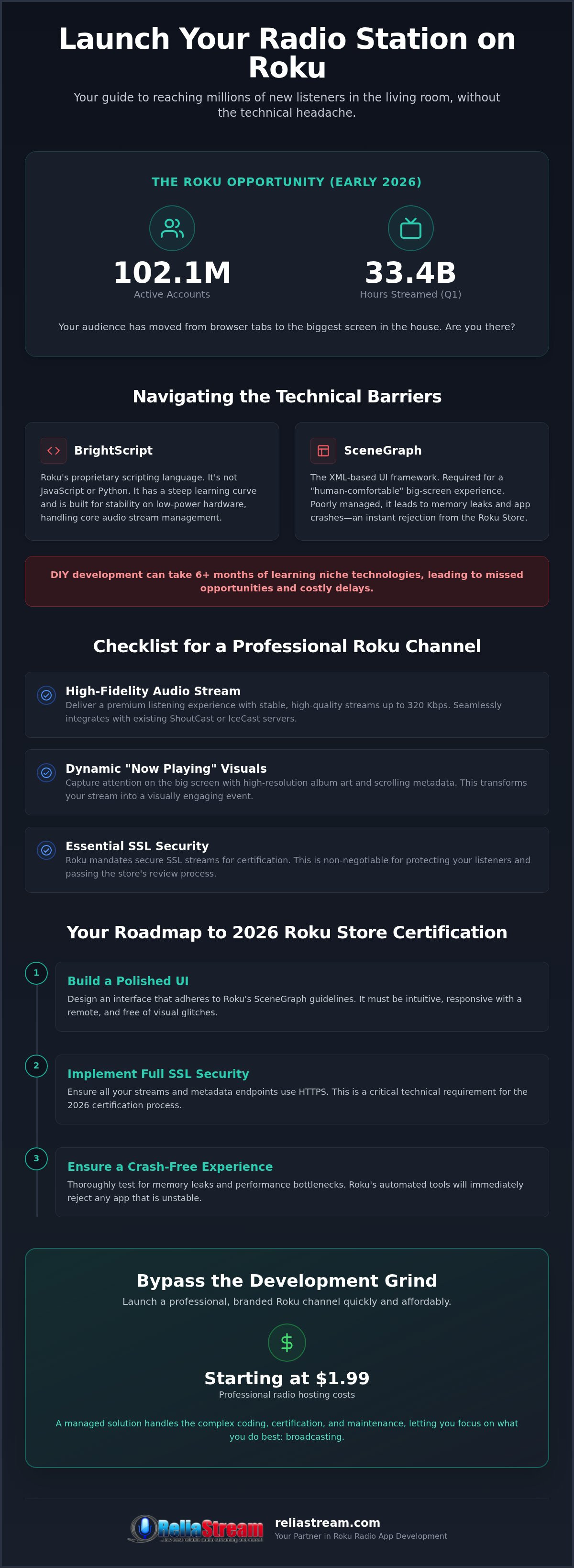
The numbers don't lie. As of Q1 2026, Roku has hit 102.1 million active accounts. That's 102.1 million potential homes for your station. Users streamed 33.4 billion hours of content in that same quarter. They aren't just watching movies. They're listening. They're engaging. They're making the TV the hub of their digital lives. If you aren't there, you're invisible to a massive segment of the market. Building an app isn't just about reach; it's about authority. When a listener sees your logo in the Roku Channel Store, your credibility spikes instantly.
The Shift in Listener Behavior
The old kitchen radio is gone. Today, the home theater system is the new standard. High-quality soundbars and smart TVs are the primary audio sources for millions of households. This has triggered a surge in "lean-back" listening. These are sessions where the user starts the stream and lets it run for hours while they live their lives. Longer session times mean more engagement. It means a more loyal audience. Being a dedicated app makes this seamless. A URL is easily closed or forgotten. An app stays on the screen. It becomes part of the room's atmosphere.
Roku vs. Mobile: Why You Need Both
Mobile is great for the commute. It's essential for on-the-go listening. But the living room offers something mobile can't: undivided attention. Engagement rates on the Roku OS are often higher because there are fewer distractions. No incoming calls or social media pings to interrupt the flow. You also get a massive visual advantage. That 65-inch screen is your canvas. Use it for high-res album art and scrolling metadata. It makes your station look elite. It makes it feel like an event.
Don't let the technical wall stop you. You can bridge the gap between affordable radio hosting starting at $1.99 and a global television presence. Roku radio app development is the multiplier that turns a local stream into a worldwide brand. It's time to stop thinking small. It's time to dominate the biggest screen in the house.
Navigating BrightScript and SceneGraph: The Barriers to Entry
Building a channel isn't like building a website. It's a different beast entirely. You can't just wrap your web player in a container and hope for the best. Roku requires a specific, specialized approach to roku radio app development. If you want to sit on that home screen next to Netflix and Hulu, you have to play by Roku's rules. This means mastering their proprietary tech stack. It's powerful, yes. But it's also a significant barrier for broadcasters who just want to get on the air.
The core of the platform is BrightScript. It's a unique scripting language designed specifically for the Roku OS. It isn't JavaScript. It isn't Python. It's a specialized tool built for stability and efficiency on low-power hardware. When you combine this with SceneGraph, the XML-based UI framework, things get complicated fast. Understanding SceneGraph core concepts is essential for creating a functional interface. Without this foundation, your app won't just look bad; it won't work.
Understanding the Technical Stack
BrightScript is the engine under the hood. It handles the heavy lifting, like maintaining audio stability and managing the stream's heartbeat. In a radio app, this is critical. A single stutter can drive a listener away forever. SceneGraph is the visual layer. It's what makes your navigation feel "human-comfortable" on a big screen. It handles how buttons move and how album art fades in. One of the biggest pitfalls for beginners is texture memory management. If your app loads too many high-resolution images at once, the system runs out of RAM. The result? A hard crash. Roku's automated certification tools will flag these memory leaks instantly, leading to an immediate rejection from the store.
The Cost of "Doing it Yourself"
Time is your most valuable asset. Do you really want to spend six months learning a niche coding language? Or would you rather spend that time curating content and selling ad spots? DIY development often feels like a way to save money, but the hidden costs are brutal. Buggy code leads to stream drops. Stream drops lead to listener churn. Even if you manage to build something that works, the certification process is a minefield. Roku is strict. They demand specific UI behaviors and performance benchmarks. If you miss a single requirement, you're back to the drawing board.
This is where a professional partnership becomes a "can-do" shortcut to success. You focus on the broadcast; we handle the code. Choosing a pro path for roku radio app development ensures you hit the store on time and without the technical headache. We bridge the gap at ReliaStream so you can dominate the living room while we manage the SceneGraph complexities behind the scenes.
Essential Features for a Professional Roku Radio Channel
Launching an app is step one. Making it world-class is step two. For successful roku radio app development, you can't cut corners on the listener experience. TV audiences expect high-fidelity audio. While mobile listeners might tolerate 64 Kbps on a spotty data connection, a home theater system will expose every compression artifact. That's why supporting streams up to 320 Kbps is essential. You want crisp, studio-quality sound that fills the room. Combine that with dynamic metadata. Your listeners want to see the "Now Playing" info and high-resolution album art on their 65-inch screens. It turns a simple stream into a full visual experience.
Security is another critical hurdle. Roku has strict standards for stream delivery. This is where ssl radio streaming becomes a non-negotiable requirement. Without a secure link, your app will fail certification before it even reaches the store. It's a technical necessity that ensures a safe, stable connection for the end user. Once they're in, don't let the music stop. Background play ensures the audio continues even if the user navigates back to the channel menu to check your "About Us" section or social links. It's about seamless flow and keeping the vibe alive.
Integration with Your Hosting Panel
Your app is only as good as the stream feeding it. Professional roku radio app development requires a rock-solid backend. Whether you're weighing the pros of centova cast vs mediacp, your app needs to pull metadata and stream URLs effortlessly. These panels allow for Auto DJ integration, ensuring your Roku channel stays live 24/7 even when your live DJs are off the clock. This constant uptime is vital for maintaining your spot in the "Recently Played" list of millions of users. We make sure the pipe between your host and the TV is wide open and always on.
Branding and User Experience
First impressions matter. When a user clicks your icon, they should see a custom splash screen that screams your station ID. This isn't just fluff; it's brand authority. The navigation must be "one-click" simple. TV remotes aren't keyboards. If it takes more than one click to start the music, you've already lost the listener. We focus on intuitive layouts that include your social media links and a dedicated "About Us" section. It's about building a community, not just a playlist. With hosting starting at $1.99, you have the budget to focus on these high-end branding details that set you apart from the amateurs. It's time to look as professional as you sound.
The Roadmap to Roku Store Certification in 2026
Think you're finished because the code is written? Think again. The Roku Channel Store is a gated community. You need a key. Getting that key means passing a rigorous review process that humbles even the most seasoned broadcasters. This isn't just about roku radio app development; it's about total compliance. Roku wants a premium experience for its 102.1 million active accounts. If your app feels like a cheap port, it's going in the trash. No exceptions.
The roadmap is clear but demanding. First, you enroll in the Roku Developer Program. It's your entry point. Second, you align your build with the latest standards, currently defined by Roku OS 15.0, released in September 2026. Third, you manage deep-linking and metadata requirements so users can actually find your station. Finally, you enter the review gauntlet. Warning: timing is everything. If you miss the 2026 holiday blackout periods (November 20 to November 29 or December 18 to January 4), your launch is dead in the water until the new year. Plan ahead or wait in line.
Why Certification is the Hardest Part
Why do apps fail? Usually, it's the little things. Stream lag. UI clutter. Memory leaks on older hardware. Roku tests your app on everything from the latest Ultra to the oldest stick still in circulation. If it stutters on a 2020 device, you're rejected. It's a high bar. But you don't have to clear it alone. We specialize in custom app builds that are pre-vetted for these specific hurdles. We guarantee a smoother path to approval because we've been doing this since 2008. Ready to skip the stress? Let's get your Roku Radio App certified today.
Post-Launch: Keeping Your App Updated
The work doesn't stop at the finish line. Roku is constantly evolving. By October 1, 2026, high-traffic apps must implement features like "Instant Resume" to stay compliant. You need a partner who tracks these OS changes so your station doesn't go dark. Use the developer dashboard to analyze listener data and see exactly when your audience is tuning in. As your station grows, your app needs to scale. With professional hosting starting at $1.99, you have the financial breathing room to focus on your content while we handle the firmware updates and OS shifts. Don't just launch. Thrive.
Deploy Your Custom Roku App with ReliaStream
Stop the DIY struggle. You've seen the technical hurdles and the certification minefields. BrightScript isn't for everyone. ReliaStream is your "no-headache" solution. We've been in the game since 2008. That's 18 years of gritty, real-world experience in the trenches. We combine professional radio streaming app development with elite hosting to give you a finished product that just works. You broadcast. We build. It's that simple. This is why roku radio app development with ReliaStream is the smart move for broadcasters who value their time. We take your vision and turn it into a high-performance channel that handles 320 Kbps streams with ease.
Why stop at one screen? The living room is bigger than just Roku. We build for the Amazon Fire TV App and Google TV App too. Need an Alexa Streaming App? We handle that as well. It's about being everywhere your listeners are. Stagnation is the silent killer of independent radio. If you aren't on these platforms, you're invisible to the modern listener. We provide the tools to make sure you're heard across every device. Our goal is to make your station the backbone of your listeners' home entertainment systems.
A Partnership, Not Just a Service
We don't just hand you a piece of software and walk away. We provide a partnership. Our team knows the gritty side of broadcasting because we live it every day. We offer direct support from pros who understand your specific pain points. Whether you're running a church station, a high-energy sports talk show, or a niche music stream, we customize the app to fit your specific niche. Don't settle for a generic template that looks like every other channel in the store. Your station has a unique voice. Your app should reflect that personality. We warn against stagnation in a multi-platform world. The world is moving fast. You need to move with it.
Ready to Go Global?
The process of starting your custom build is straightforward and efficient. We use our low bitrate radio hosting plans as the rock-solid backbone for your stream. These plans ensure your audio is stable and clear, no matter where your listeners are tuning in from. With hosting starting at $1.99, you can scale your reach without draining your budget. Professional roku radio app development is the final piece of the puzzle for your global expansion. Claim your space in the living room today. The 102.1 million active accounts on Roku are waiting for something new to listen to. Make sure it's your station they find first. Let's build something great together.
Your Station Deserves the Biggest Screen in the House
The landscape of 2026 is clear. The living room is where your audience lives. You've seen the technical walls of BrightScript and the strict certification gauntlet. These aren't dead ends; they're filters that separate the amateurs from the pros. By mastering roku radio app development, you transform your station from a simple web stream into a high-fidelity home entertainment destination. It's about moving from the smartphone screen to the center of the home theater.
Don't let the complexity of SceneGraph or constant OS updates stall your growth. You need a partner who's been in the trenches since 2008. We handle the custom builds for Roku, Fire TV, and Alexa while you focus on the content that keeps listeners coming back. With professional hosting starting at just $1.99/mo, there's no reason to stay small. It's time to stop chasing listeners and start dominating their home theater systems.
Get Your Radio Station on Roku Today with ReliaStream. The future of your broadcast is waiting on the home screen. Let's get you on the air and into the living room.
Frequently Asked Questions
How much does it cost to develop a Roku radio app?
Development costs vary based on complexity and specific feature requirements. While third-party agencies can charge anywhere from a few hundred dollars to over $75,000 for custom builds, we focus on providing a professional, accessible path for broadcasters. Remember that your underlying hosting starts at just $1.99 per month. We provide custom quotes for the app itself to ensure you get a branded, store-ready product without the enterprise price tag.
Do I need to know how to code in BrightScript to have a Roku channel?
No, you don't need any coding knowledge to launch a professional channel with our help. BrightScript is the specialized language used for the Roku OS, and it's a massive barrier for most broadcasters. We handle the entire technical stack for you. You focus on your content and audience engagement while our veterans manage the SceneGraph framework and backend logic. It's a "done-for-you" approach that skips the learning curve.
Will my ShoutCast or IceCast stream work on Roku?
Yes, your existing ShoutCast or IceCast streams are perfectly compatible with the Roku platform. We specialize in integrating these standard stream types into a custom, branded interface. Whether you use Centova Cast or MediaCP for your station management, we pull the audio feed directly into the app. This ensures your listeners hear the same high-quality audio they expect from your web player, but with the added reach of a home theater system.
How long does the Roku Store certification process take?
The certification process typically takes several days to a few weeks depending on the current review queue. Roku's team manually checks every submission for UI compliance and performance. It's a rigorous gauntlet designed to keep the store professional. We pre-vet your app to minimize rejections and speed up the timeline. Just be aware of the 2026 holiday blackout periods in November and December, as these will delay any new channel approvals significantly.
Can I monetize my radio station on Roku with ads?
You can absolutely monetize your station using audio ads or sponsorships. Roku supports various monetization models for different channel sizes. For most independent broadcasters, the best path is continuing your current on-air ad spots or securing dedicated channel sponsors. As your roku radio app development scales, you can explore more advanced options. Just remember that Roku takes a 30% processing fee for any on-device transactions or subscriptions you might offer.
Is an SSL-secured stream link required for Roku apps?
Yes, an SSL-secured stream link is a non-negotiable requirement for Roku certification. Roku's security protocols demand that all content is delivered over HTTPS to ensure a safe connection for the user. If your stream link is insecure, the app will be rejected immediately. We provide SSL Radio Links as part of our core hosting services to ensure your station meets these strict standards. It's a technical detail that makes the difference for success.
Can ReliaStream build apps for Fire TV and Google TV as well?
ReliaStream provides custom development for Fire TV, Google TV, and Alexa Skills in addition to Roku. We believe in a multi-platform strategy to prevent audience stagnation. Dominating the living room means being where your listeners are, whether they use a Roku stick or a Fire TV cube. Our team builds branded apps for all major ecosystems. This ensures your station has a professional presence across the entire home entertainment landscape.
What happens if my stream bitrate changes after the app is launched?
Your app is designed to handle your stream's bitrate automatically, provided you stay within your plan's limits. If you move from a 128 Kbps plan to a 320 Kbps plan for better sound, the app pulls the new data without needing a full rebuild. However, significant changes to the stream URL itself might require a minor update. We recommend choosing a high-fidelity plan to ensure your roku radio app development project provides the best possible sound quality.


