

Why are dev agencies still pitching five-figure video platforms when all you need is a lean audio stream? Television isn't just for video anymore. With Roku reaching over 100 million global streaming households, independent broadcasters are claiming prime real estate right on the big screen. But mastering roku radio app development shouldn't mean wrestling with complex BrightScript code or paying enterprise agency rates for bloated tools your station will never touch.
You already know your station belongs in the home ecosystem. Still, the technical hurdles feel daunting. You shouldn't have to stress over whether your IceCast or ShoutCast feed will pass store certification, or lose sleep trying to get dynamic metadata and album art rendering cleanly on a 4K display.
You don't need an enterprise software budget to establish a serious television presence. In this playbook, you'll discover how to launch a custom Roku radio channel that streams flawless audio directly into millions of living rooms with rock-solid stability and complete station branding. From lean architecture to store deployment, here is your practical roadmap to broadcast success in 2026.
Key Takeaways
- Connected TV represents prime real estate for audio broadcasters looking to capture long-form listening directly in household entertainment setups.
- Successful roku radio app development demands a lean, audio-first SceneGraph architecture rather than bloated video frameworks that slow down live streams.
- Clean ShoutCast and IceCast integration paired with automated real-time metadata is critical for passing store compliance and keeping listeners engaged.
- Navigating the five-step deployment process ensures your station branding, splash screens, and audio nodes meet strict platform certification standards.
- Broadcaster-focused solutions offer a fast, reliable path to launch without six-figure custom code fees or BrightScript headaches.
Why Roku Radio App Development Is Critical for Modern Broadcasters
Tabletop AM/FM radios are disappearing from kitchen counters and nightstands. In their place? Giant flat-screen displays plugged into dedicated home theater setups and soundbars. Connected TV (CTV) listening now represents the single fastest-growing frontier for independent radio growth. By leaning into Roku's market leadership in household streaming, your station secures prime digital real estate directly inside millions of family living rooms.
Investing in roku radio app development bridges the gap between legacy broadcast habits and modern streaming expectations. When listeners download your channel, your station sits directly alongside global media giants right on the home screen grid. That instant visibility establishes immediate legitimacy, transforming your broadcast into an everyday household staple.
The Shift from Desktop Players to Living Room Audio
Nobody wants to listen to great radio through tinny laptop speakers anymore. Today, television sets double as the central audio hub for households during remote workdays, weekend gatherings, and quiet evenings. High-definition soundbars deliver room-filling acoustics that web browser players simply cannot match.
A standalone TV app also frees you from the clutter of third-party directory aggregators. Aggregator platforms bury your station under thousands of generic feeds, force-feed their own intrusive audio ads, and strip away your brand equity. Launching your own channel keeps listeners locked into your programming without external distractions.
Monetisation and Sponsor Visibility on the Big Screen
Radio has always commanded captive audio attention, but television adds an undeniable visual punch. An interactive television display transforms standard commercial breaks into high-impact digital billboards that capture eyes as well as ears.
Sponsors love visual real estate. While your live stream plays continuous music or talk programming, your app can display dynamic station graphics, persistent sponsor logos, and local promotional banners across a 65-inch screen. This dual-exposure model allows you to pitch premium multi-format sponsorship packages that traditional audio streams cannot touch. That visual advantage makes strategic roku radio app development a massive revenue opportunity for serious broadcasters.
Technical Architecture: How Live Radio Streams on Roku Devices
Most development agencies try to shoehorn live radio into heavy OTT video frameworks. That is a mistake. Video players carry bulky rendering pipelines and unnecessary memory overhead that drag down performance. Successful roku radio app development requires a dedicated, audio-first architecture built specifically for continuous transmission.
Under the hood, Roku channels run on BrightScript and SceneGraph XML components. Instead of rendering heavy video containers, an audio channel relies on a dedicated SceneGraph Audio node. This node connects straight to your live stream URL. Because television sets are permanent fixtures in household cord-cutting habits, documented by NTIA data tracking the consumer shift to streaming video and connected devices, stability is non-negotiable. Modern TV operating systems enforce strict security protocols. If your stream lacks an HTTPS endpoint, Roku simply refuses playback. Read our comprehensive guide on ssl radio streaming to understand why secure links are mandatory for platform compliance.
Your streaming server engine dictates how your Roku node ingests audio packets. Whether evaluating shoutcast vs icecast for your underlying architecture, the channel must handle incoming raw chunks without buffer collapses. Broadcasters who want reliable infrastructure often pair their build with an audio-specialized host like ReliaStream to ensure seamless transmission.
Handling Audio Codecs and Bitrate Optimisation
Audio performance boils down to codec efficiency and intelligent buffer sizing:
- Format Selection: AAC-LC and HE-AAC v2 provide crystal-clear audio at lower bitrates, conserving bandwidth while sounding brilliant on television soundbars. MP3 remains widely compatible, but requires higher bitrates like 128 Kbps or 320 Kbps for comparable clarity.
- Buffer Tuning: Home Wi-Fi fluctuates. A pre-buffered audio margin of three to five seconds protects against dropouts without introducing noticeable connection lag.
- Failover Resilience: Automated fallback URLs ensure that if your primary mount point hiccups, the BrightScript task thread seamlessly reconnects to a backup feed without crashing the app.
Dynamic Metadata and Now-Playing Screen Logic
A static black screen will get your app rejected. Worse, stationary interfaces risk permanent burn-in on premium OLED panels. Professional roku radio app development separates the audio thread from the visual interface.
While the Audio node streams continuously, an asynchronous worker task polls your server's ICY stream headers or JSON status endpoints. It extracts the artist name, song title, and station ID. From there, the app queries music database APIs to pull high-resolution album art onto the TV screen. To protect modern displays, custom SceneGraph logic slowly shifts visual elements across the canvas, delivering an engaging user experience that safeguards home hardware.
DIY BrightScript Coding vs. Specialized Radio App Development
Every broadcaster looking to conquer the television screen eventually hits the same crossroad: should you build it yourself, hire a custom software house, or partner with an audio specialist? The official Roku Developer Getting Started Guide lays out the foundational SDK tools, but reading documentation is very different from managing a live production broadcast. Knowing your options early saves you thousands of dollars and months of wasted effort.
Approaching roku radio app development like a video project is a trap. Generic software agencies will happily quote astronomical custom enterprise fees to assemble basic playback software. Worse, they often burden simple audio streams with massive video pipelines, resulting in slow load times and bloated memory profiles. On the flip side, trying to learn custom scripting from scratch pulls you completely away from running your station. To see how Connected TV fits into broader broadcast ecosystems, read our strategic guide on radio streaming app development.
The Hidden Pitfalls of In-House Roku Development
Building an in-house app means mastering BrightScript and SceneGraph XML while managing asynchronous worker threads. One misconfigured observer call can freeze the entire channel interface. Thread deadlocks, memory leaks, and buffer underruns are notoriously tough to debug on physical television hardware.
Then comes ongoing platform maintenance. Roku regularly rolls out operating system updates. When firmware specifications adjust, unmaintained custom code easily breaks. If an unhandled exception causes your stream to drop during standard automated store testing, your submission gets rejected. Resolving certification failures independently can stall your public launch for months.
Cost and Speed: Why Audio-Focused Specialists Win
Audio specialists take a completely different path. Instead of reinventing the wheel with unproven code, they deploy battle-tested architectures optimized purely for high-fidelity audio streams and automated metadata parsing:
- No Custom Development Headaches: You skip the expense of hiring freelance developers and avoid bloated agency retainers.
- Rapid Deployment: Broadcasters transition from an active audio link to store submission in days, not quarters.
- Hardware Compatibility: Specialized templates are rigorously pre-tested across hardware tiers, ensuring smooth performance on budget streaming sticks and high-end 4K smart TVs alike.
Specialized roku radio app development eliminates technical roadblocks so you can focus entirely on growing your audience and programming great content.
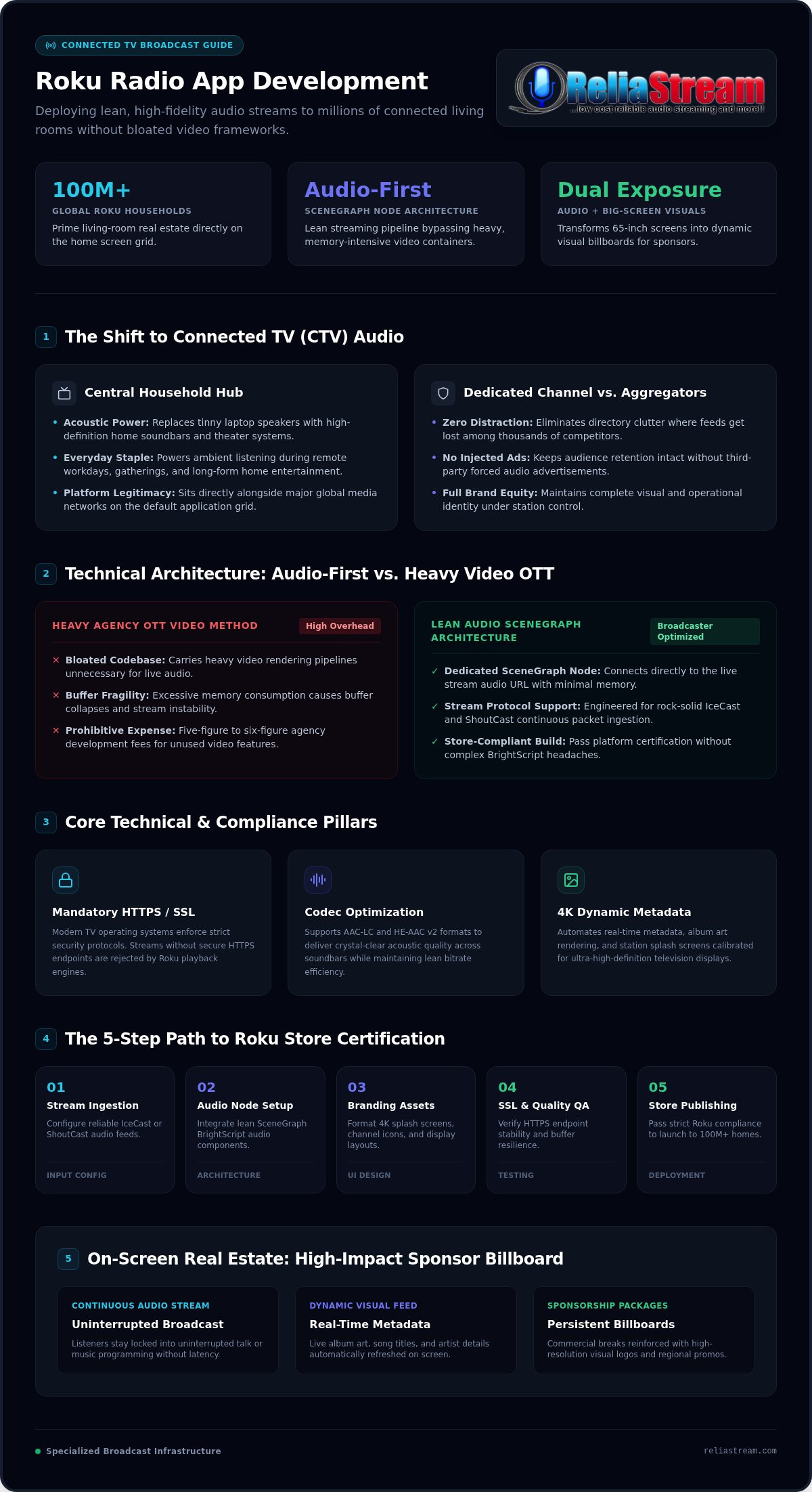
The 5-Step Process to Build, Test, and Publish Your Roku Radio Channel
Launching on connected TV doesn't have to be an agonizing six-month sprint. When you break down roku radio app development into a structured operational workflow, the path from audio link to living room playback is fast and direct. Here are the five foundational steps to launch your channel successfully:
- Secure Your Feed: Lock down an SSL-secured IceCast or ShoutCast stream running up to 320 Kbps for pristine fidelity.
- Prepare Visual Assets: Produce your channel posters, icons, and splash screens strictly to platform visual standards.
- Configure the Application: Implement your SceneGraph layout, tie in your stream URL, and configure background metadata handlers.
- Sideload and Field Test: Install the build onto local test devices to audit network stability and long-session continuity.
- Publish to the Store: Package the build, complete store listing requirements, and submit your channel for official Roku certification.
Ready to skip the technical setup entirely? Let ReliaStream build and publish your custom Roku channel so you can focus on broadcasting.
Asset Specifications and Graphic Asset Preparation
Roku enforces rigid asset guidelines during ingestion. Missing pixel dimensions by a single point will immediately throw an automated packaging error.
Your channel poster requires two distinct export resolutions: 540x405 pixels for standard HD displays and 800x600 pixels for Full HD (FHD) screens. Both must use flat, high-contrast graphics that pop against both light and dark home screen themes. Splash screens (the loading display listeners see while the channel initializes) need clean exports at 1920x1080 resolution. Always test typography legibility from a ten-foot viewing distance. Intricate scripts and tiny disclaimers turn into unreadable blurs on television screens.
Sideloading, Quality Assurance, and Store Approval
Never submit an unverified build. Sideloading lets you install your channel directly onto physical retail hardware using Roku's local web installer interface.
To enable developer settings, grab your physical Roku remote and enter the universal sequence: press Home three times, Up twice, then Right, Left, Right, Left, Right. Note the local IP address, set a developer password, and access the application installer via your desktop browser. During testing, simulate Wi-Fi drops to verify that your audio buffer recovers gracefully. Before submitting to the Roku Streaming Store, confirm you have an active Roku Developer account ($99 one-time enrollment fee), a dedicated public privacy policy URL, and valid deep-linking attributes to ensure your channel clears certification without friction.
Launch Your Custom Roku Channel with ReliaStream's Broadcast Platform
Navigating the technical maze of television app distribution shouldn't derail your station's creative momentum. That is why ReliaStream builds turn-key Roku Radio Apps engineered purely for sound. Instead of wrestling with code repositories and manifest settings, you get an optimized, broadcaster-grade channel submitted straight to the store under standard Roku review procedures.
Your streaming infrastructure and TV interface should work as one unified engine. ReliaStream channels tie directly into robust IceCast and ShoutCast architectures, connecting seamlessly whether you prefer centova cast vs mediacp control panels. With support for clean, high-fidelity streams up to 320 Kbps, your broadcast delivers pristine audio that fills living rooms through high-end home sound systems. Best of all, your living room footprint doesn't stop at one device. You can easily expand your station's reach across the entire connected screen universe with companion applications for Google TV, Amazon Fire TV, and Alexa skills.
Engineered for Broadcasters, Not Video Giants
Generic app developers treat television screens like video servers. We treat them like high-fidelity radio tuners. ReliaStream designs lean, audio-first SceneGraph applications that bypass bloated video processing layers entirely.
This streamlined architecture guarantees instantaneous stream connection without sluggish initial buffering. As your music plays, the app actively parses stream headers to display real-time song titles, artist names, and dynamic album artwork. Built-in OLED protection gently transitions on-screen visuals, giving your station a polished visual identity while running reliably 24/7 without risking hardware damage.
Get On the Big Screen with ReliaStream
Turnkey means exactly that. You provide your audio stream URL and station branding assets. ReliaStream handles the coding, asset compilation, and platform packaging. Streamline your roku radio app development without blowing your operational budget on unpredictable agency retainers.
Serving independent and commercial broadcasters globally since 2008, our team understands the unique technical demands of continuous live audio. We guide your channel through testing and submission, taking the pain out of platform compliance so you can focus on building great radio.
Claim Your Spot on the Big Screen Today
Connected TV has rewritten the rules of household listening. Meeting your audience on television provides massive brand legitimacy and unlocks lucrative visual sponsorship opportunities. But tackling roku radio app development doesn't require learning BrightScript from scratch or draining your budget on video-first agencies. With an audio-focused architecture, your station can stream continuous, high-fidelity sound directly to millions of living rooms.
Powering independent and commercial broadcasters globally since 2008, ReliaStream takes care of the technical heavy lifting. From robust ShoutCast and IceCast hosting supporting up to 320 Kbps audio to full-service custom app builds across Roku, Google TV, Amazon Fire TV, and Alexa skills, we handle the entire pipeline from code compilation to store submission. Stop letting technical barriers keep your station confined to desktop browsers. Launch your custom Roku Radio App with ReliaStream today and broadcast your sound straight to the center of the home.
Frequently Asked Questions
Can listeners play my internet radio station on Roku for free?
Yes. You can publish your station as a free channel in the Roku Streaming Store. Listeners can search for your station name, install the app in seconds, and tune into your live broadcast without paying subscription fees or signing up. Offering a free channel maximizes audience discovery and lets your broadcast integrate effortlessly into household entertainment routines.
Do I need a secure SSL stream link to publish an app on Roku?
Yes, secure streaming is mandatory. Modern Roku operating systems strictly block unencrypted HTTP media links to protect user privacy and prevent mixed-content network errors. Your ShoutCast or IceCast stream must resolve over an HTTPS link secured with a valid SSL Radio Link certificate. Unsecured feeds will fail Roku's automated store certification checks immediately during submission.
How does my Roku radio app display track titles and album artwork?
The app parses ICY metadata embedded directly inside your live stream chunks. Once the worker thread extracts the current artist name and song title, it triggers automated API calls to public music libraries to retrieve matched album art. In professional roku radio app development, this logic refreshes your television visual interface automatically with every song transition without interrupting live audio playback.
Can I monetize my station through my custom Roku channel?
Yes, and television opens high-value monetization options that audio-only players lack. Your channel interface provides visible screen space to present persistent sponsor logos, rotating visual ads, and station promos alongside continuous live sound. Because smart TV screens command collective living room attention, independent broadcasters can bundle visual branding with audio spots to command premium local sponsorship rates.
Do I have to write code myself to launch a radio app on Roku?
No, you don't need any programming background to get on the big screen. While custom in-house builds require BrightScript and SceneGraph expertise, turnkey services handle code architecture, testing, and platform certification for you. You only need to supply your audio link and station graphics. Specialized roku radio app development eliminates coding stress so you can focus purely on broadcasting.
What audio streaming formats and servers are compatible with Roku?
Roku natively supports high-efficiency AAC, HE-AAC v2, and standard MP3 audio streams. These audio feeds connect reliably from either IceCast or ShoutCast servers managed through control platforms like Centova Cast or MediaCP. Streams can run at various quality tiers up to high-fidelity 320 Kbps, provided your host maintains low latency and rock-solid uptime.
Can I expand my station to Amazon Fire TV and Google TV using the same stream?
Yes, your core streaming URL works across multiple television and voice ecosystems. The exact same IceCast or ShoutCast feed powering your Roku app can connect to companion apps for Google TV, Amazon Fire TV, and Alexa skills. Expanding across connected platforms lets you build a unified household broadcast footprint without managing separate audio pipelines for each environment.


![Centova Cast Login: Pro Broadcaster's Guide [2026]](https://getautoseo.com/storage/hero_images/centova-cast-login-pro-broadcasters-guide-2026.jpg?v=bbcae8778692)