

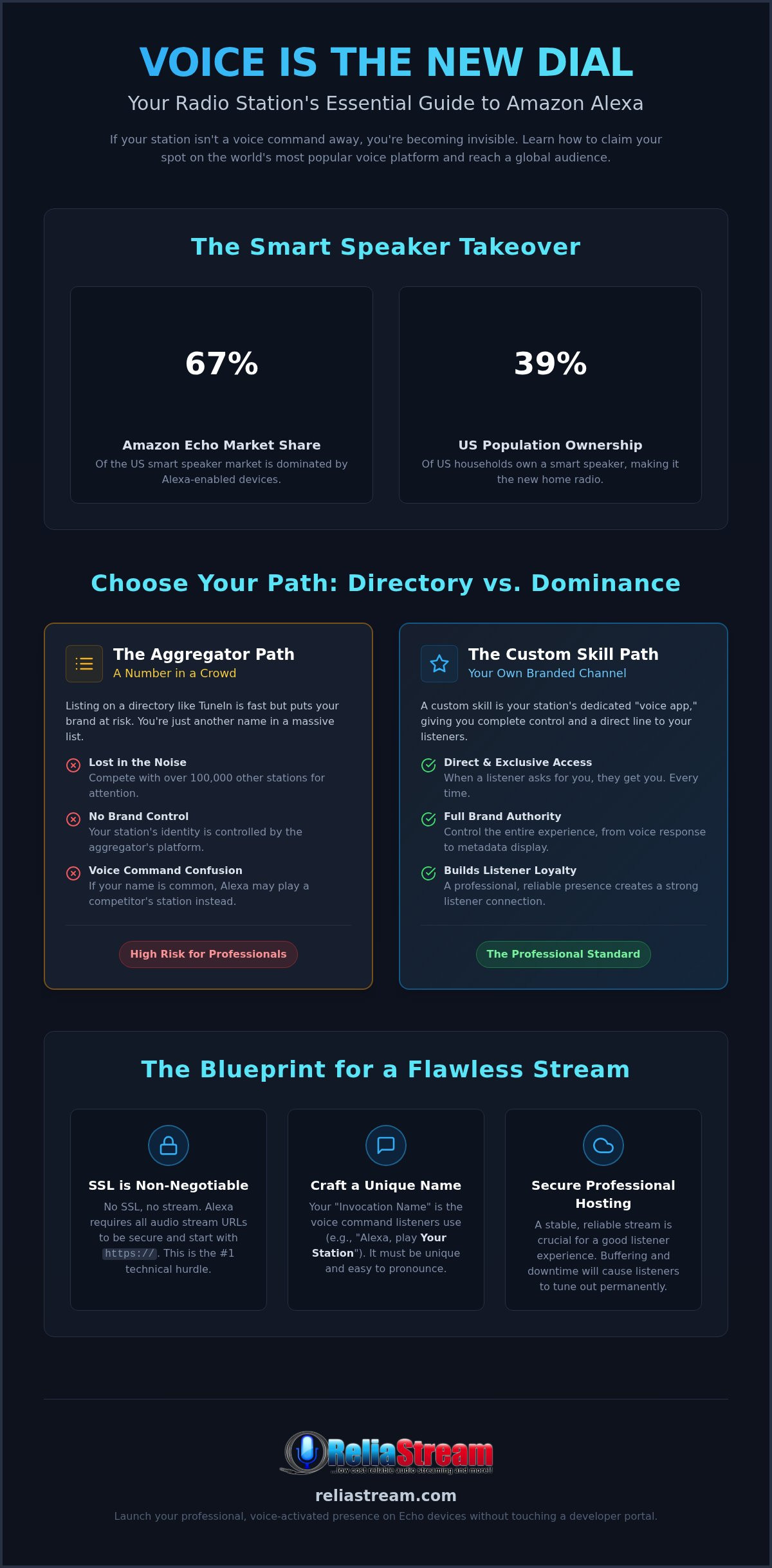
Voice isn't just a feature anymore. It's the new dial. If your station isn't one voice command away from your listeners, you're practically invisible in 2026. With Amazon Echo dominating 67% of the US smart speaker market, mastering how to stream radio on alexa is no longer optional for serious broadcasters. It's the difference between global growth and total stagnation. You need to be where the ears are, and right now, they're asking Alexa for their favorite tunes.
You've likely felt the frustration yourself. You try to get listed, but Alexa simply can't find your station. Or worse, your stream fails because of those non-negotiable SSL requirements that nobody bothered to explain. It's a complex mess of developer portals and aggregator confusion that leaves even veteran station owners scratching their heads. You want a professional, stable presence, not a broken link and a "station not found" error.
This guide cuts through the noise. You'll learn exactly how to get your radio station on Alexa devices, from picking the right hosting to launching a custom branded skill that actually works. We're breaking down the technical SSL rules, comparing TuneIn to custom apps, and showing you how to claim your spot on the world's most popular voice platform with total confidence.
Key Takeaways
- Voice is the new dial. Learn why a custom "Skill" is the essential voice app your station needs to survive and thrive in 2026.
- Directories vs. Dominance. Understand the massive difference between being buried in an aggregator and owning your brand with a custom Alexa Skill.
- No SSL, no stream. Master the non-negotiable technical requirements, including mandatory HTTPS links and bitrate balancing, to keep your audio stable.
- Stop the guesswork. Follow our proven roadmap on how to stream radio on alexa, from picking a catchy invocation name to securing professional hosting.
- Skip the code. Discover how to launch a professional, voice-activated presence on Echo devices without ever touching a developer portal.
Why Alexa is the Essential Modern Radio Dial
The FM dial is a ghost town. Look around any modern living room or kitchen. You won't find a bulky tuner with a telescopic antenna anymore. You will find a sleek, voice-activated cylinder. For millions of listeners, the radio "dial" is now their own voice. If you aren't prioritizing how to stream radio on alexa, you're essentially broadcasting into a void. It is time to stop treating smart speakers as a luxury. They are the primary gateway to your audience.
Think of an Alexa Skill as your station's personal "voice app." It lives within the Amazon Alexa ecosystem, giving you a direct line to every Echo device on the planet. Just having a website link isn't enough anymore. People don't want to open a browser, type a URL, and click play. They want to speak. They want instant gratification. If you have a stream, you can have a voice. It is that simple. This is about meeting your listeners exactly where they are, without making them work for it.
The Death of the Traditional Radio Dial
Smart speakers have officially taken over the home. According to 2026 data, 39% of the US population now owns a smart speaker. That is a massive chunk of your potential audience sitting right there, waiting to hear you. Independent broadcasters who cling to old-school distribution face total stagnation. Why? Because listeners crave convenience. A simple command like "Alexa, play [Your Station]" replaces minutes of searching. It is fast. It is frictionless. It is how you win in the modern era. If you're not there, your competitors definitely are.
The Reach of the Echo Ecosystem
The Echo ecosystem doesn't care about your transmitter's range. It doesn't care about signal interference or mountain ranges. When you master how to stream radio on alexa, your local broadcast instantly becomes a global powerhouse. Amazon Echo holds a dominant 67% of the US smart speaker market, and that footprint is only growing. This platform acts as the ultimate equalizer for broadcasters of all sizes.
- Global distribution: Reach listeners from London to Los Angeles with zero extra effort.
- Zero friction: No apps to download, no accounts to create, and no clunky menus. Just talk.
- Niche discovery: Voice search makes it easier for listeners to find specific genres or local flavors they can't find on the FM band.
This is a bold new world for independent creators. You don't need a million-dollar tower to reach a million people. You just need a stable stream and a professional presence on the world's most popular voice platform. The barrier to entry is lower than ever, but the cost of waiting is higher than ever. It is time to claim your space.
Aggregators vs. Custom Alexa Skills: Choose Your Path
Do you want to be a line item or a leader? When you're deciding how to stream radio on alexa, you're choosing the ceiling for your station's growth. You can hide inside a massive directory or you can stand alone with a custom brand. Most broadcasters start with aggregators because they're easy. But easy doesn't build an empire. If you want to dominate the home audio market, you need a dedicated presence that you control.
Aggregators like TuneIn or myTuner are essentially the digital Yellow Pages of radio. They're fast to join. They have an existing audience. But you're competing with over 100,000 other stations for a single voice command. If your station name is even slightly common, Alexa might send your listeners to a competitor. It's a branding gamble you don't need to take. For a hobbyist, being a number in a list is fine. For a pro, it's a bottleneck.
The Pros and Cons of Aggregators
Aggregators offer a "set it and forget it" approach that appeals to many. You get listed, and you're technically on the platform. But the downsides are heavy. You have zero control over your branding. You can't customize the user experience. Most importantly, voice recognition issues are rampant. If Alexa can't distinguish your "Rock Radio" from ten others, your listener is gone. You're at the mercy of someone else's directory. It's a crowded space, and standing out is nearly impossible.
Why Pro Broadcasters Choose Custom Skills
Professional broadcasters choose custom skills because they want brand authority. A custom skill means when a listener says "Alexa, play [Your Station Name]," it opens your specific app. No middlemen. No confusion. This creates instant listener loyalty. You get better metadata display, showing exactly what's playing with your own logo front and center. Smart Speakers Grow in Importance every single year, and the industry agrees that this platform is the new battleground for ears. In fact, 18% of total radio listening in the UK now occurs through a voice-assisted device. You need to win that battle with a dedicated presence.
At ReliaStream, we believe you shouldn't just be a number. You need to own your space. A custom Alexa Streaming App ensures your station is a first-class citizen in the Amazon ecosystem. This isn't just about playing music; it's about engagement. Custom skills allow for unique voice triggers and better call-to-actions that aggregators simply can't match. You get a professional, voice-activated brand that stays stable and high-quality. Stop being a line item and start being the destination.
Technical Requirements: The "Secret" SSL Rule
Why do so many stations fail the Alexa test? It's usually one single, invisible hurdle. Amazon has a non-negotiable, stone-clad rule for audio: your stream must be secured with a valid SSL certificate. If you're trying to figure out how to stream radio on alexa using a standard HTTP link, you're going to hit a wall. Alexa will simply say the station is unavailable. No warnings. No error codes. Just silence. It's the number one reason broadcasters stay stuck in the past.
This isn't just about security. It's about platform standards. Amazon requires all audio streams to be hosted at an internet-accessible HTTPS endpoint on port 443. Self-signed certificates are strictly forbidden. You need a trusted, valid certificate from a recognized authority. This is the technical "secret" that trips up independent broadcasters every single day. Without it, your voice command is a dead end. You need a professional backbone to clear this hurdle.
Understanding SSL for Radio
The technical difference is simple but massive. A standard link sends data in the clear. A secure link encrypts it. Alexa's cloud-based processing demands this layer of protection. If your current stream link starts with "http://" instead of "https://", you aren't Alexa-ready. Period. We've seen countless station owners lose listeners because they didn't realize ssl radio streaming is the only way to play in this league. It's the price of admission for the modern smart home. You can't skip this step.
Optimizing Bitrates for Voice
Stability is king on smart speakers. While you might want the highest quality possible, you have to balance fidelity with connectivity. For most broadcasters, 128 Kbps is the absolute "sweet spot." It provides crisp, clear audio without causing the buffering issues that frustrate listeners on slower home Wi-Fi networks. If you're running a high-end jazz or classical station, you can push up to a 320 Kbps Hosting Plan, but only if your server can handle the load with rock-solid reliability. Alexa supports anything from 16kbps up to 384kbps, so you have plenty of room to grow.
Whether you prefer ShoutCast or IceCast doesn't matter to Alexa, as long as the delivery is secure. Both protocols work perfectly fine when paired with a professional shoutcast vs icecast setup that includes a dedicated SSL Radio Link. Industry experts frequently discuss the complexities of smart speaker skills for broadcasters, and the consensus is clear. You need a hosting partner that understands these technical gatekeepers so you can focus on the content. Don't let a missing certificate kill your reach. Get it right the first time.
Step-by-Step: Getting Your Station Live on Alexa
Ready to move from theory to reality? Launching your station isn't just about uploading a file. It's a strategic process. If you want to master how to stream radio on alexa, you need a roadmap that avoids the technical landmines. Most broadcasters stumble because they miss a single step in the Amazon ecosystem. Don't be one of them. Follow this proven sequence to get your voice heard.
- Step 1: Secure a professional hosting plan. As we covered, an SSL Radio Link is your foundation. Without a secure HTTPS stream, Amazon will reject your skill before you even start.
- Step 2: Choose your "Invocation Name." This is the magic phrase. It's what listeners say to trigger your station. It needs to be unique, easy to pronounce, and free of trademark conflicts. Think "Alexa, play [Your Station Name]."
- Step 3: Develop the skill. You have two paths. You can brave the code yourself or choose a pro-built Alexa Streaming App that handles the heavy lifting for you.
- Step 4: Testing and Certification. Amazon's team will manually review your skill. They check for stream stability, metadata accuracy, and policy compliance.
- Step 5: Launch and Promote. Once live, don't keep it a secret. Update your imaging, social media, and website to tell your audience exactly how to find you by voice.
The Amazon Developer Portal
The developer portal is where the magic happens. It's also where most people lose their minds. You'll need to set up a free account and navigate to the Alexa Skills Kit. The most critical part? Enabling the "Audio Player" interface. This tells Alexa that your skill is designed for long-form streaming, not just short voice responses. A common pitfall is failing to provide a high-resolution logo or a clear description. Amazon is picky. If your metadata is messy, your certification will fail. Keep it clean. Keep it professional.
Testing Your New Skill
Never assume it works just because the code is saved. Start with the Alexa Simulator in the developer console. It's a great first look, but it's not the final word. You must test on a physical Echo device before going live. Why? Because the simulator doesn't always catch stream buffering issues or voice recognition quirks. Check your metadata display on an Echo Show. Does the artist and title info look right? Is the station logo crisp? If the audio drops or the text is garbled, fix it now. Testing is your last line of defense against a bad first impression.
This process might feel daunting, but it's the gatekeeper to millions of homes. If you want a stable, high-quality presence without the headache of manual coding, we've got you covered. Get your station on the world's biggest voice platform today.
Launch Your Custom Alexa Skill with ReliaStream
Stop overthinking the technical side. You’re a broadcaster, not a software developer. We’ve shown you the roadmap, the SSL rules, and the massive power of voice. Now, it’s time to execute. When you’re looking for how to stream radio on alexa without the technical headache, you need a partner that’s been in the trenches since the beginning. We build it. You broadcast. It is that simple. No code. No stress. Just results.
ReliaStream isn't just another hosting provider. We are your technical backbone. Our Alexa Streaming App service is the gold standard for independent radio because it removes every single barrier to entry. We handle the entire Amazon certification process from start to finish. You don't have to fight with the developer portal or worry about your skill being rejected for a minor metadata error. We ensure your station is live, stable, and ready for your listeners to find with a single command.
Don’t let your station get left in the analog past. The move to cloud-only voice processing and generative AI features like Alexa+ means the platform is getting smarter every day. You need a presence that can keep up. By pairing our custom skills with our budget internet radio hosting, you get professional-grade stability and global reach. We even offer entry-level plans starting at just $1.99, making it accessible for broadcasters at any stage of their journey.
The ReliaStream Advantage
Experience counts in this game. We are authoritative veterans in the streaming space, and we’ve been perfecting our craft since 2008. We provide a no-nonsense approach that prioritizes your results over corporate bloat. You get gritty, "can-do" enthusiasm backed by professional reliability. We don't just wait for things to break. We provide proactive support, warning you about technical trends and Amazon policy shifts before they impact your broadcast. It’s a partnership designed for long-term growth.
Next Steps for Your Station
The modern listener is everywhere. Why settle for one platform when you can achieve total dominance? Once your Alexa Skill is live, consider expanding your reach even further. Combine your voice presence with our Amazon Fire TV App or Roku Radio App services to put your station on the biggest screens in the house. It’s time to claim your territory on the digital dial. Request a quote for your custom skill development today and stop being invisible. Get your station on Alexa now with ReliaStream!
Take Command of the Smart Home
The future of radio is voice-activated. You've seen why a standard web link isn't enough and how the "secret" SSL rule can make or break your broadcast. Mastering how to stream radio on alexa is about more than just playing music. It's about securing your brand's place in the millions of homes that rely on Echo devices every single day. Don't let technical confusion or clunky aggregators keep your station in the dark.
You need a partner with the grit and experience to get you live without the drama. We've been the industry's reliable backbone since 2008. Every one of our hosting plans includes the mandatory SSL-secured links you need to stay Alexa-compliant from day one. Beyond smart speakers, we specialize in custom app development for Roku and Fire TV to ensure your station dominates every screen and speaker in the house. Launch Your Branded Alexa Skill with ReliaStream Today!
The digital dial is waiting for your voice. Claim your territory, connect with your listeners, and start broadcasting like a pro. Your station belongs in the smart home. Let's make it happen.
Frequently Asked Questions
Do I need to be a programmer to get my radio station on Alexa?
You don't need to write a single line of code to get your station live. While the DIY path involves complex developer portals, professional services handle the heavy lifting for you. You can focus on your content while experts manage the technical submission and certification process. It's the fastest way to get professional results without a computer science degree. You get a polished app without the stress.
Why does Alexa say my radio station is not available?
This is almost always caused by an insecure stream link or a confusing invocation name. If your stream isn't using a valid SSL certificate, Alexa will block the audio for security reasons. Additionally, if your station name is too similar to others, the voice recognition might struggle to find the right match. Checking your technical requirements is the first step in learning how to stream radio on alexa successfully.
Is there a monthly fee for having a custom Alexa radio skill?
Yes, there are typically ongoing costs associated with hosting the skill and the stream itself. While the development might be a one-time fee, the audio must be hosted on a server that can handle the traffic. These costs vary based on your bitrate needs and the number of listeners you expect to reach on the platform. Maintaining a stable, high-quality stream requires professional infrastructure that stays online 24/7.
Can I stream my radio station on Alexa for free using TuneIn?
You can list your station on TuneIn for free, but you'll be buried in a directory with thousands of other broadcasters. Using an aggregator means you lose control over your branding and metadata. Listeners have to ask Alexa to "play [Station] on TuneIn," which adds friction. If you want to know how to stream radio on alexa with total brand authority, a custom skill is the only way to own your voice command directly.
Does my radio station need an SSL certificate for Alexa?
Yes, a trusted SSL certificate is a non-negotiable requirement for all Amazon Alexa audio streams. Self-signed certificates will not work. Your stream must be hosted on an internet-accessible HTTPS endpoint on port 443. This ensures a secure connection between the Amazon cloud and your broadcasting server, which is a mandatory standard for the platform. Without it, your station simply will not play on Echo devices.
How long does it take for Amazon to approve my radio skill?
In 2026, the certification process typically takes between one and seven business days once you submit your skill to the Amazon Developer Portal. During this time, Amazon’s team tests your skill for stability, policy compliance, and voice recognition accuracy. If they find any issues with your metadata or stream link, you’ll need to fix them and resubmit for another round of review. Professional submission helps you clear this hurdle faster.
What bitrates does Alexa support for radio streaming?
Alexa supports a wide range of bitrates from 16kbps all the way up to 384kbps. For most broadcasters, 128kbps is the ideal balance of quality and stability. If you want to cater to high-end listeners, you can use a 320 Kbps Hosting Plan, provided your listener's internet connection can handle the data load without buffering. Always test your bitrate on a physical device to ensure there is no stuttering during peak hours.
Can I use Alexa to play my station in different rooms at the same time?
Yes, listeners can play your station across multiple Echo devices using Multi-Room Music groups. Once your station is streaming, a user can simply say, "Alexa, play [Station] on the Everywhere group." This allows your broadcast to fill an entire home simultaneously, provided the listener has configured their devices within the Alexa app. It is a powerful way to increase your station's presence in your listener's daily environment.


