

If your stream sounds like a tinny 1990s phone call, you aren't just losing listeners; you're killing your brand. Audiences in 2026 have zero patience for muddy audio or "good enough" bitrates. They want the punchy, crystal-clear depth of a premium streaming service. That is where 320 kbps radio hosting comes into play. It is the definitive line between a hobbyist project and a professional powerhouse. You know the frustration of hearing complaints about flat sound or dealing with "pro" hosts that buckle under the bandwidth. It is exhausting. It is unnecessary.
We agree that your content deserves to sound as good as a master recording. This guide shows you why 320 Kbps is the undisputed gold standard for broadcasters who refuse to compromise. We are going to break down how to deploy a high-fidelity stream that dominates the airwaves without the constant fear of buffering. From mastering Centova Cast to leveraging MediaCP for rock-solid uptime, you are about to discover how to build a station that matches Spotify quality. Let's get your station sounding legendary.
Key Takeaways
- Learn why 320 Kbps is the mandatory standard for broadcasters who want to compete with the likes of Spotify and Tidal.
- Pick the right engine for your station. We compare ShoutCast and IceCast to see which one handles high-fidelity streaming without breaking a sweat.
- Reach the living room audience. Discover how 320 kbps radio hosting transforms the listening experience on high-end soundbars via Roku, Fire TV, and Alexa.
- Master the technical backbone. From SSL security to managing high-bitrate Auto DJ libraries, get the blueprint for a stable, professional broadcast.
- Future-proof your station. Find out how to maintain 99.9% uptime while delivering the highest resolution audio available on the market.
What is 320 Kbps Radio Hosting and Why Does It Matter?
Why settle for mediocre sound when your audience is listening on high-end gear? If you are running a station, you aren't just playing music; you are building a brand. In the world of digital audio, the Bit rate determines exactly how much data is processed per second. More data equals more detail. It is that simple. 320 Kbps is the industry standard for "CD quality" or "Hi-Fi" digital audio. It is the pinnacle of what MP3 and AAC streams can offer. If you want to sound like a major FM station or a premium Spotify playlist, this is your baseline. Anything less tells your listeners you are just an amateur hobbyist. Professionalism starts with the quality of your signal.
The Audible Difference: 128 Kbps vs. 320 Kbps
Lower bitrates like 128 Kbps are the "budget" choice. They get the job done, but they crush the life out of your audio. You've heard it before. The cymbals sound like they are crashing through a tin can. The vocals lose their warmth and presence. This happens because low-bitrate compression throws away data to save space. 320 Kbps preserves the full frequency response, keeping the crisp highs and the thumping lows exactly where they belong. It eliminates those nasty compression artifacts that distract from the music. 320 Kbps is the maximum standard bitrate for MP3 streaming. When you make the jump, you aren't just increasing a number; you are unlocking the full emotional impact of every track in your library.
Who Needs 320 Kbps Hosting?
Not every station needs this level of power, but for some, it is absolutely non-negotiable. If you are running a music-heavy station focused on Jazz, Classical, or EDM, fidelity is your product. Audiophiles don't forgive muddy audio. They will tune out in seconds. 320 kbps radio hosting is also essential for premium subscription services. If you are asking people to pay for content, you better deliver a premium experience. This is also the secret weapon for broadcasters targeting home theater systems. With the rise of Roku and Alexa, people are listening on high-end soundbars and surround sound setups. They can hear every bit of data you leave on the table. Don't let your station be the one that sounds "flat" on a five-hundred-dollar speaker system. It is time to step up and dominate the airwaves with a signal that commands respect.
ShoutCast vs. IceCast: Choosing Your Engine for High-Bitrate Audio
You have the high-fidelity files. You have the vision. Now you need the engine to deliver it. When you are pushing a 320 Kbps signal, your choice of server software is critical. This isn't just about playing music; it is about managing massive data throughput without skipping a beat. ShoutCast and IceCast are the industry heavyweights, but they handle the load differently. If you want the full technical breakdown, check out our deep dive on ShoutCast vs IceCast. For now, let's look at how they stack up for high-bitrate performance.
ShoutCast for 320 Kbps: Reach and Reliability
ShoutCast is the veteran in the space. For high-bitrate stability, ShoutCast v2 is mandatory. It is specifically engineered to handle the sustained data flow required for high-resolution audio. Why go this route? Visibility. The ShoutCast directory is a massive discovery tool. When you tag your station as "HQ" or "High Quality," you tap into an audience specifically hunting for premium sound. It manages server resources with extreme efficiency, ensuring your stream stays rock solid even as your listener count starts to climb. It is the classic, reliable choice for broadcasters who want to be found.
IceCast for 320 Kbps: Flexibility and Mount Points
IceCast is the technical powerhouse. Its secret weapon is the use of mount points. This allows you to run your 320 kbps radio hosting master stream alongside a lower-bitrate mobile option from a single source. It is the ultimate way to reach every listener without forcing them to eat up their data plan if they aren't on Wi-Fi. IceCast also excels with modern codecs like Ogg and Opus, which can deliver even more detail than standard MP3s at high bitrates. Because it is open-source, there are no licensing headaches. It is built for the independent pro who wants total control over their technical setup.
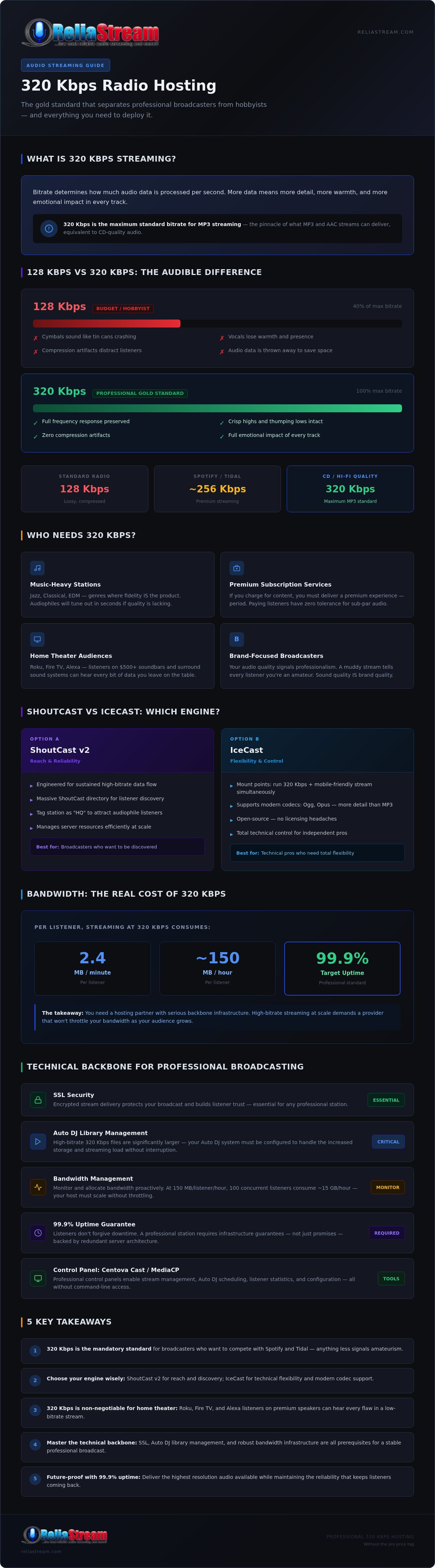
Streaming at 320 Kbps demands serious bandwidth. Each listener consumes about 2.4 MB of data every minute. That is nearly 150 MB an hour per person. You need a partner that has the backbone to support that growth without throttling your speed. If you are tired of buffering issues killing your vibe, it might be time to look at a professional 320 Kbps hosting solution that can actually keep up with your ambition. Don't let a weak server be the bottleneck for your high-fidelity dreams.
Why 320 Kbps is Essential for Roku, Fire TV, and Alexa Listeners
The radio isn't just sitting on a kitchen counter anymore. It is on the 65-inch screen in the living room. Listeners have migrated from laptops to home theater systems, and their expectations have skyrocketed. When your station is playing through a high-end soundbar or a 5.1 surround setup, every single compression flaw is magnified. This is why 320 kbps radio hosting has become the mandatory standard for serious broadcasters. Understanding audio bitrate is the first step to realizing that your mobile-friendly stream is actually killing your living room reach. If it sounds thin on a TV, people will tune out. It is that simple.
The Soundbar Test: Why Low Bitrate Fails on TV
Modern TV speakers and soundbars are engineered for cinematic depth. They are built to push air and deliver crisp detail. If you feed them a crushed 128 Kbps stream, the cymbals will hiss and the bass will feel hollow. This creates "listener fatigue." Your audience might not be able to name the technical issue, but they will feel a subconscious urge to change the station because it sounds "off." 320 Kbps provides the necessary headroom for your audio to breathe. It gives your station the professional weight it needs to compete with big-budget apps. When your branding looks massive on a big screen, your audio needs to match that scale.
Alexa Skills and High-Fidelity Audio
Smart speakers are the new household standard. When a listener asks Alexa to play your station, they want an experience that sounds "built-in," not like a struggling web stream. Alexa handles high-bitrate feeds perfectly, provided your hosting provider has the infrastructure to support it. This is where you get the professional edge. You can actually use your high-fidelity stream as a selling point in your Alexa skill description. It tells the audiophile community that you care about the art of sound.
ReliaStream’s custom Alexa skills are built to handle your 320 Kbps feed flawlessly, ensuring a rapid handoff from voice command to crystal-clear music. Don’t just host your station; dominate the living room with radio streaming app development that puts your brand on every Roku, Fire TV, and smart speaker in the house. You've worked hard on your content. Don't let a low bitrate be the bottleneck that keeps you out of the most important room in the home.
Technical Backbone: Auto DJ, SSL, and Bandwidth Management
Running a high-fidelity station isn't just about the sound; it is about the math. When you move to 320 kbps radio hosting, your bandwidth consumption skyrockets. You are pushing roughly 144MB of data per hour for every single listener. Do the math. If you have 100 people tuned in, that is 14.4GB of data flowing through your server every hour. You need a backbone that won't snap under that pressure. Choosing between Centova Cast and MediaCP is your first big decision. Centova Cast is the battle-tested veteran, known for its rock-solid stability and deep configuration options. MediaCP is the modern contender, offering a sleek interface and excellent support for video and modern codecs. Both handle high-bitrate libraries well, but your choice depends on whether you value classic reliability or modern flair.
Managing Your 320 Kbps Auto DJ Library
High-bitrate files are massive. A single 320 Kbps MP3 can easily be double the size of a standard 128 Kbps file. This means your Auto DJ storage needs to be robust. We recommend using NVMe SSD storage to ensure lightning-fast file access and gapless playback. Don't make the mistake of uploading low-quality files and letting the server re-encode them. It doesn't work. It just creates "digital mud." Always upload your library at the native 320 Kbps to avoid re-encoding loss. Centova Cast offers powerful playlist management tools that keep your high-fidelity tracks organized and rotating perfectly, ensuring your station sounds like a professional operation 24/7.
The Importance of SSL for Premium Streams
Security is no longer optional. Modern browsers like Chrome and Safari are aggressive about blocking non-secure content. If your stream isn't encrypted, your listeners will see "Not Secure" warnings or, worse, the player simply won't load. You need a secure radio stream link to keep your audience connected. SSL is now a requirement for all professional radio directories. ReliaStream provides a "No-Nonsense" SSL setup that secures your link automatically. We take the technical headache out of encryption so you can focus on the music. Ready to upgrade your signal? Check out our professional 320 Kbps hosting plans and get your station secured today.
ReliaStream: Professional 320 Kbps Hosting Without the Pro Price Tag
Most providers scream about "unlimited" features but then slap a 128 Kbps ceiling on your creativity. It's a bait-and-switch. We don't do that here. ReliaStream has been the backbone for independent broadcasters since 2008. We are veterans who know that 320 kbps radio hosting isn't a luxury; it's a requirement for anyone serious about sound. Our plans are designed by people who actually sit behind a microphone. We understand that your signal is your reputation. That's why we back every high-fidelity stream with a 99.9% uptime guarantee. Your station stays on the air. Your audience stays engaged. It's that simple.
Not ready for the full 320 yet? No problem. You can start with a budget internet radio hosting plan and scale up as your listener base grows. We make the transition seamless. You won't deal with the lag or technical hurdles that plague low-cost, amateur hosts. We provide the tools like Centova Cast and MediaCP to keep you in total control while we handle the heavy lifting on the backend. You focus on the content; we handle the infrastructure.
High-Energy Support for High-Fidelity Radio
We aren't just a faceless server company. We are your radio partners. When you have a question about your bitrate or need a custom configuration for a specific broadcast, you talk to experts who actually know the industry. We don't read from a cold corporate script. We provide proactive monitoring to ensure your bandwidth is always ahead of your demand. If you have a unique vision for your 320 kbps radio hosting setup, just ask. We build custom solutions that fit your specific needs, not some generic template designed for the masses.
Get Started with 320 Kbps Today
Stop waiting for "someday" to fix your audio quality. Your high-fidelity station can be live in minutes with our instant setup process. If you are currently stuck with a provider that treats 128 Kbps like a premium feature, let us help you move. We handle the migration details so you don't lose a single track or listener in the process. It's time to stop compromising on your sound quality and start dominating the airwaves. Ready to sound like a pro? Grab your 320 Kbps ReliaStream plan now!
Take Command of Your Sound
High-fidelity audio is no longer a luxury. It is the absolute barrier to entry for broadcasters who want to be taken seriously on platforms like Roku, Alexa, and high-end home theater systems. You now have the complete blueprint for deploying a stream that rivals the biggest names in digital media. From mastering the bandwidth math to securing your signal with mandatory SSL, every technical step you take is an investment in your brand's longevity. 320 kbps radio hosting isn't just about technical specs; it is about providing the emotional impact your audience expects.
ReliaStream has been serving broadcasters since 2008. We are the Centova Cast and MediaCP experts you need to keep your signal rock solid. With our 99.9% Uptime Guarantee, you can stop worrying about technical glitches and focus entirely on your craft. It is time to leave the muddy, low-bitrate past behind and give your listeners the experience they deserve. Upgrade to Professional 320 Kbps Radio Hosting today and let's get your station sounding legendary. You have the vision. We have the power. Let's make it happen!
Frequently Asked Questions
Is 320 Kbps really necessary for an internet radio station?
Yes, if you want to compete with premium streaming services. While 128 Kbps is functional, 320 Kbps provides the depth and clarity listeners expect on high-end sound systems and soundbars. It is the gold standard for music-heavy stations like Jazz or EDM where fidelity matters. Using 320 kbps radio hosting ensures your brand sounds professional and polished on every device. Don't let poor audio quality be the reason a listener switches to a competitor.
Will a 320 Kbps stream cause buffering for listeners with slow internet?
It can if the listener's connection is extremely unstable, but modern broadband and 5G networks handle it easily. To mitigate this, many broadcasters use IceCast mount points to offer both a 320 Kbps master stream and a lower-bitrate mobile option. This setup gives your audiophile fans the high-fidelity experience they crave while ensuring mobile users on weak data plans can still listen without constant interruptions or high data costs.
How much bandwidth does a 320 Kbps radio stream use?
A 320 Kbps stream consumes approximately 144MB of data per hour for every single listener. This is a significant jump from 128 Kbps, which uses about 58MB per hour. You need to calculate your expected listener hours carefully to avoid overage charges. If you have a growing audience, ensure your hosting plan provides enough data transfer to handle the high throughput required for a consistent, high-fidelity broadcast 24/7 without throttling.
Can I stream at 320 Kbps using ShoutCast and IceCast?
Absolutely, both platforms support high-bitrate streaming perfectly. ShoutCast v2 is preferred for its stability and directory visibility, while IceCast is the go-to for technical flexibility and multiple mount points. ReliaStream offers 320 kbps radio hosting on both engines, allowing you to choose the platform that fits your workflow. Whether you prefer the classic ShoutCast feel or the open-source power of IceCast, you can deliver crystal-clear audio to your audience.
Do I need special equipment to broadcast at 320 Kbps?
No specialized hardware is required, but you do need high-quality source files and a stable internet upload speed. Your source audio should be encoded at 320 Kbps or higher to avoid quality loss during the upload. A standard PC with a modern broadcasting encoder like SAM Broadcaster or RadioDJ will work perfectly. The most important equipment is your hosting backbone, which must be capable of handling the high data throughput without dropping packets.
Does ReliaStream provide SSL links for 320 Kbps streams?
Yes, we provide SSL-secured links as a standard feature for all our hosting plans. Modern web browsers and directories like Google Chrome and Safari will block streams that aren't encrypted. Our "No-Nonsense" SSL setup ensures your high-fidelity stream is fully compatible with HTTPS websites and mobile apps. You don't have to worry about technical security hurdles; we handle the encryption so your listeners get a safe, seamless experience every time.
Can I switch from 128 Kbps to 320 Kbps later?
Switching is easy and can be done at any time as your station grows. Many broadcasters start with a budget-friendly 128 Kbps plan and upgrade to 320 Kbps once they build a dedicated audience or launch their own Roku and Alexa apps. ReliaStream allows for seamless plan migrations without losing your settings or files. It is a proactive way to manage your costs while keeping the door open for future expansion.
How much storage do I need for a 320 Kbps Auto DJ library?
You will need roughly double the storage space compared to a standard 128 Kbps library. A single hour of 320 Kbps audio takes up about 144MB. If you have a library of 1,000 songs, you should plan for at least 10GB to 15GB of disk space to be safe. We recommend using NVMe SSD storage for your Auto DJ to ensure fast file access and gapless playback, which is essential for maintaining a professional sound.


