

Your listeners aren't quitting because your show is boring. They're quitting because your stream just choked in a 5G dead zone. It's a brutal reality in 2026. You want that crisp, high-fidelity sound, but cranking the dial to 320 Kbps is a fast track to massive hosting bills and endless buffering for your mobile fans. Finding the best bitrate for internet radio isn't just a technical choice. It's a high-stakes business strategy. You need the exact sweet spot where crystal-clear audio meets rock-solid stability.
We get it. The jargon is a total mess. AAC, MP3, xHE-AAC; it's enough to make any broadcaster's head spin. But here is the truth: your bitrate defines your reach. This guide strips away the fluff to give you a clear, no-nonsense roadmap for your station. We'll master the cost-to-quality ratio and look at how new Android 17 updates are changing the game for mobile listeners. Whether you are running a talk shop at 32 Kbps or a symphonic powerhouse at 320 Kbps, you will walk away with a plan to keep your audience hooked. No more lag. No more wasted cash. Just pure, professional sound that scales with your growth.
Key Takeaways
- Match your audio to your specific genre. Learn why 32 to 64 Kbps is perfect for talk radio while 128 Kbps remains the industry standard for pop.
- Efficiency is king. Discover how modern AAC+ codecs deliver high-fidelity sound at a fraction of the bandwidth used by traditional MP3s.
- Master the bandwidth math. Use our simple formula to calculate your monthly data usage and keep your hosting costs predictable.
- Find the best bitrate for internet radio to strike the ultimate balance between crystal-clear audio and mobile listener stability.
- Scale with confidence. Explore how tiered hosting plans from 32 to 320 Kbps give you the flexibility to grow your station at your own pace.
What is Bitrate and Why Does It Make or Break Your Radio Station?
Think of bitrate as the pipe connecting your studio directly to the listener's ears. If the pipe is too narrow, your sound gets squeezed and distorted. If it's too wide, you're paying for massive amounts of space you simply don't need. Bitrate is the speed at which audio data travels from your server to the audience. In your search for the best bitrate for internet radio, you're looking for that perfect equilibrium. If the bitrate is too low, your station sounds like a robotic transmission from the dial-up era. If it's too high, you're burning through bandwidth costs while half your listeners stare at a "loading" screen. It's a balance of power.
The Science of Sound: Kbps vs. Audio Fidelity
Kilobits per second (Kbps) is how we measure this digital flow. When you select a bitrate, you're essentially deciding how much data stays and how much gets tossed in the trash. Audio compression works by stripping out frequencies the human ear usually doesn't perceive. Low bitrates strip away more; high bitrates keep the "depth" and "clarity" of your music or voice intact. Bitrate is the pulse of your digital broadcast. If that pulse is weak, your music loses its punch and sounds flat. In 2026, listeners are more discerning than ever. They have high-end mobile devices and noise-canceling earbuds. They expect professional-grade audio, and a poorly chosen bitrate will make your station feel amateur before the first track even finishes.
Why Your Listeners Hate Buffering More Than Low Quality
Here is the gritty reality: a listener might forgive a slightly "fuzzy" stream, but they will bail the second it stutters. High bitrates demand a rock-solid, high-speed connection. While 5G has improved things significantly, it still fails in elevators, basements, and moving cars. A 320 Kbps stream sounds incredible in a static studio, but it's a disaster for someone commuting through signal dead zones. Every time the audio cuts out, you lose an audience member. Stuttering creates immediate "listener fatigue" and triggers a "quit" response. Finding the best bitrate for internet radio is about prioritizing a stable, "always-on" experience. You want a stream that follows your listeners wherever they go, not one that demands they stand perfectly still. Stability is the foundation of loyalty.
The Great Debate: MP3 vs. AAC+ in the 2026 Streaming World
Choose your weapon. MP3 or AAC+? This is the core question for anyone hunting for the best bitrate for internet radio. MP3 is the undisputed king of compatibility. It works on everything. Your grandpa’s dusty desktop? Yes. Your neighbor's brand-new Tesla? Absolutely. But MP3 is an old dog. It requires a lot of data to sound professional. AAC+, or High-Efficiency AAC (HE-AAC), is the modern standard. It is leaner, meaner, and built for a world where mobile data isn't always infinite. In 2026, the choice between these two defines your operational cost and your listener's experience.
When to Stick with MP3
Universal compatibility is the only reason to stay loyal to MP3. If your target audience relies on legacy hardware or older internet radio receivers, MP3 is your safe harbor. But safety has a technical price. MP3 hits a "quality ceiling" quickly. It typically needs at least 128 Kbps to avoid sounding like a metallic, robotic mess. If you want that professional "on-air" feel, you can't go lower. This makes it a bandwidth hog. You will burn through your hosting limits faster because you are pushing twice the data just to maintain basic audio fidelity. It is a reliable choice, but it is rarely the most efficient one.
The Power of AAC+ for Mobile Audiences
This is where the game changes. AAC+ is the secret weapon for broadcasters using 32 Kbps or 64 Kbps hosting plans. It is designed to deliver "CD quality" sound at a fraction of the bandwidth. In fact, a 64 Kbps AAC+ stream often sounds nearly indistinguishable from a 128 Kbps MP3 broadcast. This efficiency is vital for mobile listeners. In 2026, even with 5G everywhere, signal fluctuations still happen. AAC+ keeps your stream alive when a listener's signal drops. It also respects their data caps. High-bitrate MP3s can chew through a mobile data plan in hours. AAC+ lets your fans listen all day without the bill shock. If you're looking to balance quality and cost, exploring a 64 Kbps Hosting Plan using AAC+ is a smart move for any growing station.
Compatibility is catching up fast. Most modern browsers, smart speakers, and mobile apps now handle AAC+ natively. As of 2026, Android 17 even ships with xHE-AAC support by default. This makes AAC+ mandatory for anyone building a high-end mobile app or Alexa skill. You get better sound, lower costs, and happier listeners. It is the backbone of modern, scalable broadcasting.
Choosing the Right Bitrate for Your Genre: Talk, Top 40, or High-Fidelity?
One size never fits all in broadcasting. What are you actually putting out into the world? A sports talk show has completely different technical requirements than a 50-piece orchestra. Finding the best bitrate for internet radio means matching your technical settings to your specific content. If you're running a Top 40 or Pop station, 128 Kbps is the industry standard for a reason. It provides enough data to keep those synth-heavy tracks sounding punchy without ballooning your hosting costs. But for genres like Classical or Jazz, where dynamic range is everything, settling for anything less than 192 Kbps is a mistake. You need that extra headroom to capture the subtle breath of a saxophonist or the resonance of a cello.
Interestingly, some underground and lo-fi stations are moving in the opposite direction. They intentionally use lower bitrates to achieve a gritty, "aesthetic" sound that mimics old-school shortwave radio. It’s a bold move, but it only works if the "crunch" is part of your brand. For everyone else, clarity is the goal.
Voice vs. Music: Different Needs, Different Bitrates
Human speech is much simpler for a computer to process than a wall of sound from a rock band. This is why Talk Radio and Podcasts thrive in the 32 Kbps to 64 Kbps range. You don't need massive bandwidth to make a voice sound clear. In fact, over-compressing voice at ultra-low bitrates creates a "muffled" effect, making your hosts sound like they are speaking underwater. To avoid this, 64 Kbps is the "Goldilocks" zone for church broadcasts, providing enough clarity for the sermon while keeping the stream stable for older members of the congregation. It’s about being accessible without sacrificing the message.
The High-Fidelity Frontier: Is 320 Kbps Overkill?
Is 320 Kbps really necessary? For the average person listening on a smartphone speaker, probably not. But your audience isn't always "average." Audiophiles and home theater enthusiasts can hear the difference between a standard stream and a high-fidelity broadcast. If your station targets this crowd, pulling the trigger on a high-quality 320 Kbps hosting plan is a powerful statement of authority. Just be ready for the trade-off. A 320 Kbps stream eats through your monthly bandwidth limit significantly faster than a standard 128 Kbps stream. You have to decide if that extra polish is worth the investment. When your listeners are using high-end gear, that extra data translates into a professional edge that sets you apart from the sea of "good enough" stations. It’s the ultimate backbone for a premium audio brand.
Bandwidth Math: Balancing Audio Quality with Your Hosting Budget
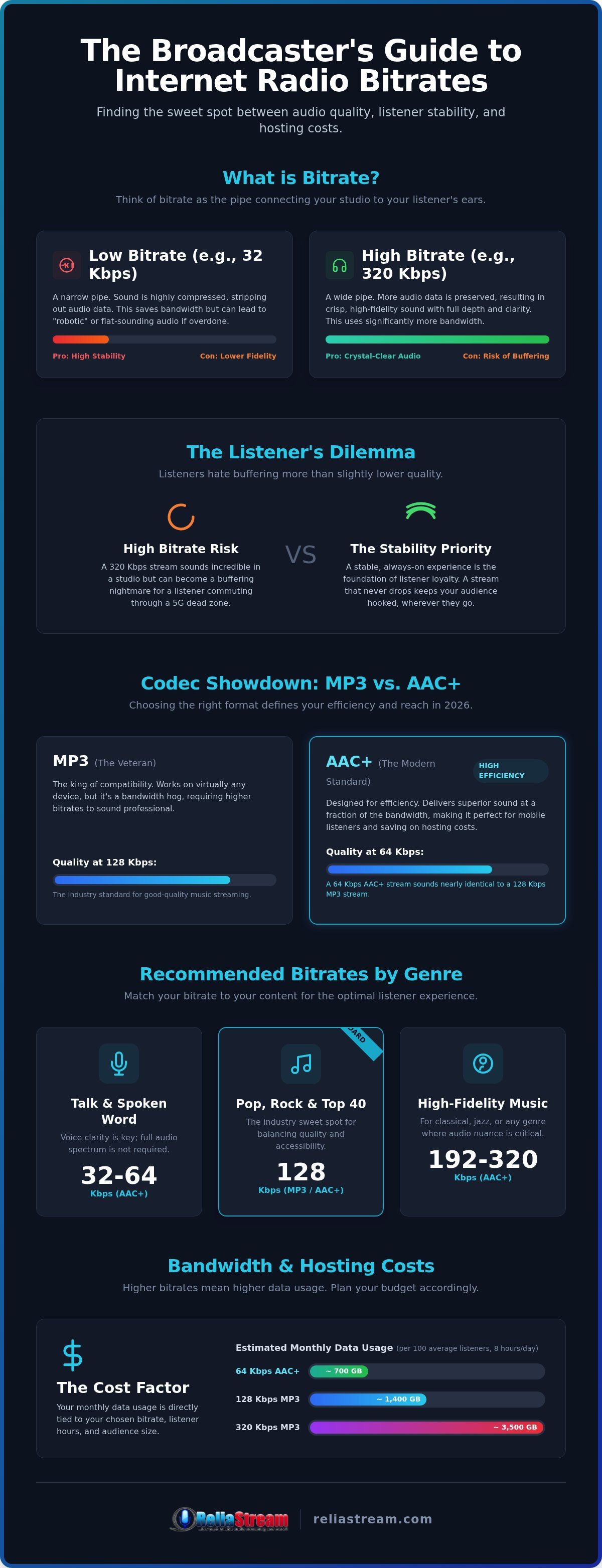
Math is the silent killer of radio dreams. You can have the sharpest content and the best voice in the industry, but if your bandwidth math is wrong, your station will die on the vine. To find the best bitrate for internet radio that actually fits your wallet, you need to understand the relationship between data and listeners. Here is the formula: Bitrate x Listeners x Time = Total Bandwidth. It is that simple. A 128 Kbps stream uses about 16 kilobytes per second. If you have 100 simultaneous listeners for just one hour, you are pushing roughly 5.7 GB of data. Understanding these numbers before you buy is the difference between a thriving station and a sudden shut-down notice.
ShoutCast vs. IceCast: Bitrate Handling Differences
The platform you choose changes how that data is handled. ShoutCast is a veteran. It is excellent at managing high-bitrate bursts, ensuring your listeners get a clean, reliable handoff from the server. IceCast is the flexible alternative. It allows for multiple mount points, meaning you can run a high-quality 320 Kbps stream for audiophiles and a 64 Kbps AAC+ stream for mobile users on the same server. For a deeper dive into these technical engines, check out our ShoutCast vs IceCast definitive comparison. Scaling for success means choosing the best bitrate for internet radio based on your current listener count and budget.
Avoiding the "Bandwidth Trap"
Beware the "unlimited" promise. In the server world, nothing is truly infinite. If a host promises unlimited bandwidth for cheap, read the fine print. They will throttle your speed or kill your stream the second you gain real traction. That is the ultimate bandwidth trap. You want a hosting partner that scales with you. A viral moment shouldn't crash your server. This is where Auto DJ becomes your backbone. It keeps the music playing even when your local internet flinches. Start with a solid 128 Kbps Hosting Plan and upgrade as your audience grows. It is about sustainable growth, not a one-hit wonder that breaks your budget.
Scaling for Success: How ReliaStream Powers Your Growth from 32 to 320 Kbps
You've got the vision. Now you need the engine to drive it. ReliaStream doesn't believe in one-size-fits-all broadcasting. We know that the best bitrate for internet radio today might not be the one you need six months from now. That's why we offer a full spectrum of tiered plans. Starting a talk show? Grab a 32 Kbps Hosting Plan or 64 Kbps Hosting Plan and focus on your message. Launching a high-fidelity jazz station? Jump straight to our 320 Kbps Hosting Plan. We give you the flexibility to pivot, upgrade, and scale without the technical headaches. With professional tools like Centova Cast and MediaCP at your disposal, you're in total command of your digital airwaves.
Secure and Professional: The SSL Advantage
In 2026, a non-secure stream is a dead stream. Modern web browsers are ruthless. If your stream link isn't encrypted, Chrome and Safari will simply block it. This isn't just about security; it's about accessibility. ReliaStream includes SSL Radio Links as standard because your station deserves to be heard on every device, every time. Don't let outdated tech kill your growth. You can read the truth about SSL radio streaming myths to see why secure broadcasting is the only way forward. It's a professional necessity, not an optional extra.
Take Your Station to the Living Room
Radio has moved beyond the browser. Your listeners are on their couches, in their kitchens, and driving their cars. To dominate in 2026, you need to be on the big screen and the smart speaker. This is where finding the best bitrate for internet radio gets critical. Platforms like Amazon Alexa and Roku have specific configuration requirements to ensure a smooth user experience. We specialize in developing custom Roku radio apps and Alexa skills that translate your stream into a living room staple. Whether it's a Google TV App or an Amazon Fire TV App, we ensure your bitrate is optimized for the hardware. The future of radio is everywhere. We're the backbone that puts you there.
Take Control of Your Digital Airwaves
You now have the roadmap to master your station's technical backbone. Choosing the best bitrate for internet radio isn't just about sound quality; it's about smart resource management and audience retention. Remember that efficiency beats raw power every single time. Use AAC+ to keep your mobile listeners connected and your bandwidth costs low. Don't forget the importance of SSL security and smart device integration to future-proof your reach in the 2026 landscape.
We've been the backbone for independent creators since 2008. With flexible tiered plans ranging from 32 to 320 Kbps, 24/7 Auto DJ support, and included SSL links, we provide the professional foundation you need to scale. Stop guessing and start growing with a partner that understands the gritty reality of broadcasting. Start your professional broadcast today with ReliaStream hosting!
Your audience is waiting for that crystal-clear sound. It's time to stop talking and start streaming. You've got this.
Frequently Asked Questions
What is the most common bitrate for internet radio?
128 Kbps remains the most common bitrate for music-based internet radio. It's the sweet spot that most listeners expect for a standard stereo experience. However, many modern broadcasters are shifting toward 64 Kbps using the AAC+ codec. This delivers similar quality while using half the data. If you want to reach the widest possible audience across various devices, 128 Kbps is your safest bet for universal compatibility. It balances audio fidelity with broad device support perfectly for music.
Can I change my bitrate after my radio station is already live?
Yes, you can absolutely change your settings as your station grows. At ReliaStream, we offer tiered plans that allow you to scale from a 32 Kbps Hosting Plan up to a 320 Kbps Hosting Plan whenever you're ready. You simply update your encoder settings and restart your stream. This flexibility is vital for independent creators who want to start small and upgrade their audio quality as their listener base and budget expand. We make the transition seamless.
Does a higher bitrate mean more buffering for my listeners?
A higher bitrate directly increases the risk of buffering, especially for mobile listeners. Since high-bitrate streams require more data per second, any dip in the listener's internet speed causes the audio to stop and catch up. This is why finding the best bitrate for internet radio involves balancing fidelity with stability. Pushing 320 Kbps sounds great but often fails in areas with weak 5G or congested public Wi-Fi networks. Stability always keeps listeners longer than raw quality.
What is the best bitrate for a talk-only radio station?
For talk-only stations, 32 Kbps to 64 Kbps is the ideal range. Human speech doesn't have the complex frequencies of a full musical arrangement, so you don't need to waste bandwidth on high bitrates. Using a 64 Kbps Hosting Plan with the AAC+ codec provides crystal-clear voice quality that sounds professional and authoritative. It also keeps your hosting costs low and ensures your stream is rock-solid for listeners on the move. It's the most efficient choice for broadcasters.
Is 128 Kbps enough for high-quality music streaming?
128 Kbps is the recognized standard for high-quality music streaming. Most listeners using standard headphones or car speakers won't notice a significant difference between 128 Kbps and higher settings. It provides a clean stereo image and full frequency response for pop, rock, and electronic music. While audiophiles might prefer 192 Kbps or higher, 128 Kbps remains the most cost-effective way to deliver a professional sound to a global audience. It is the gold standard for reliable music broadcasting.
How does bitrate affect the cost of my radio hosting plan?
Bitrate is the primary driver of your hosting costs. Higher bitrates consume more bandwidth for every single listener on your stream. If you double your bitrate from 64 Kbps to 128 Kbps, you effectively double your data usage. This is why we offer tiered plans, so you only pay for the capacity you actually need. Choosing the best bitrate for internet radio ensures you aren't overpaying for empty data that your audience can't even hear on their speakers.
Do I need a special encoder to stream at 320 Kbps?
You don't need a special encoder, but your hardware and software must support the higher data flow. Most modern broadcasting software like BUTT or Mixxx can handle 320 Kbps easily. The real challenge is your source material. If your original audio files are low-quality MP3s, streaming at 320 Kbps won't make them sound better. You need high-resolution source files and a stable upload speed to maintain a consistent 320 Kbps broadcast without stuttering or dropouts.
Will my listeners notice the difference between 128 Kbps and 192 Kbps?
Most listeners won't notice a difference between 128 Kbps and 192 Kbps on standard consumer gear like earbuds or smart speakers. The difference only becomes apparent on high-end studio monitors or home theater systems. At 192 Kbps, the high-end frequencies sound slightly airier and less compressed. Unless you're catering specifically to an audiophile niche, the added bandwidth cost of 192 Kbps rarely justifies the subtle jump in perceived quality. Stick with 128 Kbps for the best results.


