

Your listeners aren't seeing your station's branding anymore. They're staring at a massive, red "Not Secure" warning that screams "Stay Away." With Google Chrome 154 rolling out its mandatory secure connection policy this October, the era of "optional" security is dead. Finished. If you haven't mastered https streaming for internet radio, your broadcast is essentially invisible to the modern web. It's frustrating to watch your listener counts drop just because a browser decided your ShoutCast or IceCast link wasn't safe enough.
We get it. The technical jargon around SSL certificates and port 80 proxies feels like a headache you didn't sign up for. You want to focus on the music and the message, not server configurations. This guide changes that. You'll learn exactly how to secure your stream, get that coveted green padlock, and ensure your station plays perfectly on every smart speaker and mobile app. We're breaking down the shift to SSL so you can stop fighting browser blocks, boost your station's search ranking, and start growing your audience again.
Key Takeaways
- Stop the dreaded "Not Secure" warnings by understanding how HTTPS encryption builds instant trust with your audience.
- Navigate the aggressive 2026 browser crackdowns that block non-secure audio on Chrome and Safari.
- Master the technical shift to https streaming for internet radio using the latest versions of ShoutCast and IceCast.
- Follow a no-nonsense, 5-step plan to secure your broadcast via Centova Cast or MediaCP without the technical headache.
- Future-proof your station with professional SSL Radio Links that ensure compatibility with smart speakers and mobile apps.
What is HTTPS Streaming for Internet Radio?
HTTPS streaming for internet radio is the rock-solid method of encrypting the audio data traveling from your server to your listener. Think of it as a secure tunnel. Without it, your stream is naked. Modern Internet radio is no longer just about great content; it's about the delivery. In the early days, HTTP was the standard. Today, that "S" stands for Security. It's the thin line between a listener enjoying your broadcast or being scared off by a "Not Secure" warning. Stop guessing about your audience reach. Start securing it.
Why does the "S" matter so much? It's about validation. When a listener hits play, their browser asks your server for an SSL certificate. This digital document proves your server is who it claims to be. A standard stream URL is open and vulnerable, easily intercepted or blocked. A secure SSL link is encrypted, meaning the data is scrambled so only the listener's player can decode it. This isn't just a tech trend; it's the 2026 baseline for professional broadcasting.
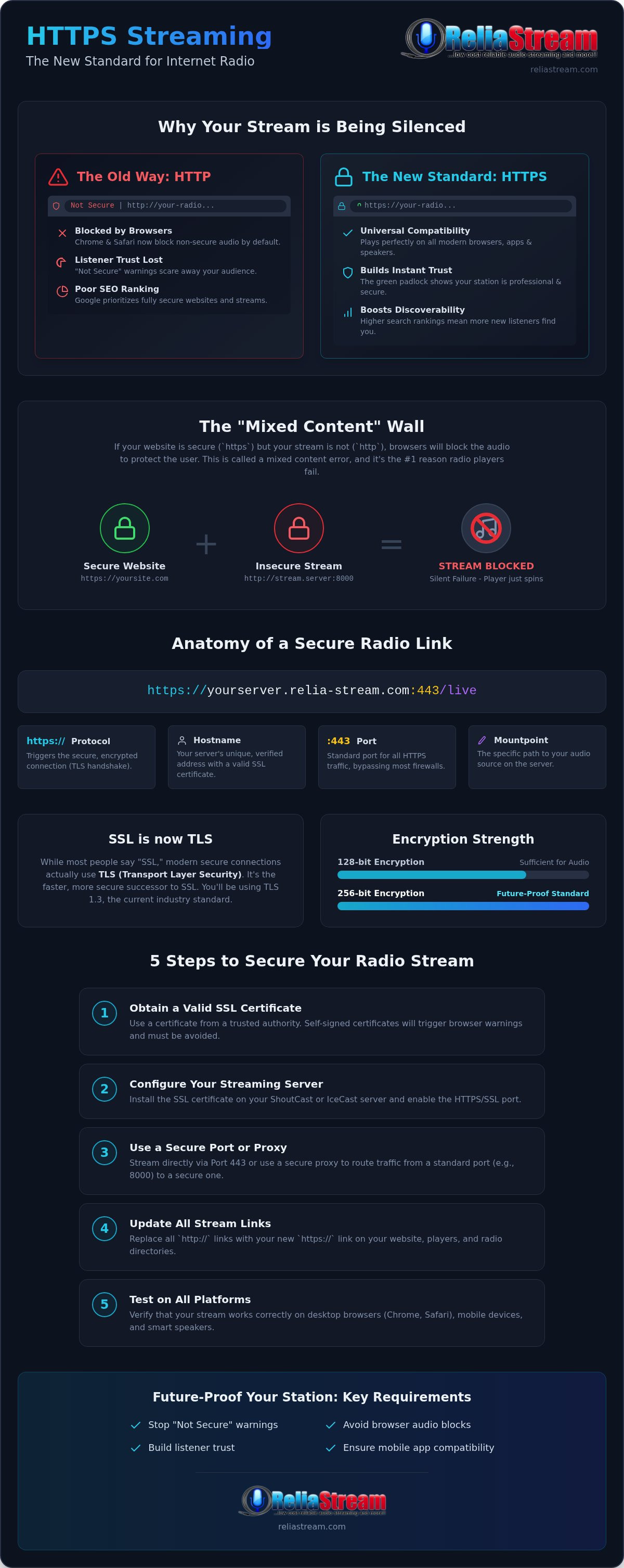
The Anatomy of a Secure Radio Link
Your stream URL is a roadmap for the browser. A professional secure link looks like this: https://yourserver.relia-stream.com:443/live. Breakdown the components to see how they work together:
- Protocol: The "https" triggers the encryption handshake.
- Hostname: Your server's unique, verified address.
- Port: While old-school HTTP used Port 80 or 8000, secure traffic flows through Port 443. This is vital because many corporate and school firewalls block non-standard ports but leave 443 wide open.
- Mountpoint: The specific path to your audio source.
Don't even think about using a self-signed certificate. Browsers hate them. They'll flag your station as a security risk faster than a skipping record, driving listeners away before they hear a single note.
SSL vs. TLS: What Broadcasters Actually Need
Let's kill the confusion. Everyone says SSL, but we actually use TLS (Transport Layer Security). It's the faster, tougher version of the same idea. When you implement https streaming for internet radio, you're likely using TLS 1.3. It's the modern standard that ensures low latency and high security.
Is 128-bit encryption enough? For audio, it's plenty. However, 256-bit is the industry standard for 2026. It provides a deeper level of protection that future-proofs your station against evolving threats. SSL streaming for radio is the digital handshake that guarantees your listeners a safe, uninterrupted connection, transforming a technical requirement into a badge of professional credibility.
The Death of the Non-Secure Stream: Why Browsers Block You
Is your radio player failing for no apparent reason? You check your encoder. The server says it's online. Yet, when a listener hits play, they get nothing but silence. This is the "Mixed Content" wall. Modern browsers have moved past simple warnings. They are now blocking mixed content by default, and it is effectively killing independent stations that refuse to adapt. If your website is secure but your stream link is not, the browser treats your audio like a security threat and kills the connection instantly.
Google Chrome 154 and Safari 26.5 are leading this aggressive crackdown. They've decided that a secure page must be 100% secure. No exceptions. This isn't just a technical glitch; it's a branding nightmare. When a potential fan sees a "Not Secure" warning next to your station name, trust evaporates. They don't see a passionate broadcaster; they see a potential risk to their data. Beyond the psychological impact, there's the SEO hit. Google’s search algorithms now prioritize sites with a fully secure infrastructure. If you aren't using https streaming for internet radio, you're essentially invisible to new listeners searching for your genre.
Understanding the Mixed Content Error
Why does the player stop working? Browsers distinguish between passive content, like images, and active content, like audio streams. While browsers used to allow "mixed" media, those days are over. The most dangerous part is the "Silent Failure." Your listener doesn't see a technical error log. They just click play, see the loading spinner spin forever, and assume your station is offline. They won't stick around to troubleshoot. They'll just move to a competitor who has their security in order.
Mobile Apps and Security Requirements
Your station's future is mobile, but the gatekeepers are strict. Apple’s App Store and the Google Play Store enforce App Transport Security (ATS) standards. If you're planning to launch a custom radio app, https streaming for internet radio is a mandatory requirement. Secure links also perform better on mobile networks. They handle handshakes more efficiently, which leads to fewer connection drops and less buffering when your listeners switch from Wi-Fi to 5G. If you're tired of fighting browser blocks and want a professional edge, it's time to upgrade to a host that provides SSL Radio Links as a standard feature.
SSL for ShoutCast vs. IceCast: A Technical Comparison
ShoutCast or IceCast? It's the classic broadcaster's debate. But in 2026, the question isn't just about which one sounds better. It's about which one handles encryption without breaking your workflow. Both protocols have evolved to meet the demands of modern browsers, but they take very different paths to get there. Choosing the wrong one could mean extra latency or a technical setup that feels like a full-time job. You need a solution that just works.
Does SSL kill your stream performance? Not anymore. Modern CPUs handle 256-bit encryption with negligible overhead. We're talking milliseconds of difference. The real bottleneck is how the server software manages the handshake. If your server is outdated, your listeners will experience buffering. If it's modern, they won't even know the encryption is there. They'll just see the green padlock and stay tuned in. This is why https streaming for internet radio is now the industry standard for professional stations.
ShoutCast SSL Implementation
ShoutCast was notoriously late to the security party. The "DNAS" challenge meant that for years, ShoutCast didn't have native SSL support built into the core software. Broadcasters had to rely on secure proxies to wrap their streams. Essentially, a proxy acts as a middleman that takes your insecure HTTP stream and delivers it via Port 443 to the listener. While ShoutCast v2.6.1.777 finally introduced native SSL support for Linux, many legacy setups still rely on these proxies. They work, but they add another layer of complexity to your setup. If you're a ShoutCast die-hard, ensure your host uses a high-performance proxy to avoid connection drops.
IceCast SSL Advantages
IceCast is the undisputed champion of native HTTPS support. Versions 2.4 and 2.5 were built with security in mind from the ground up. This native integration is a game-changer for mountpoint flexibility. You can run multiple secure streams from a single server without breaking a sweat. It's clean. It's efficient. And it's exactly why most professional IceCast hosting providers prefer this protocol for SSL delivery.
Google isn't waiting for you to catch up. They will gradually start... blocking... mixed content downloads, which includes your audio streams. If your IceCast server isn't configured for https streaming for internet radio, your station is on borrowed time. IceCast makes the transition smoother because it doesn't require the "patchwork" fixes that older ShoutCast versions do. It's the proactive choice for broadcasters who want to focus on their content rather than their server logs.
How to Set Up Your SSL Radio Stream in 5 Steps
Ready to flip the switch? Transitioning to a secure stream isn't a massive, multi-week project. It's a strategic mission. If you want to stay visible on the 2026 web, you need to move fast. Stop overcomplicating the tech. Setting up https streaming for internet radio is a straightforward process when you have the right tools and a solid plan. Follow these five steps to lock down your broadcast and reclaim your audience.
- Step 1: Choose a hosting provider that includes SSL links. Don't settle for "SSL as an add-on" that costs extra. You need a partner that provides a secure link as a standard feature for both ShoutCast and IceCast.
- Step 2: Configure your control panel. Log into your dashboard to locate your secure URL. Most professional setups generate this automatically once your account is active.
- Step 3: Update your encoder settings. Point your encoder to the secure port provided by your host. This is usually Port 443 or a specialized secure proxy port.
- Step 4: Update your web player and directory listings. Swap out your old HTTP links on your station website and in every directory where you're listed.
- Step 5: Test everything. Don't just assume it works. Open your stream on multiple browsers and mobile devices to ensure the green padlock is visible and the audio is crisp.
This isn't just about security; it's about growth. Smart devices are the fastest-growing hardware segment for radio consumption in 2026. If you want your station to play on Alexa or Roku, a secure link is your ticket to the show. Without it, you're locked out of the living room. Get your secure SSL Radio Link today and stop leaving your audience behind.
Configuring Centova Cast for SSL
Finding your secure stream URL in Centova is easy. Head to the "Quick Links" section in your dashboard. You'll see your SSL-secured link ready for action. If you're using Auto DJ, the transition is seamless. The server handles the encryption handshake in the background, keeping your music playing without a hiccup. Integrating your SSL link into the Centova Cast vs MediaCP workflow ensures your station remains professional and accessible regardless of which control panel you prefer.
The Final Testing Checklist
Before you announce your "new and improved" stream, do a deep dive. Open your station website and hit F12 to open the browser developer tools. Look for any "Mixed Content" errors in the console. If you see them, it means an old HTTP image or script is still lingering. Verify that your stream connects instantly on Alexa and Roku devices. Always double-check your dashboard to verify that your SSL certificate expiration date is set for auto-renewal so you never face a sudden blackout.
Professional HTTPS Hosting with ReliaStream
Why settle for a host that treats security like a premium add-on? You've seen why modern browsers demand encrypted links. You know that silence is the sound of a blocked stream. Now, you need a partner that handles the heavy lifting so you can get back to broadcasting. ReliaStream isn't just another hosting provider. We are the authoritative veteran in the space, providing the gritty, reliable backbone independent creators need to survive and thrive in 2026. When you choose us, you're choosing a legacy of technical excellence and a "can-do" spirit that puts your station first.
The core of our service is simple: transparency. Every one of our plans includes a professional SSL Radio Link. No hidden fees. No technical hoops. No surprises. We provide https streaming for internet radio that works right out of the box for both ShoutCast and IceCast servers. Whether you are running a 32 Kbps talk show or a high-fidelity 320 Kbps Hosting Plan for an EDM station, your audio remains secure, crystal clear, and accessible to every listener on the planet. We don't just give you a link; we give you the confidence to grow without fear of browser blocks.
Rock-Solid Infrastructure Since 2008
Uptime isn't just a luxury. It's the heartbeat of your station. If you're offline, you're irrelevant. We've been perfecting our infrastructure since 2008, ensuring that our servers stay up when others stumble. Our proactive mentor approach means we don't just host your files; we support your vision. Are you just starting out? We believe professional broadcasting should be accessible to everyone. That is why we offer radio hosting starting at $1.99, providing the most affordable entry point into the world of secure, professional radio.
Future-Proof Your Station
The living room is the new frontier for radio. In 2026, listeners expect to find you on their TV and their smart speakers. We help you dominate these spaces through custom radio streaming app development for Roku, Alexa, and Amazon Fire TV. By combining https streaming for internet radio with dedicated apps, you create a seamless experience that keeps fans coming back. The ReliaStream difference is a blend of professional-grade tools and a gritty enthusiasm for your success. We provide the reliability; you provide the voice. Ready to secure your stream? Get started with ReliaStream today!
Own the Airwaves with a Secure Connection
The digital landscape has changed. The days of "good enough" HTTP streams are over. If you want to keep your listeners and maintain your station's professional reputation, you need to act now. We've covered the browser crackdowns, the technical differences between ShoutCast and IceCast, and the simple path to a secure link. Ignoring https streaming for internet radio isn't just a technical oversight; it's a risk to your audience's trust and your station's growth.
Don't let a "Not Secure" warning be the end of your broadcast. You need a partner that understands the stakes. ReliaStream has been the reliable backbone for broadcasting experts since 2008. We include SSL links in all plans and provide the 24/7 proactive support you need to stay online. It's time to stop fighting the browsers and start reaching more fans on Alexa, Roku, and beyond. Secure Your Radio Stream with ReliaStream Hosting today. Your station deserves the best security available. Let's get to work and make your broadcast unstoppable.
Frequently Asked Questions
Do I really need HTTPS for my internet radio station?
Yes, it is non-negotiable for survival in 2026. Modern browsers like Chrome and Safari have made secure connections the baseline requirement for all digital media. If you stick with old-school HTTP, your listeners will see "Not Secure" warnings or find their players blocked entirely. Implementing https streaming for internet radio ensures your station remains accessible across the entire web. It is about protecting your brand and your audience from day one.
Will an SSL link change my stream URL?
Your stream URL will absolutely change. You'll switch from the old "http" protocol to "https," and your port number will likely shift to 443 or a specific secure proxy port. This means you must update your web players, mobile apps, and every directory listing where your station appears. It is a one-time update that pays off in long-term stability. A professional host makes this transition easy by providing the exact secure link you need.
Does HTTPS streaming cause more buffering for listeners?
No, encryption does not slow you down. Modern server hardware handles the SSL handshake in milliseconds, meaning your listeners won't notice any difference in latency. Buffering is almost always a result of poor bandwidth or outdated server software, not the security layer itself. When you use a high-performance network, your secure stream will be just as snappy as an insecure one. Focus on quality infrastructure to keep your audio crisp and uninterrupted for everyone.
Can I use a free SSL certificate like Let’s Encrypt for my radio stream?
You can, but it is often a technical nightmare for broadcasters. Let’s Encrypt certificates require frequent renewals and specific server-side configurations that can clash with ShoutCast or IceCast ports. Most independent broadcasters find it much easier to use a host that manages these certificates automatically. We handle the technical heavy lifting so your link never expires. Why waste time on server logs when you could be focusing on your next big broadcast or growing your station?
Why is my player not working in Google Chrome?
Chrome is likely blocking your "Mixed Content." If your website uses HTTPS but your audio stream uses HTTP, the browser kills the connection to protect the user. This results in a silent failure where the player simply won't start. To fix this, you must upgrade to https streaming for internet radio. Once your audio link matches your site's security level, the browser will allow the stream to play without any issues or red security warnings.
How much does it cost to add SSL to my radio hosting?
It should not cost you a dime. While some providers charge extra for security certificates, we believe safety is a right, not a luxury. We include SSL Radio Links in every hosting plan we offer. Whether you are just starting with our $1.99 entry-level plan or running a high-bitrate professional station, your secure link is included. Stop paying hidden fees for basic technology and switch to a host that values your station's growth and security.
Does ShoutCast support HTTPS streaming natively?
Native support was added in ShoutCast v2.6.1.777 for Linux servers. However, many broadcasters still use older versions or Windows-based setups that don't support it directly. In those cases, a secure proxy is used to wrap the HTTP stream in an SSL layer. This allows the stream to function on Port 443 without needing a full software overhaul. It is a reliable way to keep legacy stations compatible with modern security standards without losing your existing listener base.
Can I use an SSL link with my existing Alexa Skill?
Absolutely. In fact, an SSL link is a mandatory requirement for Amazon's Alexa Streaming App standards. If your stream isn't secure, your Alexa Skill will fail to play audio on Echo devices. Moving to a secure link ensures your station is ready for the living room and compatible with the latest smart speaker technology. It is the best way to future-proof your station and reach listeners wherever they choose to tune in, from kitchens to cars.


