

Is 320 kbps radio hosting worth it if listeners hear dropouts instead of detail? A high bitrate can preserve more audio detail, but only when the stream has enough bandwidth and reliable server capacity. Otherwise, the larger stream may buffer for listeners whose connections can’t keep up.
If low-bitrate audio leaves your station sounding thin or muddy, a higher bitrate may help. For MP3, 320 kbps is the highest standard bitrate, giving the encoder more data to represent the audio. But bitrate alone doesn’t determine sound quality. Your source files, encoder, upload connection, streaming server, and listeners’ internet connections all matter.
This guide explains what 320 kbps delivers, when it makes sense for your audience, and how to set up a dependable ShoutCast or IceCast stream. You’ll also learn what to consider for bandwidth, SSL-secured listening links, and expanding from web radio to apps for Roku, Google TV, Amazon Fire TV, or Alexa. The goal is to choose a setup that balances sound quality with stable delivery.
Key Takeaways
- Understand when higher-bitrate audio can make a meaningful difference for your station and audience.
- Learn how server bandwidth and port capacity affect stream stability as listener demand grows.
- Compare the data demands of 128 kbps and 320 kbps to make an informed quality-versus-usage choice.
- See how 320 kbps radio hosting fits into a reliable ShoutCast or IceCast setup, from encoder to stream delivery.
- Explore how to build on a high-fidelity web stream with options such as Roku or Alexa apps.
The 320 Kbps Gold Standard: Why High-Fidelity Radio Hosting Matters
Bitrate isn’t just a plan setting. It measures how much audio data is encoded each second, affecting how much detail a compressed stream can retain. For MP3, 320 kbps is the highest standard bitrate. The result depends on the source and encoding quality, and it isn’t the same as lossless audio. The Bit rate overview explains how this measurement relates to digital audio quality.
Not every station needs the highest bitrate. If your programming depends on nuanced music or polished sound, a 128 kbps stream may sound constrained to listeners using good headphones or speakers. 320 kbps radio hosting gives the encoder more data to represent the audio, which can help preserve subtle texture and reduce noticeable compression artifacts. It can’t restore detail missing from a low-quality source, and it won’t make every listener hear a dramatic difference. The source recording, encoder, playback equipment, and listening environment all matter.
There’s no single “transparent” threshold for every listener and every track. Transparency means listeners can’t readily distinguish encoded audio from its source under particular listening conditions. A well-encoded 128 kbps track may sound acceptable during casual listening, while a trained listener using revealing equipment may notice limitations. A higher bitrate gives your broadcast more room to represent demanding material, but it can’t fix poor production.
The Audiophile Experience: Why Your Listeners Care
Listeners who choose a music station for its sound expect more than a recognizable tune. Higher-bitrate MP3 can preserve more of the source’s detail, including delicate high-frequency textures and the shape of musical transients. That can make cymbals, strings, and layered arrangements sound less smeared. A clean, consistent stream also supports a polished brand impression. Fidelity alone doesn’t guarantee retention, but a muddy broadcast can undermine otherwise strong programming.
Professional Use Cases for 320 Kbps Hosting
Some formats can make the extra encoded detail more noticeable. Consider 320 kbps for:
- Classical and jazz: Quiet passages, instrument separation, and wide dynamic changes can be important parts of the listening experience.
- Electronic music: Defined bass and layered production benefit from a stream that doesn’t unnecessarily constrain the source.
- Syndicated talk: Clear voice reproduction can help presenters sound polished, though microphone technique and processing remain essential.
The practical choice is about matching quality to your format and audience. ReliaStream’s ShoutCast and IceCast hosting supports bitrates up to 320 kbps, giving stations a high-fidelity option when sound is central to the listening experience.
The Technical Engine: What Powering a 320 Kbps Stream Actually Requires
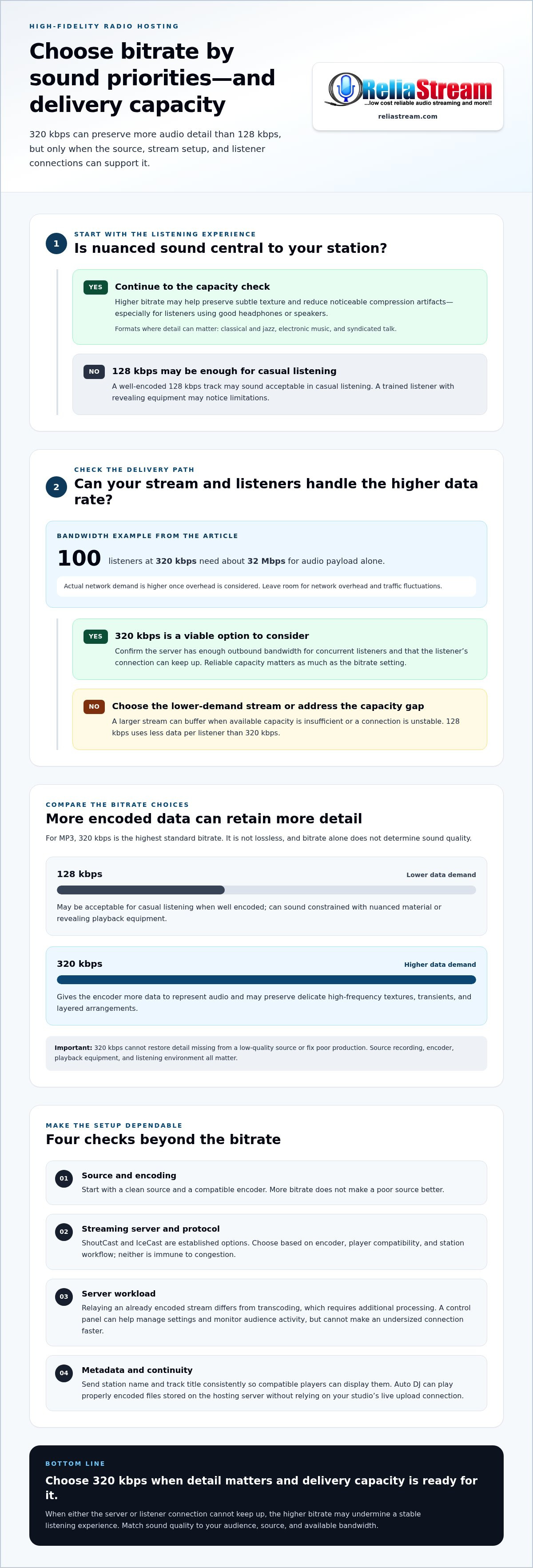
A high-bitrate stream doesn’t automatically buffer. Buffering happens when the stream’s data rate exceeds available capacity somewhere between the server and listener, or when a connection is unstable. At 320 kbps, each listener receives more audio data than at a lower bitrate, so the server needs enough outbound bandwidth for concurrent listeners, plus room for network overhead and traffic fluctuations.
Think of port speed as the size of the server’s delivery lane. A station’s total demand grows with its listener count: 100 listeners receiving a 320 kbps stream require about 32 Mbps for audio payload alone. The actual network requirement is higher once overhead is considered. CPU demand depends on the server’s tasks. Relaying an already encoded stream is different from transcoding audio, which requires additional processing. Control panels such as Centova Cast and MediaCP help broadcasters manage station settings and monitor audience activity, but they can’t make an undersized connection faster.
A radio-focused hosting setup can be a better fit than a generic VPS that you must configure and manage for streaming yourself. ShoutCast and IceCast are both established options; neither protocol makes a 320 kbps stream immune to congestion. Choose based on your encoder, player compatibility, and station workflow. For a closer look at their differences, read this ShoutCast vs. IceCast comparison.
ShoutCast, IceCast, and Stream Details
Metadata such as station name and track title is separate from the audio stream. Accurate, consistently formatted metadata helps compatible players display a professional now-playing experience. Configure your encoder to send it correctly, and make sure your server setup passes it through to listeners. Bitrate helps determine audio fidelity, but it doesn’t control metadata quality.
Auto DJ: Playback Without a Live Studio Feed
Auto DJ shifts playback from your home connection to audio stored on the hosting server. Upload properly encoded 320 kbps MP3 files and build a playlist in the station control panel. The server can then play those files without relying on your studio’s live upload connection. If your home internet drops or your computer goes offline, stored playback can continue. It’s a practical way to keep scheduled music playing while you’re away from the studio.
With 320 kbps radio hosting, reliability depends on sufficient server capacity, a compatible ShoutCast or IceCast setup, and a clean source stream. Explore ReliaStream radio hosting for high-bitrate station options.
128 Kbps vs. 320 Kbps: Decoding the Real-World Audio Quality Gap
The difference isn’t simply “more sound.” MP3 compression removes audio information to reduce file size. At 128 kbps, the encoder has a tighter data budget, which can make complex passages, bright cymbals, or layered music sound less defined. At 320 kbps, the encoder has more room to preserve detail and reduce audible compression artifacts. A higher bitrate doesn’t eliminate every artifact, restore detail missing from a poor source, or turn MP3 into lossless audio.
How noticeable is the gap? It depends on the recording, encoding quality, playback device, and listening environment. On a desktop with good speakers or headphones, listeners may notice clearer transients and more separation in dense music. On a phone speaker, in a noisy setting, or through basic earbuds, the difference may be subtle. Talk radio may also need less bandwidth than music programming to sound clear.
Data Consumption Comparison
As a rough planning comparison, one hour of streaming uses about 60 MB at 128 kbps and about 180 MB at 320 kbps, before connection overhead.
Unlimited 5G plans make higher-quality mobile listening more practical for some audiences, but “unlimited” doesn’t mean every listener has unlimited high-speed data or steady coverage. Data caps, throttling, weak signals, and Wi-Fi availability still matter. Don’t assume every listener can comfortably use the highest bitrate everywhere. Match stream quality to your audience and programming, and make a lower-bitrate option available if your station setup supports it.
The Myth of “Good Enough” Audio
128 kbps can be a sensible choice, especially for speech or listeners prioritizing lower data use. But it may sound constrained on revealing headphones and speakers, particularly with busy arrangements or prominent high-frequency detail. That doesn’t mean every 128 kbps stream sounds muddy. Source quality and encoder settings matter, too.
Sound also shapes how a station is perceived. A clean, consistent broadcast can reinforce a polished identity; audible distortion or compression can distract from the programming and weaken that impression. 320 kbps radio hosting can support premium positioning when fidelity is part of your station’s promise, but it’s one part of the experience, not a substitute for strong content and production.
Think of 320 kbps as an option for a more quality-conscious listening experience, not a universal requirement. A flexible ShoutCast or IceCast setup lets you align bitrate with audience needs, content, and available bandwidth as listening habits and devices change.
Critical Resources for High-Bitrate Broadcasting: Equipment and Connectivity
A dependable 320 kbps live broadcast starts in your studio and travels through a chain: source audio, processing, encoder, internet upload, then your ShoutCast or IceCast server. A weak link can undercut the sound before listeners hear it.
The audio payload alone needs an upload rate of at least 320 kilobits per second while you’re broadcasting. That’s a bare minimum, not a comfortable target. Leave extra capacity for network overhead and other household or studio traffic. A stable broadband connection, such as fiber or high-speed cable where available, can help. Consistency matters as much as peak speed, so test your upload connection during the hours you plan to broadcast.
The Local Studio Checklist
- Connection: Use a stable wired connection where practical, and avoid competing uploads during live shows.
- Encoder: Configure compatible encoder software, such as BUTT or Rocket Broadcaster, to send the correct format and bitrate to your server.
- Signal chain: Set appropriate gain levels on your soundcard and mixer. A clean signal with low noise gives processing software a better source to work with.
Use well-produced source files. FLAC preserves lossless audio before encoding, while a properly prepared 320 kbps MP3 can be a practical source for an MP3 stream. Converting a low-bitrate file to FLAC or 320 kbps won’t restore detail that’s already been discarded.
Processing software can help balance loudness and manage peaks before the signal reaches the encoder. Apply it carefully: aggressive compression or excessive gain can make audio harsh, even at a high bitrate. Test your broadcast using a secure radio stream link on the devices your audience uses. Listen for dropouts, clipping, and level changes.
Optimizing Your Control Panel
Set the station’s output bitrate and format to match your source and hosting configuration. Choose between Centova Cast and MediaCP based on how each fits your workflow. In Auto DJ, use crossfades and leveling where they suit your programming, then check transitions so songs don’t clash or jump in volume. Review listener statistics to understand how your audience responds over time.
Build a stable signal chain, then let hosting carry the stream. Explore ReliaStream’s 320 Kbps hosting for high-bitrate ShoutCast and IceCast broadcasting.
Launching Your Studio-Grade Station with ReliaStream’s 320 Kbps Hosting
Great sound needs a dependable path from your audio source to your listeners. ReliaStream’s ShoutCast and IceCast hosting supports streams up to 320 Kbps, with Centova Cast and MediaCP control panels for managing your station. It gives broadcasters a foundation for high-fidelity web audio, station management, and room to grow.
You don’t have to begin at the highest bitrate. Start with a plan that fits your content and audience, then move up as your programming and bandwidth needs evolve. This guide to low bitrate radio hosting explores how to get started before stepping up to a higher-quality stream.
Why Choose ReliaStream for High-Fidelity?
High bitrate is only one part of the listening experience. Source files, encoder settings, server capacity, and listener connections all contribute to a smooth broadcast. ReliaStream’s radio hosting focuses on ShoutCast and IceCast, with SSL-secured links for listeners accessing your stream through compatible players and browsers. Centova Cast and MediaCP control panels help you manage station settings and Auto DJ playback.
As your station grows beyond the web player, custom app development can bring your broadcast to platforms such as Roku, Google TV, and Amazon Fire TV, as well as Alexa-enabled listening. These apps can give listeners more ways to access your station.
Next Steps: Prepare Your Station to Go Live
Build your setup in a clear sequence. First, choose a bitrate and configure your ShoutCast or IceCast stream in the control panel. Next, upload well-encoded audio to Auto DJ or connect your live encoder. Test the stream link on different devices and connections, check metadata and volume levels, and listen through transitions before promoting the station.
- Match the plan to your audience: Consider the sound quality you want and the data demands of a high-bitrate stream.
- Set up playback: Use Auto DJ for scheduled music playback, or connect your encoder for live shows.
- Expand access: Build from web listening toward custom Roku or Alexa apps as your station’s needs develop.
Ready to make high-fidelity audio part of your station’s identity? Choose ReliaStream’s 320 kbps radio hosting for a ShoutCast or IceCast setup built around your broadcast and its next stage of growth.
Take Your Station’s Sound to the Next Level
320 kbps radio hosting can give music-focused stations more room to deliver detail, but bitrate alone doesn’t guarantee a smooth, polished stream. Reliable results depend on the whole chain: clean source audio, suitable encoder settings, stable upload connectivity, and hosting capacity matched to your audience.
ReliaStream has served broadcasters since 2008, with tiered plans from 32 Kbps to 320 Kbps. MediaCP and Centova Cast control panels give you tools to manage your broadcast, while ShoutCast and IceCast hosting supports high-bitrate streaming. ReliaStream also develops custom apps for platforms such as Roku, Google TV, Amazon Fire TV, and Alexa.
Ready to build a more polished listening experience? Choose ReliaStream’s 320 Kbps Hosting for your station.
Frequently Asked Questions
What is the difference between 128 kbps and 320 kbps radio hosting?
320 kbps carries more audio data per second than 128 kbps, which can preserve more detail in a compressed MP3 stream. The difference may stand out in complex music on quality headphones or speakers, while casual listening or speech may sound fine at a lower bitrate. Higher bitrate also uses more data, so choose based on your station’s content, audience, and streaming goals.
Does 320 kbps radio streaming cause more buffering for listeners?
Not by itself. Buffering occurs when a listener’s connection or the stream’s delivery path can’t keep up with the data rate. A 320 kbps stream needs more bandwidth per listener than a lower-bitrate stream, so server capacity and listener connectivity both matter. Test your stream under real listening conditions, and consider offering a lower-bitrate option if your station supports multiple streams.
How much upload speed do I need to broadcast at 320 kbps?
The audio payload alone requires an upload rate of at least 320 kilobits per second for a live 320 kbps feed. That’s a minimum, not a reliable target: network overhead and other internet activity need additional capacity. Use a stable connection, preferably wired when practical, and test upload performance during broadcast hours. If the connection fluctuates, listeners may hear dropouts even when its advertised speed seems adequate.
Can I use Auto DJ with 320 kbps files on ReliaStream?
Yes. ReliaStream hosting includes Auto DJ features, allowing you to upload audio files and schedule server-based playback. Use properly encoded files, such as 320 kbps MP3s, and make sure the station’s output settings match your intended stream format and bitrate. Auto DJ can keep scheduled playback running without relying on a live feed from your studio, though the original file quality still affects the sound.
Is 320 kbps necessary for talk radio stations?
No. Talk stations often sound clear at lower bitrates because speech generally doesn’t need as much data as detailed music programming. A higher bitrate may suit stations that mix speech with music or prioritize maximum audio fidelity, but it also increases data use. Focus first on a clean microphone signal, sensible audio processing, and consistent levels. Then choose a bitrate that fits your broadcast and audience.
What happens if a listener has a slow internet connection?
A listener whose connection can’t sustain a 320 kbps stream may experience buffering, interruptions, or difficulty starting playback. The issue can also result from an unstable connection, not just a low advertised speed. A lower-bitrate stream uses less data and may work better for that listener. If you offer multiple stream options, make the alternatives easy to find in your player or station app.
Do I need a special license to stream at 320 kbps?
No special license is required simply because your stream uses 320 kbps. Music licensing is a separate issue: rules depend on what you broadcast and where your station operates. In the United States, broadcasting copyrighted music may involve performance rights organizations and other rights holders. Original programming or royalty-free music can have different requirements. Check the applicable rules for your location and content.
Can I upgrade my current ReliaStream plan to 320 kbps?
ReliaStream offers tiered ShoutCast and IceCast hosting plans from 32 Kbps through 320 Kbps, including a 320 Kbps Hosting Plan. If you’re on a lower-bitrate tier, choose the 320 Kbps plan for higher-bitrate hosting. Before broadcasting, update your encoder or Auto DJ settings to match the stream configuration and confirm your source files are suitable for the bitrate you want to deliver.


