

Can you listen to your favorite radio station through a google tv radio app, or will you need to cast from your phone? It depends on your device and which apps are available for it. The terminology can be confusing: Google TV, Android TV, casting, and a station’s own app may sound like different names for the same thing. They aren’t.
There are practical ways to listen, but compatibility and setup vary. This guide explains how to look for radio apps on your Google TV device, when casting may be a useful fallback, and what to check before choosing an option. You’ll also learn how a dedicated station app can connect listeners to a broadcaster’s existing stream rather than replace it.
For broadcasters, the questions are whether a TV app fits their audience and whether their stream and station information are ready to support one. We’ll cover both listener and station needs, explain what to verify as app availability changes, and show how broadcasters can assess Google TV app development with ReliaStream.
Key Takeaways
- A google tv radio app may be a general listening app or a station’s own app. Availability can depend on the device and platform.
- Compare a radio app, casting, and a branded station app to find the option that fits your setup and listening habits.
- Before installing, check your device model, the app-store listing, station availability, and published support information.
- Broadcasters should assess listener needs and stream readiness before deciding whether a dedicated TV app makes sense.
- ReliaStream’s internet radio hosting and custom Google TV app development may fit into a station’s plans.
What Is a Google TV Radio App, and What Can You Use It For?
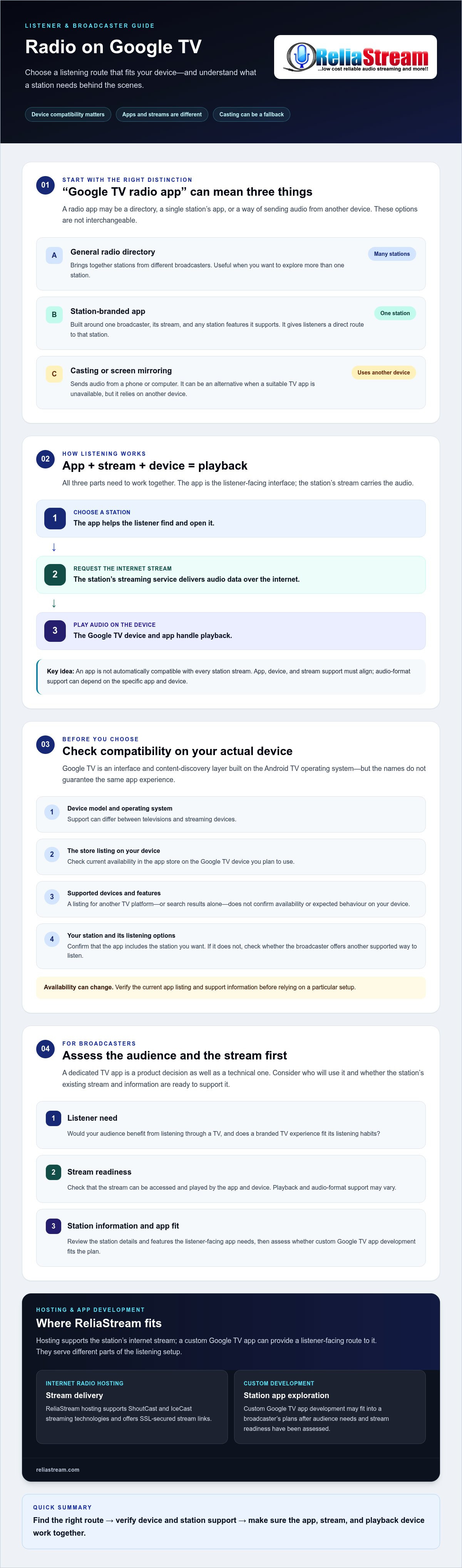
A Google TV radio app is a TV app or listening option that lets you access internet radio through a Google TV device. It might let you browse stations from different broadcasters, open one station’s branded listening experience, or play audio sent from another device. The right choice depends on how you access the stream and whether the option works on your particular TV or streaming device.
What does “Google TV radio app” mean?
For listeners, the phrase means finding a way to hear radio through a television. It can refer to a few different options:
- A general radio directory: An app that brings together stations from different broadcasters.
- A station-branded app: An app built around one broadcaster, its stream, and any station features it supports.
- Another listening route: Casting or screen mirroring audio from a phone or computer instead of opening a TV app.
These options aren’t interchangeable. A directory may make it easier to explore stations, while a branded app gives listeners a direct route to one station. Casting can work as an alternative when a suitable TV app isn’t available, but it relies on another device. Seeing an app in search results, or finding a listing for another TV platform, doesn’t confirm that it’s currently available for your Google TV device.
Google TV, Android TV, and app compatibility
Google TV and Android TV are closely related, but the names don’t guarantee the same app experience. Google TV is the interface and content discovery layer built on the Android TV operating system. The Google TV interface page offers background on the platform and its relationship with Android TV.
Why check compatibility? An app may be listed for a particular platform or device without being available on every television or streaming box. Your device model, operating system, current store availability, and the app publisher’s supported-device information can all matter. Features can vary too. Don’t assume that an app designed for one Android TV device will install or work as expected on another Google TV device.
Before choosing how to listen, look up the app in the store on your device, check its supported devices and current listing, and confirm that it includes the station you want. If the app or station isn’t available, check whether the broadcaster offers another supported way to listen. App availability and features can change, so verify them before relying on a particular setup.
How Radio Listening on Google TV Connects the App, Device, and Stream
Listening involves three parts working together: the app presents a station, the stream carries its audio over the internet, and the Google TV device plays that audio. If one part isn’t available or supported, playback may not work as expected. This distinction helps listeners troubleshoot access and broadcasters plan a TV app around an existing station stream.
What happens between choosing a station and hearing audio?
When a listener selects a station, the app requests its internet stream. The streaming service sends audio data over the internet, and the device’s software handles playback. The app is the listener-facing interface. It helps the listener reach the station, but it isn’t necessarily where the audio originates or where the stream is hosted.
An internet radio stream is audio delivered over the internet from a station’s streaming service to a compatible listening app or device. Think of the app as the front door and the stream as the audio route behind it. A station may use the same stream across different listening options, but an app still needs to access and play it.
That’s why a Google TV radio app isn’t automatically compatible with every station stream. The app, device, and stream all need to work together. Interfaces and playback behaviour vary, and support for audio formats can depend on the specific app and device. Broadcasters should verify these details rather than assume that a stream that plays elsewhere will behave the same way on a TV.
Where ShoutCast, IceCast, and hosting fit
Hosting makes a station’s audio stream available to listeners online. ShoutCast and IceCast are streaming technologies used in internet radio delivery. ReliaStream hosting supports both, so broadcasters can consider their stream setup alongside a listener-facing app. For a closer look at how the two options differ, see this guide to ShoutCast vs IceCast hosting.
ReliaStream also offers SSL-secured stream links. This is a hosting capability, not a guarantee that every TV app supports a particular link or connection. Confirm the app’s requirements and test playback on the devices listeners are likely to use. For wider context on connected devices and content distribution, Nielsen’s report on connected devices explores the role of connected screens. Broadcasters reviewing their setup can compare ReliaStream internet radio hosting with their app requirements.
Google TV Radio App Options: Existing Apps, Casting, or a Branded Station App?
There’s more than one way to listen on a TV, and the best fit depends on who’s choosing. A listener may value quick access to stations. A broadcaster may care more about its identity and making its stream easy to find. Compare the options against your needs before settling on a setup.
| Listening route | Setup effort | Station identity and discovery | Reliance on third parties |
|---|---|---|---|
| General radio app | Usually straightforward if the app is available and supported on the device. | Can help listeners browse available stations, but the app’s design and discovery experience are controlled by its provider. | Depends on the app’s continued availability, station listings, and device support. |
| Casting from another device | May involve selecting audio on a phone or computer and sending it to the TV. | Listeners start from another device, and the station’s identity depends on the source they use. | Requires casting support across the source device, app or browser, and TV setup. |
| Station-branded app | Requires the broadcaster to plan and support a TV app, while listeners need to find and use it. | Provides a dedicated station destination; listeners may need to search for it or already know the station. | Depends on the broadcaster’s app arrangements and ongoing compatibility with platform requirements. |
When is a general radio app enough?
If you mainly want to browse or play stations, a general radio app may be enough. Before relying on one, check that your station is listed, read recent reviews for relevant playback feedback, confirm compatibility with your device, and review the app’s current store listing. A listing alone doesn’t show how well it works on your particular TV.
Casting may be another option, but don’t assume every phone, app, browser, or television supports the same process. Check the instructions for the specific devices and apps you plan to use. Casting can be convenient for listeners, but it doesn’t give the broadcaster the same direct control over the app experience.
When might a broadcaster consider a dedicated app?
A station-branded app can give listeners a direct, recognizable destination on TV. It may suit a station that wants to present its identity and content beyond a general directory. Building an app is only part of the decision, though. Consider development and maintenance, current platform rules, device support, and whether listeners are likely to find and adopt it. A branded app isn’t the right choice for every station.
App-store availability and platform policies can change, so verify current requirements before planning a launch. For a broader look at connected-TV strategy, read about radio streaming app development.
How to Check Google TV Radio App Compatibility Before You Commit
Don’t assume that an app works on every television just because it appears in a search result. A compatibility check can save listeners a frustrating installation attempt and help broadcasters avoid planning around unverified assumptions. Use the checklist that fits your role.
A listener’s pre-installation checklist
Before choosing a google tv radio app, confirm the details for your actual device and the stations you want to hear.
- Identify your device. Check the TV or streaming-device model and its operating system information. Seeing “Google TV” on a search page doesn’t confirm support for your exact device.
- Check the current app listing. Search the app store on your device, then review the listing for supported devices, current availability, and stated requirements. Listings and platform support can change.
- Confirm station availability. Look for the specific station or programme you want. Don’t assume a general radio directory includes every broadcaster or that a station’s separate app is available for your TV.
- Review permissions and help information. Read the app’s current permissions, support notes, and troubleshooting guidance. These details may help clarify whether a playback issue relates to the app, device, or station.
A broadcaster’s app-readiness checklist
For a station, compatibility is only part of the decision. Define the listener experience first, then confirm how the app would connect to your existing stream and what you’ll need to manage after launch.
- Set the goal. Identify the intended TV audience, the station identity you want to present, and why a TV-specific app would be useful compared with your current listening routes.
- Document the stream setup. Note your hosting and streaming technology, then ask how the proposed app would access the existing stream. Verify app-specific requirements for links, formats, and playback.
- Ask about platform checks. Clarify which current platform and app-store requirements need review. Don’t treat submission as a promise of approval or assume compatibility with every device.
- Agree on ongoing responsibilities. Ask who handles updates, compatibility checks, and post-launch support, and what the development scope includes. Confirm the process with the provider before committing.
ReliaStream provides internet radio hosting and custom app development for Google TV. If your station has a stream in place and you’re assessing a branded TV app, review ReliaStream Google TV app development and confirm the current scope, requirements, and responsibilities before moving ahead.
How ReliaStream Can Help Broadcasters Explore a Google TV Radio App
A dedicated TV app makes sense only if it serves listeners and the station can support the project. Start with the essentials: who you want to reach, what listeners should be able to find, and how the app would connect to your existing stream. Then check platform requirements and clarify what happens after launch.
ReliaStream provides internet radio hosting and custom app development for Google TV. Its hosting supports ShoutCast and IceCast, and broadcasters can use Centova Cast or MediaCP control panels. These technologies and management options support the streaming setup, but they don’t guarantee that a particular app will work on every device or meet every platform requirement.
What a broadcaster can discuss with an app-development partner
Go into the discussion with practical questions. How will the proposed app connect to the station’s current stream and display station information? Which Google TV devices and platform requirements are included in the project scope? What does the station need to provide?
Clarify the work beyond the initial build, too. Ask who handles app updates, troubleshooting, and changes that may be needed if platform policies or device support change. Confirm the current development scope and availability directly. No provider can responsibly promise app-store approval or compatibility with devices that haven’t been confirmed.
Connect your radio stream with a wider listening strategy
A Google TV radio app is one way to make a station’s stream available to listeners. It doesn’t have to replace other listening channels. Consider how a TV app would fit alongside the station’s existing online listening options, and whether the stream and its management setup are ready to support that route.
Hosting and app development address related but distinct needs: hosting delivers the stream, while the app gives listeners a way to access it. Discuss both sides, including how your current stream setup fits the proposed app and what ongoing responsibilities remain with your station. That gives you a clearer basis for deciding whether a branded TV destination suits your audience and capacity.
If you’re ready to explore how hosting and a custom TV app could fit your station’s plans, explore ReliaStream’s radio app and hosting services. Confirm the current scope, compatibility, platform requirements, and ongoing support before choosing a path.
Choose a Listening Route That Fits Your Station
A google tv radio app is only one part of the listening experience. The app connects listeners to a station, while the stream delivers its audio. General radio apps, casting, and a station-branded app each have trade-offs, so check device compatibility and current availability before choosing a route.
For broadcasters, start with listener needs, then confirm how an app would connect to your existing stream and what platform requirements and ongoing responsibilities apply. ReliaStream has provided internet radio hosting since 2008, supports ShoutCast and IceCast hosting with SSL-secured links available, and offers custom app development for Google TV, Roku, and Amazon Fire TV. Confirm current scope and compatibility directly before making plans.
Ready to explore the options for your station? Explore ReliaStream’s radio app and hosting services. With a clear plan and the right checks, you can make a confident next move toward reaching listeners on the screens they use.
Frequently Asked Questions
Can I listen to radio on Google TV?
Yes, listening may be possible through a compatible radio app or another supported route, such as casting. The right option depends on your Google TV device, the app, and current platform support. Search for the app in the store on your own device, review its listing, and confirm your preferred station is included. Don’t assume every radio app works on every Google TV model.
Is there a Google TV app for every radio station?
No, not every radio station has its own dedicated Google TV app. A station may be available through a general listening app, or it may offer a branded app for supported devices. Availability can vary by market, device, and current app-store listings. Search for the station by name and check its official website or verified app information before assuming a particular app is available.
How do I find a radio app on Google TV?
Search your device’s app store for radio apps, then review each listing for current device support and station coverage. If you’re looking for a particular broadcaster, search its name too, since it may offer a branded app. Menus and search results can vary with device software and region. Follow the current on-screen instructions for your device instead of relying on setup steps written for another model.
Can I cast radio from my phone to Google TV?
Possibly. Casting can work when your phone app, television, and network support the same casting method, but compatibility isn’t universal. Available controls may also differ between apps and devices. Check the app’s current help information and your television’s supported features before trying it. Casting can be a useful listening route, but don’t treat it as a guaranteed substitute for a native Google TV radio app.
What is the difference between a Google TV radio app and radio hosting?
A radio app is the listener-facing way to find and play a station, while radio hosting delivers the station’s internet audio stream. They work together, but they aren’t the same service. A broadcaster should confirm that its chosen app can connect to its streaming setup and that the stream meets the app’s technical requirements. Check those details with the app developer or hosting provider before committing.
Can a radio station get a custom Google TV app?
Yes, custom app development is an option for broadcasters. ReliaStream lists Google TV app development among its services. Before starting, confirm the project scope, platform requirements, device compatibility, distribution process, and ongoing maintenance responsibilities directly with the provider. App-store approval, delivery timing, and audience response shouldn’t be assumed or guaranteed; they depend on the project and current platform requirements.
Do Google TV radio apps need an internet connection?
Internet radio playback generally requires an internet connection because the device needs to receive the station’s online stream. Other app functions and offline listening options depend on the specific app, so check its current feature description rather than assuming offline playback is available. If audio won’t start, check the device’s internet connection and consult the app’s troubleshooting guidance to help identify the cause.


