

The highest bitrate isn’t automatically the best choice for your station. The right shoutcast hosting plans balance audio quality with your audience’s listening habits and the capacity needed to deliver your stream.
Comparing plans by name or price alone can leave important questions unanswered: how bitrate affects audio and data use, whether the setup suits your format, and which tools you’ll use to manage broadcasts. A talk-focused show, a music-heavy station, and a station with a growing audience may have different priorities.
This guide walks through bitrate tiers, streaming capacity, control panel features, and planning for growth. You’ll also learn how Centova Cast or MediaCP access, Auto DJ, remote broadcasting, and SSL-secured stream links can fit into a station’s daily workflow. Use the practical comparisons to identify the setup that best matches the way you broadcast.
Key Takeaways
- Choose bitrate based on your broadcast format and listeners’ typical connections. Higher bitrate uses more streaming data.
- Compare shoutcast hosting plans by bitrate, streaming bandwidth, management tools, and the audience you need to serve.
- Use Auto DJ to keep scheduled or uploaded programming streaming when no presenter is live.
- Centova Cast and MediaCP offer control panel options for managing station activity, playlists, and remote broadcasts.
- Start with your format, audience, and schedule, then choose a setup that works now and can accommodate changes to your station.
What Do ShoutCast Hosting Plans Include?
A ShoutCast hosting plan provides the server that receives a station’s audio stream and makes it available to listeners online. Its core components include the streaming server, a bitrate option, streaming bandwidth for listener connections, and control panel access for managing the station. Shoutcast is the technology used to deliver internet radio streams. Shoutcast offers an overview of its history and role in online broadcasting.
Hosting delivers your station’s audio online, but it isn’t the whole operation. It doesn’t provide music licensing, physical broadcast equipment, or FM or AM frequencies. Those are separate from an internet radio hosting subscription.
How ShoutCast hosting connects a station to its listeners
A broadcast starts with an audio source, such as a live presenter or scheduled programming. An encoder sends the audio to the streaming server, which distributes it to listeners’ devices. Each active connection uses streaming capacity. Both bitrate and the number of concurrent listeners affect the amount of data the stream needs to deliver. A plan’s capacity determines how many connections it can support, so don’t assume there is one universal listener limit.
The server carries your broadcast online. It doesn’t grant rights to the music you choose to play, so keep music licensing separate when planning your station.
What a radio hosting plan needs to cover
Compare these three components before choosing a plan:
- Bitrate: The amount of audio data sent per second. It affects sound detail and the data required for each listener’s stream.
- Streaming bandwidth: The data capacity used to deliver the broadcast to connected listeners. Consider bitrate and peak concurrent audience together when assessing capacity.
- Control panel access: The interface for managing station activity and programming. ReliaStream offers Centova Cast or MediaCP, with features such as Auto DJ and remote broadcasting to support station management.
These components solve different problems. Bitrate helps shape the listening experience, streaming bandwidth supports delivery to your audience, and the control panel affects how you manage programming and broadcasts. Start by deciding whether you’ll broadcast live, schedule programming, or combine both. That choice helps identify which tools belong on your must-have list.
ReliaStream’s ShoutCast and IceCast comparison explains the protocols behind internet radio hosting. Understanding the distinction makes it easier to compare the technology used to stream your station with the hosting service that delivers it.
How ShoutCast Bitrate Affects Audio Quality and Streaming Capacity
Bitrate measures how much audio data is transmitted each second, usually expressed in Kbps. A higher bitrate generally uses more data per listener and can preserve more audio detail, but it doesn’t guarantee better sound by itself. Source quality and encoding settings also matter. Adobe’s overview of audio bitrate and quality explains why bitrate is only one part of the listening experience.
ReliaStream offers four bitrate options. Use this table to shortlist a starting point, not as a strict rule for any format:
| Bitrate | Consider it for |
|---|---|
| 32 Kbps | Stations prioritizing a lighter stream, especially for speech-focused programming. |
| 64 Kbps | Talk or mixed programming where efficient delivery is a priority. |
| 128 Kbps | A balance of audio detail and data use for varied station formats. |
| 320 Kbps | Stations prioritizing greater audio detail while accounting for higher data use. |
Which ShoutCast bitrate fits talk, music, and mixed formats?
Speech can often meet listeners’ expectations without the same level of musical detail as music-focused programming. A talk station may therefore prioritize efficient delivery, while a music station may prefer a higher bitrate to retain more detail. Mixed formats involve weighing both priorities. There’s no single best setting for every station: consider your content, source audio, encoding settings, and listeners’ connections together.
Why listener count and bitrate belong in the same decision
Each active listener receives the stream at its selected bitrate. More concurrent listeners require more streaming capacity, and a higher bitrate increases the data needed for each connection. When planning capacity, consider both your expected audience and when listeners tune in, such as during live shows or scheduled programming.
Bitrate and monthly data usage measure different things. Bitrate is the stream’s data rate at a given moment; total data usage builds over time as listeners connect and keep listening. A busy broadcast at a higher bitrate can use more total data than a lightly attended stream at the same setting. Compare both factors when reviewing shoutcast hosting plans, rather than choosing by audio quality alone.
Use the table to narrow your starting point, then explore ReliaStream hosting options to compare the available bitrate tiers for your station.
Compare ShoutCast Plan Features: Auto DJ, Control Panels, and SSL
Bitrate affects audio detail and data use. Management features affect how you run the station. When comparing shoutcast hosting plans, consider what happens between live shows, how you manage programming, and how listeners access your stream.
What Auto DJ and remote broadcasting do for a station
Auto DJ plays uploaded or scheduled programming through the station when a presenter isn’t broadcasting live. Use it to maintain continuity between shows or keep a playlist running on your schedule. It’s automated playback, not a live broadcast: the content comes from prepared programming rather than a presenter sending audio in real time.
Remote broadcasting supports live programming. A presenter or contributor sends an audio feed to the station’s streaming setup from a remote location. If your schedule mixes hosted shows with automated playlists, these tools serve different purposes: remote broadcasting carries live audio, while Auto DJ plays prepared content.
Choosing between Centova Cast and MediaCP access
Centova Cast and MediaCP are control panel options for managing station activity. Depending on your workflow, you can use a panel to organize station content, manage playlists, or monitor stream activity. Compare the tasks you perform regularly and how each interface supports them rather than assuming the panels have identical tools. For a closer look at their differences, read the Centova Cast and MediaCP panel comparison.
Why SSL-secured stream links matter
An SSL-secured stream link uses HTTPS to encrypt the connection between a listener’s device and the stream. It can be useful for compatible listening destinations that support secure links, including websites and apps. SSL concerns how the stream connection is delivered, not what’s playing on air. For more context, see the SSL radio streaming guide.
Consider a typical broadcast day: a presenter connects remotely, scheduled programming fills the gaps, and listeners tune in through supported destinations. Compare the panel and stream features against that workflow. A suitable setup should make routine station management straightforward, not add unnecessary steps to every broadcast.
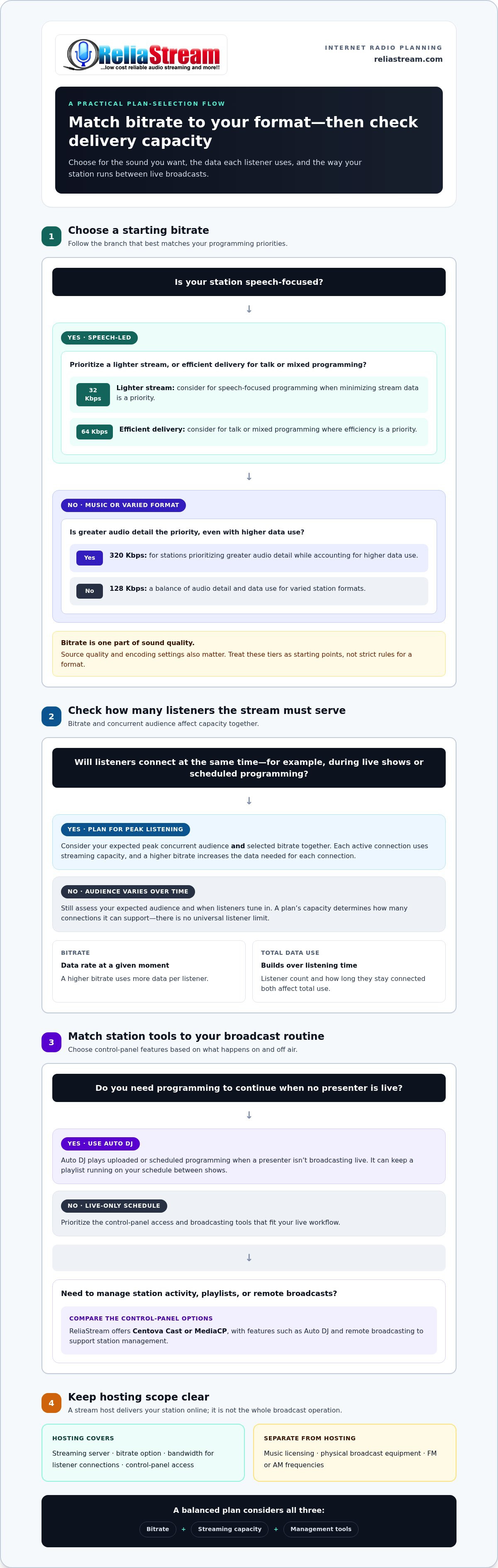
How to Choose a ShoutCast Hosting Plan for Your Station
The best fit depends on your broadcast needs, not the biggest-sounding package. Use this process to compare shoutcast hosting plans based on your station’s format, audience, and workflow.
- 1. Define your station format. Is your programming mainly speech, music, or a mix? Speech-focused content may prioritize efficient delivery, while music programming may place more value on audio detail. Use the format to narrow your bitrate options.
- 2. Estimate your audience. Use your station’s listening data to estimate typical and peak concurrent listeners. Peak connections matter for capacity planning, especially during popular live shows. Total followers alone won’t tell you how many people may be listening at the same time.
- 3. Map your broadcast schedule. Note when you broadcast live, when you rely on scheduled programming, and whether presenters need to connect remotely. A live-only schedule has different workflow needs from a station that runs playlists between shows.
- 4. Match bitrate to format and listening habits. Compare the available bitrate options against your audio priorities and your audience’s listening context. Bitrate affects data use per listener, so consider it alongside expected concurrent listening.
- 5. Separate must-haves from future needs. Identify essential tools, such as Auto DJ for scheduled programming or remote broadcasting for live presenters. Then note which features may become useful if your audience, schedule, or format changes.
- 6. Choose a control panel workflow. Consider who will organize station content, manage playlists, and monitor stream activity. ReliaStream offers Centova Cast or MediaCP access, so choose the panel that best fits your team’s routine.
- 7. Compare the plan components. Review bitrate, streaming bandwidth, control panel access, and the features that support your broadcast. Assess each component against your expected audience and workflow rather than assuming a bitrate alone determines capacity.
Quick checklist: Match your station format, peak concurrent audience, schedule, bitrate, streaming capacity, automation needs, remote broadcasting, and control panel workflow.
Plan for growth, but stay practical. A change in audience size or a shift from talk to music may affect your bitrate and capacity needs. You don’t need to select every available feature before you know it fits your station. For broader budgeting context, read the budget internet radio hosting guide.
Ready to compare options against your checklist? Explore ReliaStream hosting plans and find a setup that fits how your station broadcasts.
Explore ReliaStream ShoutCast Hosting Plans and Get On Air
Your station needs a stream that fits its format, enough capacity for its listening audience, and management tools suited to the way you broadcast. ReliaStream provides ShoutCast internet radio hosting with bitrate options from 32 Kbps to 320 Kbps, so broadcasters can match their stream to their programming priorities.
Find the plan features that fit your broadcast
Use your station checklist to narrow your options. Consider what listeners expect from speech or music programming, how many people may tune in at peak times, and whether you broadcast live, schedule playlists, or combine both. These factors help you weigh bitrate and streaming capacity without assuming one tier suits every station.
ReliaStream hosting subscriptions include streaming bandwidth and control panel access through Centova Cast or MediaCP. ReliaStream also offers Auto DJ, remote broadcasting, and SSL-secured stream links. The control panels support station management, while automation and remote broadcast tools suit different programming routines. ReliaStream has provided internet radio hosting since 2008.
For a new station, start with the essentials: a bitrate that fits your content, capacity suited to your audience, and a workflow you can manage. Revisit those choices as your schedule or listenership changes. You can plan for growth without choosing features before they fit your needs.
Start with a plan that can support your next broadcast
Compare the plan components against your checklist. Consider bitrate, streaming bandwidth, control panel access, and the features that support your broadcast routine. This turns a broad choice into a practical decision, whether you’re launching your first show or expanding an established station.
Ready to find a setup that fits your station and get your next broadcast moving? Explore ReliaStream ShoutCast hosting.
Set Your Station Up for Its Next Broadcast
The right shoutcast hosting plans balance sound quality, audience capacity, and the way you manage programming. Match bitrate to your station’s format and listeners, then consider whether Auto DJ, remote broadcasting, and SSL-secured links support your daily workflow. A suitable fit matters more than choosing the highest tier by default.
ReliaStream offers bitrate options from 32 Kbps to 320 Kbps, with control panel access through Centova Cast or MediaCP. Compare the plan components with your audience needs, broadcast schedule, and must-have tools. ReliaStream has provided internet radio hosting since 2008.
Ready to take the next step? Explore ReliaStream ShoutCast hosting plans and choose a setup that fits the way you broadcast.
Frequently Asked Questions
What are ShoutCast hosting plans?
ShoutCast hosting plans are subscriptions that deliver a station’s audio stream from a streaming server to online listeners. Plans combine a bitrate, streaming bandwidth, and management access through a control panel. Together, these components affect sound quality, stream delivery, and station workflow. Hosting carries your broadcast; it doesn’t provide music licensing, physical broadcast equipment, or FM/AM frequencies. Compare the options with your format, audience, and broadcasting routine in mind.
How do I choose the right bitrate for my ShoutCast station?
Choose a bitrate that balances the audio detail your format needs with the data used for each listener. Speech-focused stations may prioritize efficient delivery, while music-focused programming may benefit from more audio detail. ReliaStream offers 32, 64, 128, and 320 Kbps options. Consider source quality, audience listening habits, and streaming capacity together. The highest bitrate isn’t automatically the right fit for every station.
How much bandwidth does a ShoutCast radio station need?
Bandwidth needs depend on stream bitrate, concurrent listeners, and how long they listen. Each active listener receives the stream at its selected bitrate, so peak audience size is an important planning factor. Use your station’s listening data to estimate typical and peak connections, then compare those needs with the plan’s streaming capacity. A generic listener limit won’t reflect every station’s requirements.
Can a ShoutCast hosting plan support both live broadcasting and Auto DJ?
A station can use live broadcasting and Auto DJ for different parts of its schedule. A live broadcast sends a presenter’s audio feed to the stream, while Auto DJ plays uploaded or scheduled programming when no presenter is live. Remote broadcasting supports live contributions from outside the studio. These features suit stations that combine hosted shows with automated playlists.
What is the difference between Centova Cast and MediaCP for ShoutCast hosting?
Centova Cast and MediaCP are radio control panels used to manage station activity. Compare how each interface supports your regular tasks, such as monitoring streams and organizing programming. Don’t assume the panels have identical tools. Consider your day-to-day workflow and which management tasks matter most, then read the Centova Cast and MediaCP comparison for more detail.
Do ShoutCast hosting plans include SSL streaming?
SSL-secured stream links use HTTPS to encrypt the connection between the stream and compatible listening destinations. ReliaStream offers SSL-secured links for destinations that accept secure streams. Include secure-link support in your compatibility checklist alongside the websites, apps, or other destinations where listeners access your station.
Can I change my ShoutCast hosting plan as my station grows?
Your station’s needs may change as its audience, schedule, audio format, or automation workflow develops. Revisit your bitrate, peak concurrent listeners, streaming capacity needs, and control panel workflow when those factors shift. Then compare the available plan options with your updated requirements to select a setup that fits.


