

Why spend your valuable broadcasting hours wrestling with raw server daemons and finicky firewall ports just to watch your station freeze during peak drive-time traffic? Reliable audio streaming server hosting shouldn't feel like a high-wire technical act. If you want a serious internet radio presence, you need an infrastructure that stays stable when listener numbers surge, not a fragile DIY setup that drops out when it matters most.
You already know the frustration. Insecure HTTP links trigger annoying browser security warnings. Home-spun Auto DJ playlists bog down your local hardware. Worst of all, unpredictable buffering loops drive listeners away before your second track even starts. You got into broadcasting to share incredible audio, not to spend your nights troubleshooting network logs.
Discover how dedicated audio streaming server hosting powers 24/7 internet radio with zero buffering and rock-solid uptime. In this 2026 guide, we break down modern web-based control panels, native HTTPS stream delivery, and the battle-tested server architectures required to keep your station running flawlessly worldwide.
Key Takeaways
- Understand how professional audio streaming server hosting offloads raw data traffic to prevent local bandwidth bottlenecks during listener spikes.
- Compare the hidden maintenance overhead of DIY Linux servers against high-performance, managed web environments.
- Identify the core technical specifications needed to deliver crystal-clear audio up to 320 Kbps without stutter or latency.
- Discover how native SSL stream links protect your broadcast from modern browser blocks and mixed-content playback errors.
- Learn how automated Auto DJ suites seamlessly keep your station on the air when you step away from the live microphone.
What Is Audio Streaming Server Hosting and How Does It Work?
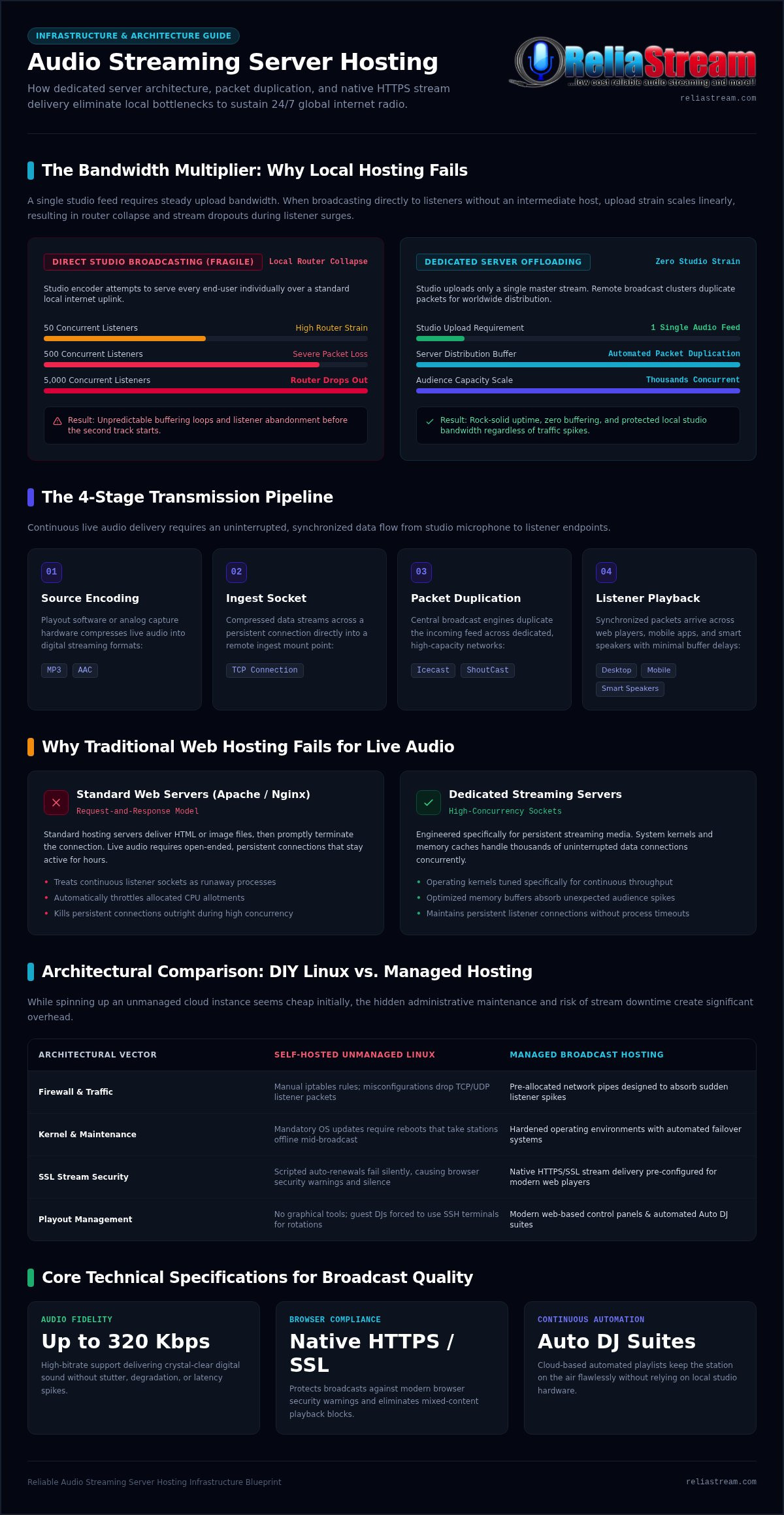
At its foundation, audio streaming server hosting is an enterprise-grade distribution framework engineered to deliver high-fidelity digital sound to thousands of simultaneous listeners without latency spikes or bandwidth collapse. If you try running an online broadcast directly from your home studio, your internet connection will choke almost immediately. A single high-definition stream consumes modest upload speed, but multiply that by fifty, five hundred, or five thousand concurrent connections. Your local router crashes. Your stream drops out. Listeners leave.
Dedicated audio streaming server hosting solves this bottleneck completely. Instead of feeding every end-user individually from your studio, your encoder uploads a single audio feed to a remote server cluster. The server receives that master signal, holds it in an optimized buffer, and splits it into identical, synchronized data streams for every connected device worldwide. This architectural pipeline relies on three moving parts: the encoder, the streaming server engine, and the media player.
The Core Mechanics: Source Client to Listener
Live audio delivery requires continuous, uninterrupted data flow from end to end:
- Source Encoding: Your studio hardware or playout software captures raw analog sound and compresses it into digital formats like MP3 or AAC.
- Ingest Socket: This compressed data travels across a persistent TCP connection straight into your server's designated ingest mount point.
- Packet Duplication: The central broadcast server, running specialized streaming media systems like Icecast or ShoutCast, duplicates the incoming stream across dedicated network pipes.
- Listener Playback: Desktop players, mobile apps, and connected smart speakers receive identical, time-aligned packets with minimal buffer delays.
Why Traditional Web Hosting Fails for Live Audio
Standard web servers simply are not built for continuous media distribution. Regular Apache or Nginx environments operate on a request-and-response loop. A visitor requests an HTML page or image file; the server delivers it and promptly closes the connection. Audio broadcasting breaks this model completely. A live radio stream requires open-ended, persistent connections that stay active for hours at a time.
When you try pushing live audio through a standard shared web host, the hosting platform treats those active sockets as runaway processes. They quickly throttle your CPU allotment or kill the connection outright. Dedicated streaming servers avoid this friction entirely. Their operating kernels and memory caches are tuned specifically for high-concurrency throughput, keeping audio streams flowing smoothly even when traffic spikes without warning.
Self-Hosted Streaming Servers vs. Managed Audio Hosting: Architectural Comparison
Every broadcaster hits a fork in the road: run your own virtual server or choose managed audio streaming server hosting? On developer forums, spinning up an unmanaged Linux box and compiling open-source streaming software sounds tempting. The direct server fee looks tiny on paper. In production, however, raw instances demand constant sysadmin maintenance that pulls you away from producing great radio.
The difference comes down to infrastructure ownership versus broadcast execution. DIY hosting forces you to act as an uncompensated network engineer. Managed hosting wraps raw streaming daemons inside hardened operating environments, graphical dashboards, automated failover systems, and pre-allocated network pipes designed to absorb sudden listener spikes.
The Hidden Overheads of Unmanaged Cloud Instances
Managing an unmanaged server quickly turns into a high-stakes maintenance chore:
- Manual Firewall Configuration: A misconfigured iptables rule can drop listener UDP or TCP packets, causing unexplained audio stutters during peak hours.
- Kernel Patch Disruptions: Mandatory OS security updates require server reboots. If you reboot during a live show, your station drops off the map.
- Silent SSL Certificate Drops: Modern web players reject unencrypted audio streams. If your auto-renewal script fails, your player displays browser security warnings and goes completely silent.
- Zero Playout GUI: Raw daemons lack graphical tools. Guest DJs must manage complicated SSH terminals just to update scheduled rotations.
Key Advantages of Turnkey Managed Radio Hosting
Managed streaming platforms solve these operational bottlenecks right out of the box. Instead of editing raw configuration files, you get instant access to robust control suites like Centova Cast or MediaCP. These platforms automate stream scheduling, deliver real-time listener geographic telemetry, and maintain persistent daemon monitors that relaunch services instantly if a process crashes.
Bandwidth stability is another major operational perk. Unmetered generic cloud VPS plans often come with restrictive acceptable-use policies. When a live broadcast goes viral, sudden traffic bursts can lead to CPU throttling or surprise bandwidth overages. Turnkey radio hosting provides predictable capacity built specifically around simultaneous listener connections.
Check out our breakdown on budget internet radio hosting for sensible, cost-efficient infrastructure decisions. If you want rock-solid streaming without the Linux headaches, exploring managed options at reliastream.com lets you focus 100% on programming while experts handle the backend plumbing.
Core Technical Specifications for Broadcast-Quality Audio Servers
Crystal-clear broadcasting isn't an accident. It requires pairing your sonic goals with the right server specifications. When picking audio streaming server hosting, you aren't just buying disk space; you're securing raw network capacity, low-latency processing, and secure socket delivery. Miss a single technical requirement, and your listeners will suffer dropped connections or silent HTML5 web players.
Three architectural pillars separate amateur setups from pro-grade webcasts: bitrate efficiency, server protocol capabilities, and strict browser transport security.
Bitrate Tiers and Codec Selection: 32 Kbps to 320 Kbps
A higher bitrate doesn't always equal a better station. The goal is balance: maximum sonic clarity matched with flawless listener reception on congested mobile networks.
- 32 Kbps to 64 Kbps (Spoken Word & Talk): Perfect for talk formats, news roundups, and sports broadcasts. Using high-efficiency AAC+ encoding at 64 Kbps delivers punchy, intelligible voice tracks while consuming minimal listener data.
- 128 Kbps (Standard Music): The longstanding workhorse tier for online radio. It provides dependable FM-quality stereo sound across MP3 streams while keeping bandwidth usage predictable.
- 320 Kbps (Audiophile Fidelity): The benchmark for transparent, dynamic audio. If you broadcast rich acoustic sets, classical recordings, or club-grade electronic music, 320 Kbps streaming ensures every crisp high and deep bass transient reaches the listener intact.
ShoutCast vs. IceCast: Picking Your Server Engine
Your streaming engine dictates how media connects to outside listeners. ShoutCast represents the legacy foundation of internet radio, delivering instant discovery through established directory networks and universal hardware player support. It's stable, familiar, and rock-solid for single-stream operations.
IceCast offers broader architectural flexibility. It allows multiple mount points on a single port, enabling you to run fallback automation channels and multi-bitrate streams simultaneously. Read our definitive analysis on ShoutCast vs IceCast to select the perfect protocol for your broadcast vision.
Native SSL Encryption and Web Player Security
Outdated streaming servers still output raw HTTP ports (like :8000 or :8002). That's a massive problem today. Modern web browsers automatically kill non-SSL audio streams embedded on HTTPS websites to prevent "mixed content" vulnerabilities. The player simply fails to start, showing no obvious error to the user.
Broadcasters must implement native SSL stream links delivered over port 443. This end-to-end encryption guarantees seamless playback across Chrome, Safari, Firefox, and smart mobile apps without triggering security blocks. Review the essential facts about SSL radio streaming to safeguard your audience access and protect your station's professional image.
How to Choose the Right Audio Streaming Server Hosting: Evaluation Framework
Choosing an infrastructure partner is the single most important operational decision you'll make for your radio station. Many providers promise unmetered bandwidth and limitless reach, only to throttle your stream the minute your audience spikes. Picking the right audio streaming server hosting means evaluating real-world throughput, software tooling, and long-term delivery channels before you broadcast a single track.
Run your potential hosting providers through this three-step technical evaluation to ensure your station stays on air, no matter how fast your listener community grows.
Step 1: Audit Bandwidth and Simultaneous Listener Requirements
Network capacity is basic math. Multiply your intended audio bitrate by your target concurrent listener count to calculate raw throughput demand. For instance, hosting one hundred simultaneous listeners at 128 Kbps requires roughly 12.8 Mbps of continuous, unthrottled upstream data. Look for providers deploying dedicated gigabit server network ports that easily absorb sudden traffic peaks without forcing buffering loops onto your audience.
Confirm the upgrade path up front. Your station will grow. Can you bump up your listener slots without enduring IP migrations or mount-point reconfigurations? Avoid platforms that slap punitive overage fees onto unexpected traffic surges instead of offering smooth, predictable capacity scaling.
Step 2: Compare Control Panels: Centova Cast vs. MediaCP
Your web control panel is your station's operational command center. It manages your media libraries, schedules jingles, tracks listener geography, and automates server-side Auto DJ playout when your live studio goes dark. The two dominant industry standards offer distinct advantages:
- Centova Cast Plans: The undisputed industry standard for rock-solid stability, precision track rotation logic, granular staff DJ account permissions, and deep audience metrics.
- MediaCP Plans: A modern, intuitive control interface with fluid playlist organization and integrated support for diverse multi-bitrate streams.
Check out our detailed breakdown in Centova Cast vs MediaCP for a direct feature-by-feature comparison.
Step 3: Verify Cross-Platform Distribution and Smart Apps
Desktop web players are merely the starting gate. Modern listeners tune into audio streams through living-room devices, smart TVs, and voice-activated digital assistants. Your audio streaming server hosting must deliver clean, standards-compliant stream URLs that integrate painlessly into custom apps for Roku, Amazon Fire TV, Apple TV, and Google TV, alongside dedicated smart speaker skills.
Learn how to expand your footprint with radio streaming app development for connected devices. Ready to skip the trial-and-error phase and build on enterprise infrastructure? Explore scalable solutions at reliastream.com to lock in rock-solid audio delivery today.
Deploying and Scaling Your Station on ReliaStream Infrastructure
Serving digital radio broadcasters continuously since 2008, ReliaStream delivers the battle-tested backbone modern station operators need. Instead of leaving you to troubleshoot connection errors alone, this infrastructure is engineered specifically for hands-off server reliability. You get instant access to fully configured ShoutCast and IceCast servers, eliminating raw command-line installs so you can start broadcasting immediately.
Flexibility sits at the center of the platform. Broadcasters can match their sonic identity and bandwidth budget precisely, choosing from a 32 Kbps Hosting Plan, a 64 Kbps Hosting Plan, a 128 Kbps Hosting Plan, or a top-tier 320 Kbps Hosting Plan for pure audiophile fidelity. Every account includes native SSL Radio Link protection right out of the box, ensuring your stream runs everywhere without browser security blocks.
Seamless Live-to-Auto DJ Handover
Running a station around the clock shouldn't tie you to your mixing board 24 hours a day. Upload your media library directly to high-speed cloud storage using your web browser or direct FTP access. From there, manage rotations, jingle drops, and station IDs using responsive playlist tools inside Centova Cast Plans or MediaCP Plans.
The magic happens during live transitions. When you connect your live studio encoder, the Auto DJ gracefully fades out and yields the mount point to your microphone. The moment your live show concludes and you disconnect, the cloud automation smoothly resumes playback without a millisecond of dead air. Your station stays alive and engaging around the clock without keeping a home computer running day and night.
Extending Reach Across Connected Living Room Ecosystems
Limiting your station to traditional browser widgets leaves massive audience growth on the table. Living rooms are the new frontier for online broadcasting. ReliaStream bridges this gap by deploying custom-branded smart TV apps directly to your audience:
- Connected TV Distribution: Reach home listeners right from their couches with dedicated apps like the Roku Radio App, Google TV App, and Amazon Fire TV App.
- Smart Voice Automation: Enable effortless voice tuning in kitchens and offices through a custom Alexa Streaming App.
- Rich Metadata Support: Transmit dynamic artist names, track titles, and album art straight to living-room television screens alongside pristine, low-latency audio.
Take your broadcast vision to the next level with dependable audio streaming server hosting built to grow alongside your audience. Launch your professional radio stream with ReliaStream today and broadcast with complete confidence.
Build Your Unstoppable Radio Station Today
Broadcasting great audio shouldn't depend on whether your home network holds up or whether a raw Linux daemon decides to crash mid-track. Dedicated audio streaming server hosting removes that friction completely. By pairing high-capacity bandwidth with zero-friction SSL audio links compatible with all modern browsers, you keep your stream fast, reliable, and accessible across every device.
Don't let technical bottlenecks hold your station back. With comprehensive control panel choices featuring Centova Cast and MediaCP, you get the automated scheduling, real-time analytics, and seamless Auto DJ transitions needed to run a world-class broadcast. Powering independent digital radio stations worldwide since 2008, ReliaStream delivers the battle-tested backbone your sound deserves. Power your radio station with robust ReliaStream hosting and bring your audio vision to listeners everywhere.
Frequently Asked Questions
Can I use standard website hosting to stream live radio?
No, standard web hosting cannot handle live radio streaming. Regular web hosts use short-lived HTTP connections built for static web pages. Live audio broadcasting requires continuous, long-lived data sockets that remain open for hours. Pushing continuous audio through standard shared hosting causes resource throttling or immediate account suspension. Dedicated audio streaming server hosting is engineered specifically for persistent data streams and high concurrent listener traffic.
What is the difference between ShoutCast and IceCast hosting?
The core difference lies in directory integration versus architectural mount point flexibility. ShoutCast is the classic standard with built-in directory indexing, making your station discoverable across legacy player software. IceCast is an open-source powerhouse that supports multiple audio mount points on a single server port. This allows you to broadcast different bitrates or switch between live audio and fallback streams seamlessly without changing ports or disconnecting listeners.
Why is an SSL certificate necessary for an audio streaming link?
Modern web browsers block unencrypted audio streams on secure websites. If your station website uses HTTPS, browsers like Chrome and Safari strictly prohibit mixed content. When you embed an insecure HTTP audio link, the browser refuses to load the player, leaving listeners with complete silence. An SSL Radio Link encrypts the broadcast connection over port 443, ensuring your HTML5 player functions across every device without security warnings or failed connections.
How much internet bandwidth does an audio streaming server require?
Bandwidth requirements scale directly based on your broadcast bitrate and concurrent listener count. Your home or studio upload connection only needs enough speed to push a single audio stream to the server. From there, the server handles listener distribution. For example, hosting one hundred simultaneous listeners at 128 Kbps demands roughly 12.8 Mbps of dedicated server throughput. Quality audio streaming server hosting provides unthrottled gigabit server ports to keep heavy traffic spikes buffering-free.
What happens to the broadcast when my live DJ disconnects?
A properly configured streaming server seamlessly switches to an automated Auto DJ playlist. When your live encoder signal drops, modern control suites like Centova Cast or MediaCP detect the silence instantly. The server immediately engages your pre-scheduled music rotation and station IDs without dropping the connection or forcing listeners to refresh their players. The transition happens server-side, protecting your broadcast from dead air while keeping your stream live around the clock.
Which audio bitrate should I choose for my radio station?
Your ideal bitrate depends on your content type and your target audience's network stability. Talk, news, and sports stations perform exceptionally well on a 32 Kbps or 64 Kbps Hosting Plan, especially when using high-efficiency AAC+ codecs. Standard music broadcasting thrives on a 128 Kbps stream for crisp FM fidelity. If your audience expects transparent, audiophile-grade dynamic range, a 320 Kbps Hosting Plan ensures studio-master sound without noticeable compression artifacts.
Can listeners tune into my stream on smart speakers and televisions?
Yes, modern audio streams easily connect to living-room devices and smart voice assistants. You aren't limited to desktop players or mobile websites. With custom smart application development, your station can stream natively on connected platforms. Broadcasters expand their daily audience reach by deploying custom apps like a Roku Radio App, Google TV App, or Amazon Fire TV App, alongside an Alexa Streaming App that lets listeners start your stream with simple voice commands.


