

What if the real key to scaling your internet radio station isn't another mobile player, but the massive screen hanging on your listener's living room wall? Staring at flatlined listener counts hurts. You're trapped in web players and buried inside crowded directory listings while listeners close browser tabs and move on. It's frustrating. Launching a dedicated amazon fire tv radio app changes that dynamic immediately. Living room streaming turns casual listeners into loyal, hours-long audiences with zero remote friction.
You might feel intimidated by complicated app store submission processes, shifting Fire OS policies, or stream buffering issues on smart TVs. You don't have to be. You'll discover how to broadcast your internet radio station directly into living rooms using a custom app built for reliable, continuous playback. We'll walk through the technical requirements, operating system changes, and simple steps needed to turn living room television screens into persistent 24/7 radio tuners.
Key Takeaways
- Connected TVs command the home entertainment space, turning idle television screens into high-retention, branded audio stations.
- Flawless living room playback starts with a rock-solid streaming backbone using secure IceCast or ShoutCast feeds built for smart TV players.
- Publishing a custom amazon fire tv radio app gives you full brand ownership and direct listener access instead of competing for attention inside crowded directory listings.
- Navigating Fire OS technical standards and Appstore submission guidelines requires clean visual assets, proper metadata, and continuous playback stability.
- Smart TV streaming is only the beginning; combining television apps with voice assistant skills locks down a complete, multi-device living room listening loop.
Why Your Station Needs a Dedicated Amazon Fire TV Radio App
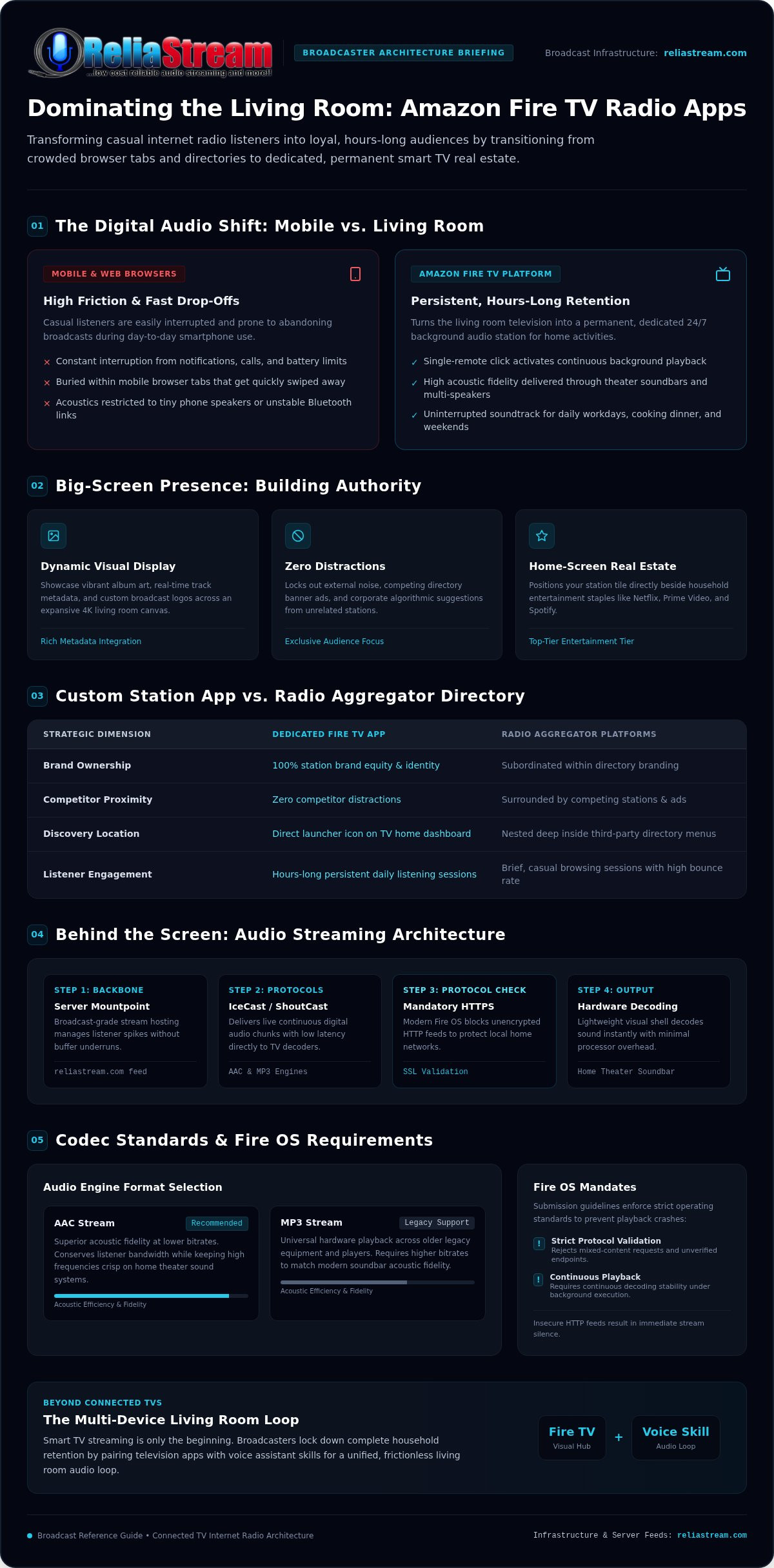
Living rooms run on connected television screens. The classic tabletop stereo is long gone, replaced entirely by smart panels and streaming devices. That shift creates an immediate opening for smart broadcasters. When you run a dedicated Amazon Fire TV radio app, you claim permanent real estate inside your listener's house. You're not tucked away in a buried mobile browser tab that gets swiped away five minutes later. You're front and center on the main home entertainment system.
Audience retention behaves completely differently on connected TVs. Mobile listeners jump between notifications, phone calls, and battery concerns. Smart TV listeners don't. Once they click your station tile with their remote, that stream stays alive for hours. Soundbars and multi-speaker theater setups turn your feed into the soundtrack for workdays, cooking dinner, and weekend get-togethers.
The Living Room Shift in Digital Audio
Smart TVs have become the modern home tuner. Viewers demand frictionless audio. They don't want to pair Bluetooth adapters, navigate tiny smartphone players, or tolerate mobile dropouts. A standalone amazon fire tv radio app delivers instant, one-click access directly through the television remote, keeping your stream running reliably in the background through every daily routine.
High-Visibility Branding on the Big Screen
Screen presence builds real authority. While commercial directory platforms push competing banner ads, corporate recommendations, and unrelated stations right beside your feed, your own custom Fire TV app locks out all external noise. It establishes pure brand equity:
- Dynamic visual display: Showcase vibrant album art, real-time track metadata, and custom broadcast logos on a massive 4K canvas.
- Zero competitor distractions: Keep your audience engaged exclusively with your programming instead of losing them to multi-station browsing directories.
- Instant home-screen discovery: Place your branded station icon directly beside Netflix, Prime Video, and Spotify on the user's primary dashboard.
Deploying your own application transforms an ordinary internet stream into a legitimate home entertainment network. It signals immediate credibility to new listeners and gives loyal fans a rock-solid, permanent way to tune in every day.
How Amazon Fire TV Audio Streaming Works Behind the Screen
Launching audio on a television screen isn't just about loading an app icon. It requires an unbroken data pipeline. An amazon fire tv radio app functions as a tailored visual shell wrapped around a dedicated media player engine. Rather than fetching bulky video files, the software pulls lightweight, continuous digital audio chunks straight from your streaming server's mountpoint, decoding sound instantly with minimal processor overhead.
Living room audio systems quickly expose weak feeds. A stream that sounds acceptable on tiny smartphone speakers can sound thin or choppy through a home theater soundbar. Low latency and reliable server bandwidth are critical. If your server cannot handle concurrent traffic spikes during peak broadcast hours, the TV player buffers, drops packets, and exits. Flawless living room delivery requires a broadcast-grade backbone, which is why pairing robust hosting from reliastream.com with a native application keeps audio rock-solid under heavy listener volume.
Streaming Engine Protocols: ShoutCast and IceCast
Your TV application relies on proven server architectures to maintain live digital audio feeds. Both ShoutCast and IceCast serve MP3 and AAC formats directly to TV hardware decoders. While MP3 offers universal playback across older legacy equipment, AAC delivers superior acoustic fidelity at lower bitrates, conserving user bandwidth without muddying high frequencies. Deciding on your stream architecture? Explore the nuances between them in ShoutCast vs IceCast to choose the right match for your broadcast goals.
The Crucial Role of HTTPS and Secure Streams
Unencrypted audio feeds are dead in the water on modern connected TV hardware. Amazon Fire OS strictly regulates media connections to protect local home networks. If your stream mountpoint points to an insecure HTTP URL, the operating system blocks the audio pipeline entirely, resulting in silence or instant application crashes.
- Strict protocol validation: Amazon Fire TV devices running modern Fire OS versions reject mixed-content requests and unverified endpoints.
- Persistent streaming stability: Encrypted HTTPS streams prevent mobile broadband and home ISP firewalls from throttling or interrupting audio data.
- Appstore compliance: Passing Amazon Appstore automated security scans requires clean, secure media connections across every deployment target.
Getting your security protocol configured properly from day one prevents silent app failures. To safeguard your transmission architecture, dig into the essential mechanics of SSL radio streaming before submitting your build.
Custom Station Apps vs. Radio Aggregator Directories
Most internet broadcasters take the path of least resistance early on: submitting their stream URL to massive multi-station directory apps. It feels like an easy win. You get an immediate listing, basic search functionality, and existing ecosystem traffic without writing a single line of code. But convenience comes with severe compromises that choke your long-term growth.
Directory platforms are built to serve themselves, not your station. When someone opens a multi-station portal to find your channel, they are immediately greeted by competing recommendations, flashing banner ads for rival media outlets, and generic category pages. A dedicated amazon fire tv radio app eliminates every layer of that friction. You own the listener's entire visual and sonic universe the moment they click your tile.
The Hidden Pitfalls of Directory Aggregators
Submitting to aggregators hands over complete control of your listener's first impression. These platforms monetize your broadcast audience without cutting you in:
- Forced pre-roll ads: Aggregators frequently inject their own 30-second commercial interruptions before your stream connects, alienating incoming listeners.
- Station hopping: If your show takes a brief pause or airs a quiet transition, the platform's algorithm immediately suggests rival stations right on the screen.
- Generic visual presence: Your hard-earned visual identity gets compressed into a tiny square thumbnail surrounded by thousands of competing logos.
Why Dedicated Station Apps Win Listener Loyalty
A standalone application changes how audiences perceive your brand. Instead of searching through endless menus, your fans access your stream with a single click from their Fire TV home ribbon. There are no competing recommendations, no platform fees siphoning your sponsor impressions, and no algorithmic distractions pulling listeners away. You control the background artwork, station announcements, and commercial breaks.
Retaining direct access matters. When you eliminate third-party intermediaries, you can partner directly with local or niche sponsors and grant them full visibility across your TV display interface. Understanding the strategic business advantages of native releases helps clarify why professional radio streaming app development delivers significantly higher audience lifetime value than remaining hidden inside directory search bars. Building an owned channel puts you in charge of your broadcast future.
How to Build and Launch Your Amazon Fire TV Radio App
Releasing a channel on television screens requires a practical deployment plan. You don't need a massive software engineering firm, but you do need attention to detail. Amazon enforces strict technical and interface standards before approving any live application. Rushing an unpolished package to the Appstore leads to rejected submissions, broken layouts, and frustrating audio dropouts. Setting up your custom amazon fire tv radio app the right way comes down to three focused phases.
Step 1: Solidify Your Audio Hosting Foundation
Your streaming pipeline must remain bulletproof before touching application code. Fire TV players demand constant stream availability. Equip your station with guaranteed server bandwidth, continuous 24/7 AutoDJ automation, and proper metadata encoding. Dynamic metadata injection ensures track titles and artist names populate accurately across wide screens. Whether you deliver crystalline audio using high-bitrate feeds or optimize delivery through efficient low bitrate radio hosting, baseline stream reliability dictates user retention.
Step 2: Design Big-Screen Visual Assets
Television interfaces require a unique design approach. Phone screens sit inches from the user's face, but TVs operate across a 10-foot viewing distance. High contrast and uncluttered visuals are essential:
- Safe-zone compliance: Build 1920x1080 full HD backgrounds keeping core text and logos within central display boundaries to prevent TV bezel clipping.
- High-resolution iconography: Produce sharp square launcher badges and horizontal landscape banners tailored for the Fire OS home grid.
- Remote-friendly navigation: Structure menu controls for intuitive directional-pad navigation, ensuring users can start listening with two clicks.
Step 3: Develop, Test, and Submit to the Amazon Appstore
Once audio sources and graphics align, assemble the native media player package. Testing on physical hardware is mandatory. Fire TV Stick and Fire TV Cube units run specialized Fire OS builds that handle memory differently than standard mobile devices. Sideload your test build onto a physical device to audit remote-control responsiveness, verify stream reconnection after network drops, and confirm visual scaling.
Submitting through a free Amazon Developer account is the final hurdle. You will provide store metadata, privacy policy URLs, and content ratings for catalog certification. If building, configuring, and maintaining native TV software feels outside your wheelhouse, you don't have to tackle it alone. You can deploy a turnkey Amazon Fire TV App through ReliaStream and let experienced broadcast specialists handle development, store approval, and ongoing OS compatibility updates from day one.
Expanding Your Living Room Ecosystem Beyond Fire TV
Deploying a native television presence is an incredible milestone, but modern home entertainment doesn't end with a single screen. Securing your own amazon fire tv radio app anchors your brand in the living room, yet complete audience capture requires reaching listeners across every device they interact with throughout the day. Diversifying your footprint turns occasional listeners into habit-driven daily fans.
Modern households use a mix of technology. A listener might catch your morning show on a smart speaker in the kitchen, stream your midday music block via a connected TV in the home office, and relax with your evening broadcast in the living room. Broadcasters who integrate complementary distribution channels build a persistent listening loop that keeps their programming within arm's reach at all times.
Voice Integration with Alexa Skills
Amazon Fire TV remotes double as voice controllers powered by Alexa. That voice integration creates an effortless transition for your audience. Pairing your television presence with a dedicated Alexa voice skill allows listeners to summon your station hands-free without even touching a directional pad. When the TV screen is turned off to save power, users can simply speak a direct voice command to resume your live feed through any paired smart speaker, eliminating interface friction entirely.
Unified Management with Professional Control Panels
Broadcasting across multiple connected platforms shouldn't mean multiplying your administrative workload. A unified server architecture feeds all of your destination endpoints simultaneously:
- Single stream ingestion: Send one reliable audio feed from your studio to power your smart TV applications, mobile listeners, and voice assistant skills at once.
- Synchronized automation: Manage rotating sponsor drops, station IDs, and playlist schedules from a single web dashboard.
- Comprehensive analytics: Track total concurrent listeners and geographic reach across all connected hardware from one centralized interface.
Selecting the right administration engine keeps this cross-platform distribution simple. Compare your management software options inside Centova Cast vs MediaCP to pinpoint the best control panel for scheduling content, tracking listeners, and powering your multi-device broadcast network without technical headaches.
Take Your Station Directly into the Living Room
The living room audience is waiting. Transitioning from buried directory listings to an owned, big-screen channel transforms casual browsers into dedicated daily listeners. A secure audio stream paired with clean, remote-friendly visual layouts turns idle television displays into permanent broadcast hubs.
You don't have to wrestle with Fire OS code or Appstore certification hurdles on your own. Powering global internet radio stations since 2008, ReliaStream delivers rock-solid ShoutCast and IceCast hosting with 99.9% uptime. When you're ready to modernize your reach, launch your custom Amazon Fire TV radio app with ReliaStream. With turnkey custom app development for Fire TV, Roku, and Google TV, deploying your brand on smart televisions is fast and straightforward.
Stop leaving your station's growth to chance. Put your stream where listeners spend their evenings, flip on the tuner, and build the audience your sound deserves.
Frequently Asked Questions
Can I turn an existing web radio stream into an Amazon Fire TV app?
Yes, you can easily convert any standard IceCast or ShoutCast feed into a television channel. The software acts as an audio player interface that connects directly to your existing stream mountpoint. Your current server encoder keeps running without changes, while the application provides the visual branding, remote navigation, and playback controls tailored for big screens.
Do I need an active Amazon Developer account to publish a Fire TV radio app?
Yes, submitting an application to the official store requires an active Amazon Developer account. Standard developer registration is free and gives you access to the developer console for uploading builds, submitting screenshots, and setting distribution territories. If you work with a managed app builder, they often handle these technical catalog submissions on your behalf.
Why is an SSL secure stream link required for modern smart TV apps?
Operating systems running on modern Fire TV hardware reject unencrypted media connections by default. Standard HTTP streams trigger built-in security blocks, causing the player to throw silent network errors or fail entirely. A secure HTTPS connection validates the audio transmission pipeline, guaranteeing uninterrupted playback and hassle-free Amazon Appstore policy approvals.
What audio bitrate works best for streaming radio on Amazon Fire TV?
A 128 Kbps stereo stream provides the sweet spot between acoustic fidelity and buffer resistance. Home theater soundbars reveal audio compression much faster than phone speakers, making clean encoding essential. For high-fidelity music broadcasts, a 320 Kbps stream delivers premium clarity, while speech-heavy talk radio performs reliably at 64 Kbps or 32 Kbps without consuming unnecessary bandwidth.
How do listeners find and install my station app on their Firestick?
Listeners search for your station name directly through the Amazon Appstore interface or using Alexa voice search on their remote control. Once they select your custom amazon fire tv radio app tile, the device installs it in seconds. After installation, the station icon sits permanently on their home apps ribbon for one-click access.
Can my Fire TV radio app display live song titles and album cover art?
Yes, native TV applications pull dynamic metadata directly from your streaming server feed. When your automation system sends artist and track information, the app displays that text on screen in real time. Advanced configurations can also fetch matching high-resolution album art from web databases, giving listeners an eye-catching visual experience while music plays.
What happens if my stream disconnects while someone is listening on television?
A properly coded TV application features automated reconnect logic to recover quickly from minor network drops. Rather than crashing or forcing the user back to the home screen, the player pauses, attempts immediate re-buffering, and resumes the live broadcast. Solid server hosting minimizes these interruptions by providing stable, redundant network paths.


