

A station that streams around the clock still won’t build an audience on autopilot. Auto DJ internet radio hosting can keep scheduled audio playing while you’re away from the studio, but it can’t define your format, earn listener trust, or resolve music rights questions. How can you keep a small station consistent without turning it into a second full-time job?
Automation can reduce routine broadcasting work and leave more time to plan live shows and connect with listeners. This guide explains what Auto DJ can handle, what still needs your attention, and how to compare income options for a modest audience. It also covers hosting choices, rights considerations, and a practical way to test your station concept. ReliaStream offers Auto DJ access through Centova Cast or MediaCP, options to consider after you’ve identified your needs. The goal isn’t overnight growth. It’s a dependable setup you can improve one show, listener, and experiment at a time.
Key Takeaways
- Separate the automation software, streaming host, listener-facing station, and revenue model so you can assess each part of your setup.
- Use auto dj internet radio hosting to support a consistent schedule, then choose sponsorships, memberships, donations, or affiliate partnerships that fit your audience.
- Compare ShoutCast or IceCast hosting by checking control panel options, Auto DJ functions, SSL links, and the support you may need.
- Build a testable workflow: set station goals, review panel instructions and audio requirements, schedule programming, test the stream, and review results.
- Match hosting requirements to concurrent listeners, bitrate, listening patterns, and workflow instead of guessing at capacity.
What Auto DJ internet radio hosting does, and what it cannot do
Auto DJ is software that schedules and plays uploaded audio while a presenter is offline. Paired with a streaming host, it can keep planned programming on air between live shows without requiring someone to operate the station continuously. It’s useful infrastructure, not a complete station-in-a-box. For broader background on what internet radio is, see Wikipedia’s overview.
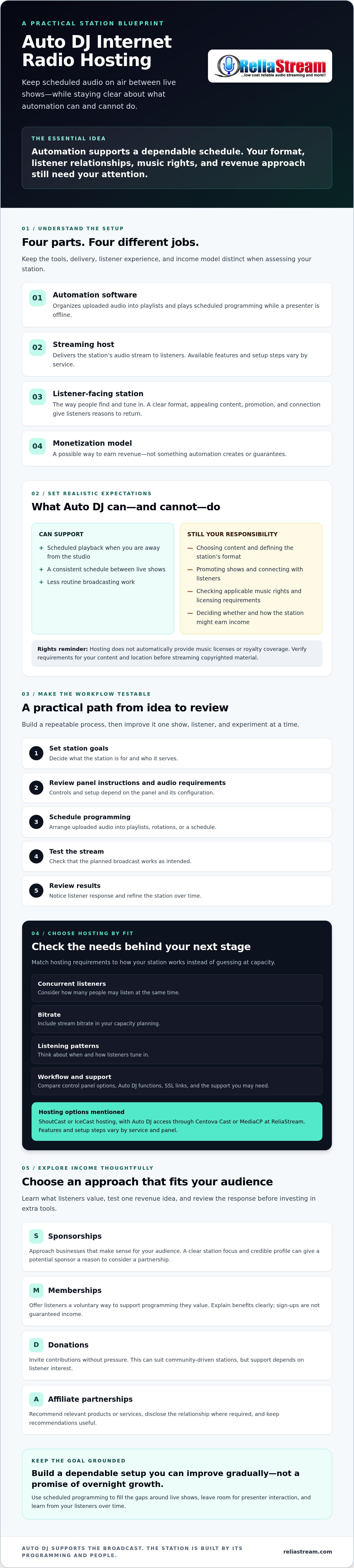
Think of the setup as four distinct parts:
- Automation software organizes and plays scheduled audio.
- Streaming host sends the station’s audio stream to listeners.
- Listener-facing station is how people find and tune in to your broadcast.
- Monetization model is how you may earn revenue, if your audience and approach support it.
In short, Auto DJ hosting can help deliver scheduled programming; it does not generate station revenue or guarantee an audience. Listeners still need a reason to tune in and return: a clear format, appealing content, promotion, and a connection with the people behind the station.
How Auto DJ keeps a station playing between live shows
Upload audio, arrange it into playlists, and set a rotation or schedule so tracks and recorded segments play in the order you choose. The available controls depend on the panel and its configuration, so check the instructions before building your schedule. Auto DJ handles unattended playback; a live broadcast gives a presenter room to speak, respond, and shape the moment. The two can work together, with scheduled programming filling the gaps around live shows.
What hosting handles, and what the broadcaster remains responsible for
At a high level, hosting delivers the stream, while a control panel provides tools to manage settings and, where included, Auto DJ. Features and setup steps vary by service and panel. For example, ReliaStream provides ShoutCast and IceCast hosting with Auto DJ access through Centova Cast or MediaCP. These tools support broadcasting, but they don’t define your station or build its audience.
You remain responsible for selecting content, promoting shows, connecting with listeners, and deciding how the station might earn income. You also need to check which music rights apply to your content and location. Hosting doesn’t automatically provide music licenses or royalty coverage. Verify requirements in your jurisdiction before streaming copyrighted material.
Build an internet radio income model around a real audience
Automation can make your schedule more dependable. It can’t bring listeners in, persuade a sponsor to invest, or guarantee that anyone will contribute. Income depends on audience fit, consistent programming, promotion, and execution. Start by learning who listens and what they value, then test one revenue idea before paying for extra tools.
For a small station, consider a model that suits both your content and your community:
- Sponsorships: Approach businesses that make sense for your audience. A clear station focus and credible profile give potential sponsors a reason to consider a partnership.
- Memberships: Give listeners a voluntary way to support programming they value. Explain the benefits clearly, and don’t count on sign-ups as guaranteed income.
- Donations: Invite contributions without pressure. This can suit community-driven stations, but support depends on listener interest.
- Affiliate partnerships: Recommend relevant products or services, and clearly disclose the relationship where required. Keep recommendations useful, not just promotional.
Choose a model that fits your station
Don’t try every option at once. A specialist music show might explore a relevant sponsor, while a station built around a close-knit community could invite voluntary donations. Test one approach with a simple, clear message. Review the response before investing in extra services or building a more elaborate revenue setup.
If you’re sorting out online broadcasting requirements in the U.S., the FCC guide to online content can help clarify the agency’s role. It doesn’t answer every question about music rights or advertising disclosures, so check the rules that apply to your content and location.
Turn consistent programming into a listener habit
Build a repeatable schedule around a specific interest or community. For example, plan a regular themed block and use Auto DJ to fill its scheduled airtime when you can’t host live. This gives listeners a more predictable experience while leaving room for live shows to bring personality and interaction.
Track returning listeners and engagement over time. Ask what people value, note which scheduled programs draw a response, and use those signals to decide whether to adjust the format or test a revenue idea. Auto DJ internet radio hosting can support a dependable programming routine, but the station still needs your editorial judgment and follow-through. To plan the infrastructure for that routine, review internet radio hosting options alongside your programming needs.
Compare the tools behind Auto DJ internet radio hosting
Make two separate decisions: which streaming protocol to use and which control panel to manage. ShoutCast and IceCast are streaming technology options. Centova Cast and MediaCP are control panels for managing station functions. The right combination depends on your encoder, directory listings, listener apps, and day-to-day workflow. No option is universally best.
That flexibility is part of what has democratized broadcasting. With more options, it pays to check how each part fits your station before committing.
| Component | What to compare | Questions to ask |
|---|---|---|
| Streaming technology | ShoutCast or IceCast | Does it work with your encoder, preferred directories, and the apps or players your listeners use? |
| Control panel | Centova Cast or MediaCP | Can you find the scheduling, media management, live handoff, and reporting tools your workflow needs? |
| Auto DJ | Panel-specific automation tools | Can you organize and schedule audio for your programming plan? Verify current functions and setup instructions. |
| SSL | Secure stream link availability | Does the hosting setup provide an SSL-secured link, and will it work with your intended player or app? |
| Support | Guidance for your setup | What help is available for the protocol, panel, and configuration you plan to use? |
ShoutCast or IceCast: assess the streaming setup
Start with your encoder and the places listeners will tune in. Check which protocol your broadcast software supports, whether your chosen directories accept the stream, and whether your planned player or app can connect. A comparison such as “ShoutCast vs IceCast” can help organize those questions, but confirm compatibility with the specific tools in your setup.
Centova Cast or MediaCP: choose a manageable control panel
ReliaStream provides hosting with Auto DJ access through Centova Cast or MediaCP. Don’t assume the panels have identical features or workflows. Check the latest instructions and compare how each handles your key tasks: playlist scheduling, media organization, switching between Auto DJ and live broadcasting, and reviewing available reports. The Centova Cast vs MediaCP comparison guide is a useful next reference; verify details against current documentation before deciding.
Make a short list of must-haves, then test how easily you can complete those tasks in the panel you’re considering. A straightforward workflow matters. If scheduling or live handoff feels confusing, routine station management can become harder than it needs to be.
Set up and test a practical Auto DJ radio workflow
A reliable routine starts before you upload a playlist. Decide what the station should deliver, then configure and test each step before promoting the stream. Setup varies by hosting service and control panel, so follow the current panel instructions rather than assuming settings or controls are identical.
- Set a station goal. Define your format, intended audience, and planned mix of scheduled programming and live shows.
- Choose hosting and a control panel. Match your streaming and management needs, then confirm the provider’s requirements and setup guidance.
- Check the technical requirements. Verify accepted audio formats, stream settings, encoder compatibility, and panel-specific instructions before configuring the station.
- Build the schedule and library. Organize audio into purposeful blocks that suit your format. Review file quality, metadata, and transitions, and confirm that you have the rights needed for the content you plan to broadcast.
- Test, listen, and review. Check scheduled playback, the stream link, live handoff, and SSL access if configured. Listen on the devices and from the locations your intended audience uses, then review engagement and operational issues before making changes.
Prepare a schedule, library, and fallback plan
Give each playlist a purpose. Group music or recorded segments by theme, mood, or show block, and make sure the sequence suits your audience. Check for missing or mislabeled files and abrupt transitions. Plan how presenters will take control for a live show and how Auto DJ will resume afterward. Write down the panel steps and a fallback action in case a scheduled item or handoff doesn’t work as expected.
Run a launch test and review the results
Don’t rely on a single check from the studio. Open the stream on common phones, computers, or speakers your audience may use, and test from different locations where practical. Ask a small test audience specific questions: Did the stream open? Was the audio clear? Did scheduled content and live transitions play as intended? Record responses, technical problems, and unresolved content-rights questions.
Use what you learn to make one change at a time. A schedule adjustment may solve a programming gap; an encoder or stream-setting issue needs a different fix. Review listener engagement alongside technical notes before changing your format or monetization approach. If you’re ready to match hosting to your workflow, explore internet radio hosting options with Auto DJ access through Centova Cast or MediaCP.
Choose hosting that can support your station's next stage
Choose hosting based on what your station needs to deliver, not a guessed listener target. Consider expected concurrent listeners, stream bitrate, typical listening time, and whether Auto DJ, live broadcasts, or both will shape your workflow. Capacity needs depend on how those factors combine, so check plan limits and stream details before choosing.
Stream quality is part of the decision. ReliaStream offers hosting plans at 32, 64, 128, and 320 Kbps, alongside ShoutCast and IceCast hosting with Auto DJ access through Centova Cast or MediaCP. Match bitrate and management tools to your audience’s listening needs and your workflow. Hosting provides infrastructure for scheduled broadcasts, but it can’t guarantee listener growth, stream performance in every circumstance, or revenue.
Know when to upgrade or add listener access options
Reassess your setup when audience demand changes, you encounter stream performance issues, or your operating routine no longer fits the current arrangement. Review listener patterns and the provider’s documented limits before changing plans. If listeners ask for more ways to tune in, custom apps for Roku, Google TV, Amazon Fire TV, or Alexa may be a later-stage way to extend access. They’re optional, not a substitute for a clear format or active audience-building. For details on that route, look for the radio streaming app development guide.
Evaluate a provider before committing
Use a practical checklist. Confirm supported streaming protocols, control panel access, Auto DJ workflow, SSL options, and how plan limits are documented. Ask how configuration questions are handled and where to find current instructions. Check that the setup fits the encoder and listening options you plan to use rather than assuming every combination will work the same way.
Before comparing providers, write down your requirements: expected concurrent listeners, bitrate, listening patterns, scheduling needs, and whether you plan to run live shows. Then compare those needs with the available plan information. This makes it easier to spot a mismatch before it becomes a daily headache.
If ReliaStream’s ShoutCast or IceCast hosting and Auto DJ access through Centova Cast or MediaCP fit your checklist, review the available hosting options and compare their details with your station’s needs.
Build a Station You Can Sustain
Auto dj internet radio hosting can keep scheduled programming moving while you focus on live shows, audience relationships, and a realistic income plan. It’s infrastructure, not a shortcut to listeners or revenue. Choose your stream and control panel around your workflow, test the setup on the devices your audience uses, and refine it based on real feedback.
ReliaStream has operated since 2008 and provides ShoutCast and IceCast hosting with Auto DJ access through Centova Cast or MediaCP. Compare those options with your station’s needs, including listener capacity, stream quality, and how you plan to manage programming.
Ready to explore a setup that fits your next step? Explore ReliaStream radio hosting options and review the available details before choosing. Start with a clear format, make steady improvements, and give your station room to grow.
Frequently Asked Questions
What is Auto DJ internet radio hosting?
Auto DJ internet radio hosting combines scheduled audio playback with a service that delivers your station’s stream to listeners. You upload audio and use a control panel to organize playlists or schedules, depending on its available features. The hosting setup handles streaming delivery, while you remain responsible for programming, promotion, audience relationships, and any required content rights. Auto DJ supports consistent broadcasting, but it doesn’t automatically attract listeners or generate income.
Can you make money from an internet radio station?
Yes, an internet radio station can earn income, but revenue isn’t guaranteed. It depends on factors such as audience fit, consistent programming, promotion, and execution. Potential approaches include sponsorships, listener memberships, donations, and relevant affiliate partnerships. Start by identifying who your station serves, then test one suitable option and pay attention to listener response before adding tools or expanding your plans. A reliable stream supports the work, but it isn’t a business model on its own.
How does Auto DJ help an internet radio station earn income?
Auto DJ can support income efforts indirectly by playing scheduled programming when a presenter is offline, helping maintain a planned listener experience. That consistency may support audience habits and make it easier to deliver agreed programming to potential sponsors. It doesn’t sell ads, secure sponsors, or guarantee audience growth. You still need to choose suitable content, promote the station, build listener trust, and test whether a revenue approach fits your audience.
Do I need a music licence to run an internet radio station?
If you plan to stream copyrighted music, you may need licenses or other permissions. Requirements depend on your location, content, and type of broadcast. Don’t assume that a hosting subscription covers music rights. Check current guidance from the relevant rights organizations or a qualified adviser in your jurisdiction before streaming. ReliaStream provides radio hosting and Auto DJ access, but it doesn’t sell music royalty licensing.
Which is better for Auto DJ hosting, ShoutCast or IceCast?
Neither ShoutCast nor IceCast is universally better for Auto DJ hosting. Both are streaming technology options, and the right fit depends on your encoder, hosting setup, directory listings, and the players or apps your listeners use. Check compatibility across those parts before choosing, and consider the control panel separately from the streaming protocol. ReliaStream supports ShoutCast and IceCast hosting, with Auto DJ access through Centova Cast or MediaCP.
Can Auto DJ play music while I am offline?
Yes, Auto DJ can play scheduled audio while you’re offline if it’s configured through a hosting setup that supports the feature. You typically upload audio, organize playlists, and set a schedule using the control panel. Controls and setup steps vary, so check the current panel instructions and test playback before relying on it. Auto DJ handles planned playback; live shows can still add presenter interaction and personality to your station.
How do I choose an Auto DJ hosting plan for my radio station?
Choose based on expected concurrent listeners, stream bitrate, listening patterns, and how you’ll manage scheduled and live programming. Check the plan’s documented capacity and confirm it supports your streaming protocol, control panel, Auto DJ workflow, and any SSL needs. Avoid choosing based on a guessed audience estimate alone. ReliaStream offers ShoutCast and IceCast hosting with Auto DJ access through Centova Cast or MediaCP, so compare the available details with your station’s requirements.


