

The right online radio server hosting setup isn’t necessarily the one with the biggest listener figure on a plan page. It’s the one that matches your audience and broadcast workflow while delivering the audio quality you need. A server label alone won’t tell you that.
It’s easy to mix up streaming server software with the company hosting it, or to wonder whether your setup can handle live shows, scheduled playlists, and secure stream links. Compare the whole setup, not just one feature. This guide explains how radio hosting works and what to check before choosing a provider.
We’ll break down SHOUTcast and Icecast, bitrate and listener capacity, plus control-panel features such as AutoDJ and stream security. You’ll also learn what to confirm about plan details and workflow before moving your station online. ReliaStream has provided SHOUTcast and Icecast hosting since 2008, with bitrate options from 32 to 320 Kbps and control-panel choices including Centova Cast and MediaCP. Let’s find a setup that fits the way you broadcast.
Key Takeaways
- Understand how audio moves from your live or playlist source through a streaming server to listeners.
- Estimate audience demand and compare it with bitrate, since simultaneous connections affect delivery needs.
- Compare server software, control panels, AutoDJ, SSL, support, and scaling, then verify what each plan includes.
- Use a practical checklist to assess online radio server hosting, including stream security, reliability details, and provider terms.
- Match hosting capabilities to your workflow, whether you broadcast live, schedule playlists, or combine both.
What Is Online Radio Server Hosting, and What Does It Actually Handle?
Online radio server hosting is a service that receives a station’s encoded audio stream and distributes it over the internet to connected listeners. It provides the streaming destination and delivery infrastructure, while the station supplies the audio and programming. In short, hosting helps get your broadcast out, but it doesn’t create the show.
Internet radio delivers audio through internet connections rather than a public AM or FM frequency. For a broader overview of the format and its history, see Internet radio. Radio hosting is also different from website hosting: a website may promote your station or provide a player, but the streaming server handles live audio connections. It isn’t physical broadcast hardware, either.
What happens between the broadcaster and the listener?
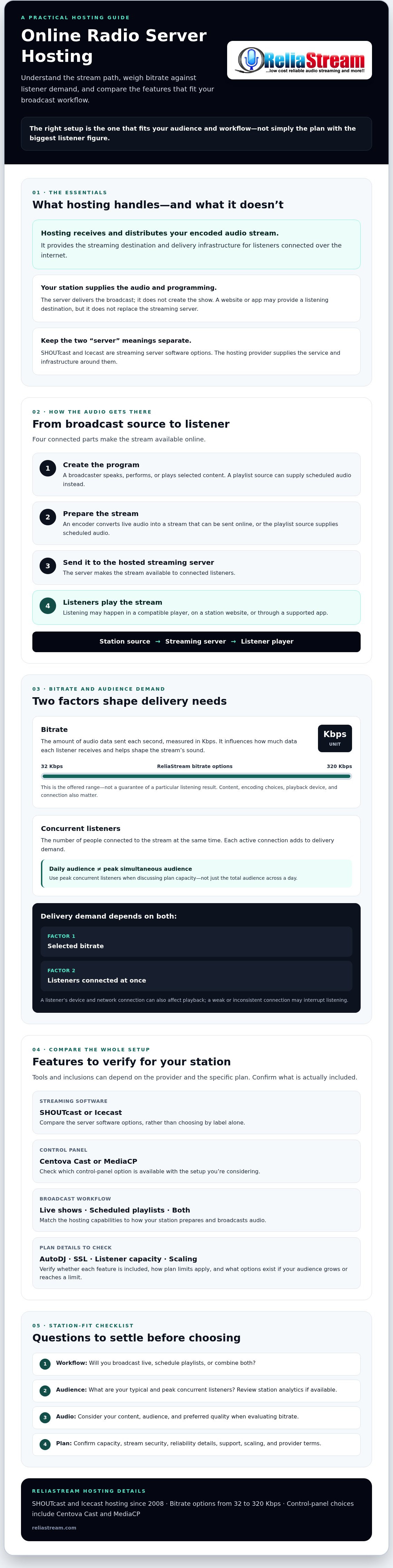
The process has four parts. First, the broadcaster speaks, performs, or plays selected content. An encoder converts live audio into a stream that can be sent online, or a playlist source supplies scheduled audio. That source connects to the hosted streaming server, which makes the stream available to listeners. A listener presses play in a compatible player, on a station website, or through a supported app.
The server delivers the audio, not the programming. The station remains responsible for what goes on air and how its live or scheduled content is prepared. A website or app can be a listening destination, but it doesn’t replace the streaming server behind the broadcast.
What does a radio hosting subscription typically manage?
A subscription commonly provides access to streaming server resources, stream distribution, and a control panel for managing parts of the service. Depending on the provider and plan, tools may also support automated playlists or secure stream links. Don’t assume a feature is included just because it appears on a provider’s general service page. Confirm the details for the specific subscription you’re considering.
ReliaStream offers SHOUTcast and Icecast hosting, with control-panel options including Centova Cast and MediaCP. Confirm the available setup and plan inclusions directly. For a closer look at how the two server software options differ, read this SHOUTcast versus Icecast comparison. Understanding the division of responsibilities makes it easier to compare what providers actually deliver, not just the server name.
How Bitrate, Listener Connections, and Stream Delivery Work Together
Bitrate is the amount of audio data sent each second, measured in Kbps. It influences how much data each listener receives and helps shape the stream’s sound, but it doesn’t guarantee a particular listening result. The connection, playback device, and encoding choices matter too.
Think of each listener as receiving a copy of the same stream. Concurrent listeners are the number of people connected to a stream at the same time. Hosts ask about audience size because each active connection adds to delivery demand. A station’s total audience over a day is different from its peak simultaneous audience.
The stream travels from the encoder or playlist source, through the streaming server, to each listener’s player. How Internet Radio Works explains these core roles. A listener’s device and network connection can also affect playback. A weak or inconsistent connection may interrupt listening even when the station’s source audio is steady.
How should a broadcaster think about bitrate?
ReliaStream offers bitrate plans ranging from 32 Kbps to 320 Kbps. That range gives broadcasters options to evaluate, not a promise that one setting will sound a certain way in every situation. A spoken-word station may weigh voice clarity and data use differently from a music station. Consider your content, audience, and preferred quality together. For more detail, see the 320 Kbps radio streaming guide.
Why does listener demand affect hosting capacity?
Every active listener receives the stream, so demand depends on both the selected bitrate and the number of people connected at once. Don’t size a setup using a guess alone. Review station analytics, if available, and estimate typical as well as peak concurrent listeners. If you’re launching without that history, identify the audience you expect and ask the provider how its limits apply.
Before selecting online radio server hosting, confirm the plan’s listener capacity and what happens if your audience grows or reaches its limit. Ask whether scaling options are available and how a change would work. Don’t assume a bitrate option, control panel, or general claim of scalability confirms a specific capacity for your subscription.
To review the available bitrate options, visit ReliaStream radio hosting and confirm current plan details with the provider.
Which Radio Hosting Features Matter Most When Comparing Providers?
Compare the setup as a working broadcast system, not a list of buzzwords. Server software, control-panel access, automation, secure links, support, and capacity all affect how you run a station. For a refresher on the encoder, server, and player in the streaming chain, see How Internet Radio Works. Then use these questions to check what each provider actually includes.
| Feature | What to compare |
|---|---|
| Server software | Does the provider offer SHOUTcast, Icecast, or both, and will your encoder and players work with the option? |
| Control panel | Which panel is available with your specific plan, and what can you manage through it? |
| AutoDJ | Can you schedule playlists, and what setup or controls are included? |
| SSL | Is the listener stream link SSL-secured? Ask what security claims cover beyond the stream URL. |
| Support | Which support channels are available, and what help is provided for setup or troubleshooting? |
| Scaling | What listener limits apply, and how can you change capacity if your audience grows? |
How do SHOUTcast and Icecast fit into the choice?
SHOUTcast and Icecast are streaming server software options, not complete hosting decisions. Compare them with your encoder, listener players, and station workflow. ReliaStream offers both, but confirm compatibility and plan details for your intended setup. Neither option is automatically right for every station. For a closer look at secure stream links, read the SSL radio streaming guide.
What do control panels and AutoDJ help you manage?
Control panels such as Centova Cast or MediaCP provide tools for managing a hosted station. AutoDJ can play scheduled playlists when you’re not broadcasting live, making it useful for automated or mixed live-and-scheduled workflows. Ask the provider which panel your plan uses, whether AutoDJ is included, and what playlist setup involves. Don’t assume a feature is available at every plan level just because it appears in general marketing.
Use the same discipline for support and scaling. Ask specific questions, then confirm the answers against the subscription details before choosing online radio server hosting. A feature name is a starting point, not proof of what your station will receive.
How to Evaluate Radio Hosting Security, Reliability, and Support
Clear service details are more useful than broad promises. Before choosing online radio server hosting, assess what your station needs, then ask each provider the same questions so you can compare answers rather than marketing language.
- Map your broadcast needs. Note when you go live, whether you use scheduled playlists, where listeners tune in, and what level of interruption your workflow can tolerate.
- Check stream-link security. Ask whether HTTPS or SSL-secured stream links are available for your intended players, website, or apps. Confirm the exact link format and compatibility with your listening destinations.
- Ask about account access. Find out how control-panel credentials are managed, whether you can set up separate user access, and what steps are required to recover an account. A secure stream link is not the same as protection for your account or the provider’s infrastructure.
- Review reliability information. Ask what uptime information the provider publishes, what it covers, and how service interruptions are reported. Don’t treat broad terms such as “reliable” or “high availability” as a substitute for specific service details.
- Check support and escalation. Confirm available contact methods, support hours, help resources, and how urgent issues are escalated. Make sure the stated process fits your live broadcast schedule.
- Confirm everything before subscribing. Compare the provider’s answers with the plan details and service terms. Get any important feature or support clarification in writing.
What should you verify about stream security and access?
SSL-secured links help secure the connection between a stream and compatible listening destinations, but SSL alone doesn’t secure every part of a station. Ask separately about account credentials, user permissions, and account recovery. Also confirm which links are available on the plan you’re considering. Don’t assume a general security statement answers these practical questions.
How can you assess reliability and customer support?
Look for details you can evaluate: published uptime information, the scope of any service terms, interruption notifications, support contact options, and escalation steps. If you run scheduled live shows, ask how the support process works during those broadcast windows. Avoid assuming support hours, response times, or uptime commitments that the provider hasn’t confirmed.
Before choosing, ask: Are SSL-secured stream links available for my listening destinations? How are panel access and account recovery handled? What uptime information and service terms apply? How will interruptions be communicated? Which support channels and hours are offered, and how are urgent issues escalated?
For hosting options to review against these questions, explore ReliaStream radio hosting and confirm the details that matter for your station before subscribing.
How to Choose Online Radio Server Hosting That Fits Your Station
Make the choice in order: define how you broadcast, estimate who’ll be listening at the same time, select a stream quality that suits your content, check the tools you need, then confirm the plan details and service terms. This keeps you focused on fit, not features you may never use.
- Define your workflow. For live-only broadcasts, check how your encoder connects to the server. For automated programming, ask about playlist-based AutoDJ. If you switch between live shows and scheduled audio, confirm the setup supports both.
- Estimate your audience. Record your expected peak concurrent listeners, not just total daily listeners. Confirm the plan’s capacity limits and available scaling options with the provider.
- Choose your stream quality. ReliaStream offers bitrate plans from 32 Kbps to 320 Kbps. Consider your content and listening needs, then verify the options available for the plan you’re evaluating.
- Check software and tools. Compare SHOUTcast or Icecast compatibility with your encoder and players. Confirm which control panel is available and whether AutoDJ and SSL-secured stream links are included.
- Confirm the terms. Check capacity, support arrangements, security details, and any plan-specific limits before subscribing. For a focused look at assessing lower-cost options, read the budget internet radio hosting guide.
What information should you gather before selecting a plan?
Bring a short station brief to your comparison. Include your expected peak listeners, preferred stream quality, broadcast schedule, and current encoder or streaming software. List every listening destination, such as your website player or apps, and check compatibility with the server option you’re considering. Then ask which plan details, capacity limits, and control-panel options need confirmation. Clear questions make provider answers easier to compare.
When is it time to expand beyond server hosting?
Hosting delivers your stream. A custom app may be a separate next step if listeners want to tune in through a particular connected-TV or smart-speaker platform. ReliaStream develops custom apps for Roku, Google TV, Amazon Fire TV, and Alexa. These are separate services, not an assumed part of every hosting subscription.
ReliaStream’s hosting options include SHOUTcast or Icecast, AutoDJ, SSL-secured stream links, and control-panel choices including Centova Cast and MediaCP. Confirm which features and panel apply to the plan you’re considering. Once you’ve mapped your requirements, explore ReliaStream radio hosting and compare the available setup with your station’s workflow.
Build a Stream Setup Ready for Your Station
The strongest online radio server hosting choice starts with your real broadcast needs: how you go live, how many listeners may tune in at once, and what stream quality and tools fit your station. Compare capacity, control-panel access, AutoDJ, SSL-secured links, and support terms, then confirm the details for the specific plan before subscribing.
ReliaStream has supported broadcasters since 2008, with SHOUTcast and Icecast hosting options and control-panel choices including Centova Cast and MediaCP. Compare those options with your encoder, listening destinations, and day-to-day workflow. The right setup should make broadcasting manageable now while giving you a clear basis for evaluating future needs.
Ready to review the options against your station’s requirements? Explore ReliaStream radio hosting and check the plan details that matter to your workflow. With a clear checklist and the right questions, you can move forward with confidence and focus on the broadcast you’re building.
Frequently Asked Questions
What is online radio server hosting?
Online radio server hosting receives a live encoder feed or scheduled playlist and distributes the audio stream to listeners over the internet. The hosting service usually provides server access and station-management tools, while the broadcaster supplies the audio and programming. Compare providers by audience demand, stream quality, compatible software, security options, and support terms. ReliaStream offers SHOUTcast and Icecast hosting, with Centova Cast or MediaCP panel options. Confirm which features are available on the plan you’re considering.
How does an online radio streaming server work?
A broadcaster sends audio from an encoder or automation workflow to a streaming server. The server makes that stream available to listeners through compatible players, websites, or apps. A hosting control panel may help manage settings and automation, depending on the provider and plan. The exact setup depends on the broadcaster’s encoder and software, the chosen server option, and the tools the host makes available, so check compatibility before configuring your station.
How much bandwidth does an online radio station need?
Bandwidth demand depends mainly on stream bitrate and the number of listeners connected at the same time. A higher bitrate sends more audio data to each listener, while more concurrent listeners increase overall delivery demand. Estimate peak listening activity rather than using your total audience as a substitute. Then ask the provider to confirm the plan’s capacity limits and scaling options. Don’t assume a general plan description guarantees a particular listener capacity.
Is SHOUTcast or Icecast better for online radio hosting?
Neither SHOUTcast nor Icecast is the best choice for every station. Compare each option with your encoder, listener apps, control panel, and existing workflow. Check which server software the provider supports and whether your preferred features are available on the specific plan. ReliaStream offers both SHOUTcast and Icecast hosting. The practical choice is the option that fits your setup and listening destinations, not simply the server name that sounds most familiar.
Can I run an online radio station without broadcasting live?
Yes. Playlist-based automation, often called AutoDJ, can schedule audio to play when a presenter isn’t broadcasting live. Whether it’s available, and how it’s configured, depends on the hosting plan and control panel, so confirm the details with the provider. Automation can help maintain scheduled programming, but the broadcaster still manages the audio library and playlist. You’re also responsible for ensuring your content is cleared for the way you plan to broadcast it.
Do I need SSL for an online radio stream?
An SSL-secured stream link can help your station work with websites, players, and apps that expect a secure connection. Check the listening destinations your audience uses, then confirm that the host provides a compatible secure link for your setup. SSL protects the connection between the stream and listener, but it isn’t a complete security solution for every part of your station. Ask separately about account access, credentials, and other security practices.
Can online radio hosting support Roku, Fire TV, or Alexa?
Hosting delivers the audio stream, while listening through platforms such as Roku, Amazon Fire TV, or Alexa may require a compatible app or integration. Confirm that your stream can be used by the platform you want to reach, and ask whether app development is a separate service. ReliaStream develops custom apps for Roku, Google TV, and Amazon Fire TV, as well as Alexa streaming apps. These are distinct services, not automatically included with every hosting subscription.


