

What if the best streaming server isn’t the one with the biggest name, but the one that fits your encoder and listeners? That’s the practical question behind shoutcast vs icecast. Both can deliver your station’s audio, but compatibility, setup, and everyday management can make one a better fit for your workflow.
Choosing a server is only part of the decision. Hosting provides the environment for running your stream, while a control panel helps you manage settings and station features. Keep these pieces separate when you compare options, especially if you’re planning a migration.
This guide explains what to check with your encoder, stream format, metadata, and listener destinations. You’ll also learn how to compare setup and management needs, plan for growth, and test a switch before changing your live stream.
Key Takeaways
- In the shoutcast vs icecast decision, neither server is automatically right for every station. Match the choice to your encoder, players, and broadcast workflow.
- Separate the streaming server from hosting and station management tools so you can compare each part of your setup clearly.
- Before choosing, verify the encoder settings, stream format, metadata, and listener destinations your current setup depends on.
- Plan any migration in stages: document your configuration, test the new stream, and confirm listeners can connect before switching over.
- ReliaStream offers hosting for both ShoutCast and IceCast, with bitrate options from 32 Kbps to 320 Kbps.
ShoutCast vs IceCast: What Are You Actually Comparing?
Neither option is automatically best for every station. In the shoutcast vs icecast choice, the right fit depends on whether your encoder and listener players support the setup, how you run broadcasts, and what your station needs.
A streaming server is software that receives an encoded broadcast feed and makes the stream available to listeners. It’s one part of a larger setup. Your encoder sends audio to the server, automation software can schedule or play content, and a hosting provider supplies the environment and access to run the stream. Listener apps and web players connect to the stream. Keeping these roles clear helps you compare the server without confusing it with hosting or station management features.
What does ShoutCast do in an internet radio setup?
ShoutCast DNAS receives a feed from your encoder and distributes the resulting stream to listener players. It acts as the delivery point between your broadcast source and your audience. The encoder, server, and player need to work together, so confirm the connection details and supported formats for your specific software versions and hosting setup. Don’t assume every feature or legacy configuration applies to all ShoutCast versions.
What does IceCast do, and how is it different from hosting?
IceCast also receives an encoded audio feed and serves it to listeners. The Icecast project is open source and associated with the Xiph.Org Foundation. IceCast is server software; hosting provides the environment and access for running a stream. A provider may offer IceCast hosting, ShoutCast hosting, or both. The control panel is a separate layer for managing stream settings and station features.
Use these definitions to separate the parts of your setup:
- Server: receives and distributes the stream.
- Encoder: sends audio to the server using configured settings.
- Automation: manages scheduled or continuous programming.
- Hosting: supplies the resources and access to run the server.
- Player: connects listeners to the stream.
Don’t choose by name alone. Check compatibility across your encoder, server configuration, and listener destinations, then assess the hosting and management tools you need. ReliaStream provides both ShoutCast and IceCast hosting, so broadcasters can evaluate server fit separately from their hosting provider.
How ShoutCast and IceCast Fit Into Your Streaming Workflow
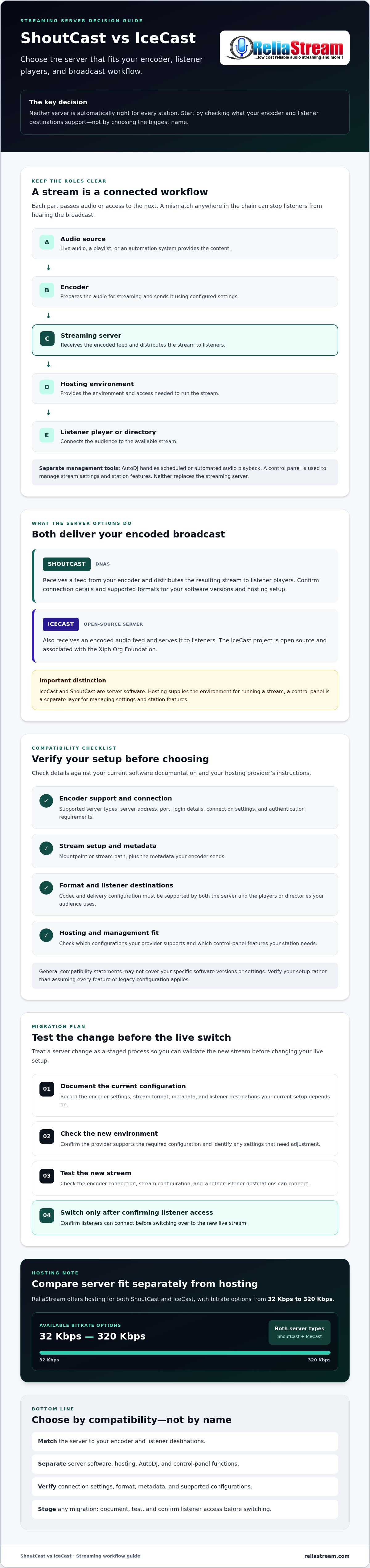
Your server is one link in a longer chain. Audio begins with a live source, playlist, or automation system. An encoder prepares it for streaming and sends it to the server. The hosted stream then makes the feed available to listener players or a directory. A mismatch at any step can prevent listeners from hearing a working broadcast.
Audio source → encoder → streaming server → hosted stream → listener player: each part must accept the settings and format passed along by the one before it. For the shoutcast vs icecast decision, start with your encoder and the destinations your audience already uses, then confirm the server configuration fits.
Which compatibility checks should you make first?
Check your encoder’s documentation for supported server types, connection settings, and authentication requirements. Then confirm that your target players and directories accept the stream format and delivery configuration. A general compatibility statement may not cover your software versions or settings, so verify the details for your setup.
Before changing anything, check these details against current software documentation and your hosting provider’s instructions:
- Connection: server address, port, login details, and any required authentication.
- Stream setup: mountpoint or stream path, plus the metadata your encoder sends.
- Format: codec and delivery configuration supported by both the server and your listener destinations.
For IceCast-specific requirements, consult the official Icecast project documentation. Ask your provider which configurations the hosting plan supports. This can help identify settings that work in one environment but need adjustment before a migration.
Where do AutoDJ and control panels fit?
AutoDJ handles scheduled or automated audio playback, such as keeping programming on air when a live source isn’t connected. It supplies audio to the streaming workflow; it doesn’t deliver the stream to listeners. A control panel is the interface for tasks such as configuring stream settings and managing station features. The available controls depend on the panel and hosting setup.
To compare the management layer separately from the server, see this guide to Centova Cast and MediaCP control panels. ReliaStream offers both ShoutCast and IceCast hosting. Review its radio streaming hosting options alongside your workflow requirements.
ShoutCast vs IceCast: Compare Compatibility, Management, and Flexibility
There’s no automatic winner in the shoutcast vs icecast comparison. The better fit is the one that works with your encoder, reaches your listeners, and supports the way you manage the station. Use this matrix to identify what to verify, then check your software versions and hosting configuration.
| Area | ShoutCast | IceCast | What to verify |
|---|---|---|---|
| Encoder compatibility | Depends on encoder support, server version, and connection settings. | Depends on encoder support, server version, and connection settings. | Server type, authentication, address, port, and stream path. |
| Listener playback | Compatibility can vary by player, format, and configuration. | Compatibility can vary by player, format, and configuration. | Test the stream in the players and directories your audience uses. |
| Management | Control panel and automation features depend on the hosting setup. | Control panel and automation features depend on the hosting setup. | Confirm which management tools and features are included. |
| Migration | Existing settings may need adjustment for a different setup. | Existing settings may need adjustment for a different setup. | Test links, metadata, encoder settings, and listener access before switching. |
Check compatibility across the full streaming chain, from encoder to server to every listener destination. Server capabilities are only part of the picture. SSL links, AutoDJ, listener capacity, and control panel access are hosting or management considerations, so confirm their availability and configuration with the provider. For IceCast setup details, consult this Icecast server configuration guide, then verify requirements against the software and host you’ll use.
Which option may fit an existing station setup?
Start with what’s already on air. List your encoder and server versions, stream settings, metadata, and the directories or players your station relies on. Check that each integration supports the configuration you plan to use. Before replacing a working stream, test the proposed setup with a separate test stream or another low-risk arrangement. Confirm playback from the listener destinations your audience uses.
Which option may suit a new or growing broadcaster?
Choose based on the management tools you’ll use and the provider’s stated listener capacity, not an assumption that either server guarantees growth. Ask how capacity, SSL links, and control panel access fit your needs. For secure-link considerations, read the SSL radio streaming guide. ReliaStream offers both ShoutCast and IceCast hosting, so you can assess server fit alongside hosting requirements.
How to Choose Between ShoutCast and IceCast Without Disrupting Your Station
A server change doesn’t have to become a broadcast problem. Document your current setup, verify what the new one supports, and test before redirecting listeners. Treat migration as a separate task from choosing a server: the exact steps depend on your encoder, hosting arrangement, and listener destinations.
What should you document before selecting a server?
Build a snapshot of the station as it runs today. Record the encoder software and version, output format, connection settings, current stream links, and metadata configuration. Then list every place that uses the stream, including embedded players, directories, apps, and other integrations. Ask the provider which settings can carry over and which need to change for the new server or hosting setup.
Use this five-step transition process
- Inventory your tools. Record your encoder, automation, current server setup, control panel, stream links, and listener destinations.
- Confirm compatibility. Check encoder and listener requirements against the server documentation and provider instructions. Verify version-specific settings directly.
- Compare hosting needs. Confirm listener capacity, bitrate options, management features, and SSL link availability for the setup you’re considering. Server software alone doesn’t determine which hosting features are included.
- Test the new stream. Follow the provider’s instructions. Check that audio plays, metadata displays correctly, SSL links work if used, and listeners can connect on the devices and platforms that matter to your station.
- Switch only after checks pass. Agree with the provider on changeover steps, timing, and a rollback option before changing a live stream. Keep the existing stream available until the replacement has been checked, if the provider’s process supports it.
Don’t assume a stream link, mountpoint, login, or metadata setting will stay the same. Confirm each detail for the destination setup. If a directory or app points to the old stream address, find out whether it needs updating and who controls that change. Document the answers so you can troubleshoot during the transition.
Before making a change, compare your checklist with ReliaStream’s ShoutCast and IceCast hosting options and confirm the configuration and features for the setup you’re considering.
Choose ShoutCast or IceCast Hosting That Fits Your Station
The right choice in the shoutcast vs icecast comparison depends on verified compatibility and how your station operates, not a universal winner. Check that your encoder, stream configuration, and listener destinations work with the server. Then assess hosting needs separately, including bitrate, management tools, and secure links.
ReliaStream offers both ShoutCast and IceCast hosting, with bitrate options from 32 Kbps to 320 Kbps. Depending on the setup, control panel access through Centova Cast or MediaCP and SSL-secured links may also be relevant. Confirm which features, settings, and stream formats are supported for the specific hosting plan. For help weighing plan criteria, see this budget internet radio hosting guide.
What should you ask a hosting provider before signing up?
Bring your compatibility checklist to the conversation. Ask which server options support your encoder settings and stream format, and confirm connection details such as authentication and stream path. Then ask what’s included: which control panel you’ll use, whether AutoDJ capabilities are available for your setup, and whether secure stream links are provided. Ask how migration works and what steps you’ll need to take. Verify plan-specific details before ordering rather than assuming a feature applies to every option.
When is it time to review your current streaming setup?
Review your setup when you change encoders, add listener destinations, or alter how the station broadcasts. It’s also a good time to check whether your current bitrate and stream quality still suit your programming and audience. As your workflow changes, reassess whether your plan still fits. This radio hosting plan overview offers broader context for evaluating hosting requirements.
Explore ReliaStream radio hosting and confirm that the available server option, bitrate, and setup requirements match your station before making a change.
Build a Streaming Setup That’s Ready for What’s Next
The right choice in the shoutcast vs icecast decision fits your encoder, listener destinations, and station workflow. Verify compatibility across the full stream, and test a new configuration before changing your live setup.
Hosting and management matter too. ReliaStream offers both ShoutCast and IceCast hosting, bitrate options from 32 Kbps to 320 Kbps, and control panel options that include Centova Cast and MediaCP. Check which settings and features apply to the setup you’re considering.
With a clear checklist and a tested transition plan, you can make a change while keeping your station focused on its listeners.
Frequently Asked Questions
Is ShoutCast better than IceCast for internet radio?
Neither is automatically better for every station. ShoutCast may suit a setup that depends on compatible legacy receivers or software, while IceCast supports a wider range of audio formats. The practical choice depends on your encoder, stream format, listener players, and hosting configuration. In the shoutcast vs icecast comparison, verify those pieces together rather than choosing by reputation or assuming one server will work everywhere.
What is the main difference between ShoutCast and IceCast?
The main differences are licensing and supported formats, not the basic job they perform: both receive a broadcast feed and deliver a stream to listeners. IceCast is open-source software distributed under the GNU GPL version 2. ShoutCast is proprietary. IceCast supports formats including MP3, AAC, Ogg Vorbis, Opus, FLAC, and WebM, while ShoutCast supports MP3 and AAC/AAC+. Confirm format support for your specific setup.
Can ShoutCast and IceCast use the same encoder?
Sometimes. An encoder can connect to either server if it supports that server type and can be configured with the correct format, connection details, and authentication. That doesn’t mean every encoder supports both, or that one configuration will work unchanged for each. Check the encoder documentation and hosting provider’s requirements for server type, stream path or mountpoint, and metadata before testing your chosen setup.
Can listeners play both ShoutCast and IceCast streams in a browser?
Yes, listeners can play either stream in a browser when the stream format, delivery setup, and web player are compatible. Browser playback isn’t guaranteed for every format or configuration. Check the specific stream link in your embedded player and the browsers or devices your audience uses. If you use HTTPS, confirm that the secure link is configured and works with the player and hosting setup.
Which is easier to set up, ShoutCast or IceCast?
There’s no universal answer. Setup difficulty depends on your experience, encoder, hosting environment, and management tools. With hosted streaming, a control panel may simplify routine tasks, but server settings still need to match the encoder and listener setup. Before choosing, compare the provider’s current instructions with your existing workflow. Test the stream and verify audio, metadata, and listener playback before going live.
Can I switch my radio station from ShoutCast to IceCast?
Yes, a station can switch, but the exact steps depend on its encoder, hosting arrangement, stream links, and listener destinations. Record current connection settings, output format, metadata, and player or directory links first. Then configure and test the replacement stream, including playback on relevant devices. Ask your provider about migration steps and rollback options, and keep the existing stream available until the replacement is confirmed working.
Do ShoutCast and IceCast support SSL streaming?
Yes, both ShoutCast and IceCast support SSL/HTTPS streaming. Whether it’s available and how it’s configured can depend on the software version and hosting provider. Confirm that the specific stream link is secure, then test it in your website player and other listener destinations. Ask the provider whether SSL is included in your hosting setup and whether any existing player or stream URL needs to be updated.
Ready to compare server options and bitrate needs for your station? Explore ReliaStream ShoutCast and IceCast hosting and confirm the setup details that fit your workflow.


