

Why are you paying for "high definition" bandwidth when your mobile listeners are hearing nothing but silence and buffering loops? It's a common trap. You want that studio-grade sound. You want your station to sound like a million bucks. But high bitrates often lead to high costs and dropped connections on cellular networks. You're caught between sounding like a tinny robot or breaking your budget. It's frustrating. We get it. Finding the best bitrate for internet radio in 2026 isn't just a technical choice. It's a strategic move to keep your audience locked in. With 233 million Americans now listening to online audio every month, you can't afford to get this wrong.
This guide will show you how to master the balance between crystal-clear audio and bandwidth efficiency. You'll grow your global audience without draining your bank account. We'll break down the AAC vs. MP3 debate. We'll explain why SSL is no longer optional for modern browsers. We'll even get your stream ready for Alexa and Roku. It's time to modernize your sound and expand your reach. Let's get to work.
Key Takeaways
- Stop guessing and start streaming. Learn how to strike the perfect balance between high-fidelity sound and data efficiency to keep your listeners happy and your costs low.
- Discover why AAC is the modern king of efficiency for 2026. Get the lowdown on why this codec delivers superior sound at lower bitrates compared to the aging MP3 standard.
- Identify the best bitrate for internet radio based on your specific content, from talk-heavy 32 Kbps streams to high-energy 128 Kbps music stations.
- Eliminate buffering on mobile devices and smart speakers. Master the technical settings needed to reach audiences on Alexa, Roku, and Fire TV without dropping a single beat.
- Scale your station with confidence. See how tiered hosting plans allow you to start small and ramp up your bitrate as your global audience grows.
What is Bitrate? (And Why Your Station’s Future Depends on It!)
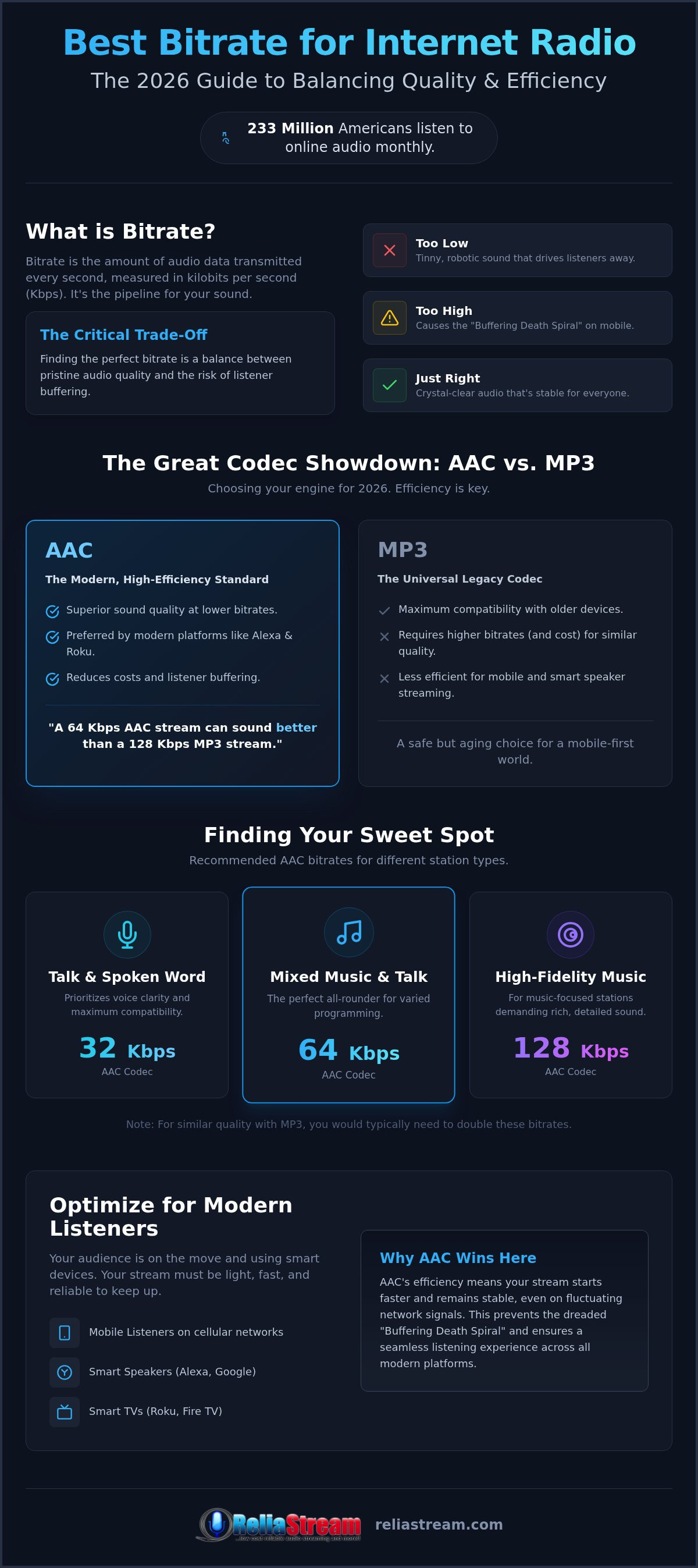
Bitrate is the pulse of your station. It is the amount of data transmitted every second, usually measured in kilobits per second (Kbps). Think of it as the pipe size for your audio. A bigger pipe means more detail, more depth, and more "wow" factor for your audience. But here is the reality check: a bigger pipe also costs more to run and requires a faster, more stable connection from your listeners. It is a trade-off that defines your professional reputation.
Why does this matter? Because bitrate is the gatekeeper of your sound quality and your monthly bandwidth bill. If you set it too low, your music sounds like it is playing through a tin can. Set it too high, and you hit the "Buffering Death Spiral." This happens when your stream demands more data than a listener's connection can handle. The audio stops. The loading icon spins. The listener leaves. Usually, they don't come back. Finding the best bitrate for internet radio is about avoiding that spiral while keeping your sound elite.
Why settle for "okay" when you can sound professional at any speed? It is about strategy, not just raw power. You need a setup that sounds great on a high-end home system but stays rock-solid for a commuter on a shaky mobile connection. It is time to stop guessing and start engineering your sound for growth.
The Relationship Between Bitrate and Bandwidth
Every kilobit counts. If you stream at 128 Kbps, you're using twice the bandwidth of a 64 Kbps stream for every single listener. This math dictates your hosting costs and your total capacity. Most professional hosting plans use these bitrates to determine your listener limits and data caps. If you push the bitrate too high without the right plan, you'll hit your limits faster than you think.
The bitrate-bandwidth balance is the strategic equilibrium where audio quality remains high without exceeding your hosting plan limits or causing listener buffering.
Why 2026 Standards Are Different
The world has moved on. With 5G and fiber optics becoming the standard, listener expectations have skyrocketed. "Standard Definition" audio is no longer the benchmark for competitive stations. People expect clarity. They expect an immersive experience. According to recent data, 81% of Americans aged 12 and older now listen to online audio monthly. That is 233 million potential listeners who won't tolerate 1990s-era audio quality.
However, 2026 is also the year of mobile-first listening. Your audience is tuning in from cars, gyms, and trains. Your settings must account for fluctuating signal strengths. You need a stream that is robust enough for a crowded subway but high-quality enough for a smart speaker in a quiet living room. Don't get left behind using 2010 settings for a 2026 audience. It's time to adapt.
The Great Codec Showdown: AAC vs. MP3 in 2026
Choosing your codec is like picking the engine for your station. Do you want the heavy, classic muscle of MP3, or the lean, high-tech efficiency of AAC? In 2026, the choice defines your reach. MP3 is the universal veteran. It works on every device ever made. But it is hungry for data. To get professional sound, you need more bandwidth. That means higher costs for you and more buffering for them. It is a legacy system that still has its place, but it is no longer the cutting edge.
AAC (Advanced Audio Coding) is the modern standard for a reason. It is the high-efficiency choice for professional streams. Here is the secret: a 64 Kbps AAC stream can actually sound better than a 128 Kbps MP3 stream. It handles complex audio with more precision. This efficiency is a game changer when you are hunting for the best bitrate for internet radio. Why pay for massive bandwidth when you can get superior clarity at half the data? It is a smart business move that keeps your station sounding elite. Ready to see the difference? Explore our professional hosting options to get started.
What about compatibility? Modern platforms like Alexa and Roku are built for AAC. They prioritize stability and speed. If you want your station to stay rock-solid on smart speakers, AAC is your best friend. It keeps your stream light and responsive. It ensures that when a listener says "Play my station," the music starts instantly. No lag. No waiting. Just pure sound.
When to Stick with MP3
MP3 isn't dead yet. It still offers legacy support for older web players and vintage hardware. If your target audience is using older tech, MP3 is the "safe" choice. It ensures your stream plays everywhere without a hitch. It is also incredibly easy for beginners. Most basic encoders default to MP3, making it a "plug and play" solution for those just starting out. It provides broad, unoptimized reach when you don't want to worry about device compatibility.
Why Pro Broadcasters are Moving to AAC+
Pros are moving to AAC+ because it saves money. Period. It uses superior compression algorithms to keep music sounding rich and talk sounding crisp. You can maintain an "audiophile" feel while slashing your bandwidth consumption. This is especially vital for low-bitrate streaming where every kilobit is a battle for quality.
AAC is also the backbone of modern radio streaming app development. When we build apps for Roku or Fire TV, AAC ensures the fastest load times. It makes your station feel like a premium service. It is about dominating the living room with technology that works as hard as you do. Don't settle for yesterday's tech when today's standards are so much more efficient and cost-effective.
Finding Your Sweet Spot: Recommended Bitrates for Every Station
Stop throwing money at bandwidth you don't need. The best bitrate for internet radio isn't a "one size fits all" setting. It is a calculated business decision. If you are broadcasting a talk show, you don't need the same data rate as a symphony orchestra. You need to match your output to your content. This keeps your stream lean and your audience growing. Are you overpaying for quality your listeners can't even hear on their earbuds? Probably. Let's fix that.
For most music stations, 128 Kbps remains the gold standard. It provides a rich stereo field that satisfies the vast majority of your audience. It is the perfect middle ground. You get professional sound without the massive data overhead. But if you're running a niche station for audiophiles, you might want to push higher. It is all about knowing who is listening and what they are using to hear you. Match the bits to the beats. It is that simple.
The 32 Kbps Strategy for Talk and Sports
Voice is different. Human speech doesn't require the massive frequency range that a kick drum or a violin needs. You can drop your bitrate significantly and still sound crystal clear. This is where low bitrate radio hosting becomes your secret weapon. By using a 32 Kbps or 64 Kbps plan, you can host more listeners for a fraction of the cost. It is the ultimate growth hack for news, sports, and community talk stations. Focus on vocal clarity. Cut the fluff. Save the bandwidth for your listener count and watch your station scale.
High-Fidelity Music Broadcasting (192 Kbps - 320 Kbps)
Sometimes, you have to go big. If you are streaming high-energy DJ sets, complex jazz, or classical masterpieces, your listeners expect every detail. They want to hear the breath of the flute and the deep rumble of the sub-bass. For these elite stations, 192 Kbps is the floor. 320 Kbps is the ceiling. This requires a serious server that won't flinch under high-data loads. Even when listeners have a high minimum download speed, a weak server will crash your stream. ReliaStream’s 320 Kbps plans are engineered for this exact scenario. They provide the raw power needed to deliver audiophile quality to a global stage. If you want to be the best, you have to sound like the best.
Mobile Listeners and Smart Devices: The Bandwidth Balancing Act
Mobile data is expensive. It is unstable. It is the ultimate enemy of a high-bitrate stream. If you push 320 Kbps to a listener on a crowded train, you are going to lose them. They won't wait for the buffering wheel to stop spinning. They will just switch to a podcast or another station. This is why the best bitrate for internet radio often leans toward efficiency rather than raw, uncompressed data. You have to balance that crystal-clear sound with the reality of a 5G signal that drops to LTE in an instant. It is about staying connected, no matter where your listener goes.
Don't fall for the "Auto-Switching" myth. Many broadcasters assume that modern players will automatically downsample the audio if the connection gets weak. While some advanced players do this, many standard web players and smart devices do not. If you set a high primary bitrate, you are forcing that data load on every single listener. It is better to pick a solid, reliable primary bitrate that works for the majority of your audience. Consistency is your best friend in a mobile-first world.
Optimizing for Alexa and Google Home
Smart speakers handle buffering differently than your desktop browser. They have smaller buffers. They prioritize an immediate start. If your stream takes too long to handshake or load, Alexa will simply say she can't find the station. Consistency beats raw quality every single time in the voice assistant world. You want that music playing the second the command is given.
Security is also a non-negotiable factor here. Modern voice assistants require ssl radio streaming to function correctly. If your stream link isn't secure, these devices will often block the audio entirely. For this hands-free audience, we recommend a stable 64 Kbps or 128 Kbps AAC stream. It provides the perfect blend of speed and clarity for home environments.
Broadcasting to the Big Screen: Roku and Fire TV
The living room is a different beast. Devices like Roku and Fire TV usually stay connected to high-speed home Wi-Fi. You have more breathing room here. You can push for that higher fidelity sound because the connection is stable. But you still need a professional presentation. Your station needs to look as good as it sounds on a 75-inch screen.
ReliaStream’s custom app development handles these technical hurdles for you. We build apps for Roku, Google TV, and Amazon Fire TV that are optimized for the big screen environment. We ensure your metadata, album art, and audio stream work in perfect synergy. Ready to dominate the living room? Check out our app development services to take your station to the next level. We make sure your bitrate is optimized for every device, from the smartphone in a pocket to the TV on the wall.
Ready to Launch? Choosing the Perfect ReliaStream Hosting Plan
You have the data. You have the strategy. Now, it is time to pull the trigger. Don't get stuck in "analysis paralysis" trying to find the perfect setting before you even go live. The best bitrate for internet radio is the one that gets your voice heard today. You can always scale up as your audience grows. That is the beauty of a professional setup. You start where you are, and you grow into where you want to be.
ReliaStream offers a tiered approach designed for every stage of your broadcasting journey. Whether you need a 32 Kbps Hosting Plan for a lean talk station or a 320 Kbps Hosting Plan for an elite music stream, we have the infrastructure to back you up. We don't believe in "one size fits all." Your station is unique. Your hosting should be too. You get the flexibility to choose exactly what fits your content and your budget.
Managing that bitrate is easy with the right tools. We provide industry-leading control panels like MediaCP and Centova Cast. These aren't just dashboards. They are your mission control. You can adjust your settings, manage your Auto DJ, and monitor your listener stats in real time. It is about having total control over your sound and your growth. No guesswork. Just results.
Why ShoutCast and IceCast Still Rule in 2026
Protocols matter. While new tech comes and goes, ShoutCast and IceCast remain the gold standard for global audio delivery. They are reliable. They are compatible with almost every player on the planet. They ensure your stream reaches listeners from London to Tokyo without a hitch. Deciding between ShoutCast vs IceCast depends on your specific technical needs, but both offer the rock-solid stability you need for a professional station. We handle the heavy lifting of the technical setup so you can focus on the mic.
The ReliaStream Difference: More Than Just Hosting
We've been in this game since 2008. That's 18 years of helping independent creators win. We aren't just a service provider. We are your proactive partner. We want to see you scale from a hobbyist stream to a global brand. That is why we offer custom app development for the Amazon Fire TV App, Google TV App, and more. We help you dominate the living room and the car. Your station deserves a backbone that won't quit. It's time to build something that lasts. Start your professional radio journey with ReliaStream today!
Your Path to Global Broadcasting Starts Now
You've got the technical roadmap. You've got the strategy. Now, it's time to take the mic and own the airwaves. Finding the best bitrate for internet radio is the first step toward building a station that sounds elite on every device. We've shown you how to balance crystal-clear audio with the realities of mobile data. You know why AAC is the efficiency king for 2026. You understand that consistency on Alexa and Roku matters more than raw, unoptimized data. The guesswork is over. The path to growth is clear.
You need a backbone that won't quit. ReliaStream has been serving independent broadcasters since 2008. We bring 18 years of experience to your corner. Whether you're starting small with a budget-friendly plan or scaling to a 320 Kbps pro stream, our tiered hosting options grow with you. We don't just host streams; we build brands. From custom app development for Roku to seamless Alexa integration, we provide the tools to dominate the living room. Stop waiting for the "perfect" moment. The world is ready to listen. Ready to go on-air? Explore ReliaStream's professional hosting plans and start broadcasting today!
Frequently Asked Questions
What is the industry standard bitrate for internet radio in 2026?
128 Kbps remains the industry standard for music stations seeking clear stereo sound. It provides the perfect balance for most listeners. For talk radio or mobile-focused stations, 64 Kbps using the AAC+ codec is the modern benchmark. This ensures your stream sounds professional without causing buffering on cellular networks. Choosing the best bitrate for internet radio depends on your content type and how your audience tunes in. Don't overcomplicate it.
Can I change my bitrate after my station is already live?
Yes, you can adjust your bitrate settings at any time through your control panel. Whether you use Centova Cast Plans or MediaCP Plans, changing the output speed is a straightforward process. But wait. You must ensure your hosting plan supports that higher rate. If you're on a 64 Kbps plan, you'll need to upgrade before cranking up the encoder. Always restart your server after making changes. It's that simple.
Does a higher bitrate mean I can have fewer listeners?
Higher bitrates eat more bandwidth per listener. It's a simple fact. If your hosting plan has a fixed data limit, a 320 Kbps stream will hit that wall much faster than a 64 Kbps stream. It's a direct trade-off between audio fidelity and total audience scale. Most pros find that 128 Kbps offers the ideal sweet spot for reaching a global audience without blowing through their monthly data caps or hosting resources.
What is the best bitrate for a talk-only radio station?
For talk-only stations, a bitrate between 32 Kbps and 64 Kbps is usually ideal. Human speech doesn't require the wide frequency range of high-energy music. By choosing a lower bitrate, you significantly reduce your bandwidth costs while maintaining excellent vocal clarity. This strategy allows you to support a much larger number of simultaneous listeners. It is the smartest way to scale a news, sports, or community talk station effectively. Don't waste data on silence.
Why does my 128 Kbps stream sound better in AAC than MP3?
AAC uses more advanced compression algorithms than the older MP3 format. This allows it to preserve more detail and depth, even at lower data rates. At 128 Kbps, the difference is noticeable, but at lower rates like 64 Kbps, AAC sounds significantly cleaner. It handles complex frequencies better, making it the preferred choice for professional broadcasters. It's the best bitrate for internet radio when you want audiophile quality without the massive overhead.
Do I need an SSL link for high-bitrate streaming on mobile apps?
Yes, an SSL Radio Link is mandatory for modern broadcasting. Browsers like Chrome and Safari, as well as mobile apps, will block non-secure audio streams to protect user data. This requirement applies regardless of your bitrate. If you want your station to play on iPhone, Android, or smart speakers, you must provide a secure HTTPS streaming link. It ensures your stream is accessible to everyone and prevents playback errors on modern devices. Stay secure.
How does bitrate affect the cost of my radio hosting plan?
Bitrate is a primary factor in hosting costs because it determines how much data you transmit every second. ReliaStream offers tiered plans to match your specific needs, ranging from a 32 Kbps Hosting Plan for budget-conscious talk shows to a 320 Kbps Hosting Plan for high-fidelity music. Higher bitrates require more server resources and bandwidth. That's why plans are structured by the maximum bitrate allowed. Start small and scale as you grow.
What bitrate do I need to get my station on Alexa or Roku?
For smart devices like Alexa or Roku, a stable 64 Kbps to 128 Kbps AAC stream is recommended. These devices prioritize consistent playback over raw, uncompressed quality. If your bitrate is too high, it may cause the stream to fail on slower home Wi-Fi connections. Using a standard bitrate ensures your station loads quickly and stays connected. ReliaStream's custom app development for Roku and Alexa ensures your stream is perfectly optimized for these platforms.


