

Why settle for being a tiny, nameless listing on a crowded aggregator when you could own the biggest screen in the house? You have felt the sting of losing listeners to the "Big Stations" on apps that treat your brand like an afterthought. It is time to stop playing by their rules. Establishing your broadcast radio on amazon fire tv isn't just a tech upgrade; it is a land grab for the living room! You know that audio alone isn't enough anymore. Listeners want more. They want to see what they are hearing. They want a destination, not just a stream.
We are here to help you bridge that gap. This guide shows you exactly how to launch your own branded radio app and turn passive listeners into a visual-first audience. No more technical intimidation. No more being buried in a list of a thousand other stations. We are diving into the exact steps to get your brand on the Fire TV home screen, use visual metadata to skyrocket retention, and maintain TOTAL control over your broadcast. The living room is waiting. Let's go get it.
Key Takeaways
- Stop fighting for scraps on aggregator apps. Launching your own branded broadcast radio on amazon fire tv puts your logo front and center on the biggest screen in the house.
- Discover why the "Living Room Shift" is the new frontier for radio. It's time to capture the massive audience using Fire Sticks and smart TVs.
- Master the mandatory technical specs. You'll learn why SSL security is non-negotiable for Fire TV compatibility in 2026.
- Learn how to balance bitrate and visual assets. Turn a basic audio stream into a high-end, visual-first media experience that keeps listeners locked in.
- Skip the technical headaches. Use a professional development partner to build and manage your custom app while you focus on the content.
Why Broadcast Radio on Amazon Fire TV is the New Frontier
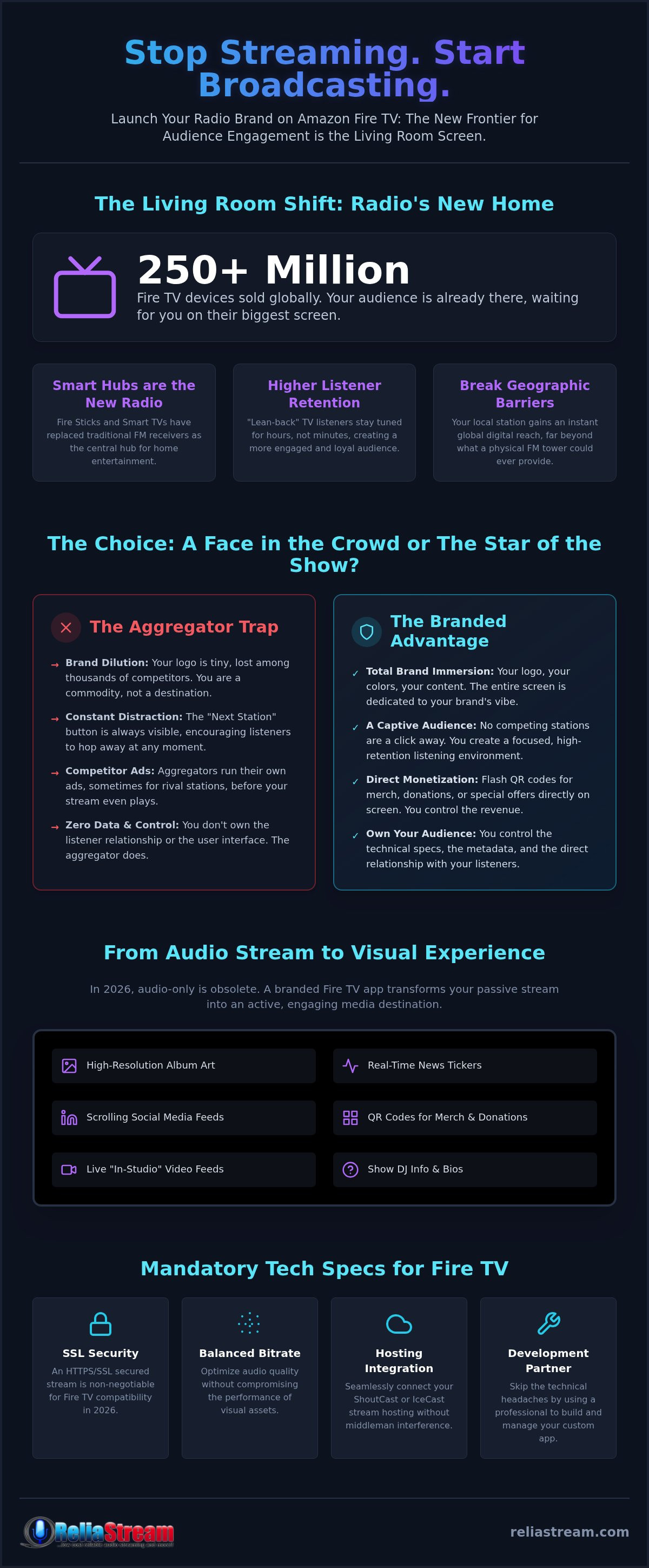
The radio tower isn't the center of the universe anymore. The living room is. We're seeing a massive shift in how people consume audio; it's moving from the car dashboard to the 65-inch 4K screen. Why? Because that's where the audience lives. With over 250 million Fire TV devices sold globally, the hardware is already in their homes. You just need to be on it. Building your broadcast radio on amazon fire tv isn't a luxury. It's a survival tactic for 2026. If you aren't on the home screen, you don't exist to the modern listener.
The Death of the Traditional Receiver
When was the last time you saw a standalone FM receiver in someone's living room? They're gone. The central hub for home entertainment has transitioned to streaming television. This isn't just about convenience. It's about engagement. TV listeners are "lean-back" listeners. They aren't just scanning through stations while stuck in traffic. They stay tuned longer. They're settled in. By launching an app, you break the geographic FM barrier. Your local station suddenly has a global digital reach that a physical tower could never provide.
- Smart Hubs: Fire Sticks and Fire Edition TVs are the new radio sets.
- Higher Retention: At-home listeners stay locked in for hours, not minutes.
- Global Presence: Reach listeners in London, Tokyo, or New York from one digital stream.
From Audio Stream to Visual Brand
2026 is the year audio-only dies. If your station is just a black screen with a play button, you're losing. Your audience expects a visual experience. Think high-resolution album art. Real-time news tickers. Scrolling social media feeds. This is your chance to turn a passive stream into an active brand. Want to sell merch or take donations? Flash a QR code on the screen. It's direct. It's immediate. It works. You're no longer just a voice in the dark; you're a presence in the room.
OTT radio is the future of independent broadcasting because it gives you the keys to the kingdom without the gatekeepers. You aren't just a frequency anymore. You're a destination. Use that big-screen real estate to show off your personality. Display your DJ's face. Show live studio footage. Make them feel like they're part of the show. The technical intimidation is a myth. The opportunity is real. Don't let your station get left behind in the static of the past.
Branded App vs. Aggregators: Which Strategy Wins?
You have a choice. Be a face in the crowd or the star of the show. Many broadcasters start by listing themselves on massive aggregators like TuneIn or iHeartRadio. It's easy. It's fast. It's also a trap. When you are one of 50,000 stations, you aren't a brand. You're a commodity. If you want to truly own your broadcast radio on amazon fire tv, you need a standalone presence. Aggregators serve the aggregator. Branded apps serve you.
The Limitations of Aggregator Listings
Think about the user experience on a directory app. It's cluttered. It's noisy. Most importantly, it's not yours. You have zero control over the UI. Your station is just a text link next to your biggest competitor. Even worse, many aggregators run their own pre-roll ads. Imagine a listener tuning in to your station only to hear a 30-second spot for a rival broadcaster. It happens every day. You're working hard to drive traffic to an app that actively tries to distract your audience. It's not just inefficient. It's a recipe for high churn.
- Brand Dilution: Your logo is tiny, and your colors are non-existent.
- Station Hopping: The "Next" button is always visible, encouraging listeners to leave.
- Zero Data: You don't own the listener relationship. The aggregator does.
Total Control with a Custom Fire TV App
Now, imagine a different world. A listener sees your icon right on their Fire TV home screen. They click it. Suddenly, the entire 65-inch screen is filled with your station's vibe. High-res backgrounds. Your custom color palette. Exclusive content. This is how you build a tribe. There are no competing stations a single click away. It's just you and your audience. This level of immersion is exactly why we recommend a branded Amazon Fire TV App for any serious broadcaster.
A custom app also gives you direct technical control. You can seamlessly integrate your ShoutCast vs IceCast hosting without middleman interference. You decide the bitrate. You decide the metadata. You decide the experience. When someone searches the Amazon Appstore for your station name, they find your dedicated app. They don't find a directory where they might get lost. You've worked too hard on your sound to let an aggregator steal your thunder. Own the app. Own the audience. Own the living room.
Mandatory Technical Specs for Fire TV Broadcasting
Getting your broadcast radio on amazon fire tv is a massive leap forward. But let's be real. It only works if the tech is solid. You cannot throw a low-quality, unsecured stream at a modern smart TV and expect a professional result. Fire OS is picky. It demands high security and even higher quality. If you ignore the technical mandatory specs, you are just building a fast track to a "Stream Not Available" error. Your audience won't give you a second chance if the app fails on the first click. Let's get the foundation right.
SSL and the Secure Stream Requirement
Security isn't optional anymore. In 2026, Amazon Fire OS protocols require every media stream to be delivered via HTTPS. If your station is still running on an old, unsecured HTTP link, your app will fail. It is that simple. You need to upgrade to SSL radio streaming immediately to stay compatible. This isn't just about encryption; it's about basic functionality. A secure link ensures your stream bypasses modern browser blocks and device security filters that kill unverified audio. Don't let a "Not Secure" warning be the first thing your listeners see.
Optimizing Audio Quality for Home Theater Systems
Think about your audience's environment. They aren't listening through a tinny phone speaker in a noisy subway anymore. They are sitting in front of a high-end soundbar or a full surround sound system. A low-bitrate stream sounds like mud on professional hardware. To dominate the living room, you need high-bitrate hosting that can handle the range. While 128 Kbps is the bare minimum, a 320 Kbps stream is the gold standard for 2026. It sounds crisp. It sounds professional. It makes your station feel premium. If you want to compete with the big networks, you have to sound like them.
Consistency is king. Your listeners expect a seamless experience, especially during Auto DJ transitions. Using professional control panels like Centova Cast or MediaCP allows you to push real-time metadata. When the song changes, the artist and title must update instantly on the TV screen. This metadata isn't just for show; it's what keeps people engaged with the visual experience. Pair this with 99.9% uptime, and you have a station that feels as reliable as any major network. Don't let technical debt hold your brand back. Secure your stream, crank up the bitrate, and give your audience the high-definition audio they deserve. The living room demands excellence. Give it to them.
How to Launch Your Radio App on Fire TV
Ready to stop talking and start launching? Good. Getting your broadcast radio on amazon fire tv is a technical marathon, not a sprint. But it is a race you can win. You have the vision. You have the sound. Now you need the vessel. This isn't about just "being online." This is about professional deployment. Follow these steps to move from a simple stream to a dedicated home screen presence.
- Step 1: Secure the foundation. You need a rock-solid ShoutCast or IceCast stream. If it isn't SSL-secured, stop right here. Amazon will not let you through the door without a secure link.
- Step 2: Design for the big screen. Gather your high-resolution logos, background art, and splash screens. What looks good on a phone might look pixelated on a TV.
- Step 3: Build the APK. Your Android Package must be optimized for Fire OS 16. If you're targeting the newest hardware, keep the latest compatibility standards in mind.
- Step 4: Submission. Create your Amazon Developer account. As of August 2026, registration remains free. Submit your assets and your APK for review.
- Step 5: Promote. Your app won't rank itself. Tell your existing listeners to download it immediately to boost your store visibility and rankings.
Preparing Your Visual Identity
Your app icon is your digital storefront. It needs to look sharp on a 70-inch TV, not just a smartphone. Amazon requires specific icon sizes, typically 512x512px and 114x114px, to ensure clarity across all device types. Don't ignore the splash screen. This is the image that displays while your app loads. It is your first chance to build excitement. Keep your branding consistent across other platforms like Roku and Google TV. A unified look across every device makes your station feel like a major network.
The Submission and Approval Process
The Amazon Developer Console can be intimidating at first. Don't let the menus scare you. Most rejections happen for simple, avoidable reasons like broken stream links or missing metadata. Test your stream on a physical Fire TV device before you hit submit. Once you send it off, the typical approval timeline for a new radio app is between 24 and 72 hours. If you want to skip the technical headache entirely, check out our custom Amazon Fire TV App development service. We handle the heavy lifting while you focus on the music.
ReliaStream: Your Partner in Multi-Platform Dominance
You have the vision. You have the sound. Why get bogged down in the code? DIY "app builders" promise the world but often deliver a buggy, generic mess that fails Amazon’s strict review process. You need a partner that knows the ropes. We have spent nearly two decades in the trenches of digital broadcasting. We don't just build apps; we build foundations. When you launch your broadcast radio on amazon fire tv with ReliaStream, you aren't just getting an icon on a screen. You're getting a veteran team that ensures your stream is secure, your metadata is sharp, and your uptime is absolute.
Integration is where the magic happens. Our custom app development services are designed to work perfectly with our hosting infrastructure. Whether you're starting small with our 32 Kbps plan for just $1.99 per month or pushing high-fidelity audio at 320 Kbps, the experience is seamless. No duct tape. No workarounds. Just a professional broadcast that works every single time a listener hits play. We handle the technical heavy lifting so you can focus on what matters: the content.
The ReliaStream Advantage
Technical support shouldn't be a headache. We provide no-nonsense support from people who actually understand the difference between a buffer underrun and a mount point. Our hosting is built to scale. As your Fire TV audience explodes, your infrastructure grows with you. We offer expert management across the industry’s top control panels. Not sure which one fits your workflow? Check out our breakdown of Centova Cast vs MediaCP to see which powerhouse should drive your station.
- Proven Reliability: 24/7 stability backed by nearly twenty years of industry experience.
- Multi-Platform Reach: Don't stop at Fire TV. We expand your brand to Roku, Google TV, and Alexa.
- SSL Security: Every professional plan includes the secure links required by modern smart devices.
Ready to Own the Big Screen?
Stop being just another name in a crowded directory. It's time to become a destination. The living room is the new frontier for independent radio. You have the opportunity to capture an audience that has moved beyond the traditional dial. Don't let technical intimidation stand in your way. Take the first step toward a professional, branded presence that commands attention. Your station deserves to be heard. It deserves to be seen. It's time to dominate. Get Your Custom Fire TV App Started with ReliaStream and claim your spot on the home screen today.
Claim Your Spot on the Home Screen Today
The era of being a hidden link in a massive directory is over. The living room is the new battlefield for audience attention. We have shown you why a branded app beats a crowded aggregator every time. You know the technical specs. You understand the Living Room Shift. Now, it's about execution. Establishing your broadcast radio on amazon fire tv is the single most important move you can make for your station's growth in 2026. Don't let your brand get lost in the noise of the past.
You have the sound; we have the backbone. With over 18 years of broadcasting expertise and a 99.9% uptime guarantee, ReliaStream is ready to take your brand beyond the dial. We build the tools that turn passive listeners into loyal fans across Fire TV, Roku, and Alexa. The big screen is waiting for your logo. It is time to stop being just another station and start being a destination. Your audience is already there. Go meet them.
Launch Your Branded Fire TV App with ReliaStream and dominate the living room today. The future of radio is visual, and it is happening right now.
Frequently Asked Questions
Can I broadcast my radio station on Amazon Fire TV for free?
No, professional broadcasting requires a reliable infrastructure. While creating an Amazon Developer account is free as of August 2026, you still need a hosting provider for your stream. ReliaStream offers hosting plans starting at $1.99 per month for 32 Kbps. You also have to consider the development of the app itself. Free builders often lead to rejection. Investing in a professional setup ensures your station actually reaches the living room.
Do I need a special license to stream radio on a smart TV app?
Yes, you are responsible for music royalty licensing. We provide the technical backbone for your broadcast radio on amazon fire tv, but we don't sell music licenses. If you play copyrighted music in the U.S., you typically need coverage from entities like SoundExchange or ASCAP. Always check the current regulations for your specific region. Staying legal is the only way to ensure your station isn't pulled from the store.
How does an Amazon Fire TV app differ from a mobile radio app?
It is all about the lean-back experience. Mobile apps are designed for small screens and on-the-go listening. Fire TV apps must look stunning on 70-inch displays. This means high-resolution art, larger text, and simplified navigation for remote controls. TV listeners also use better speakers, so audio quality matters more. You aren't just a background app; you are a visual destination for the entire room.
What is the best bitrate for radio streaming on Amazon Fire TV?
320 Kbps is the gold standard for 2026. Most Fire TV users connect their devices to soundbars or home theater systems that expose every flaw in a low-quality stream. While a 128 Kbps hosting plan works for mobile, it can sound thin on big speakers. We recommend our 320 Kbps plan for broadcasters who want to sound as professional as the major networks. Don't let poor audio ruin your brand.
Can I display ads on my Fire TV radio app?
Absolutely. A branded app gives you total control over monetization. You can sell rotating banner ads, visual sponsorships, or on-screen QR codes for merch. Unlike aggregators that might play their own ads over your stream, every cent you earn from your custom app stays with you. It is your real estate. Use it to generate revenue through direct deals or programmatic platforms that support streaming television.
What happens if my stream is not SSL secured?
Your stream will simply not play. Amazon Fire OS 16 enforces strict security protocols. If your ShoutCast or IceCast link uses HTTP instead of HTTPS, the device will block the connection. This results in the dreaded "Stream Not Available" error. We include SSL Radio Links in our professional plans to ensure your broadcast radio on amazon fire tv remains functional and secure at all times.
How long does it take to develop a custom Fire TV radio app?
The timeline is surprisingly fast when you work with experts. Once your visual assets are ready and the APK is built, the Amazon review process usually takes between 24 and 72 hours. If you use a template-based service, you can move from a concept to a live app in just a few days. The key is getting your metadata and SSL links right the first time to avoid common rejection pitfalls.
Is ShoutCast or IceCast better for Amazon Fire TV apps?
Both are excellent choices, but it depends on your workflow. ShoutCast is a veteran industry standard with massive compatibility. IceCast offers more flexibility with mount points and is often preferred for complex setups. The most important factor isn't the protocol; it's the security. Both must be delivered via an SSL-secured link to work on Fire TV. We support both Centova Cast and MediaCP to give you total control.


