

A hosting plan is more than a bitrate: it combines stream delivery, broadcasting tools, and support. An internet radio hosting provider comparison helps you see how those elements differ, from plan options to metadata controls and listener-facing audio quality. The right fit depends on your station’s needs, not just the headline price.
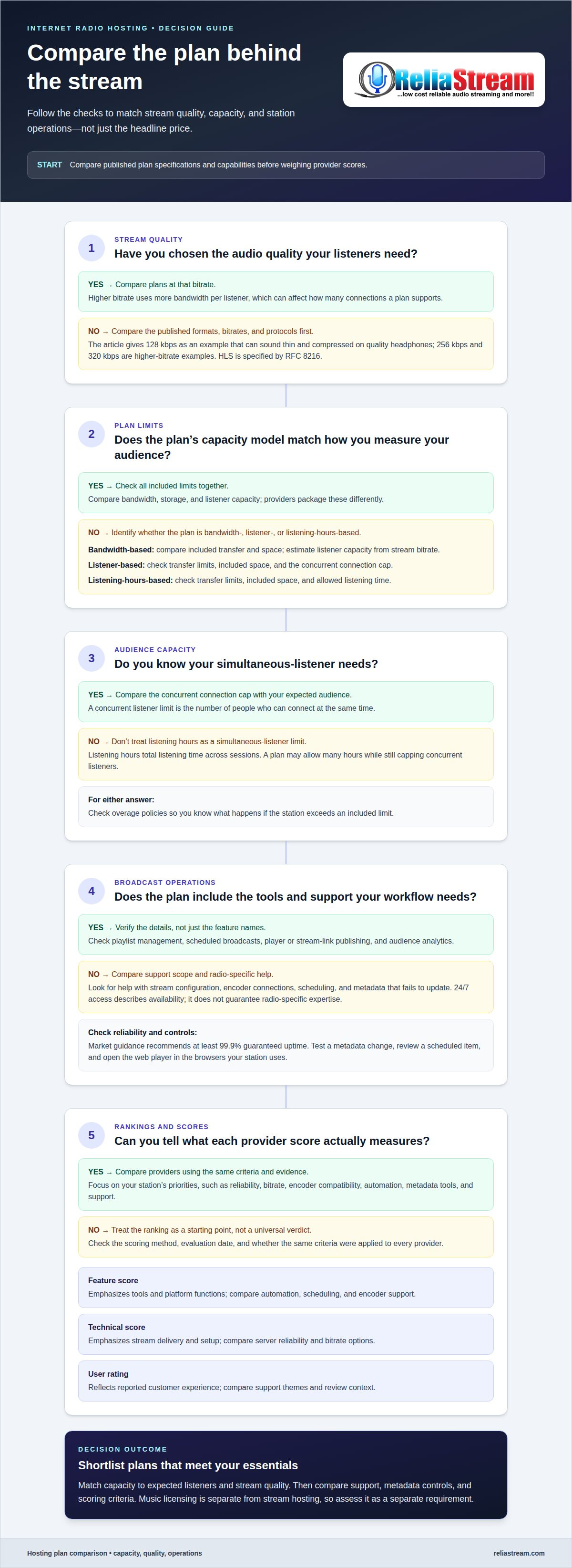
It makes sense to focus on cost first. But the plan also needs to suit your audio quality goals and the way you run your station. A 128 kbps stream, for example, can sound thin and compressed to listeners using quality headphones, while 256 kbps and 320 kbps are higher-bitrate examples.
This guide compares internet radio hosting providers using practical criteria, including support, metadata tools, rankings, and scores. You’ll learn how to assess the differences, identify the features that matter for your setup, and choose more confidently.
Key Takeaways
- Compare what each hosting plan includes, not just its listed price, to see how well it fits your station’s needs.
- Assess support and metadata tools by how they help keep broadcasts running smoothly and track information current.
- Read provider rankings and scores through their stated criteria, so you can judge what each rating actually tells you.
- Use your station’s priorities to narrow the options, then compare plans that meet your essential requirements.
What are Internet Radio Hosting Providers?
An internet radio host delivers a station’s audio stream to listeners through a player. Compare capacity, streaming options, programming tools, and analytics alongside plan price.
Bandwidth and Listener Capacity
Bandwidth carries the stream to listeners, while storage holds uploaded audio and listener capacity reflects simultaneous connections. Providers package these limits differently, so compare bandwidth, storage, and concurrent listener capacity together. A higher bitrate uses more bandwidth per listener, which can affect how many connections a plan supports.
Providers’ supported audio formats, bitrates, and streaming protocols vary. Compare the published specifications: 128 kbps can sound thin and compressed on quality headphones, while 256 kbps and 320 kbps are higher-bitrate examples. HTTP Live Streaming, or HLS, is specified by RFC 8216.
| Plan option | Bandwidth | Storage | Listener capacity |
|---|---|---|---|
| Bandwidth-based | Compare included transfer | Compare included space | Estimate from stream bitrate |
| Listener-based | Check transfer limits | Compare included space | Check concurrent connection cap |
| Listening-hours-based | Check transfer limits | Compare included space | Compare allowed listening time |
Choose a plan with bandwidth and connection limits that match your expected audience and desired stream quality.
Concurrent Listener Limits and Overages
A concurrent listener limit is the number of people who can connect at the same time. Listening hours measure total listening time across sessions, so a plan may allow many hours while still capping simultaneous listeners. Compare overage policies too, so you know what happens if your station exceeds an included limit.
Hosted programming tools can manage playlists and scheduled broadcasts, while publishing features can distribute a player or stream link. Analytics show audience activity and help broadcasters assess engagement. Check which tools each plan includes rather than assuming every host offers the same control panel or reports.
Music licensing is separate from stream hosting. The Electronic Code of Federal Regulations states a statutory minimum fee of $1,000 per year per channel. SoundExchange charges a $1,000 minimum per channel and $0.0025 per performance.
Evaluating support and metadata
Compare support coverage, metadata handling, and stream reliability as separate criteria. Market guidance recommends at least 99.9% guaranteed uptime; technical risks include playback failures, stale track titles, and missed scheduled programming.
Radio-Specific Support
Radio-specific support covers broadcast workflows, not just account or software questions. Compare whether support can help with stream configuration, encoder connections, scheduling, and metadata that fails to update. These details matter during a live show, when practical troubleshooting is more useful than generic instructions. Testing a web player in the browsers your station uses can also reveal playback issues.
Around-the-Clock Customer Support
24/7 customer support describes access to assistance at any hour. It differs from radio-specific expertise: broad availability doesn’t necessarily mean the support team understands a stream, software setup, or broadcast schedule. Compare available contact channels and whether help covers technical faults as well as account questions. For a station with overnight programming, a stream interruption outside normal business hours makes support coverage especially relevant.
Metadata, Scheduling, and Analytics
Metadata tells listeners what’s playing, so check that track titles update instead of getting stuck. Consider scheduling too: a missed playlist change can leave the wrong program on air. Compare how each control panel handles metadata edits and scheduled shows. Analytics can help you understand listener engagement and assess which programming resonates with your audience.
Make the comparison concrete: test a metadata change, review how a scheduled item appears, and open the web player in the browsers your audience uses. If secure stream delivery is part of your checklist, a secure radio streaming link can support that consideration. Pair those checks with uptime commitments and the scope of technical support, rather than treating a single score as the whole picture.
Comparative provider rankings and scores
Provider rankings are useful only when you know what each score measures. An editorial rating may weigh features differently from a customer review score, so use rankings as a starting point, not a universal verdict. Check the criteria behind each result before deciding which platform fits your station.
Build your comparison around factors that affect your broadcast: stream reliability, supported bitrate, encoder compatibility, automation, metadata tools, and support. Consider licensing separately, because streaming infrastructure and music rights are different requirements. A platform may score well for automation yet be a poor fit if it doesn’t support your encoder.
| Ranking approach | What it emphasizes | What to compare |
|---|---|---|
| Feature score | Tools and platform functions | Automation, scheduling, encoder support |
| Technical score | Stream delivery and setup | Server reliability, bitrate options |
| User rating | Reported customer experience | Support themes and review context |
Scores are easier to interpret when the criteria are consistent. If one ranking prioritizes server performance and another emphasizes ease of setup, their results may differ without either being misleading. Check the scoring method, evaluation date, and whether the same criteria apply to every provider.
For a practical comparison, identify your station’s two most important criteria first. Assess every provider against those points using the same evidence. For example, compare encoder compatibility across all candidates rather than rewarding one platform for a feature you didn’t assess elsewhere. Record the reason behind each score, not just the rank. This makes trade-offs clear and prevents a high rating from hiding a gap in your broadcast workflow.
Rankings can narrow your options, but your station’s format and technical setup should determine the final fit. A provider’s score matters most when its strengths match your stream and programming needs.
Internet radio hosting plan comparisons
Plan comparisons work best when the station’s two essential criteria come first. Decide what matters most, such as stream quality and listener capacity, then compare plans meeting both. This keeps a low headline price from distracting from a real limit in broadcasting, network capacity, or managed features.
Bitrate affects stream quality and the bandwidth required to connect listeners. A 128 kbps stream is often recommended for phone audiences, while 256 kbps and 320 kbps are higher-bitrate examples. Higher bitrate can use more bandwidth per listener, so compare audio quality and audience capacity together.
| Plan approach | Best fit to assess | Key comparison |
|---|---|---|
| Lower-bitrate stream | Stations prioritizing bandwidth efficiency | Audio quality and connection capacity |
| 128 kbps stream | Stations serving phone listeners | Balance of quality and bandwidth use |
| Higher-bitrate stream | Stations prioritizing audio detail | Bandwidth needs and audience reach |
Managed hosting can reduce the need to maintain streaming infrastructure yourself, so compare the administration and automation included in each plan. Check that your encoder can connect to the platform and that its stream format suits your station. An Icecast setup, for example, requires compatible hosting and encoder settings.
Compare included bandwidth, storage, listener limits, scheduling tools, and support in the same order for every plan. A provider’s uptime commitment matters too: market guidance recommends looking for at least 99.9% guaranteed uptime. Plan price depends on bitrate, listener capacity, bandwidth allowance, and included management, and is given after a quote request.
Choose the least complex plan that meets your station’s must-haves, then compare price among those qualifying options. For bitrate-based hosting options, explore radio hosting plans and match stream quality to your broadcasting needs.
ReliaStream
ReliaStream gives broadcasters hosting plan options across several bitrates, making it a relevant choice when you’re matching stream quality with your station’s needs. Its 32 Kbps, 64 Kbps, 128 Kbps, and 320 Kbps Hosting Plans let you compare different bitrate levels within one provider’s lineup.
Use your comparison priorities to find a suitable fit. A station focused on a particular audio bitrate can consider a plan at that rate, while broadcasters weighing audience reach and stream quality can assess which option suits their setup. This keeps the decision grounded in practical requirements rather than rankings alone.
For a closer look at ReliaStream’s hosting options and how they fit your broadcast, contact us.
Set Your Station Up for Its Next Stage
Turn your comparison into a clear broadcast plan. Decide which streaming bitrate suits your programming, which tools fit your workflow, and what audience you’re building for. A useful internet radio hosting provider comparison should help you make purposeful choices, rather than leave you chasing the highest score or lowest price.
ReliaStream offers 32 Kbps, 64 Kbps, and 128 Kbps Hosting Plans, giving broadcasters options to consider against their station’s needs. Focus on the setup that supports your next move, whether you’re launching a new station or refining an existing stream. Clear priorities make the decision easier.
Contact ReliaStream about your station to discuss a hosting option for your broadcast. Your station’s next chapter starts with a plan that fits. You’ve got this.
Frequently Asked Questions
Can I host a radio station for free?
Yes, potentially, through a free hosting tier or by running your own streaming server. Free access doesn’t automatically suit an ongoing station. Before choosing, consider whether the setup supports your broadcast schedule, custom player, and intended audience. A limited option may work for a pilot show, while regular programming may require more capacity and control.
Does the platform handle music licensing for me?
No. ReliaStream provides stream hosting, not music royalty licensing. Hosting delivers audio to listeners, but it doesn’t grant permission to use recordings or compositions. Treat licensing as a separate part of station planning, and establish what rights apply to your music and broadcast territory before scheduling a public show. Keep relevant documentation with your programming records for easy reference.
How Do You Choose?
Choose a service that matches your broadcast workflow, not its rank alone. Note your format, how you deliver audio to the host, and whether you need scheduled or live programming. Then compare those needs with the plan details and support approach. A short test broadcast can reveal setup issues before you move a full schedule to a platform.
How Do the Main Platforms Compare?
An internet radio hosting provider comparison is most useful when it distinguishes streaming hosts from audio publishing platforms. A streaming host carries a live station feed; a publishing platform may focus on recorded episodes or on-demand listening. Compare each option with your broadcast goal, encoder workflow, and how listeners will access the player. Scores aren’t directly comparable when services differ.
Is a free tier enough to start?
A free tier can be enough to rehearse a pilot, test your encoder connection, or learn a control panel. It may be less suitable when you need regular public programming, station branding, or a dependable listener experience. Define what “start” means for your station: a private technical test has different needs from a regular broadcast promoted to an audience.
What happens to my listeners if I switch platforms?
Listeners may need an updated stream address if your station’s endpoint changes. Update every place that points to the old feed, including your website player, station directory entries, and social profiles. Before announcing the move, test the new stream on a listener’s device and confirm the station name and current program appear correctly. A clear transition message helps regular listeners find the new feed.


