

What if the hosting plan that gets your station on air becomes a barrier when you want to grow? A station needs reliable online delivery, but the right fit also depends on stream quality, how listeners access the stream, and how easily your setup can adapt.
If you’re deciding what to look for in a radio hosting provider in 2026, start with what the service includes, then compare bitrate options, stream URL portability, and room to scale. Internet radio hosting makes your station’s audio stream available online, giving listeners a way to tune in beyond a traditional broadcast signal.
This guide explains the hosting features and plan options that matter when choosing a setup for your station’s format and audience. It also covers stream URLs, moving hosts, and how to assess whether a plan can adapt as your station develops. Comparing these details before launch or a transition makes it easier to choose a setup that fits.
Key Takeaways
- Compare hosting plans by bitrate and how listener activity is measured, not just by the headline plan size.
- Understand how stream URL changes affect listeners before switching hosts, and plan the transition around your station’s setup.
- Look for automation and scheduling options that can keep your station running between live broadcasts.
- Choose a plan that fits your current format while leaving room to adjust as your audience and streaming needs change.
Stream URL portability and provider-assisted switching
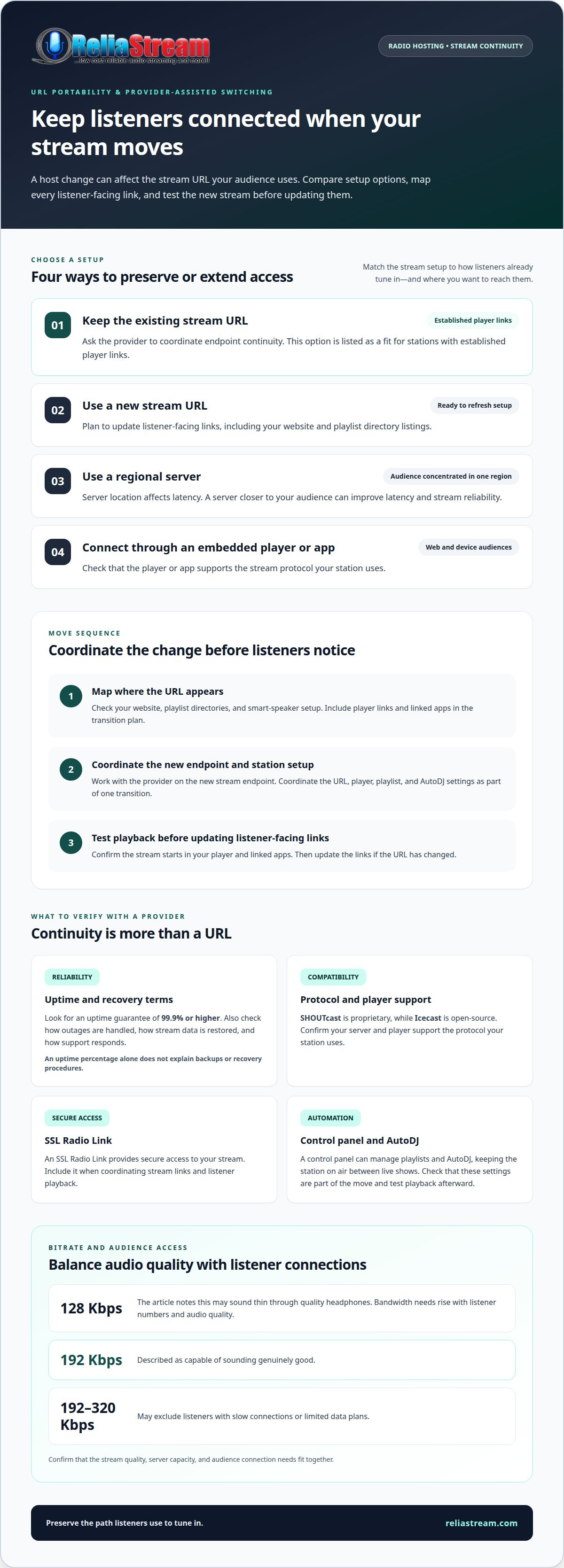
A stream URL connects listeners to your station through a browser, app, or embedded player. It may change when the stream moves to a new server. Before launch, map where that URL appears, including your website, playlist directories, and smart-speaker setup. During a move, the provider can coordinate the new stream endpoint and test playback before you update listener-facing links.
Look for an uptime guarantee of 99.9% or higher, plus clear terms for redundancy, backups, and customer support. Those terms should explain how outages are handled, how stream data is restored, and how support responds. An uptime percentage alone doesn’t describe recovery or backup procedures.
Server location affects latency: a server closer to your audience can improve latency and stream reliability. Bandwidth needs rise with listener numbers and audio quality. A 128 Kbps music stream may sound thin through quality headphones; 192 Kbps can sound genuinely good, while 192-320 Kbps may exclude listeners with slow connections or limited data plans.
| Option | URL or setup | Best fit |
|---|---|---|
| Keep the existing stream URL | Provider coordinates endpoint continuity | Stations with established player links |
| Use a new stream URL | Update website and directory links | Stations ready to refresh their setup |
| Regional server | Places infrastructure near listeners | Audiences concentrated in one region |
| Embedded player or app | Connects listeners through a player or app | Stations reaching web and device audiences |
Choose a hosting setup that preserves listener access and supports the way your audience tunes in. SHOUTcast is proprietary, while Icecast is open-source, so confirm that your server and player support the protocol your station uses. A control panel can manage playlists and AutoDJ, keeping your station on air between live shows. After a change, test playback in your player and linked apps.
Streaming continuity also sits alongside broadcast obligations. According to SoundExchange, a small noncommercial U.S. internet radio station pays a $1,000 minimum fee per channel in 2026.
An SSL Radio Link provides secure access to your stream. When moving hosts, coordinate the URL, player, playlist, and AutoDJ settings as part of one transition. Then test that listeners can still start the stream.
What is internet radio hosting?
Internet radio hosting uses a server to deliver a station’s audio stream to online listeners. A control panel helps manage stream settings and automation. Plans may measure listener-hours, bandwidth use, or concurrent listeners. For broadcasters deciding what to look for in a radio hosting provider in 2026, understanding those meters is a practical starting point.
Listener-hour billing reflects how long people tune in. Concurrent-listener limits focus on how many people connect at once. Bandwidth reflects the data moving from the server to listeners, and rises with both audience size and bitrate. A 5 Mbps home upload connection can support roughly 40 simultaneous listeners at 128 Kbps. That example shows why connection capacity and stream quality matter together.
An “unlimited listeners” claim needs context. It may describe the plan’s listener cap, but bandwidth, bitrate, and server capacity still affect how the stream performs. At 64 Kbps, a plan may advertise unlimited listeners, yet high demand can still make capacity and fair-use terms important. Read the stated concurrent limit, any bandwidth threshold, and what happens if usage exceeds the plan. Overage rules can describe extra charges, reduced service, or an upgrade path.
Providers estimate demand using expected listener peaks and the selected bitrate. A 128 Kbps stream uses more bandwidth per listener than a 64 Kbps stream. As a station gains listeners, an upgrade can provide more capacity or support a higher bitrate. Check whether the control panel shows concurrent connections and stream activity, so growth becomes visible before limits disrupt listening.
Security and audience reporting should help protect stream access and clarify listening patterns. Look for secure stream delivery and control-panel reports on concurrent listeners and listening duration. Use those insights to understand audience growth, bandwidth requirements, and the capacity your plan needs.
To decide what to look for in a radio hosting provider in 2026, match listener patterns and desired stream quality to the plan’s capacity terms. Explore internet radio hosting options when you’re ready to match a stream setup to your audience.
Can a provider move my radio station to a different host later?
Yes, you can move a radio station to a new host. The transition involves coordinating the stream, schedule, and listener connections. First, document your stream settings, playlists, and scheduled programs. Then configure matching automation on the new host and prepare the replacement stream endpoint. Test playback before changing player links to help manage the launch.
AutoDJ keeps an internet radio station broadcasting when its presenter isn’t live. It can play a playlist between live programs, so listeners continue to hear scheduled content. Before moving hosts, organize the music library, playlist order, and rotation rules for the new control panel. For example, a station might alternate music categories or schedule a regular program between automated sets. Document the schedule clearly so you can reproduce it on the new host.
Live broadcasting adds another transition point. The new setup needs to handle the handoff between a presenter’s live connection and AutoDJ. Test both modes: confirm a live program takes over as intended, then confirm automation resumes afterward. AutoDJ can keep a station broadcasting 24 hours a day between live shows. The station’s schedule should make those transitions clear, especially for listeners tuning in through mobile connections.
U.S. internet radio stations generally need performance-royalty licenses from ASCAP, BMI, and SESAC for compositions, and SoundExchange for recordings. Eligible U.S. webcasters use a statutory license for noninteractive digital performances of sound recordings, according to the U.S. Government Publishing Office. Moving hosts does not replace these separate licensing responsibilities.
Plan a host move around your programming, not just the stream endpoint. Map recurring shows, AutoDJ playlists, and live handoffs before launching the new stream. Test both scheduled and live broadcasting on the destination setup. This helps preserve the listening experience while the hosting changes behind the scenes.
Scalability and flexible hosting plans
A scalable plan grows with your audience without forcing an unnecessary jump in stream quality. Compare capacity across concurrent listeners, bitrate, and bandwidth. A 128 Kbps stream and a 320 Kbps stream place different demands on delivery capacity. More listeners tuning in simultaneously also increase total bandwidth use. Knowing what to look for in a radio hosting provider in 2026 means checking how a plan can adapt across these needs.
Start with your current format, then consider how it may develop. A talk-focused station may prioritize listener capacity, while a music station may prefer a higher bitrate. If you add a podcast, consider whether its on-demand listening belongs in the same hosting setup. Audience growth, new programming, or a higher-quality stream can each affect the resources your network needs.
Platform choice matters. SHOUTcast is proprietary, while Icecast is open-source. Choose a host that supports your station’s streaming system and can accommodate its requirements as they change. Check how control-panel features, automation, and stream settings work across plan changes. This helps preserve familiar workflows as capacity evolves.
Plan in stages: assess your current audience and bitrate, identify likely next demands, and choose a plan that can support them. For example, a station adding live programs should consider peak listening, not just average audience size. A station adding another stream may need capacity for both channels. Check how clearly the host explains upgrades for changing listener numbers, bandwidth, or programming.
Don’t choose on the word “unlimited” alone. Capacity still depends on stream bitrate, simultaneous connections, and available bandwidth. Match those limits to your format and growth plans. For a practical next step, consider what to look for in a radio hosting provider in 2026, then explore scalable internet radio hosting that can support your station’s next stage.
ReliaStream
ReliaStream provides internet radio hosting for broadcasters choosing a plan around stream quality and audience needs. Its options range from the 32 Kbps Hosting Plan and 64 Kbps Hosting Plan to the 128 Kbps Hosting Plan and 320 Kbps Hosting Plan. That range gives stations different bitrate options as their format or listening goals evolve.
Turn to ReliaStream when you’re comparing hosting plans or preparing to launch a station with a dedicated streaming setup. Consider your broadcast format, desired listener experience, and suitable bitrate. These details help narrow down a plan for your station today and its direction as it grows.
Contact ReliaStream to discuss internet radio hosting for your station.
Set Your Station’s Next Direction
Your next hosting decision can support more than today’s broadcast. Think about the kind of station you’re building, the listening experience you want to deliver, and how your programming may change. That gives you a practical way to apply what to look for in a radio hosting provider in 2026: choose around your station’s direction, not just its immediate setup.
ReliaStream offers the 32 Kbps Hosting Plan, 64 Kbps Hosting Plan, and 128 Kbps Hosting Plan. Consider which bitrate suits your station’s content and audience, then choose a starting point that fits your plans. As the broadcast develops, that decision can help guide your next hosting choice.
Contact ReliaStream about your station to discuss internet radio hosting for your broadcast. Your station’s next chapter starts with a setup that fits the sound you want to share.
Frequently Asked Questions
What happens if my internet drops?
If your station’s internet connection drops during a live broadcast, the live audio feed may stop reaching the hosting server. If AutoDJ is already running from the server, it can continue playing the scheduled playlist while the studio connection is down. Listeners whose connections are interrupted may need to reconnect after service returns. Plan for station internet access and hosted stream continuity as separate parts of your broadcast.
What features should a radio hosting provider offer in 2026?
Look for compatible streaming protocols, bitrate options, a usable control panel, AutoDJ, and secure stream delivery. Consider whether listener reports help identify peak listening periods and whether the provider clearly explains capacity and backups. A station adding a new program may need scheduling tools, while one reaching listeners through smart speakers may benefit from an app. Match features to your station’s actual workflow.
How much does internet radio hosting cost in the US in 2026?
Internet radio hosting costs vary by plan. Compare the selected bitrate, listener capacity, bandwidth, control panel, and any additional streaming features. Talk and music stations may have different delivery needs. Review what the plan includes, not just its headline rate, so you can see which resources support your broadcast.
How do radio hosting providers compare on listener limits, bandwidth, and audio quality?
Compare how each plan defines capacity, such as concurrent connections, listener-hours, or bandwidth usage. Then consider how stream quality affects data delivery to each listener. A brief audience peak can matter even when average listening is modest. Review plan limits and overages, and check whether an upgrade changes capacity, bitrate, or both. This is more useful than relying on “unlimited” wording alone.
Which streaming formats, codecs, and bitrates should radio hosting support?
Choose a host that supports the streaming system used by your encoder and player, such as SHOUTcast or Icecast. The encoder, hosting server, and listener player must also support the same audio format. Set bitrate based on your content and audience access. Talk programming may work well at a lower bitrate, while music stations may prioritize audio fidelity and consider listeners with limited connections.
Does radio hosting include AutoDJ, scheduling, and live DJ switching?
Many hosting setups combine AutoDJ, scheduled playback, and live DJ connections, though available tools depend on the plan and control panel. ReliaStream plans include Free Auto DJ and Stream Live / Remote DJ’s, with a choice of control panel. For stations with rotating presenters, these tools can support transitions between scheduled playlists and live broadcasts within one hosting setup.


