

What should you look for in a streamserver24 alternative? If buffering, a difficult control panel, or limited ways to reach listeners are getting in the way, compare more than the monthly price. Check the streaming options, management tools, security features, and platforms your audience uses before deciding whether to move your station.
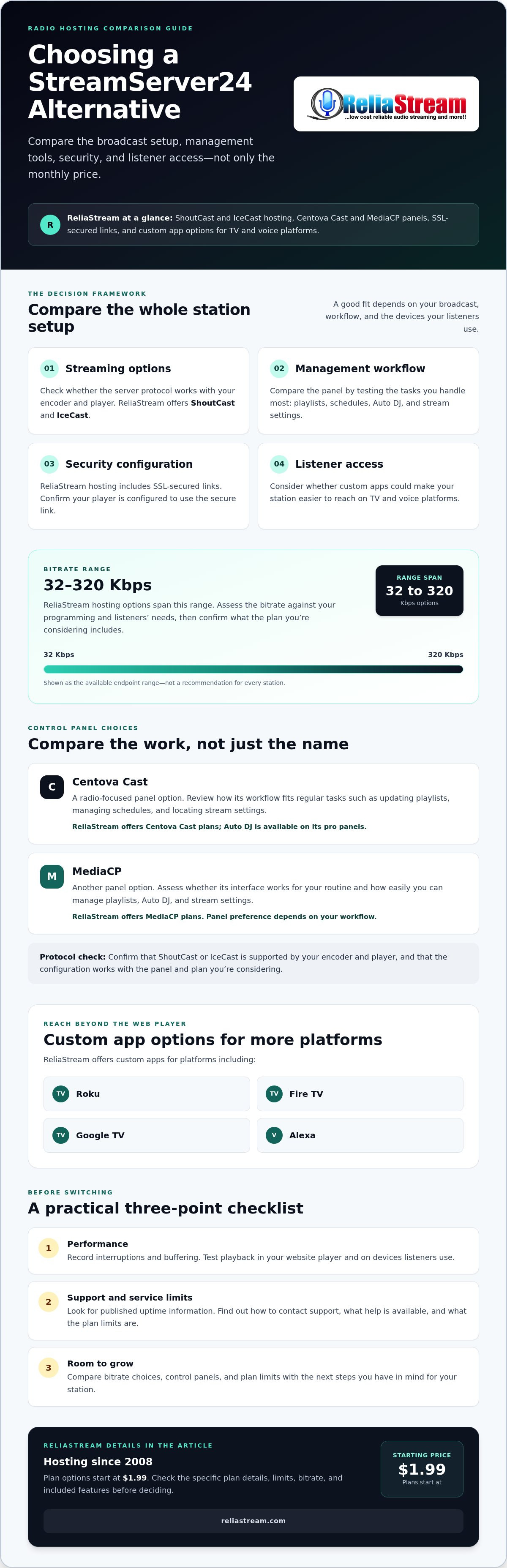
You shouldn’t have to choose a bitrate or control panel without understanding how it fits your broadcast. ReliaStream provides ShoutCast and IceCast hosting, Centova Cast and MediaCP control panels, SSL-secured links, and custom apps for platforms including Roku and Alexa. Its hosting options range from 32 Kbps to 320 Kbps, so you can assess the setup against your programming and listeners’ needs.
This guide looks at ReliaStream as a StreamServer24 alternative, including bitrate options, control panels, SSL-secured links, and app development for TV and voice platforms. Use the comparison points to identify what you need to verify before switching, and decide whether ReliaStream’s services fit your station.
Key Takeaways
- Use a clear checklist to assess whether a streamserver24 alternative fits your station’s streaming, management, and growth needs.
- Compare Centova Cast and MediaCP by testing the tasks you handle most, and check whether ShoutCast or IceCast works with your encoder and player.
- Choose a bitrate based on your content and audience, and confirm that your stream and player are configured to use an SSL-secured link.
- Consider whether custom app options for Roku, Fire TV, Google TV, and Alexa could make your station easier to access.
- Review ReliaStream’s hosting options, with plans starting at $1.99, and check the details of the plan that fits your broadcast.
Why Settle? Finding a StreamServer24 Alternative that Scales
A stream that works only some of the time is a shaky foundation for a radio station. Buffering or a dead player can interrupt a listening session, and you can’t count on a listener returning after playback fails. When searching for a streamserver24 alternative, look beyond the server price. Compare stream options, the tools you’ll use to run the station, and the information available about support and service limits.
Internet radio delivers audio over a network, so a problem anywhere between your encoder and a listener’s player can affect playback. A low price may not be good value if the plan’s limits are unclear or you can’t get useful answers when troubleshooting. A broken player does not automatically mean a search-ranking penalty, but it can frustrate site visitors and make it harder for them to listen.
The Hidden Costs of Unreliable Hosting
Downtime can mean missed listening time and a disrupted broadcast, even if it does not erase a station’s growth. Unclear troubleshooting responsibilities can add to the problem: you may not know whether to check the encoder, your connection, the player, or the hosting setup first. Before choosing a provider, look for published uptime information and find out how to contact support and what help is available. Ask direct questions about the issues you are most likely to face, then compare the answers rather than relying on assumptions.
ReliaStream: A Veteran Voice in a Crowded Market
ReliaStream has provided ShoutCast and IceCast hosting since 2008. Its bitrate options span 32 Kbps to 320 Kbps, giving stations a range to consider as their programming and listening needs change. Before moving, check the specific plan limits and confirm which bitrate and features it includes. Ask how the available options fit your current setup instead of assuming that a broader range automatically means every plan includes every feature.
Use this three-point checklist to evaluate your current service and compare alternatives:
- Performance: Keep a record of interruptions and buffering. Test playback in your website player and on the devices listeners use.
- Support: Find out how to request help, what details to include, and whether the provider can advise on radio-streaming setup issues.
- Room to grow: Compare bitrate choices, control panels, and plan limits with the next steps you have in mind for your station.
No provider can remove every broadcasting challenge. A useful hosting setup makes the essentials easier to manage and gives you clear options to assess as your station changes.
Pro-Grade Control: Centova Cast vs. MediaCP Showdown
Your control panel is where you manage key parts of your station. With Auto DJ, you can organize programming that plays without a live computer continually feeding the broadcast. The right panel depends on the tasks you handle and how its workflow feels in practice. To understand how the encoder, streaming server, and listener’s player fit together, see this accessible explainer on how internet radio works.
ReliaStream supports both ShoutCast and IceCast. Check which protocol your encoder and player support, then confirm that the configuration works with the panel and hosting plan you are considering. When comparing providers, assess the server option and control panel together, not as separate decisions.
Centova Cast: The Industry Standard
Centova Cast is a radio-focused option that may suit broadcasters who prefer its interface and workflow. Before choosing it, consider the tasks you’ll perform regularly: updating playlists, managing schedules, and locating stream settings. ReliaStream offers Centova Cast plans, and Auto DJ functionality is available on its pro panels. Ask how Auto DJ is set up in the plan you are considering and whether the workflow suits your programming routine. For a deeper comparison, read Mastering your Centova Cast vs MediaCP choice.
MediaCP: A Modern Option
MediaCP is another control-panel option. Whether its interface suits you is a matter of preference, so assess the tasks you need to complete before deciding. If you plan to use SSL streaming, confirm that your player is set up with the SSL-secured link included with ReliaStream hosting. The control panel alone does not determine whether a listener’s connection is configured securely.
ReliaStream offers both Centova Cast and MediaCP plans, so broadcasters can compare the available workflows. To make the comparison practical, consider how each panel handles playlist management, Auto DJ, and access to the stream settings you use. If possible, review the interface or ask questions about your specific setup before selecting a plan.
- Choose Centova Cast if its radio-focused workflow feels intuitive for the tasks you handle.
- Choose MediaCP if its interface better suits the way you want to manage your station.
- Check compatibility by confirming that your encoder, ShoutCast or IceCast setup, SSL link, and listener player work together.
These are useful criteria for comparing any streamserver24 alternative. To review the available panel and hosting options, explore ReliaStream hosting and control panels.
Beyond the Stream: SSL Security and 320 Kbps Quality
Audio quality and secure delivery both affect the listening experience. An unencrypted stream may not play in some modern browser setups, particularly when it is embedded on an HTTPS website, because browsers can restrict insecure content. The result depends on the browser and player configuration, so test your stream on the platforms your audience uses. ReliaStream hosting includes SSL-secured links that broadcasters can configure in their players.
Bitrate measures how much audio data is sent each second. A higher bitrate can preserve more audio detail, but it also uses more bandwidth for the station and its listeners. The digital audio broadcasting service concept involves several elements working together, including encoding, streaming delivery, and playback. Choose a bitrate that fits your programming and audience rather than selecting the highest option automatically.
The 320 Kbps Difference
ReliaStream offers hosting options from 32 Kbps to 320 Kbps. A lower bitrate may suit speech-focused programming, while a higher bitrate can support music stations aiming to deliver more audio detail. Bitrate alone does not determine sound quality: the source audio, encoder settings, and listener’s playback equipment also matter. Consider your audio goals alongside the connection speeds and data limits of your audience.
At a higher bitrate, each listener uses more data. A setting that works well for a studio or home connection may be less convenient for someone listening on a limited mobile connection. Think about where your audience listens, then test playback on the devices and connections they are likely to use before settling on a bitrate.
Why Your Listeners Need SSL
SSL encrypts the connection between the stream and its listener. Without a secure stream URL, a browser may block playback or show a security warning, particularly when the station website uses HTTPS. SSL does not address every security risk, but a secure stream link can support playback in secure web contexts. Check that the player, website, and stream URL are configured to work together.
When comparing a streamserver24 alternative, check both bitrate options and secure delivery. Confirm that the hosting includes an SSL-secured stream link, then test it on your station website before sharing it widely. ReliaStream includes SSL-secured links with hosting. Review the SSL radio streaming guide for more on secure broadcasting, or explore ReliaStream hosting options to assess which bitrate and setup fit your station.
The Living Room Takeover: Roku, Fire TV, and Alexa
Your station can reach listeners beyond a desktop player. A radio app for a smart TV gives people another way to access your broadcast, while voice access lets them ask a device to play a station instead of navigating to a website. These options may make tuning in more convenient for listeners who use those devices at home.
ReliaStream offers custom app development for Roku, Google TV, and Amazon Fire TV, as well as an Alexa Streaming App. Before starting an app project, identify the platforms you want to target and ask what branding, features, and materials are required. App development does not necessarily include app store placement or approval, so check what the process covers rather than assuming your app will be featured.
Bring Your Station to the Living Room
A TV app can give listeners a direct way to access your station on a device they already use for entertainment. ReliaStream offers app development for Roku, Google TV, and Amazon Fire TV. Choose platforms based on where your audience listens and which ecosystems matter to your station. For a closer look at why apps can help broadcasters extend their reach, read about radio streaming app development.
Consider the whole listener experience, not just whether the station appears on a screen. Your station name, logo, and presentation help listeners recognize your broadcast. Ask what branding can be included and what the process of opening the app and starting the stream will look like. Those details help you assess whether an app will provide a clear route to listening.
Make Tuning In Easier with Voice
Smart speakers offer another way to listen: people can ask a device to play a station rather than navigate a website or app. Alexa and Google Home are separate ecosystems, so check which voice platforms are supported. ReliaStream lists an Alexa Streaming App; that does not confirm that a Google Home integration is included.
An Alexa Skill lets listeners use a voice command to ask an Alexa-enabled device to play your stream. Before promoting the feature, test the command and playback behavior so you can tell listeners exactly how to find the station.
- Pick platforms intentionally: Focus on the TV and voice ecosystems your listeners use.
- Check the details: Confirm app branding, setup requirements, and platform availability before development.
- Test the listener journey: Check that people can find the station and start listening as expected.
If you’re weighing a streamserver24 alternative that can help your station reach beyond the browser, explore ReliaStream’s radio app options for Roku, Google TV, Amazon Fire TV, and Alexa.
Join the ReliaStream Family: Pro Hosting Starting at $1.99
A radio project can start with a modest setup and change over time. ReliaStream’s professional hosting starts at $1.99, with bitrate options from 32 Kbps to 320 Kbps. That range gives broadcasters options to consider as programming and audience needs evolve. Check the details of the specific plan you are considering, including its bitrate and included features.
For a first station, the radio hosting starting at $1.99 article outlines a budget-conscious way to approach broadcasting. A low starting price can help manage the initial cost, but it does not tell you whether the plan’s stream settings, panel features, and support options suit your station. Compare those details as well as the headline price.
Low Bitrate, High Impact
Talk, interviews, and community updates may not need the same bitrate as music programming focused on high-fidelity sound. ReliaStream’s 32 Kbps and 64 Kbps options may be worth considering for speech-led content, while its higher options provide alternatives for different audio goals. The low bitrate radio hosting guide can help you think through where to start. Bitrate affects data use as well as audio detail, so consider your audience and test playback on the devices and connections they use.
A lower bitrate can be a practical starting point, but it does not guarantee stream stability. Review what each plan includes and ask whether you can change to a different bitrate if your needs evolve. A suitable starting plan supports your current content without requiring you to choose more capacity than you need.
Switch Providers with a Plan
Changing hosts takes more than signing up. Before migrating, record your stream settings, player links, playlists, and any directories or apps that point to your current stream. Ask the new provider what migration help is available and which updates you’ll need to handle yourself. Don’t assume setup is immediate or that existing links transfer automatically. A written checklist can help you identify what needs to change and test it after the move.
ReliaStream has served broadcasters since 2008 and offers Centova Cast and MediaCP plans, with Auto DJ functionality available on its pro panels. Use those features as specific points of comparison rather than relying on a general promise of uninterrupted service. If you’re weighing a streamserver24 alternative, compare the bitrate, control panel, SSL link, and migration process with your station’s actual requirements.
Ready to compare your options? Explore ReliaStream hosting plans and review the setup that fits your broadcast today.
Build a Stronger Station, One Smart Upgrade at a Time
Choosing a streamserver24 alternative is an opportunity to assess more than the stream link. Consider whether the control panel suits your workflow, whether an SSL-secured link is configured for your website player, and whether custom app development could help listeners access your station on Roku, Google TV, Amazon Fire TV, or Alexa.
ReliaStream provides ShoutCast and IceCast hosting, Centova Cast and MediaCP plans, SSL-secured links, and custom app development. Match those options to your station’s current needs, and check the plan details before making a change. A clear comparison of bitrate, panel, and listener access can help you decide what to do next.
Ready to assess your setup? Explore ReliaStream radio hosting and compare the available options for your station.
Frequently Asked Questions
Is ReliaStream a better alternative to StreamServer24 for uptime?
ReliaStream may suit your station as a streamserver24 alternative, but no uptime guarantee is confirmed here. Compare each provider’s published uptime information, stream limits, and support process before deciding. You can also test your current stream and record interruptions to help identify what you need from a new provider. Experience and features are useful comparison points, but check the service terms and ask how outages are handled.
Can I keep my current Auto DJ files when I switch to ReliaStream?
Possibly, but don’t assume your files, playlists, or schedules will transfer automatically. Back up your audio files and export playlist or schedule information if your current panel allows it. Then ask ReliaStream whether your file formats and Auto DJ setup are compatible with the Centova Cast or MediaCP plan you are considering. Auto DJ functionality is available on ReliaStream’s pro panels, but transfer of existing files is not confirmed.
Does ReliaStream support SSL streaming for modern browsers?
Yes. ReliaStream hosting includes SSL-secured links that you can use to configure secure stream playback. If your station website uses HTTPS, check that its player uses the SSL link. Test playback in the browsers and on the devices your listeners use, since player settings and the way a stream is embedded can affect the result.
How much does it cost to get my radio station on Roku or Alexa?
The cost of a Roku or Alexa app is not specified here, so confirm the price directly with ReliaStream before planning your budget. ReliaStream offers custom app development for Roku and an Alexa Streaming App. When asking for details, name the platform and describe what your station needs. Confirm what development includes, whether any setup charges apply, and what steps are required before listeners can access the app.
What is the difference between ShoutCast and IceCast hosting?
ShoutCast and IceCast are different streaming server platforms used to deliver internet radio audio to listeners. ReliaStream supports both. The right fit depends on your encoder, player, and broadcast setup, so check that your current tools work with the server option you choose. If you are changing hosts, confirm the required stream settings and identify any player links or directories that need updating.
Can I start with a cheap $1.99 plan and upgrade later?
ReliaStream offers hosting options across bitrates from 32 Kbps to 320 Kbps, but the details of changing plans are not confirmed here. Before signing up, ask whether you can move to a different bitrate, how a change is handled, and whether your stream settings or listener links need updating. A lower bitrate may suit a speech-led station, while music-focused broadcasters may have different audio goals.
Do you provide help with migrating my station from another host?
Migration assistance is not confirmed here, so ask ReliaStream what help is available before switching. Prepare a list of your current stream settings, Auto DJ files, playlists, control panel, and website or app links that may need updating. Keep backups until you have tested the new stream and confirmed your programming works. Clarifying responsibilities in advance can help you plan the move and avoid preventable disruption.
Is 320 Kbps audio quality available on all plans?
No. ReliaStream offers bitrate options ranging from 32 Kbps to 320 Kbps, so 320 Kbps is an available option, not a feature confirmed on every plan. Check the bitrate included with the specific plan you are considering. Higher bitrates use more data for each listener, so consider your content, audience connections, and audio quality goals before choosing. Match the plan to your station rather than selecting the highest setting by default.


