

Your TV is sitting there. It's a massive, high-definition canvas. But why is it silent? Most people think Roku is just for binge-watching shows. They're dead wrong. Your living room is the ultimate untapped real estate for professional radio. If you've been searching for how to get radio on roku without the headache of clunky, generic interfaces, you're finally in the right spot.
We know the frustration. You're tired of missing local stations. You're sick of aggregator apps that feel like they were built a decade ago. For broadcasters, it's even worse. You feel invisible on the major platforms. This guide changes that. You'll discover exactly how to access thousands of global stations as a listener and how to launch your own branded radio app as a broadcaster. We'll break down the massive difference between being buried in a directory and owning your own custom station. It's 2026. Stop settling for crumbs and start owning the biggest screen in the house.
Key Takeaways
- Stop settling for crumbs. Roku is the ultimate untapped real estate for professional radio in 2026.
- Master the setup. We'll show you how to get radio on roku using the top aggregator apps currently dominating the store.
- Own your audience. Learn why a custom branded app beats being buried in a crowded directory every single time.
- Stay compliant. Get the lowdown on SSL-secured ShoutCast streams and the latest Roku SceneGraph requirements.
- Scale fast. Discover how ReliaStream hosting and custom app development put your brand in the spotlight.
Why Roku is the Ultimate Destination for Radio in 2026
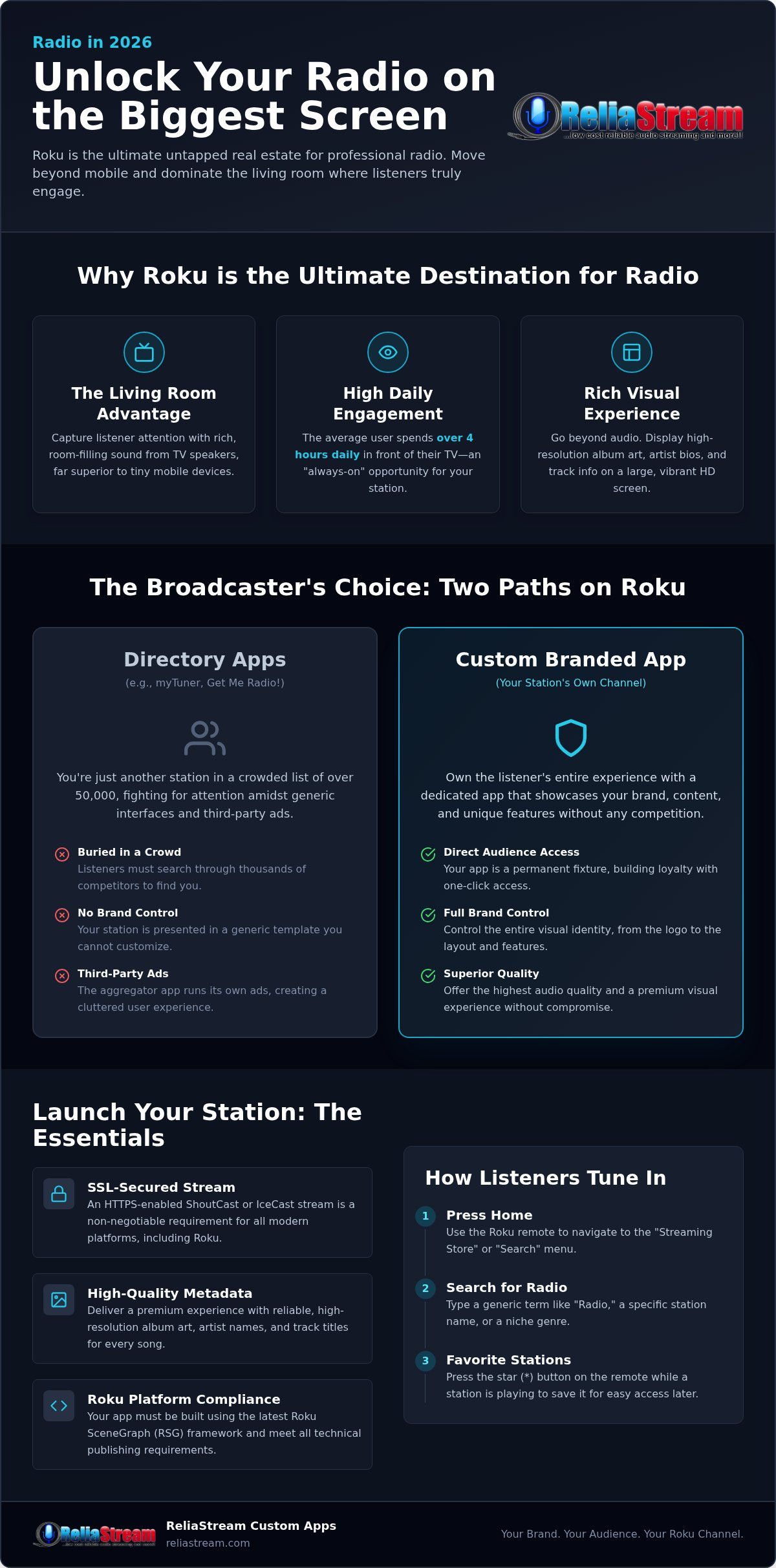
Think bigger than Netflix. Roku isn't just a box for binge-watching anymore. It's the new command center for home audio. People spend hours every day in front of that screen; often more than four hours daily according to recent media consumption trends. Why shouldn't your station be there? If you're wondering how to get radio on roku, you're already thinking like a leader. You're looking at the ultimate untapped real estate. The living room is the heart of the home, and the TV is the heartbeat.
The "Living Room" advantage is real. TV speakers beat tiny smartphone speakers every single day. Listeners want that rich, room-filling sound without the hassle of Bluetooth pairing or dying batteries. This is OTT (Over-the-Top) radio. It's the modern way to bypass old-school gatekeepers and put your stream directly into the listener's sanctuary. It's professional. It's high-fidelity. It's exactly where you need to be.
The Shift from Mobile to Smart TV Audio
Mobile is for the commute. The TV is for the home. Listeners are ditching the tiny screens for the immersive experience of the Roku streaming platform. In 2026, visual metadata is the law. Listeners don't just want to hear the music; they want to see high-res album art, artist bios, and live track updates on a 50-inch display. Traditional FM and AM radio are becoming ghosts in modern houses. Roku makes discovery instant and painless. A few clicks and your station is playing. No static. No tuning. Just crystal clear sound and a beautiful interface.
Roku vs. Other Smart TV Platforms
Why choose Roku? It's simple. It's the market leader for a reason. While other platforms feel cluttered or restricted, Roku stays focused on the user. The demographics are wide open. From Gen Z to Boomers, everyone knows how to navigate a Roku remote. These devices are "always-on" and integrated into the daily routine of millions. Knowing how to get radio on roku isn't just a technical skill; it's a survival strategy for the modern broadcaster. You aren't just launching a station. You're claiming your territory on the biggest screen in the house. This is where you build loyalty. This is where you dominate.
The Listener’s Guide: 3 Ways to Get Radio on Roku Today
Ready to turn that TV into a global receiver? It's easier than you think. You don't need extra wires or expensive hardware. If you're looking for how to get radio on roku, the answer starts with the remote in your hand. Most users stick to the basics, but the real power lies in the Channel Store. You aren't limited to what's pre-installed. You have the world at your fingertips.
First, grab your remote and hit the Home button. Scroll down to "Streaming Store" or "Search." Type in "Radio." You'll see a massive list of options instantly. It's a goldmine. Data shows that online audio listenership has increased as more people move away from traditional dials. Roku is the perfect place to catch this wave. You can find local FM frequencies or obscure niche genres from across the globe in seconds. For broadcasters testing new streams, using a developer code allows you to sideload niche stations before they go live to the general public.
Using Aggregator Apps for Maximum Variety
Aggregators are the shopping malls of the radio world. Apps like myTuner, Get Me Radio!, and iHeartRadio house thousands of stations under one roof. It's convenient. You get variety. But there's a catch. You're just one station in a list of 50,000. It can feel like finding a needle in a haystack. These apps are often free, but they come with a cost: interface clutter and constant third-party ads. If you want quick access, always use the "Favourites" feature. Press the star button on your remote while a station is playing. This pins the station for easy retrieval later, saving you from digging through the directory every time you sit down.
Finding Branded Apps for Your Favourite Stations
This is where the pros play. Branded apps are standalone channels dedicated to a single station or network. They offer superior audio quality because they aren't fighting for bandwidth inside a massive directory. When you search the store, look for specific station names rather than generic terms. These dedicated apps often include extra features like high-res artist art and direct listener interaction. If you're a broadcaster, launching your own Roku Radio App is the fastest way to build real listener loyalty without the noise of a directory. It's about owning the experience. It's about being the only voice in the room.
The search function is your best friend. Don't just scroll through categories. Type in your local frequency or a specific genre like "Synthwave" or "Classic Jazz." Knowing how to get radio on roku with precision saves you from endless scrolling and gets the music playing faster.
Directory Apps vs. Branded Apps: Which Strategy Wins?
Broadcasters often get stuck on the "how." They search for how to get radio on roku and stop at the first directory they find. That's a rookie move. Think of a directory like a massive shopping mall. You're just one kiosk in a sea of thousands. Sure, you're there. But are you being seen? Being in a directory is renting space. Building an app is owning the building. If you want to grow in 2026, you need to own the real estate.
The stakes are massive. Recent industry data proves that radio listening accounts for 67% of ad-supported listening. That's a huge audience you can't afford to lose. If you're just renting space in a generic app, you're leaving your growth to chance. You're letting a third-party platform control your branding, your ads, and your connection to the listener. When you understand how to get radio on roku through your own dedicated channel, the game changes completely.
The Directory Trap: Why You Might Be Invisible
Directories like myTuner suffer from the "Endless Scroll" problem. A listener searches for a genre, and fifty stations pop up. Why would they pick yours? Without your own icon on the home screen, you're practically invisible. Most directories strip away your unique metadata. Your logo? Gone. Your custom track info? Often replaced by generic text or third-party ads. You're just a stream. You aren't a brand. Technical limitations in shared apps also mean you're at the mercy of their bandwidth and update schedules. It's a crowded, noisy environment where your station is just another number.
The Power of a Branded Roku Radio App
Owning your own app is the ultimate power move. It's about one-click listening. When a fan turns on their TV, your logo is right there on the home screen. No searching. No scrolling. Just instant engagement. This is the core of professional radio streaming app development. You control the visuals. You control the ads. You own every bit of listener data. You can offer high-resolution visual metadata that pops on a big screen, creating a professional experience that directories simply can't match.
- Direct Home Screen Access: Your brand stays top-of-mind every time the TV turns on.
- Zero Competitor Distractions: No other stations are just one click away.
- Full Monetization Control: Keep 100% of your ad revenue and sponsorship deals.
- Custom Listener Experience: Tailor the interface to match your station's unique vibe.
If you're serious about the future of broadcasting, stop settling for crumbs in a directory. A branded app isn't just a luxury anymore. It's the backbone of a modern station that wants to dominate the living room.
The Broadcaster Roadmap: How to Get Your Station on Roku
Getting your station on the big screen isn't magic. It's engineering. Most broadcasters fail because they ignore the technical basics. They think they can just throw a link at the platform and hope it sticks. If you want to know how to get radio on roku successfully, you need to start with the backbone: your stream. Roku is a professional ecosystem. It demands a professional foundation. Stop guessing and start building.
Preparing Your Stream for Roku
Security is the first and most critical hurdle. In 2026, ssl radio streaming is non-negotiable. Roku requires HTTPS for content delivery. If your stream link starts with HTTP, your app will be rejected before a human reviewer even sees it. Next, look at your bitrate. You want the perfect balance between high-fidelity and zero buffering. While we offer everything from 32 Kbps to 320 Kbps, a 128 Kbps stream is often the gold standard for stability on home networks. Don't forget metadata injection. Listeners on a massive TV screen expect to see "Now Playing" info. If your app is a blank screen, it's a failure. Metadata makes your station feel alive.
The Development Path: DIY vs. Professional
You have choices, but choose wisely. Roku Direct Publisher exists, but it's a dead end for serious broadcasters. It's built for video. For a real radio experience, you need to use Roku SceneGraph. This requires custom SDK development. It gives you the power to create a dedicated audio-only channel that meets Roku's strict certification requirements. Your choice between shoutcast vs icecast matters here too. Icecast often handles SSL and metadata more gracefully in modern app environments, though Shoutcast remains a powerhouse for raw reliability. Stability is the name of the game. If your stream drops, you lose the listener.
The submission process is a gauntlet. You'll need a Roku Developer Account and a full suite of branding assets. Common rejections happen because of broken stream links or poor UI navigation that doesn't follow Roku's "10-foot" user interface rules. Don't let a simple formatting error kill your launch. If you're ready to skip the technical headaches and launch a rock-solid channel, check out our Roku Radio App development services to get it right the first time. Understanding how to get radio on roku is one thing. Executing it perfectly is where you win. Build on a solid foundation. Own the living room.
ReliaStream Custom Apps: Dominate the Roku Living Room
You've seen the map. You know the technical hurdles. Now, it's time to execute. Stop waiting for a directory to notice you. Quit hoping for a lucky search result. If you're serious about how to get radio on roku, you need a partner who eats technical barriers for breakfast. ReliaStream doesn't just host streams. We build empires on the big screen. We take the heavy technical lifting off your plate so you can focus on the music. This isn't just about being available. It's about being dominant. It's about owning the room.
Seamless Integration with Your Hosting
Your workflow shouldn't break because you added a new platform. We ensure a one-click sync between your existing Centova Cast or MediaCP panel and your Roku app. Expect a seamless, fast, and reliable connection. Our Auto DJ support means your Roku channel stays live 24/7. Even if your local studio goes dark, your TV audience never misses a beat. You get real-time listener statistics across every TV platform. You'll know exactly who is listening and where they are. This data is gold. Use these insights to sell sponsorships and fuel your growth. No more guessing games. Just raw, actionable data.
Launch Your Professional App in 2026
We don't do formal polish for the sake of it. We do results. Our gritty, can-do approach to custom development ensures your station looks professional on a massive screen. But the living room is just the start. The modern broadcaster owns the entire home ecosystem. That's why we advocate for alexa radio skill development to complement your Roku presence. Voice search is the law in 2026. Your listeners should be able to call your name from the kitchen and hear you instantly. We also handle expansion into Google TV and Amazon Fire TV. One station. Multiple platforms. Total coverage.
The living room is waiting. The audience is there. The technology is ready. You have the guide. Now, you need the engine to drive it. Don't let another year pass as a ghost in a directory. Take the professional leap. Get your station on Roku today and show the world what you've got. Whether it's a solid how to get radio on roku strategy or a full-scale assault on the smart TV market, we've got your back. This is your time to modernise. This is your time to expand. Let's build something massive together.
Claim Your Living Room Dominance Today
The landscape of radio has shifted. It's no longer just about the car or the kitchen counter. It's about the biggest screen in the house. You've now seen the technical roadmap. You understand the strategic difference between renting space in a directory and owning your own branded channel. Mastering how to get radio on roku is the first step toward a future-proof station that listeners can't ignore. No more ghosts. No more generic lists. Just your brand, your sound, and your audience.
We've been the trusted backbone for broadcasters since 2008. From tiered hosting starting at $1.99 to expert custom app development for all Smart TVs, we handle the technical grind so you can focus on the sound. It's time to stop being a ghost in an endless scroll. It's time to become a household name. Launch Your Branded Roku Radio App with ReliaStream and put your station where it belongs. The living room is waiting. Let's get to work and build your legacy today.
Frequently Asked Questions
How do I add a specific radio station to my Roku?
Start by using the search function in the Roku Channel Store. Type the station name directly into the search bar. If the station has a standalone app, it will appear instantly. If it doesn't, you'll need to use an aggregator app like myTuner or iHeartRadio. Simply open the aggregator and search for your station inside their directory. For niche stations, you might need a private developer code provided by the broadcaster.
Is there a free radio app for Roku?
Yes, the majority of radio apps on the platform are completely free to download. Popular choices like TuneIn, Get Me Radio!, and iHeartRadio don't cost anything to install. These apps typically monetize through audio ads or visual banners within the interface. If you're searching for how to get radio on roku without a subscription, these directories are your fastest path to thousands of global stations at zero cost.
Can I listen to FM radio on my Roku TV?
You can't use a traditional FM antenna with your Roku, but you can stream almost any FM station over the internet. Most local broadcasters now provide digital streams of their over-the-air content. You just need to find the station's dedicated app or a directory app that carries their signal. This digital transition provides a much cleaner sound than a standard receiver and eliminates the static common in home environments.
How much does it cost to get my radio station on the Roku store?
Roku doesn't charge a direct fee to submit a public channel, but you must have a registered developer account. The actual investment lies in professional development and secure hosting. You need a stream that meets modern security standards and a user interface that follows Roku's strict certification rules. While we don't quote fixed development prices here, investing in a professional build prevents costly rejections and ensures your brand looks authoritative.
Do I need a special server to stream radio to Roku?
You need a broadcast-grade server that supports SSL (HTTPS) encryption. Roku's modern ecosystem is strict; if your stream link starts with HTTP instead of HTTPS, it won't pass certification. Your server must also be compatible with ShoutCast or IceCast protocols. We offer specialized hosting plans that are pre-configured for smart TV compatibility. It's about more than just playing music; it's about providing a stable, secure connection that never drops.
Can I use a ShoutCast link on Roku?
Yes, you can use a ShoutCast link, but it must be secured. Older ShoutCast links often use non-standard ports that Roku's security protocols will block. To make it work, you'll need an SSL Radio Link to wrap your stream in a secure layer. Once you've handled the encryption, your ShoutCast stream will integrate perfectly with a custom Roku app. It's a reliable way to reach millions of listeners using your existing broadcast setup.
What is the best radio app for Roku in 2026?
The best app depends on whether you want variety or quality. For sheer volume, myTuner and iHeartRadio are the top choices for 2026. However, for the most professional experience, a branded standalone app is always superior. These dedicated channels offer higher bitrates and custom visual metadata that you won't find in a crowded directory. If you want the best possible sound on your TV, always look for the station's official app first.
How long does it take to develop a custom Roku radio app?
A professional custom build typically takes a few weeks from the design phase to final submission. This timeline includes building the UI, integrating your SSL-secured stream, and performing internal testing. After submission, Roku's own certification team usually takes about a week to review and approve the channel. When you work with an experienced partner, the process is streamlined. You can go from a concept to being live in the living room relatively quickly.


