

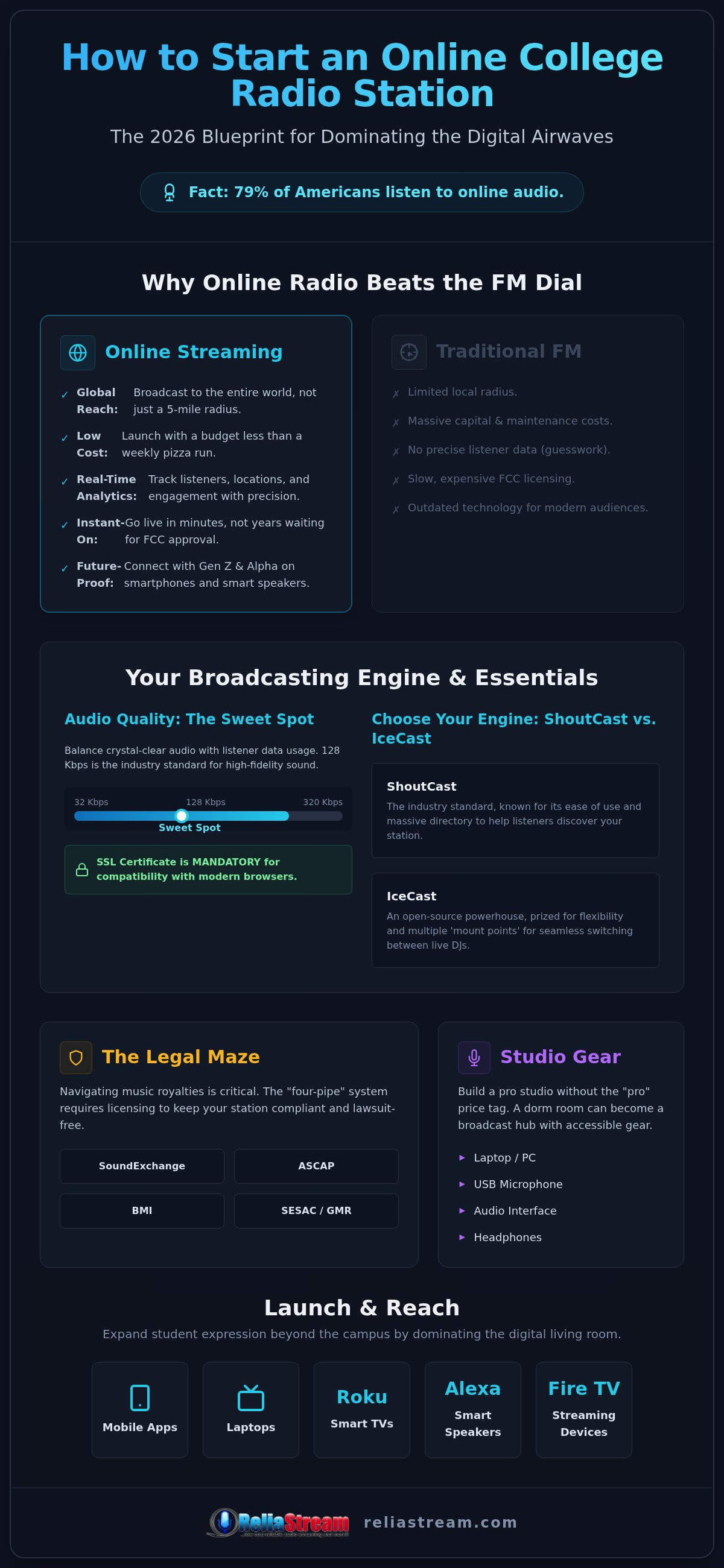
Why beg the FCC for a sliver of the FM dial when 79% of Americans are already listening to online audio? The era of massive transmitters and mountain-top towers is over. If you're wondering how to start a college radio station online without drowning in red tape, you aren't alone. You want to give your students a voice, but the "four-pipe" royalty mess, technical confusion, and tight campus budgets make the dream feel impossible. It's frustrating. It's overwhelming. But it doesn't have to be a dead end.
We've built this guide to show you exactly how to launch a professional, high-reach station in 2026. You'll learn to bypass the crushing costs of traditional broadcasting and build a high-fidelity stream that lives on every smart device. We're cutting through the noise to give you a gritty, "can-do" blueprint for a 24/7 digital platform that sounds incredible. No more waiting for administration approval that never comes. No more hardware that costs more than a semester of tuition.
This is your roadmap to modern campus media. We're covering everything from legal licensing and high-performance hosting to the essential gear that turns a dorm room into a global broadcast hub. Let’s get your station on the air.
Key Takeaways
- Learn exactly how to start a college radio station online by ditching expensive FM towers for professional digital hosting that reaches listeners worldwide.
- Discover why choosing the right engine—like ShoutCast or IceCast—is critical for high-fidelity 320 Kbps streaming and 24/7 reliability.
- Navigate the "four-pipe" royalty maze of SoundExchange and PROs to keep your campus station fully compliant and lawsuit-free.
- Build a pro-grade hybrid studio without the "pro" price tag using accessible USB mics and smart audio interfaces.
- Expand student expression beyond the quad by launching custom apps for Roku, Alexa, and Fire TV to dominate the digital living room.
Why Online Radio Beats the FM Dial for Colleges in 2026
Stop thinking about the quad. Traditional Campus radio used to mean a dusty basement room and a transmitter that barely reached the edge of the campus parking lot. Those days are dead. In 2026, the "Coverage Map" is a global reality. Why fight for a five-mile FM radius when you can broadcast to the entire world? It’s about reach. It’s about influence. Digital streaming removes the physical borders that once limited student expression.
The financial reality is even more striking. Building a terrestrial FM station requires massive capital for towers, transmitters, and physical real estate. Contrast that with low bitrate radio hosting that costs less than a weekly pizza run. It’s about efficiency. When you look at how to start a college radio station online, the barrier to entry isn't a mountain of cash; it’s just a clear vision and a reliable stream.
Digital listeners are also significantly easier to track. Try telling a college board of directors exactly how many people heard an FM broadcast at 2:00 PM on a Tuesday. You can't. It's guesswork. With online streaming, you get real-time analytics. You see the listener count, their geographic location, and exactly how long they stayed tuned in. That data is pure gold for securing campus funding and proving student engagement.
The Barrier to Entry: FM vs. Internet
Applying for an FCC license is a bureaucratic nightmare. It’s slow. It’s expensive. It can take years to navigate the red tape. Who has that kind of time? Terrestrial radio requires massive hardware footprints and constant engineering maintenance. Online stations? You need a laptop and a decent microphone. You can be live in minutes, not months. This "Instant-On" capability lets students experiment, iterate, and launch programming without the regulatory headache. It’s the ultimate learning lab for the digital age.
Future-Proofing Your Campus Media
Gen Z and Gen Alpha don't own FM radios. They own smartphones. They live on smart speakers and laptops. If your station isn't digital-first, it simply doesn't exist to them. Learning how to start a college radio station online gives students a modern digital portfolio. They aren't just learning to talk into a mic; they're mastering stream management, digital marketing, and global distribution. It’s a professional edge that translates directly to the 2026 job market. Plus, an online stream integrates perfectly with social media. You can’t embed an FM signal into a TikTok bio, but you can embed a stream link.
Choosing Your Engine: ShoutCast vs. IceCast and Hosting Essentials
Thinking about streaming directly from a laptop in the student union? Don't. Residential or campus Wi-Fi isn't built for broadcasting. You need a dedicated server that can handle hundreds or thousands of simultaneous connections without breaking a sweat. When you are figuring out how to start a college radio station online, your hosting provider is your backbone. A professional host ensures your stream stays live even if your local power goes out. It provides the bandwidth you need and the security your listeners expect.
Quality matters. While we offer everything from a 32 Kbps hosting plan up to a 320 Kbps hosting plan, the 128 Kbps mark is the industry "sweet spot." It delivers crystal-clear audio for both high-energy music and student talk shows without eating up too much listener data. But here is the kicker: audio quality means nothing if the stream won't load. Modern browsers like Chrome and Firefox will block non-secure streams. You absolutely must have an ssl radio link to ensure compatibility. Without it, your station is essentially invisible to half your potential audience.
ShoutCast vs. IceCast: The Technical Breakdown
The shoutcast vs icecast debate is the first major fork in the road. ShoutCast is the long-standing industry standard. It's famous for its ease of use and its massive directory, which helps new listeners discover your station. IceCast is the open-source powerhouse. It’s incredibly flexible and handles various audio formats with ease. IceCast is often preferred for college stations because its multiple mount points allow for seamless switching between different live student DJs and the automated system. If you want a platform that grows with your campus, IceCast is a bold choice. You can explore our MediaCP and Centova Cast plans to see which engine fits your budget best.
Control Panels: Centova Cast vs. MediaCP
Managing a 24/7 station shouldn't be a full-time job for a busy student. That is where centova cast vs mediacp comes into play. These are the brains of your operation. They feature an "Auto DJ" that keeps the music flowing even when the studio is empty. You can schedule playlists, tracks, and station IDs weeks in advance. For a campus environment, remote DJ access is a game-changer. It allows student broadcasters to take over the stream from their dorm rooms or off-campus apartments. It keeps the energy high and the content fresh without requiring everyone to be in the same room at 2:00 AM.
The Legal Maze: Navigating Music Royalties and Campus Compliance
Think the internet is a lawless land? Think again. The "Golden Rule" of digital broadcasting is simple: internet radio is not a lawless land. One of the biggest hurdles in learning how to start a college radio station online is the legal paperwork. It’s not just about hitting "play." If you’re broadcasting commercial music, you need to pay the creators. Ignore this, and you’re looking at massive fines that could shut down your station before finals week. It’s about respect for the craft. It’s about staying on the air.
Who are the heavy hitters you need to know? You’ve got ASCAP, BMI, and SESAC. These Performance Rights Organizations (PROs) collect money for songwriters. In 2026, a combined webcasting license for these three costs $70 per URL. But that’s only half the battle. You also need SoundExchange. They handle digital performance royalties for the actual recording artists. For noncommercial webcasters in 2026, the minimum annual fee is $1,000 per channel. It’s a steep entry price, but it’s the only way to stay legal. If those fees are too high for your current budget, look at Creative Commons or royalty-free libraries. They are the ultimate budget-friendly move for a new station. You get high-quality tracks without the legal headache.
Then there is the DMCA. The Digital Millennium Copyright Act has strict rules called the "performance complement." Basically, you can’t play more than three songs from the same album or four songs by the same artist within a three-hour window. It’s about preventing piracy. If your playlist looks like a "Best Of" marathon for one band, you’re breaking the law. Most professional automation tools will help you manage this, but you need to stay vigilant.
Music Licensing for College Stations
Don't get confused by the jargon. Performance rights cover the "public" broadcast of music. Mechanical rights are for physical or digital reproductions. For most online stations, performance rights are the priority. Before you spend a dime, check with your administration. Many universities already hold blanket licenses for student media. If they do, you might already be covered. If not, don't risk "Pirate Radio" status. Professional hosting with MediaCP Plans or Centova Cast Plans makes it easier to track what you play, ensuring you have the data needed for compliance.
Talk Radio and Fair Use
On a tight budget? Stick to talk. News, sports, and interview formats often fall under "Fair Use," especially for educational purposes. But don't get lazy. You still need to avoid libel and respect privacy. Your control panel logs are your best friend here. If a legal audit ever happens, those logs prove exactly what was said and when. It’s about accountability. It’s about protecting the station and the university. Use a 128 Kbps Hosting Plan to ensure your student journalists sound professional while they build their digital portfolios. It provides the clarity they need without the high cost of terrestrial hardware.
Gear and People: Building Your Digital Campus Studio
Forget the dusty basement bunkers of the 90s. You don't need a soundproofed vault in the student union to sound like a professional broadcaster. In 2026, the hybrid studio is king. A laptop, a reliable mic, and a clean internet connection are your new broadcast suite. This flexibility is a game-changer when you are researching how to start a college radio station online. It means your "office" can be a dorm room, a library study hall, or the campus coffee shop. Why tie yourself to a single room when the world is your studio?
Building a team is just as critical as the hardware. You need a Station Manager to handle the big picture, a Program Director to curate the sound, and a Social Media Lead to keep the hype alive. The goal is a 24/7 presence. But how do you stay on-air while students are in class? Automation. You balance high-energy live shows with the Auto DJ features built into your hosting. It ensures your stream never goes silent, even during midterms. Ready to get started? Check out our pro-grade hosting plans to see how easy 24/7 broadcasting can be.
The Essential 2026 Gear List
Dynamic microphones are your best friend. Why? Because they are designed to ignore background noise. Condenser mics might look fancy, but they’ll pick up every hum from a dorm fridge or a roommate’s mechanical keyboard. A USB dynamic mic like the Shure MV7 is the ultimate starter kit. It’s plug-and-play. It sounds incredible. Skip the massive, confusing analog boards. A simple audio interface like the Scarlett 2i2 is more than enough for beginners. And don't cut corners on headphones. Closed-back models are non-negotiable. They prevent audio from leaking out of the earcups and back into your mic, keeping your broadcast clean and professional.
Recruiting and Retaining Student Talent
Pitch the station as a career launcher. This isn't just a club; it’s a high-impact resume-builder for communications, marketing, and tech majors. When students see they are building a digital portfolio for a $3.62 billion industry, they stay committed. Create a "Station Manual" to maintain consistent quality across different shifts. It keeps the "brand" of the station intact even as student DJs rotate. Want to keep the energy high? Gamify the experience. Use the real-time listener stats from your control panel to reward the most popular shows. It creates healthy competition and proves that their voices are actually being heard by a global audience.
Launch and Reach: Getting Your Station on Roku, Alexa, and Beyond
The browser is just the starting line. If you think your audience is going to sit at a desk and click a "Listen Now" button on a website, you're living in the past. In 2026, listeners expect your station to be everywhere. They want it on their TVs while they study. They want it on their smart speakers while they cook. They want it in their pockets while they walk to class. When you are figuring out how to start a college radio station online, don't limit your vision to a desktop experience. You need to dominate the living room.
Smart TV integration isn't a luxury; it's the new FM. This is where radio streaming app development becomes your secret weapon for growth. By launching on platforms like Roku, Google TV, and Amazon Fire TV, you transform a local campus project into a professional media powerhouse. It’s about being where the eyes and ears already are. It’s about making your station as easy to find as Netflix or Spotify. That is how you build a brand that students actually respect.
Beyond the Browser: Custom Apps
Brand authority is built on accessibility. A dedicated Roku Radio App or Google TV App gives your station instant credibility with the university administration and local community. It shows you're serious. Then there is the "Alexa Skill" advantage. Imagine a student saying, "Alexa, play [Your College] Radio," and your stream starts instantly. It’s seamless. It’s modern. Using an Alexa Streaming App or Amazon Fire TV App ensures your station is the default soundtrack for dorm room life. Mobile apps keep that connection alive on the go, making sure your student DJs are always just one tap away.
Promotion and Growth Strategies
Learning how to start a college radio station online is only half the battle. You have to drive the traffic. Start with the basics: QR codes. Put them on every flyer, every pizza box, and every student union table. Link them directly to your SSL Radio Link so the stream opens instantly in any mobile browser without security warnings. Don't just stay in the studio. Partner with other campus clubs for "Live Remote" broadcasts. Set up a table at the big game or the spring festival. It’s about presence.
Finally, think about sustainability. You don't need "ads" that annoy listeners. Pitch local businesses on "Underwriting." It’s a professional, non-commercial way for businesses to support student media in exchange for a simple on-air mention. It’s a win-win. It funds your licensing fees while giving students real-world experience in media sales and community relations. This is how you turn a digital stream into a campus institution.
Launch Your Campus Voice Today
The FM tower is a relic of the past. You've seen the blueprint. You know that global reach, technical flexibility, and smart device integration are the keys to a modern campus media powerhouse. It isn't just about playing music; it's about building a digital legacy for your students. We've covered the royalty maze and the hybrid studio setup. Now, it's time to stop planning and start broadcasting.
Learning how to start a college radio station online shouldn't be a financial burden or a technical nightmare. You need a partner that provides the backbone while you focus on the creative side. ReliaStream delivers the professional ShoutCast and IceCast hosting you need to stay on-air 24/7 with built-in Auto DJ support. We even handle the heavy lifting for custom Roku and Alexa app development to get your station into every dorm room and living room.
Launch your college station for just $1.99 with ReliaStream!
Your campus has a voice. It’s time the world heard it.
Frequently Asked Questions
Do I need an FCC license to start an online college radio station?
No, you don't need an FCC license for internet broadcasting. Terrestrial FM stations require massive regulatory approval and expensive frequency allocation, but online streams operate independently of these federal restrictions. This freedom is a major reason why schools are looking into how to start a college radio station online. While you skip the FCC red tape, you still have to respect copyright laws and royalty requirements for any music you play.
How much does it cost to start a campus radio station online?
Starting a digital station is incredibly affordable compared to traditional broadcasting. Your main expenses include professional hosting, music licensing, and basic studio gear like USB microphones. While terrestrial hardware costs thousands, a digital setup fits almost any campus budget. We offer hosting plans that scale with your needs, ensuring you only pay for the listener capacity and audio quality you actually use. It’s about being smart with your resources.
Can we play any music we want on our online station?
You can play mainstream music, but only if you have the right licenses. In the U.S., this means paying entities like SoundExchange, ASCAP, BMI, and SESAC. You also must follow DMCA rules, such as not playing too many songs by the same artist in a short window. If those fees are too high, stick to royalty-free music or student-created content. Staying legal is non-negotiable for a professional station.
What is the best bitrate for a college radio stream?
128 Kbps is the industry standard for a reason. It provides high-fidelity audio that sounds great for both music and talk shows without putting a massive strain on your listeners' data plans. While we offer everything from a 32 Kbps hosting plan to a 320 Kbps hosting plan, the 128 Kbps mark is the ideal balance for campus media. It sounds professional on headphones and smart speakers alike.
Do we need a physical studio on campus to broadcast?
Not anymore. While a central hub in the student union is great for visibility, you can run a professional station entirely from laptops. Many modern stations use a hybrid model where student DJs broadcast from their dorm rooms or off-campus apartments. This flexibility makes it much easier when you're figuring out how to start a college radio station online. All you need is a stable internet connection and a decent microphone to go live.
How do we get our station on Alexa and smart speakers?
You need a dedicated skill or app to dominate smart home devices. Listeners want to say, "Alexa, play our station," and get an instant stream. We specialize in developing custom Alexa streaming apps and Roku radio apps that put your campus voice on the devices people actually use. It’s about accessibility. Without these integrations, you're missing out on the biggest growth areas in digital audio today.
What is Auto DJ and do we need it?
Auto DJ is an automation tool that keeps your station on-air 24/7 without a live human. It’s essential for college stations. You can't expect students to be in the studio at 4:00 AM on a Tuesday. Auto DJ takes over when the live mics are off, playing your scheduled playlists, station IDs, and underwriting spots. It ensures your stream never goes silent, maintaining your professional image around the clock.
Can we make money from our college radio station?
Absolutely. While you shouldn't run traditional commercials that drive listeners away, you can sell underwriting spots to local businesses. It’s a professional way to fund your station while providing students with real-world experience in media sales. You can also partner with campus organizations for sponsored events. Using high-quality streams and professional apps makes your pitch much more persuasive to local sponsors who want to reach the student demographic.


