

Did you know there are over 300 million active devices running Google TV and Android TV globally right now? That is 300 million living rooms where your radio station is currently silent. You know your stream is world-class. You have the talent. You have the drive. But the thought of submitting radio app to google tv feels like a technical nightmare. The Google Play Console is a maze. TV-specific UI standards are brutal. One wrong click and you are staring at a rejection notice. It is frustrating. It is exhausting. We get it.
You deserve a professional brand presence on the biggest platform on the planet. This 2026 Broadcaster’s Guide is your shortcut to success. We are cutting through the corporate fluff to give you a no-nonsense roadmap. You will learn exactly how to navigate the $25 developer registration and meet the strict August 1, 2026, 64-bit architecture mandates. We are covering everything from mandatory closed testing for new personal accounts to the latest TV Ready quality tiers. Stop guessing. Start broadcasting. Let us get your station live on the big screen.
Key Takeaways
- Reach over 300 million active devices by shifting your broadcast strategy from the dashboard to the living room.
- Navigate the Google Play Console like a pro, from the $25 registration fee to the critical technical steps for submitting radio app to google tv.
- Meet the mandatory 2026 technical standards, including 64-bit architecture and the Android App Bundle format, to avoid instant rejection.
- Secure your brand’s professional presence by optimizing metadata and stream stability for a premium TV listener experience.
- Discover how to skip the coding headaches entirely with custom development solutions that handle the entire submission process for you.
Why Google TV is the Must-Have Platform for Radio in 2026
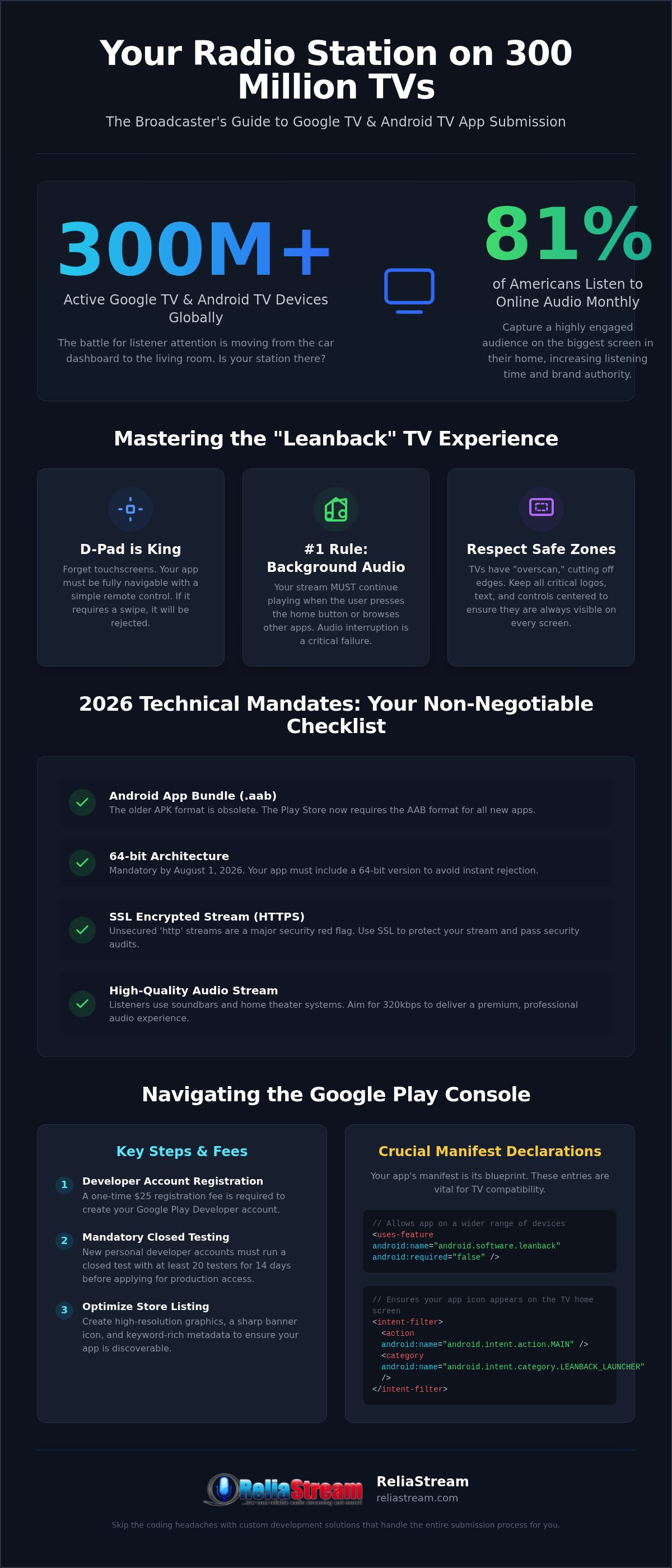
The radio landscape is shifting. Fast. For decades, the car dashboard was the undisputed throne of audio. Now? The living room is taking over. People aren't just watching TV; they are listening to it. With over 300 million monthly active devices globally, the Google TV ecosystem is a massive opportunity for broadcasters. Why limit yourself to a local FM signal? You can sit right next to Netflix and YouTube on a 65-inch screen. It is about global scale without the massive overhead of physical towers.
Understanding the tech is your first hurdle. Google TV is the shiny, content-first interface users love, but it is built on the Android TV platform. When you begin the process of submitting radio app to google tv, you are actually targeting a vast range of hardware, from high-end Sony sets to affordable Chromecast dongles. This is the "Can-Do" advantage. You get to bypass the FCC and reach listeners in London, Tokyo, and New York from a single digital hub.
The Living Room Opportunity
Visual radio is the ultimate game changer. Why let listeners stare at a black screen? Use your app to display high-resolution album art, live studio feeds, or scrolling news tickers. It turns a passive audio stream into an immersive experience. Statistics show that online audio listenership is exploding, with 81% of Americans tuning in monthly as of 2026. By putting your station on the biggest screen in the house, you increase average listening time and build instant brand authority. A listing on the Play Store tells your audience one thing: you are a professional player.
TV-Specific UI Essentials
Forget touchscreens. On Google TV, the D-pad is king. If your app requires a finger to swipe, it's dead on arrival. This is the "Leanback" experience. Users are ten feet away, relaxed, and using a remote. You must design for that distance or face immediate rejection.
- Overscan and Safe Zones: Every TV screen cuts off the edges differently. You must keep your branding and controls in the center "safe zone" or risk losing your logo to the bezel.
- Background Audio: This is the absolute #1 requirement for any radio app. If a listener hits the home button to browse other apps, your music must keep playing. If the audio stops, the user leaves.
Technical Prerequisites: What Your Radio App Needs Before Submission
Don't just toss an APK into the console and hope for the best. Those days are over. Google now mandates the Android App Bundle (AAB) as the only standard for the Play Store. It's more efficient and handles different screen densities better, but it requires a specific build process. If you are targeting Android 15 or higher, you also need to ensure your app supports 16KB memory page sizes. This is a hard requirement for anyone submitting radio app to google tv in 2026. If your code isn't up to date, the console will reject it before you even reach the review stage.
Security isn't just a suggestion; it's a wall. Google is aggressive about protecting user data, even for a simple audio stream. Using SSL radio streaming is non-negotiable. If your stream URL starts with "http" instead of "https", your app will likely fail the security audit. Beyond security, think about the hardware. Listeners aren't using tiny phone speakers. They have soundbars and subwoofers. Aim for a 320kbps audio stream to give your station the professional edge it deserves on a home theater system. You can review the full TV app development prerequisites to ensure your environment is set up correctly from day one.
The Developer Manifest Checklist
Your app's manifest is the blueprint Google uses to understand your software. For a TV app, you need to declare specific features. Set the android.software.leanback requirement to false. This might sound counterintuitive, but it allows your app to run on a wider range of devices that might not strictly follow the leanback hardware standard. You must also include the android.intent.category.LEANBACK_LAUNCHER. This ensures your icon actually shows up on the Google TV home screen. Keep your permissions minimal. If a radio app asks for access to contacts or the camera, it's an instant red flag for reviewers.
Visual Asset Standards
TV is a visual medium. Your graphics need to be sharp. You'll need a "Banner" icon at 320x180 pixels. This is the wide icon users see in their app rows. For the store listing, prepare a Feature Graphic at 1024x500 pixels. Don't forget the screenshots. You need at least two 1920x1080 shots showing your player in action. If this technical list feels overwhelming, you can explore ReliaStream's custom Google TV App services to let the experts handle the heavy lifting for you.
Step-by-Step: Submitting Your App to the Google Play Console
Ready to see your station logo on the big screen? The process of submitting radio app to google tv starts in the Google Play Console. First, you need a Developer Account. It is a one-time $25 fee. No annual renewals. No hidden subscriptions. Just one payment to join the big leagues. If you are a new personal developer, pay attention. You must run a closed test with at least 12 testers for 14 continuous days before Google lets you hit the publish button. Don't plan your launch party for tomorrow; this testing phase is a hard requirement in 2026.
Once your account is set, head to the "Setup" menu and look for "Advanced settings." You must manually add the "Android TV" form factor. This tells the console you aren't just building for phones. From there, complete the Content Rating and App Content questionnaires. Be honest. Is your radio stream 24/7? Does it contain explicit lyrics? Google uses these answers to place you in the right categories. After that, upload your AAB file to the Internal Testing track. This is your dry run to ensure the stream connects and the UI doesn't crash on actual hardware.
Navigating the Console Workflow
Precision matters here. Set your category to "Music & Audio" and use relevant tags like "Radio" or "Internet Radio." This helps the Google TV algorithm find you. If your stream requires a login, you must provide test credentials in the "App Access" section. Google's reviewers need to hear the music to approve the app. Write a store description that pops. Highlight your 24/7 broadcasting and unique content. Why should a listener pick your station over 10,000 others? Tell them right there in the description.
The Review and Launch Phase
What happens after you click submit? The Review Phase begins. In 2026, expect a wait time of three to seven days for the initial review. Google is looking for two things: D-pad navigation and background audio. If your app stops playing when the user goes back to the home screen, you will get a rejection notice. Don't panic. Rejections are just feedback. Most "TV-specific" failures are due to missing banner icons or controls that a remote can't reach. Fix the bugs and resubmit. When you finally get the "Approved" status, choose a manual release. This gives you total control over the exact moment your station goes live globally.
Optimizing for Radio: Metadata, Streams, and SEO
Metadata is the soul of your TV presence. Why? Because on a 75-inch screen, "Unknown Artist" looks amateur. It kills your brand. When you are submitting radio app to google tv, you need to ensure your software talks to your server perfectly. Your app should pull live data from your ShoutCast or IceCast server to show listeners exactly what is playing. ICY metadata is the industry-standard protocol that carries artist and title information within the audio stream itself. This isn't just about text. It's about creating a dynamic, living interface that keeps the user's eyes on the screen while their ears are on the music.
Visuals matter. Fetching high-resolution album art is a must. If you display a blurry 200px thumbnail on a 4K display, you have lost. Use an API to pull crisp, large-scale imagery. It keeps the "Leanback" audience engaged. They might leave the TV on for hours if it looks as good as it sounds. A professional presentation builds trust and keeps your station at the top of their favorites list.
Stability is the next hurdle. Not every listener has gigabit fiber. Some are on shaky Wi-Fi. This is where low bitrate radio hosting saves your reputation. By offering a 64kbps or 128kbps fallback, you ensure the music never stops, even when the bandwidth drops. The process of submitting radio app to google tv requires more than just code; it requires a strategy for visibility and reliability across all connection types.
Store Listing Optimization
Want to be found? You need App Store Optimization (ASO). Google TV search is different from mobile search. People use voice commands or simple remote typing. Use heavy-hitting keywords like "Live Radio," "Internet Radio," and "Smart TV Music" in your title and description. Don't stop at your home country. Localize your listing. If you have a global sound, translate your description into Spanish, French, and German to capture a wider audience.
Quality is your best marketing tool. If you offer 320 Kbps streams, shout it from the rooftops. High-fidelity audio is a major selling point for home theater enthusiasts who want a premium experience. Finally, make sure your app integrates with the Google TV "Now Playing" card. This puts your station controls directly on the dashboard. It makes switching back to your station effortless for the user. It keeps your brand front and center even when the app is in the background.
Ready to dominate the living room? Get a professional Google TV app from ReliaStream and let us handle the technical optimization for you.
ReliaStream’s Custom Google TV Apps: We Build, You Broadcast
Why struggle with complex code when you have a station to run? The process of submitting radio app to google tv is a technical minefield. You have content to create and listeners to engage. Why waste weeks debugging manifest files or fighting with the Google Play Console? At ReliaStream, we have been in the trenches of the industry since 2008. We know exactly what Google wants. We build the app. We handle the submission. You get the glory. It is that simple. We act as your proactive partner, ensuring your station doesn't just exist on TV but dominates it.
Our radio streaming app development service is designed for speed and reliability. We take your stream URL and transform it into a high-performance application for Google TV and Android TV. You get a professional UI, rock-solid background play, and full metadata support right out of the box. Your listeners see the artist, the title, and the album art on their 4K screens. No glitches. No crashes. Just your brand, loud and clear, sitting right next to the biggest media giants in the world.
Professional Development vs. DIY
DIY sounds cheap until you factor in the cost of your time. How many hours can you afford to lose? A DIY project can drag on for months as you navigate the 14-day mandatory testing or the August 2026 64-bit architecture requirements. We launch your app in days, not months. We handle the technical rejections so you don't have to deal with cryptic error messages from the console. Plus, we provide ongoing support. When Google changes the standards, we update your app to keep it live and compliant. You focus on the broadcast; we handle the backbone.
Ready to Dominate the Living Room?
Your stream deserves a professional TV presence. There is a powerful synergy when you pair our tiered hosting plans with a custom Google TV App. You get the stability of our global network and the reach of the world’s biggest screens. It is the ultimate growth strategy for independent broadcasters and small-scale stations. Don't let your station stay trapped on a smartphone. Bring your brand into the living room where the real engagement happens. Are you ready to expand your reach?
Get your station on Google TV with ReliaStream today!
The Future of Your Radio Station Starts Now
The living room is no longer just for movies. It is the new heart of radio. You have seen the massive numbers. You understand the technical stakes. Between 64-bit mandates and strict UI standards, the process of submitting radio app to google tv is a heavy lift. But why let technical hurdles keep your station small? You have a voice that needs to be heard. You have a brand that deserves a global stage.
We have been supporting independent broadcasters since 2008. We are experts in ShoutCast and IceCast integration. More importantly, we maintain a 100% submission success rate for our custom apps. Don't waste your energy on console rejections. Focus on your content. Let us handle the code. We have the experience to bridge the gap between your stream and the world’s biggest screens.
Start Your Professional Google TV App Development with ReliaStream
Your audience is waiting on the couch. Go claim your spot on the big screen. It is time to broadcast like you mean it.
Broadcaster Frequently Asked Questions
How much does it cost to submit an app to Google TV?
To get your station live, you must pay a one-time registration fee of $25 USD to create a Google Play Console developer account. There are no annual renewal fees or hidden costs from Google. This single payment covers all your app submissions across the entire ecosystem. It is the first critical step in submitting radio app to google tv. Once active, you can manage your station and track your listener growth globally.
Do I need a separate app for Android TV and Google TV?
You don't need two different apps. Google TV is essentially a modern interface built on top of the established Android TV platform. When you build and submit your Android App Bundle (AAB), it targets both environments simultaneously. This unified approach makes it easier to manage your presence. You get to reach millions of viewers using different hardware brands through a single, streamlined submission process in the console.
Why did Google reject my radio app for TV?
Rejections usually happen because of Leanback UI failures or technical oversights. If your app requires a touchscreen or lacks D-pad navigation, it won't pass review. The technical process of submitting radio app to google tv also requires you to meet the August 1, 2026 deadline for 64-bit architecture support. If your code is outdated, Google will block it. Ensure your background audio remains active or you will face a rejection notice.
Can I use my mobile app's code for the Google TV version?
You can reuse your core streaming logic, but the user interface needs a total overhaul. Mobile apps rely on touch; TV apps rely on remotes. You must declare the Leanback launcher in your manifest and remove any dependencies on hardware features like GPS or cameras. A simple port of a mobile app will fail review. It is about creating a stunning 10-foot experience that looks great on a massive 4K screen.
How long does the Google Play Store review process take for TV apps?
Expect the initial review to take between three and seven days. However, if you have a new personal developer account, you must complete a mandatory closed test first. This requires 12 testers to run your app for 14 continuous days before you can apply for production. Factor this buffer into your launch timeline. Once you clear that hurdle, the actual store approval is relatively fast and efficient for most broadcasters.
Do I need an SSL stream to get on Google TV?
Yes, an SSL-secured link is a non-negotiable requirement for modern broadcasting. Google prioritizes security across all its platforms. If your stream uses an unsecured http link, the app will likely be rejected during the security audit. ReliaStream provides SSL Radio Links with all hosting plans to ensure your station meets these strict standards. It protects your listeners and guarantees your app remains compliant with current Play Store policies and security mandates.
Can my radio app play in the background on Google TV?
Your app absolutely must support background audio. This is the number one requirement for any radio application on the platform. If the audio cuts out when a listener returns to the home screen or opens another app, Google will reject your submission immediately. No exceptions. Listeners expect to browse other content while your station continues to play. It is a core part of the professional TV experience that every station must provide.
What is the minimum bitrate required for a Google TV radio app?
While Google doesn't enforce a specific bitrate, stability is key for a good user experience. We recommend a minimum of 64 Kbps for standard connections, but 128 Kbps is the sweet spot for home audio. If you want to impress audiophiles, our 320 Kbps Hosting Plan provides the high-fidelity sound that large TV speakers deserve. Quality matters when you are competing for attention in the living room. Don't settle for low-quality audio.


