

The safest way to change internet radio providers is to keep your current stream active until the new one is running and tested. This guide to changing internet radio providers shows how to plan 1 to 3 days of overlap, review your contract for early termination fees, and time the switch to reduce the risk of going off air.
It’s easy to focus on a new provider’s features and overlook costs or timing details that could disrupt a broadcast. Before cancelling, review your current agreement, request a final bill, and arrange the new service early enough to test the stream before the old one ends. A little coordination can make the handoff much smoother.
This guide walks through comparing hosting options, checking possible cancellation charges, and moving your station without rushing the handoff. Clear steps mean fewer surprises and a smoother transition for listeners.
Key Takeaways
- Keep your current stream active while the replacement is set up, then test the new connection before cancelling the old service.
- Compare connection reliability, upload capacity, data policies, equipment needs, and support, not just the advertised speed.
- Review your existing agreement for early termination charges and billing-cycle timing before you schedule the switch.
- Match your hosting bitrate to your station’s needs so the change supports a steady listening experience.
Scheduling overlapping service to avoid downtime
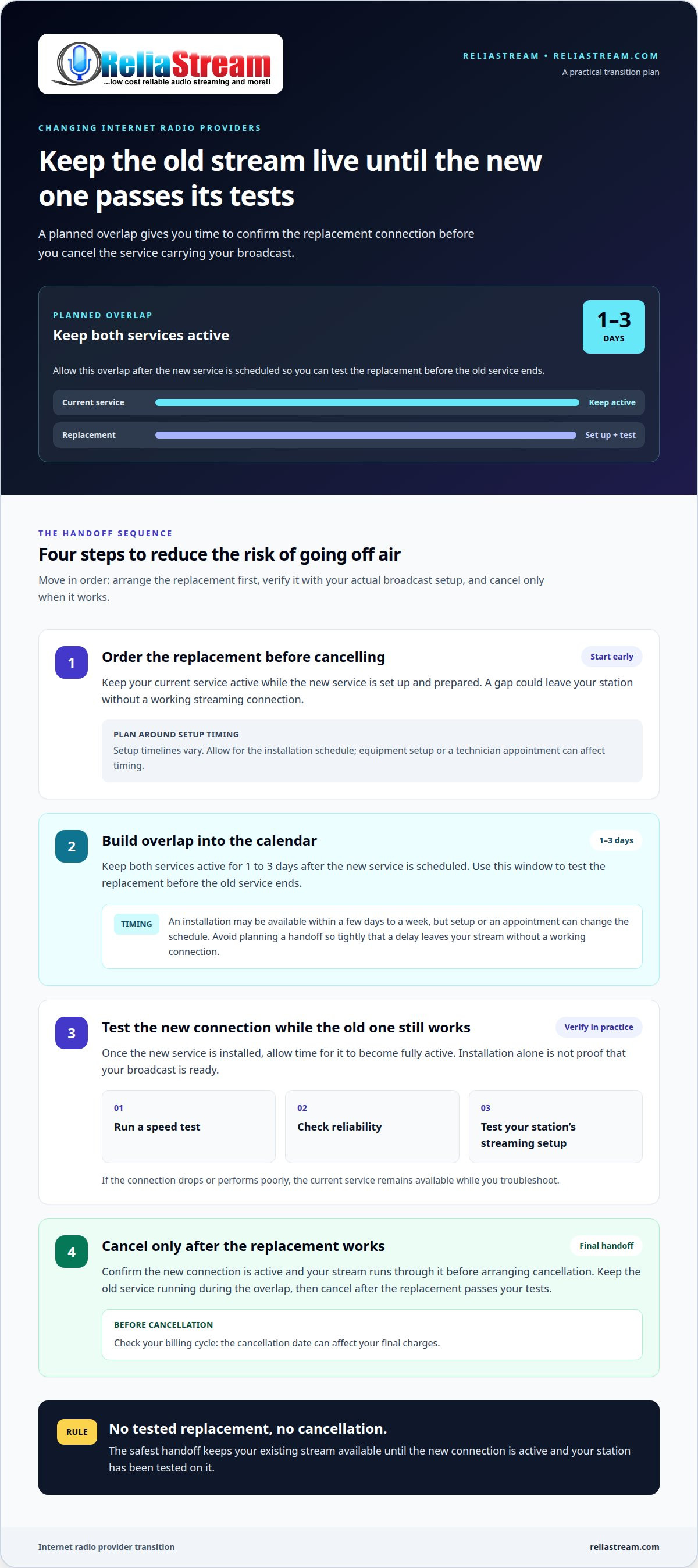
- Order the replacement before cancelling. Keep your current service active while the new service is set up and prepared. A gap could leave your station without a working streaming connection. Setup timelines vary, so begin planning as soon as you decide to move and account for the installation schedule when choosing your cancellation date.
- Build overlap into the calendar. Keep both services active for 1 to 3 days after the new service is scheduled. That window gives you time to test the replacement before the old service ends. An installation may be available within a few days to a week, but equipment setup or a technician appointment can affect the timing. Avoid scheduling the handoff so tightly that a delay leaves your stream without a working connection.
- Test the new connection before the old one ends. Once the new service is installed, allow time for it to become fully active. Run a speed test, check connection reliability, and test your station’s streaming setup rather than relying on installation alone. If the new connection drops or performs poorly, your current service remains available while you troubleshoot.
- Cancel only after the replacement works. Confirm the new connection is active and your stream runs through it before arranging cancellation. Check the billing cycle, since the cancellation date can affect your final charges. Keep the old service running during the overlap, then cancel after the replacement passes your tests. This creates a clear handoff without putting your broadcast at the mercy of an installation appointment.
Comparing connection types, speeds, data limits, reliability, and support
- Compare connection types and upload performance. A reliable wired connection is a strong choice for a radio station. Fiber can provide faster download and upload speeds than other connection options. Compare upload capacity as well as download speed, because your station sends audio to listeners. A 500 Mbps plan can support multiple streaming devices, video calls, smart-home technology, and general family use. Your broadcast needs still depend on its stream and audience.
- Compare the full plan terms. Compare monthly pricing alongside speeds, data policies, equipment costs, installation options, contract requirements, and support. Promotions can change the total cost over time, so read the service agreement carefully. A useful changing internet radio providers guide looks beyond advertised speed to the full plan and the terms attached to switching incentives.
- Check location and device compatibility. Internet service availability varies by address, so options in the United States depend on where you live. Internet radio devices and apps vary too, from portable players to custom automotive audio setups showcased by specialists like musicinmotion.com. List the phones, computers, smart speakers, and listening apps your audience uses, then check that the provider supports them. Make sure the connection also fits your broadcast workflow.
- Estimate data use from bitrate and listening time. Streaming radio data use depends on audio bitrate and listening duration. Higher bitrates send more data over the same listening period. Compare data policies with your station’s broadcast schedule, including long streams and repeat listening. Treat connection speed and data allowance as separate parts of your internet plan.
- Include security and support. Changing providers involves account credentials, connection settings, and stream configuration. Use unique passwords and protect stream connections with encryption. For stations and small businesses seeking extra assistance safeguarding their systems, managed IT providers like Trinity Networx can provide proactive cybersecurity and technical support. Compare support options for setup and connection troubleshooting. A changing internet radio providers guide should also cover subscription terms: costs vary by plan and included features, so compare current pricing rather than assuming subscriptions are alike.
Streaming radio data use depends on audio bitrate and listening time. Higher bitrates use more data over the same listening period.
Early termination fees and contract buyout eligibility
Before switching, review your previous provider’s contract for cancellation charges and any buyout offer. Internet radio subscriptions may have contract, cancellation, and refund terms. The agreement sets out what applies.
-
Review Contract Terms and Early Termination Fees
Read the service agreement to find the contract end date, cancellation process, and any early termination fee. Some fees are calculated for each month remaining, so the amount may depend on how long the agreement has left. Check whether a promotion or equipment charge could also affect your final bill. Before committing to faster service, compare potential charges with the value of switching now.
-
Check Contract-Free Switching Flexibility
Check whether the new plan requires a contract or allows cancellation without an early termination charge. Contract-free terms can make switching easier if your station’s needs change, but compare monthly pricing, service terms, and included features together. No-contract terms do not necessarily remove every charge: equipment, installation, or outstanding balances may be covered separately in the agreement.
- Ask about buyout eligibility before enrolling. Some U.S. internet radio providers offer contract buyout programs to help cover your early termination fees when switching. The offer’s conditions matter: some providers require an itemized final bill showing the fee within 60 to 90 days of activation. Keep the previous provider’s bill and follow the new provider’s stated submission process and deadline.
- Request a final bill and compare the full cost. Ask the previous provider for an itemized final bill and details of any remaining charges. Check the cancellation date against your billing cycle, then weigh the fee, any eligible buyout, and the new plan’s terms before deciding when to switch.
Avoiding a service interruption during the transition
Keep your station settings and account details organized as services change. Planning the transition also helps you coordinate household internet, streaming accounts, and billing dates.
-
Transfer Playlists, Favorites, and Stations
Save your station list, playlist files, favorite links, and stream settings before ending the previous service. These details may not transfer automatically between platforms. Use the new provider’s import options where available or rebuild the list manually. Keep a separate copy of station names and stream information, then test each saved link once the new setup is live.
-
Avoid Overlapping Billing
Compare the previous service’s billing cycle with the new internet plan’s start date before requesting cancellation. Schedule the old plan to end after the replacement works, allowing for full-month billing rules or promotions. Request the final bill and cancellation confirmation, and keep both with your account records. This makes it easier to distinguish expected transition charges from an unwanted renewal.
- Cancel subscriptions using the correct account. Check whether your radio subscription renews through the provider, an app store, or another billing account. Cancel through the account that manages the charge and save the confirmation. Review the renewal date and refund terms in the subscription agreement, since cancellation and refund conditions depend on those terms.
- Reconnect household devices deliberately. If your router or Wi-Fi network changes, reconnect speakers, phones, and other listening devices. Keeping the same Wi-Fi name and password can simplify setup, though devices may still need reconnecting if network details change. Test the stream on a phone and speaker before relying on the new connection for a broadcast.
- Prepare the stream endpoint. Update saved stream links wherever listeners access your station, then test playback from a separate device. For an encrypted stream connection during setup, review the SSL Radio Link.
ReliaStream
ReliaStream provides internet radio hosting for broadcasters moving their station to a new streaming provider. Once you’ve compared contract terms and planned the handoff, its 32 Kbps, 64 Kbps, 128 Kbps, and 320 Kbps Hosting Plans offer bitrate options to consider for your station. Choosing a suitable hosting plan is one part of the transition; keep the existing stream active until the replacement is ready and tested. If you’re preparing to move your broadcast, compare the plan options against your station’s streaming needs. For details about hosting your station with ReliaStream, contact ReliaStream.
Make Your Next Broadcast Move With Purpose
Changing providers is more than a technical handoff. It’s an opportunity to align your streaming setup with the station you’re building and the audience you want to reach. Use this guide to changing internet radio providers as a planning tool, not just a last-minute checklist. Decide what matters most to your broadcast, then make each transition choice support that priority.
Before taking the next step, clarify your station’s needs and preferred setup. ReliaStream offers ShoutCast and IceCast hosting, with a choice of control panel, as well as custom streaming apps for platforms including Roku, Google TV, Amazon Fire TV, and Alexa. Compare these options with your broadcasting workflow and audience, then explore a hosting setup that fits your move.
Contact ReliaStream to plan your switch and take the next step toward a setup built around your broadcast. Your station’s next chapter starts with a deliberate move.
Frequently Asked Questions
Are there hidden fees or penalties to watch out for?
Yes. Charges can include early termination fees, equipment costs, or a balance affected by promotional pricing. Review the final bill for itemized charges and return any equipment the previous provider requires. Keep the return receipt or tracking details with your account records until the account is settled. This gives you documentation if an unexpected device charge appears.
Can I switch providers if I'm currently under a contract?
Yes, you can switch while under contract, but ending service early may trigger charges under your agreement. Compare the remaining contract obligation with the new plan’s terms before committing. For example, a faster connection may not justify switching immediately if the cancellation charge outweighs the benefit. Keep the contract and final bill available when reviewing any eligible buyout offer.
How can I avoid downtime when switching providers?
Run the new stream alongside your current setup before changing links listeners use. Test playback on a phone and a separate computer, then confirm your usual audio source reaches the new stream consistently. Keep a copy of the old stream details during the transition. If a directory or app uses a saved station address, update it only after the replacement endpoint works.
How do I change internet radio providers?
Choose a replacement that supports your station’s format and broadcasting workflow, then set up its stream before ending the old service. Move your audio source and saved station details, and test the new output on a listener’s device. Once the new stream works, update audience links and cancel the previous service according to its agreement.
What should I compare when choosing an internet radio service?
Compare audio bitrate options, stream security, control panel tools, app support, and broadcast management. Check that the service fits your live broadcasting workflow and the devices your audience uses. ReliaStream offers Centova Cast Plans, MediaCP Plans, and streaming apps for platforms including Roku and Alexa. Match the available tools to your station’s setup.
What are the privacy and security risks of switching internet radio providers?
Protect account credentials, connection settings, and stream configuration when changing providers. Use unique passwords and encryption for stream connections.


