

What good is a live stream if listeners can’t find it with a simple voice command? A radio station Alexa skill gives listeners a voice-accessible way to request your station, while your stream delivers the audio they hear. The skill and the stream have different jobs, and understanding that distinction helps you choose the right way to make your station available on Alexa.
This guide explains the main routes for bringing a station to Alexa, the station and stream details to prepare, and how an Alexa listening option connects to your broadcast. You’ll also find practical criteria for comparing Amazon’s Radio Skills Kit with a custom station app.
ReliaStream has supported broadcasters since 2008 and offers Alexa streaming apps alongside radio hosting. An Alexa app can add another way for listeners to tune in without replacing your station’s stream.
Key Takeaways
- Learn how a radio station Alexa skill can help listeners request your station, and why the skill and the audio stream have different jobs.
- Compare Amazon’s Radio Skills Kit with a custom Alexa app to choose a route that fits your station’s needs.
- Prepare your station name, alternate identifiers, and stream details before setting up Alexa listening.
- See how ReliaStream’s Alexa streaming app and hosting features, including Free Secure Link and Free Auto DJ, can support another listening route.
What Is a Radio Station Alexa Skill, and What Does It Let Listeners Do?
A radio station Alexa skill is a voice-accessible route that helps listeners request a station and hear its internet stream on an Alexa-enabled device. The skill helps listeners call up the station by voice; the stream supplies the audio. They work together, but they aren’t the same thing.
How do listeners ask Alexa to play a station?
Listeners can make a spoken request using a station name or another identifier supported by the service, such as an alternate name, call sign, or frequency. For example, someone might ask Alexa to play a station by its familiar on-air name or call sign. What Alexa recognizes depends on how the station is made available and which identifiers are associated with it, so don’t assume every variation of a name will work automatically.
That voice interaction is the front door. Alexa processes the request and connects it to an available listening option. For background on how voice recognition, devices, and custom skills fit into Alexa, see this overview of Amazon Alexa skills architecture.
What is the difference between a skill and a radio stream?
Think of the skill as the route a listener uses to find or request your station. The stream is the audio source that plays once the request reaches it. A skill can make listening more accessible, but it doesn’t create your station’s shows, music, news, or other programming. Your broadcast still comes from the station and its live stream.
This distinction clarifies what broadcasters need to prepare. The voice experience connects a request to the right station, while the stream carries the audio listeners expect. An Alexa app can add a listening route without replacing the stream itself. Keep the two roles clear as you plan: the skill handles access, and the stream delivers the broadcast.
Radio Skills Kit or Custom Alexa Skill: Which Route Fits Your Station?
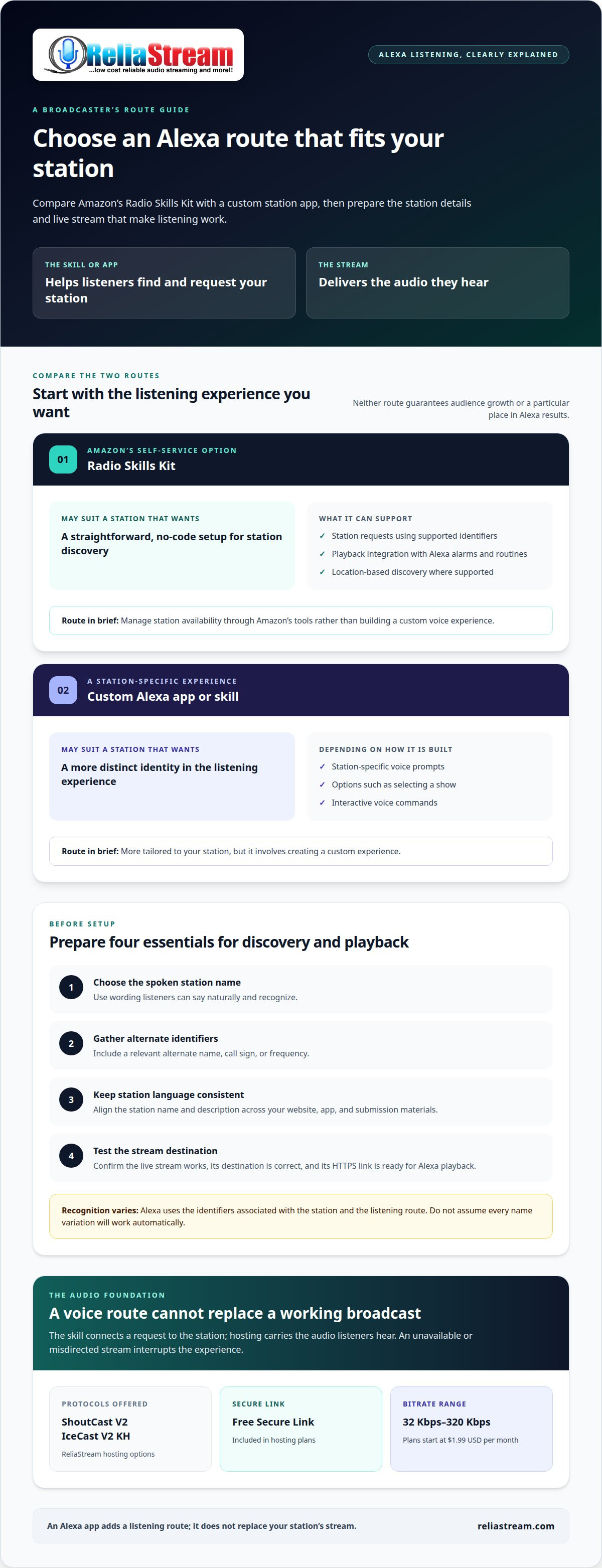
There are two broad paths to a radio station Alexa skill: use Amazon’s self-service Radio Skills Kit or choose a custom Alexa app experience. The choice comes down to the listening experience you want and the setup involved. The kit offers a standardized route for station discovery, while a custom app can provide a more station-specific experience. Neither guarantees audience growth or a particular place in Alexa results.
When might a no-code radio skills route make sense?
Amazon describes the Radio Skills Kit as a no-code way for eligible broadcasters to manage station availability through its tools. It may suit a station that wants a direct setup without building a custom voice experience. Listeners can request stations using supported identifiers, and the kit can integrate station playback with Alexa alarms and routines. Location-based discovery may also help listeners find stations where that feature is supported. For broadcast-industry context on the self-service approach, see this overview of Alexa Radio Skills Kit deployment.
When might a custom station app be the better fit?
A custom app can suit a station that wants a distinct identity in the listening experience. Depending on how it’s built, a custom skill can offer station-specific voice prompts or options such as selecting a show and using interactive commands. This route can be more tailored, but it involves a custom experience rather than relying solely on Amazon’s station-management option.
Choose based on your priorities: straightforward station discovery or a more branded, station-specific experience. For a closer look at how broadcaster apps fit into connected listening, explore this radio streaming app development guide. ReliaStream offers an Alexa streaming app and radio hosting to support a custom listening route alongside your station stream.
Prepare Your Radio Station for Alexa Discovery and Listening
A smooth Alexa listening experience starts with clear station details and a stream that’s ready to deliver audio. Use this checklist to organize the essentials before setting up a radio station Alexa skill. Amazon’s submission rules and eligibility details can change, so follow its current guidance for the route you choose.
- Settle on the station’s spoken name. Choose wording listeners can say naturally and recognize.
- Gather alternate identifiers. Note an alternate name, call sign, or frequency where relevant.
- Review your station description. Keep the station name and listener-facing language consistent wherever the station appears.
- Test the stream destination. Confirm the live stream is working and that its HTTPS link is ready for Alexa playback.
What station information should you organize?
Start with the name listeners use on air, then add any useful alternate name, call sign, or frequency. These identifiers can help connect a spoken request to the right station, but don’t assume every possible variation will be recognized. Keep your station description and naming consistent across your website, app, and submission materials so listeners encounter a clear identity.
How does streaming infrastructure fit into the experience?
The skill provides a way to access your station; hosting carries the audio listeners hear. Before setup, check that the stream is live, its destination is correct, and its secure link is ready. A voice interface can’t compensate for an unavailable or misdirected broadcast.
ReliaStream offers ShoutCast V2 and IceCast V2 KH hosting, with a Free Secure Link included in hosting plans. Plans range from 32 Kbps to 320 Kbps and start as low as $1.99 USD per month. To compare the protocols before choosing a setup, use this ShoutCast and IceCast comparison. ReliaStream radio hosting includes the streaming infrastructure behind another listening route.
Extend Your Station’s Reach with ReliaStream’s Alexa Streaming App
A radio station Alexa skill or app can make your broadcast easier to access by voice, but it doesn’t replace your stream or other ways listeners tune in. ReliaStream offers an Alexa streaming app alongside radio hosting, connecting a listener-facing app option with the streaming foundation behind your station’s audio. ReliaStream has helped broadcasters since 2008.
How can an Alexa app complement your existing station?
Think of Alexa as another access point, not a new broadcast. Listeners who use voice commands have an additional way to reach your station, while your existing online listening channels remain available. The goal is straightforward: make it easier for people to find and play the station in the ways they already listen. The app doesn’t create programming or promise audience growth; it adds another route to the broadcast.
What can broadcasters explore next?
Consider the app and hosting together. ReliaStream hosting plans include a Free Secure Link and Free Auto DJ, as well as Remote DJ capability. These hosting features support the stream behind your listening options. When planning an Alexa app, consider how listeners will find it and confirm that your stream is ready to play through the app.
For an overview of the available options, explore ReliaStream’s radio streaming solutions, including the Alexa app and radio hosting.
Plan Your Station’s Next Listening Route
Make your next step practical. Decide how you want listeners to find your station, then shape the experience around the words they already use for it. A radio station Alexa skill works best as part of a clear listening plan, not as a technology project on its own. Keep your station identity consistent and make the route to listening easy to explain on air, on your website, and across your other channels.
Start with one question: what should a listener be able to say or do to reach your broadcast? Use that goal to guide the setup and any listener-facing instructions. Once the route is in place, review those instructions as your station evolves. A clear, familiar path helps listeners move from a voice request to tuning in with less guesswork.
Keep your station details consistent and your stream ready to play. Then choose the Alexa listening route that fits your station’s goals.
Frequently Asked Questions
Can Alexa play any radio station?
Alexa can play radio stations made available through supported skills or services, but a station isn’t automatically accessible just because it broadcasts online. Availability and request behavior depend on the station’s Alexa route and Amazon’s current support. For example, a listener may be able to request one station by its listed name while another isn’t available through that route. The station’s stream still carries the audio.
Is Amazon’s Radio Skills Kit free for radio stations?
Yes. Amazon describes the Radio Skills Kit as a free, no-code solution for radio providers to manage station availability on Alexa. That applies to the kit, not every custom Alexa app or related development service. Before choosing it, review Amazon’s current eligibility and submission requirements to make sure they fit your station and intended market.
Can listeners ask Alexa for a radio station by call sign?
Yes, Amazon documents requests by call sign through the Radio Skills Kit, along with station name, alternate name, or frequency. Recognition still depends on how the station is listed and how Alexa handles the spoken request. Decide which identifiers listeners actually use and keep them consistent in your station information. Treat alternate phrasing as useful preparation, not a guarantee that every wording will trigger playback.
Does a radio station Alexa skill work on every Alexa device?
Not necessarily. Alexa-enabled devices provide the voice interface, but a radio station Alexa skill may not have identical availability or behavior across every device, account, or region. The station’s route and Amazon’s supported markets and requirements can affect access. Before announcing device compatibility to listeners, consult Amazon’s current documentation for the relevant market and device setup. To add an Alexa listening option alongside your stream, explore ReliaStream’s radio streaming solutions.


