

Bitrate shapes sound quality, not where listeners can tune in. Geo-locking is a separate access-control feature, so a bitrate plan alone won’t restrict access by location. Audio stream hosting brings your broadcast online, while the right setup helps it reach listeners smoothly.
It’s easy to focus on audio quality first. But a clear-sounding stream also needs enough bandwidth for its bitrate and audience, plus software and formats that fit your broadcast setup. Miss one piece and listeners may hear buffering, or the stream may not work the way you intend.
This guide explains how hosting plans, listener capacity, bandwidth, supported software, formats, and bitrate fit together. Learn how bitrate affects sound and data use, what to consider when estimating capacity, and where geo-locking fits into the setup. The goal is to help you choose the right setup for your internet radio stream.
Key Takeaways
- Estimate how many listeners your connection can serve by weighing stream bitrate against available bandwidth.
- Compare hosting plans by the capacity and audio quality your station needs, not by plan labels alone.
- Match your broadcast software and stream format to the hosting setup before you go live.
- Choose a bitrate that balances clear audio with the data required to deliver a steady stream.
Listener limits, bandwidth, and audio quality
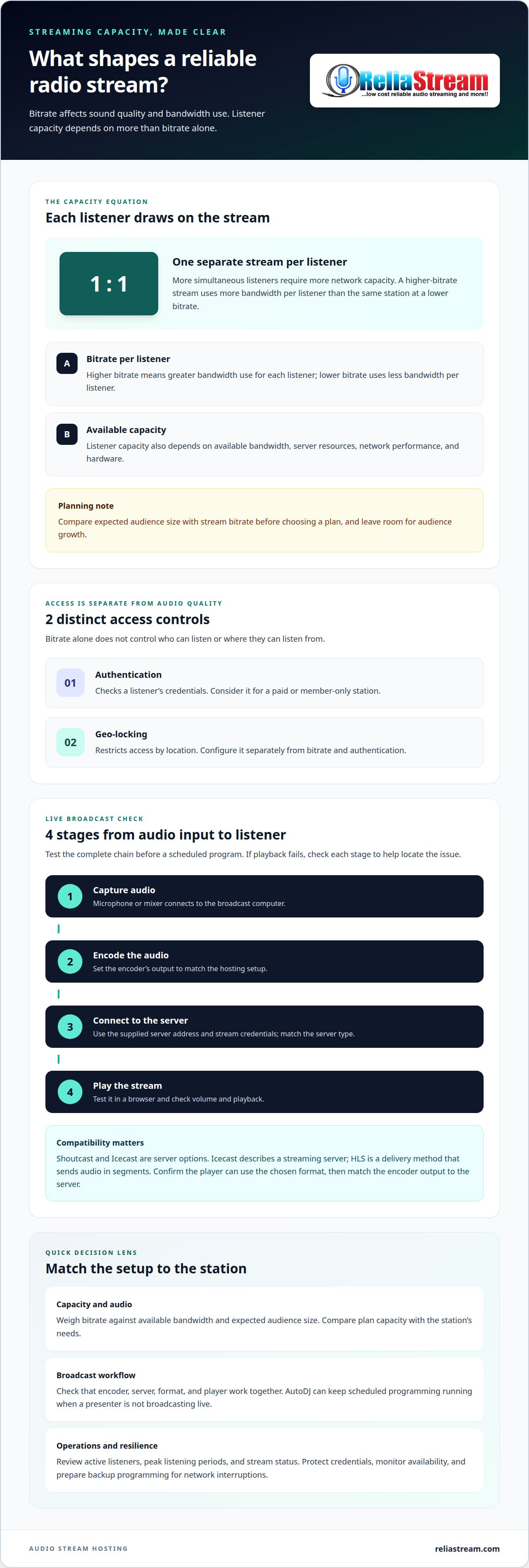
A stream’s listener capacity depends on bitrate and available bandwidth. Each listener receives a separate stream, so more simultaneous playback requires more network capacity. For example, a station carrying a higher-bitrate stream uses more bandwidth per listener than the same station at a lower bitrate. Capacity also depends on the platform’s server resources, network performance, and hardware. Compare expected audience size with the stream’s bitrate before choosing a plan, then leave room for audience growth.
Copyright and licensing rules for hosting and streaming audio in the US depend on the rights involved. Under § 106, copyright owners have the exclusive rights to reproduce, distribute, perform, display, and license copyrighted works, according to Cornell Law School Legal Information Institute. Hosting a stream doesn’t itself grant permission to use copyrighted material.
Authentication and geo-locking control access in different ways. Authentication checks a listener’s credentials, while geo-locking restricts access by location. For a paid or member-only station, decide which access controls you need and configure them separately. A bitrate plan alone does not provide either control.
Use station management tools to review active listeners, peak listening periods, and stream status. Listener statistics can show when demand rises, while analytics may reveal which programs draw repeat listeners. Review available reports regularly and use them to refine schedules, promotion, or capacity planning. An embedded player can also make your station easier to find on its website.
Security, uptime, and content moderation need separate attention. Protect access credentials, monitor stream availability, and establish rules for submitted or scheduled material. Network interruptions can disrupt playback, so review stream status and prepare backup programming. Define who can publish content and how questionable material will be handled. These steps help manage operational risks without confusing stream capacity with content rights.
Internet radio hosting plans and pricing
A hosting plan combines streaming infrastructure with tools for running a station. Compare bitrate, listener capacity, management features, and playback options with your broadcast needs.
Plan Options and Pricing
Plans can differ by bitrate, listener capacity, bandwidth, and included controls. Review what each tier supports before choosing, especially if you broadcast live and schedule shows through AutoDJ. For a hosted station, price depends on the case and is given after a quote request; cost factors include bitrate, capacity, bandwidth, and features.
Infrastructure matters, too. Streaming servers and networks carry your audio to listeners worldwide. Check how the control panel handles schedules, stream status, and station settings. These tools shape day-to-day management as much as the plan itself.
Free and Paid Hosting Tradeoffs
Free hosting can suit a test broadcast or a small internet radio project. Its tradeoffs may include fewer management tools, less control over the listening experience, or limits that affect growth. Paid radio hosting is designed around a defined service tier, making it easier to match station needs with capacity and features.
Compare the actual features, not just the label. Ask whether the setup supports AutoDJ, a customizable player, or station widgets. If you’re comparing hosted options, review radio hosting features against the tools your station needs.
For creators in 2026, the best platform is the one that fits the station’s audience, workflow, and distribution goals. Consider how you’ll manage scheduled audio, broadcast live, and present a player on your website. Alexa integration can add another listening route, while website widgets help visitors start playback without hunting for the stream. Confirm that these pieces work together in your station’s setup.
Before committing, map the listener experience from discovery to playback. A global audience may tune in through a website player, a widget, or Alexa, so test each route you plan to use. Then compare the control panel and streaming setup with your programming plan. The right fit keeps station operations manageable as listening demand changes.
Supported broadcast software and streaming formats
Your encoder, streaming server, and audio format must work together. Map the signal path before choosing tools for an internet radio station.
Broadcast Software Compatibility
Compatibility starts with the connection details supplied by the streaming server. In your encoder, enter the server address, stream credentials, and output settings. Shoutcast and Icecast are common server options, but encoder configuration still matters. Match the selected server type and audio output to your hosting setup. A mismatch can prevent the broadcast from reaching listeners.
For live broadcasting, connect a microphone or mixer to a computer running encoder software. Test the complete chain before a scheduled program: capture audio, encode it, connect to the server, then play the stream in a browser. Check volume and playback at each step. This helps pinpoint whether an issue comes from the input, encoder, or connection.
Streaming Formats and Features
Icecast describes a streaming server, while HLS is a delivery method that sends audio in segments. They aren’t interchangeable. Confirm which format your player and audience can use, then match the encoder’s output to the server. Playlists organize scheduled programming, while analytics help stations review listening patterns. These features support different parts of broadcast management.
Auto DJ can keep scheduled programming running when a presenter isn’t broadcasting live. Prepare playlists, set their order, and test transitions before they go on air. Keep a live encoder ready for shows that need real-time broadcasting. ReliaStream plans include Free Auto DJ and Remote DJ capability, so stations can manage scheduled and presenter-led programming through their hosting setup.
Before launch, test the stream using the same players listeners will use. Try a browser player and any website widgets, then check playback on the station’s page. Confirm encoder settings, server connection, and playlist behavior together. This practical test can catch configuration conflicts before they interrupt a broadcast.
Audio bitrate and streaming quality
Bitrate sets how much audio data reaches each listener per second. Higher settings can preserve more sound detail, but they also increase bandwidth demand. The codec and source recording matter, too. A clean recording encoded efficiently can sound better than a noisy source sent at a higher bitrate.
For internet radio hosting, compare the stream’s bitrate with your music and talk format. Spoken-word programming may not need the same setting as music with dense instrumentation. Available hosting options include 32, 64, 128, and 320 Kbps. Treat these as choices to test, not automatic quality rankings. Listen on headphones and ordinary speakers before settling on a setting.
Use this practical sequence:
- Start with a clean source signal and consistent encoder settings.
- Choose a bitrate that fits the program’s sound and audience access.
- Listen to the stream at its destination, not only through the studio monitor.
- Compare playback quality with bandwidth needs before changing settings.
Icecast and an encoder such as SAM Broadcaster handle different parts of the chain. The encoder prepares audio; the server distributes the stream. Keep their output settings aligned. If your station uses automation, test both scheduled playback and a live handoff, since transitions can reveal clipping or level changes.
A control panel can help manage stream settings, while analytics can inform a future upgrade. Use listener feedback alongside playback tests. Don’t upgrade bitrate just because a larger number looks better; first identify whether listeners hear a real improvement. A stable source, compatible encoding, and suitable stream setting work together.
Ready to compare bitrate options for your station? Explore radio streaming plans and match a setting to your broadcast.
ReliaStream: 32 Kbps Hosting Plan
ReliaStream offers the 32 Kbps Hosting Plan for broadcasters comparing stream bitrate with their audio and audience needs. A lower bitrate uses less bandwidth per listener than a higher one, while the sound result depends on the source audio and encoding. Choose based on real playback tests, not the plan label alone.
If your station’s requirements change, ReliaStream also offers 64 Kbps, 128 Kbps, and 320 Kbps Hosting Plans. These options let you compare bitrate tiers as you refine your broadcast setup. Match the plan to your intended audio quality and delivery needs.
For internet radio hosting that fits your stream, contact ReliaStream to discuss the available plans.
Build Your Next Broadcast With Confidence
Your next step is turning a technical setup into a listening experience people can return to. Set a clear launch goal, then test the full journey: how listeners find the station, start playback, and hear each transition. A rehearsal with your actual programming can reveal issues that a control panel alone won’t show.
Keep a simple record of what you test, what listeners report, and what you change. That gives you a practical basis for refining your audio stream hosting setup as your station develops. Adjust deliberately, and let the listening experience guide your next improvement.
Ready to take the next step? Contact ReliaStream about hosting and explore a setup for your broadcast. Your station’s next chapter starts with a clear plan and a sound test.
Frequently Asked Questions
Does hosting include listener analytics?
Listener analytics depend on the reporting tools in your hosting control panel. Streaming delivery and audience reporting are separate functions, so review what data the panel displays, such as listening sessions or peak activity. ReliaStream plans include a choice of Centova Cast or MediaCP, with Auto DJ and Remote DJ management. Use the reports available in your panel to guide programming decisions.
What is audio stream hosting and how does it work?
Audio stream hosting sends a station’s audio from a streaming server to listeners over the internet. For example, a presenter’s live show enters an encoder, which sends the audio feed to the server. A listener then opens the station’s player to hear it. Hosting provides the online delivery infrastructure, while the broadcaster manages the audio source and programming.
How do I choose an audio streaming host for live or on-demand audio?
Start by defining how listeners will access each program. Live radio needs a reliable path from the presenter’s encoder to the listener; on-demand audio needs files that listeners can select and play separately. Compare the hosting workflow, playback options, control panel, and audience reporting. If you run both formats, map each one before choosing a setup.
What bandwidth, listener, and storage requirements should I plan for?
Estimate outgoing bandwidth by multiplying the stream’s bitrate by the number of simultaneous listeners. Then account for scheduled programming files: storage needs depend on audio format, file size, and how much content you keep online. A live-only station has different storage needs from one maintaining an Auto DJ library. Revisit estimates as listening patterns and programming change.
Best audio streaming hosting platforms for creators in 2026
The right platform fits your station’s audience, workflow, and distribution goals. Compare listener capacity, bitrate, management tools, and playback options, then test the listening routes you plan to use.


