

Talk shows and music streams don’t need the same bitrate. Talk radio stream hosting keeps an internet station online 24/7, while bitrate affects audio quality and data use. A 64 kbps bitrate is a suggested choice for talk radio; 128 kbps is common for music, and 192 kbps is suggested for high-quality streaming. These are practical starting points.
You want clear speech, reliable streaming, and a setup that fits your show without getting lost in technical details. This guide explains what talk radio stream hosting includes, how to assess listener capacity, and which bitrate trade-offs matter for speech and music. You’ll learn how to match your format to a stream quality and understand what hosting does behind the scenes, whether you’re building a talk-first station or mixing interviews with music. Here are the essentials for choosing a setup that fits your broadcast.
Key Takeaways
- Learn how listener limits and monthly listener hours shape your station’s capacity as your audience grows.
- Follow the path audio takes from your broadcast software to listeners, and see what hosting handles along the way.
- Use your show format and audio priorities to narrow down a bitrate that fits your stream.
- Compare hosting options by the features that matter for live broadcasting, then explore plans suited to different bitrate needs.
Does hosting include listener analytics?
Hosting features vary. ReliaStream plans include a control panel and Auto DJ, while listener analytics, live archives, and podcast tools are separate features, not automatic parts of every stream. A control panel may show current listeners, peak connections, or listening patterns. Archives require recording, while podcasts need audio files that listeners can play later. Compare the functions you need with the features included in your plan.
Capacity has two measures: concurrent listeners and monthly listener hours. A streaming server can handle hundreds or thousands of simultaneous listeners, depending on its capacity and stream settings. Monthly listener hours add up listening time across sessions. A short show with a concentrated audience creates different demand from a continuous online radio stream with listeners tuning in throughout the month.
Bandwidth links bitrate to capacity. Each listener connection receives the stream, so a higher audio bitrate uses more bandwidth per connection. As the audience grows, simultaneous connections can increase total bandwidth demand. The server must support that combined load, and a listener cap can still limit access even when bandwidth remains available.
Server location can affect the route between the stream and listeners. A server closer to a listener generally means a shorter network path, while mobile connections can vary as people move between networks. For a dispersed audience, consider consistent access across locations, not just the broadcaster’s connection. The encoder sends audio to the server, and the player delivers it to each listener.
An embedded player puts the stream on a station page, letting listeners press play without opening separate software. Test the player on desktop and mobile, and see how it behaves when the stream is offline. ReliaStream plans include Auto DJ to keep scheduled audio running between live shows, but it doesn’t replace analytics or recording tools.
Free plans need the same careful comparison. Their stated bitrate and listener limit determine stream quality and connection capacity; monthly listener-hour limits, if included, constrain total listening time. Match those limits to your show schedule and audience pattern, then review analytics and archive features separately. That distinction helps prevent a free plan’s low bitrate from being mistaken for unlimited access.
What is internet radio hosting?
Hosting receives a broadcaster’s audio and distributes the stream to listeners through an online radio station. The setup links studio audio, broadcast software, a streaming server, and a listener’s player.
Audio Delivery and Streaming Infrastructure
A microphone or studio mixer feeds audio into broadcast software. The encoder turns that audio into a stream and uploads it to the hosting server. The server handles listener connections, while bandwidth carries audio from the server to each player. This infrastructure makes the broadcast available beyond the studio’s local network.
ShoutCast and IceCast are streaming server platforms. Hosting also includes the connection that receives the encoder’s stream and sends it onward. Consider how the service connects your broadcast software, server, and player. A browser-based player can make listening straightforward, while Auto DJ can organize audio between live shows.
Live Stream Setup
To set up a live talk stream, choose a hosting plan, then enter its connection details in compatible broadcasting software. Connect a microphone or studio mixer, select encoder settings that match the stream, and start broadcasting to the server. Test the internet connection and encoder settings before each live show.
For talk radio, the workflow is direct: speak into the microphone, send audio through the encoder, then let the server distribute it. Any Icecast-compatible broadcasting software can go live on the described platform. If the station uses playlists between programs, configure AutoDJ as a separate part of the broadcast workflow.
Licensing depends on broadcast content: broadcasters who air music should ensure they hold appropriate music licenses. Hosting delivers the stream; it doesn’t replace content licensing.
Supported Audio Formats and Protocols
Supported formats depend on the encoder and streaming server combination. The encoder creates the audio stream; the host must accept that stream for distribution. Icecast-compatible broadcasting software can connect to the described platform, while Shoutcast is another hosting-server option. Match software settings to the server’s connection requirements before going live.
Don’t assume every host accepts every format or protocol. Confirm the encoder’s output matches the server setup, then test playback in a browser and player. This practical check can catch connection or playback issues before a scheduled broadcast reaches listeners on desktop or mobile.
Bitrate choices for talk and music radio
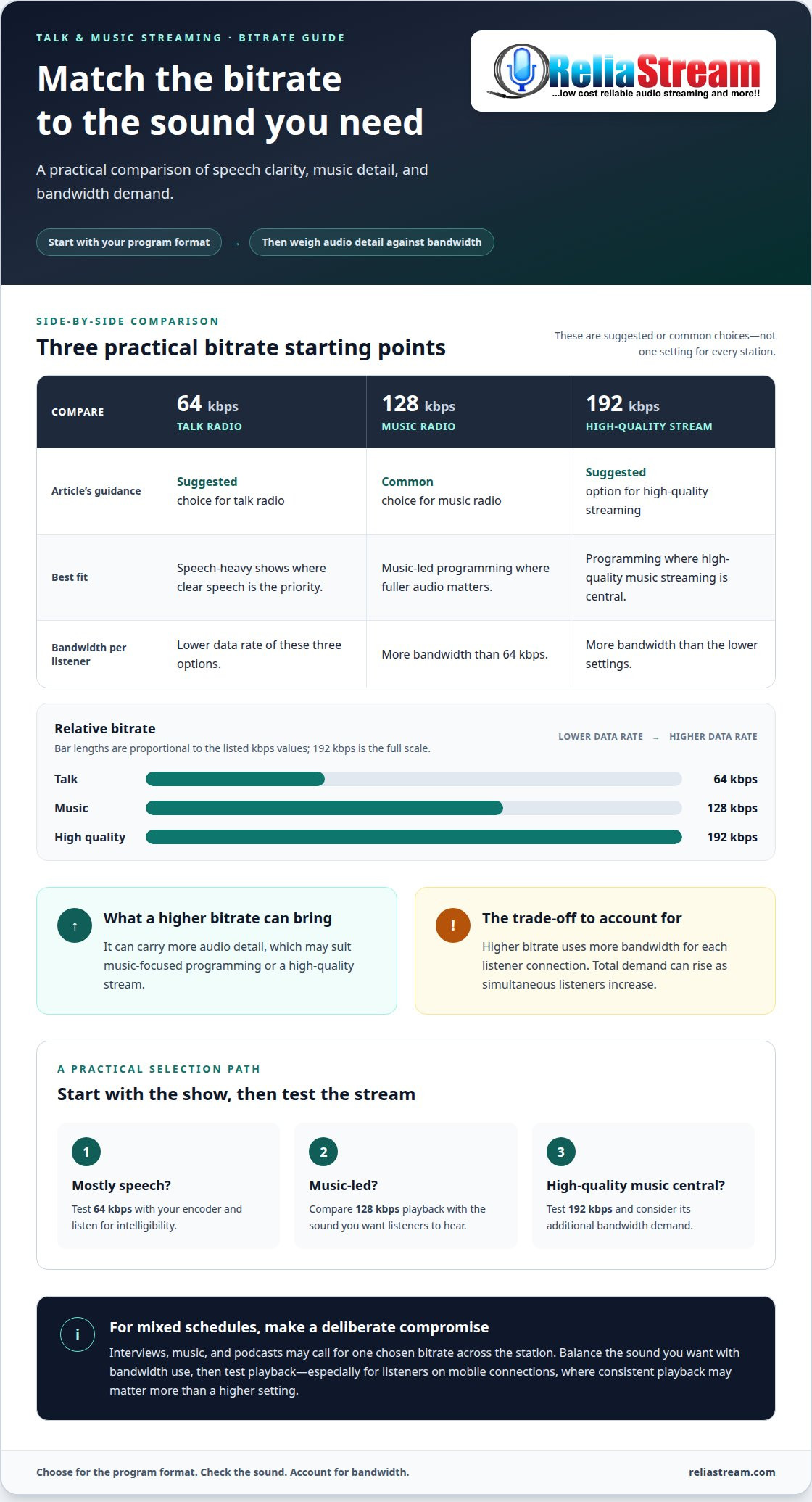
Choose bitrate around the sound your audience needs, not the biggest number available. A 64 kbps stream is a suggested choice for talk radio, where clear speech is the priority. A 128 kbps stream is common for music radio, where fuller audio matters. For high-quality streaming, 192 kbps is a suggested option.
Bitrate describes how much audio data the stream sends each second. A higher bitrate can carry more audio detail, but it also uses more bandwidth for each listener connection. That trade-off matters when stations serve a global audience across different internet connections. A mobile listener may prefer a stream that plays consistently over one with a higher setting.
Use your program format as the first decision point. For a speech-heavy online radio station, start by testing 64 kbps with your encoder and listen for intelligibility. For music-led programming, compare 128 kbps playback with the sound you want listeners to hear. If high-quality music is central, test 192 kbps and consider the additional bandwidth demand.
Mixed schedules call for a deliberate compromise. A station that runs interviews, music, and podcasts can choose one bitrate for its live stream, then assess whether that setting suits its main broadcast. Avoid changing encoder settings without updating the matching control panel configuration. With IceCast, the encoder and server must work together for a stable stream.
Make the decision with a simple test: configure the chosen bitrate, play the stream through the station’s player, and listen on desktop and mobile. Compare speech clarity, music detail, and playback consistency. Then review listener capacity and bandwidth together, especially if the audience grows. A higher setting may suit a music-first station; a lower one may better fit talk-focused programming.
Bitrate is only one part of the listening experience. The encoder, IceCast setup, player, and listener connection all affect playback. Pick the setting that serves your station’s main content, then check that the same configuration supports its audience and broadcast schedule.
Best talk radio streaming hosting providers in the US
The best fit depends on your broadcast, not a ranking label. Compare server platform, bitrate options, audience capacity, and listening tools. Then match those features to your show format and how listeners tune in. A talk-focused station has different priorities from a music-heavy stream.
Use these checkpoints to assess a hosting service:
- Bitrate range: Confirm the available settings suit speech or music. A 64 kbps bitrate is suggested for talk radio; 128 kbps is common for music.
- Streaming platform: Check compatibility with the encoder and server workflow you use, such as Icecast or Shoutcast.
- Audience capacity: Compare simultaneous listener limits and monthly listener-hour terms with your broadcast schedule.
- Control tools: Review whether the control panel supports the functions your station needs, such as analytics or scheduled playlists.
- Listener access: Consider browser and mobile playback, plus whether an SSL-secured stream link fits your setup.
ReliaStream is an option for broadcasters who want Shoutcast or Icecast hosting with tiered bitrate plans. Its available plans include 32 Kbps, 64 Kbps, 128 Kbps, and 320 Kbps options. That range gives talk and music stations distinct settings to consider. The SSL Radio Link is also relevant when secure stream access is part of your requirements.
Don’t treat a provider’s highest bitrate as an automatic win. A music station weighing 128 kbps against a higher setting should consider bandwidth and listener access. A speech-led program can start with the suggested 64 kbps choice, then assess clarity through its usual player. Compare the service’s stated limits against your expected listening pattern, rather than relying on a headline capacity.
For a practical comparison, write down your format, preferred bitrate, encoder platform, and listener needs. Then explore radio hosting plans that align with those requirements.
ReliaStream: 32 Kbps Hosting Plan
ReliaStream offers the 32 Kbps Hosting Plan as a bitrate option for broadcasters choosing a stream setup. Match the plan to your show’s audio needs and the listening experience you want to provide. If your station’s format or quality priorities call for another setting, options include the 64 Kbps, 128 Kbps, and 320 Kbps Hosting Plans.
For talk programming, consider whether a lower-bitrate option suits your audio goals; music-focused stations may prefer a higher bitrate. Your choice also affects bandwidth use, so weigh stream quality alongside audience access. Start with your format, encoder settings, and intended listening experience.
Choose a plan that aligns with your broadcast, then contact ReliaStream to discuss your hosting needs.
Set Your Station Up for Its Next Broadcast
Choose a setup that fits the show you’re building now and leaves room for its format to evolve. With talk radio stream hosting, consider not just audio quality but how your broadcast workflow and listener experience work together.
ReliaStream’s 32 Kbps, 64 Kbps, and 128 Kbps Hosting Plans give broadcasters options to weigh against their programming needs. Focus on the experience you want listeners to have, then choose a starting point that supports your station’s direction.
Ready to move from planning to broadcasting? Contact ReliaStream about hosting and discuss a setup for your station. Your next show can start with a clear plan and the right stream behind it.
Frequently Asked Questions
What is talk radio stream hosting and how does it work?
Talk radio stream hosting connects your broadcast software to a streaming server that distributes audio to listeners. Your microphone or mixer feeds the encoder, which sends the stream to the server. Listeners then play it through a browser, station website, or compatible app. For example, a live interview can reach listeners without each person connecting directly to your studio computer.
What features should I compare when choosing a radio streaming host?
Compare encoder compatibility, listener capacity, control panel tools, and stream access options. Then match those features to your station’s workflow. A solo host may prioritize a simple live connection, while a station with rotating presenters may need remote broadcasting controls. ReliaStream plans include Remote DJ capability. If you plan to publish recorded shows, consider storage and archive tools separately from live-stream features. Test the player on your intended listening platforms.
How much bandwidth and storage does a talk radio stream need?
Bandwidth demand depends mainly on stream bitrate and the number of listeners connected at once. More simultaneous listeners receiving the same stream increase the server’s outgoing data use. Storage serves a different purpose: it holds recorded programs, playlists, or other audio files. A live-only station needs less file storage than one that keeps an expanding archive of interviews and episodes.
How many simultaneous listeners can different hosting plans support?
Capacity varies by server resources and plan limits. A streaming server can handle hundreds or thousands of simultaneous listeners, but that broad range doesn’t identify the capacity of a particular plan. Compare the plan’s listener allowance with your expected peak audience, not just typical attendance. A scheduled guest or promoted broadcast can bring more listeners at once than a regular show.
What are the risks of outages, buffering, and data limits with radio stream hosting?
Outages can interrupt a broadcast when the encoder loses its connection or the streaming server becomes unavailable. Buffering can occur when a listener’s connection can’t keep pace with the stream’s bitrate. Data limits may restrict service or access after usage reaches the plan’s allowance. Test the encoder and playback before a live show, and understand how your plan handles capacity and data consumption.


