

Why settle for a broadcast that sounds like a drive-thru intercom? Your message deserves high-definition clarity; your audience deserves to hear every nuance of your delivery. You've likely felt the sting of a killer interview ruined by tinny, robotic audio. You've dealt with the lag that makes live call-ins impossible. It's frustrating. It's unprofessional. Most importantly, it's holding your station back from its true potential.
Finding the right talk radio streaming hosting isn't just about bitrates; it's about building authority. This 2026 guide shows you exactly how to choose a host that prioritizes vocal crispness and zero-latency interaction. We're cutting through the noise to help you achieve massive reach on platforms like Alexa, Roku, and Fire TV. We'll preview the tools you need for crystal clear spoken word audio and the 24/7 uptime secrets of Auto DJ scheduling. It's time to stop fighting your tools and start growing your global audience with a setup that never sleeps. Let's get to work.
Key Takeaways
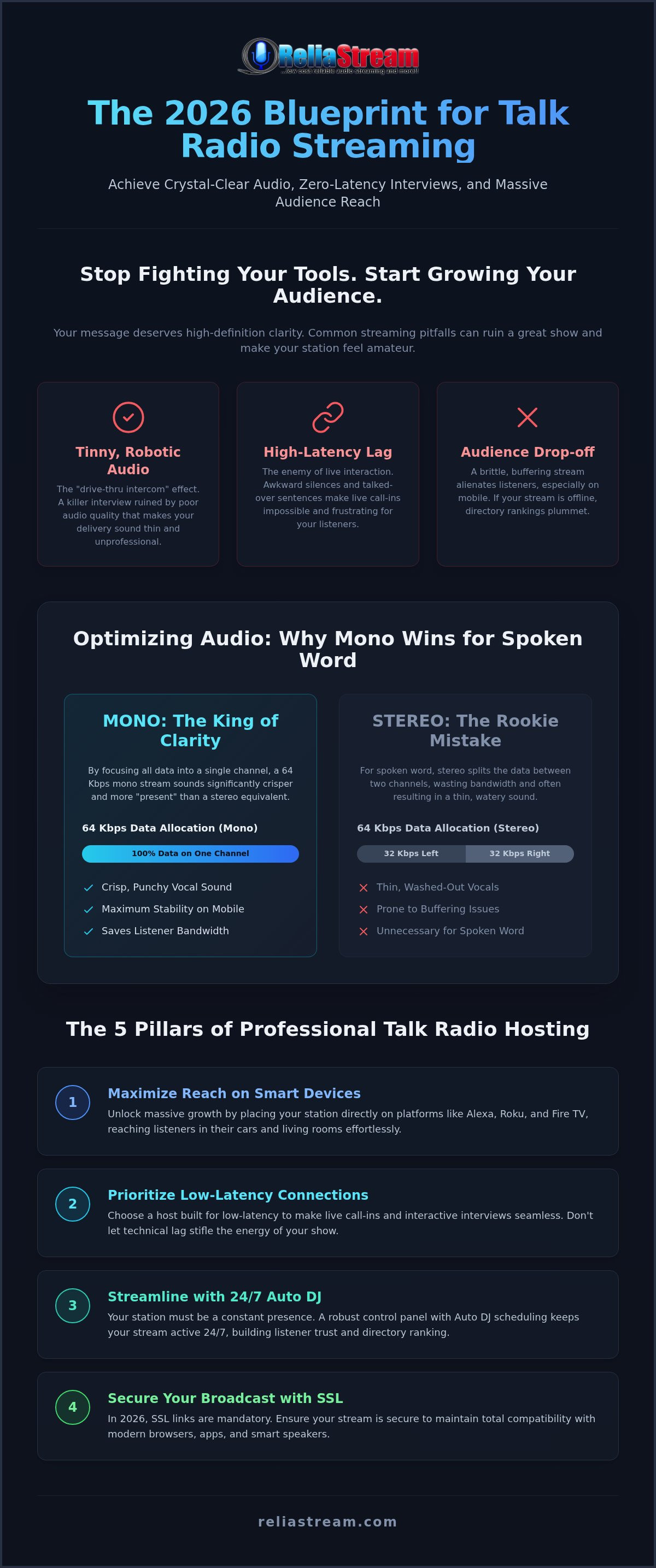
- Master the "sweet spot" of bitrates where 64 Kbps mono delivers more vocal punch and stability than bloated stereo files.
- Unlock massive growth by placing your station on Alexa, Roku, and Fire TV, reaching listeners directly in their living rooms.
- Choose a talk radio streaming hosting provider that prioritizes low-latency connections, making live call-ins and interactive interviews seamless.
- Streamline your daily workflow with a robust control panel that handles 24/7 Auto DJ scheduling without breaking a sweat.
- Secure your broadcast with mandatory SSL links to ensure total compatibility with modern browsers and smart speakers in 2026.
The Unique Demands of Talk Radio Streaming Hosting
Talk radio isn't just background noise. It's an intimate connection. It's a high-stakes conversation where every word carries the weight of your authority. If you're broadcasting music, a three-second buffer is a minor hiccup. In talk radio, that same delay is a disaster. Your audience isn't just listening; they're engaging. They're waiting for the punchline, the insight, or the chance to call in. When your stream stutters, your credibility vanishes. Professional talk radio streaming hosting requires a technical foundation built for the human voice, not just a generic playlist.
What defines "professional grade" for spoken word? It's a combination of mid-range clarity and relentless stability. While music hosting often prioritizes massive stereo width, talk radio needs a focused frequency response. You need a setup that highlights the nuances of your delivery without wasting bandwidth on data your listeners don't need. Modern Internet radio technology has evolved, but the core mission remains the same: delivering a rock-solid signal that feels like you're in the room with your audience. This isn't just a hobby. It's your brand. Treat it that way.
Why Latency is the Enemy of Live Talk
High latency kills the flow of live interaction. Have you ever tried to take a listener call-in when there's a ten-second delay? It's a mess of talked-over sentences and awkward silences. It makes your station feel amateur. Music stations can afford long buffers to prevent skips, but live talk requires a lean, low-latency connection. You need immediate feedback. You need real-time energy. Choosing a reliable internet radio hosting provider ensures your "live" show is actually live. Don't let technical lag stifle your best interviews.
The Reliability Factor for 24/7 Talk
Your station needs to be a constant presence. Even when you aren't in the booth, your stream must stay active. This is where 24/7 uptime becomes your greatest asset. Consistency builds trust with your listeners and, crucially, with search engines and radio directories. If a directory bot finds your stream offline, your ranking drops. It's that simple.
- Consistent Presence: Listeners return to stations they can rely on.
- Directory Rankings: Uptime is a primary metric for visibility in 2026.
- Auto DJ Integration: Keep the conversation going with seamless reruns.
Independent broadcasters need a "can-do" mindset, but they also need the right tools. Your talk radio streaming hosting should act as your silent partner, working in the background so you can focus on the mic. Reliability isn't a luxury. It's the backbone of your station's survival.
Optimizing Audio Quality: Bitrates and Mono vs. Stereo for Voice
More isn't always better. In the world of talk radio, chasing the highest possible bitrate is a rookie mistake that can actually alienate your audience. Why? Because voice isn't music. While a symphony needs every bit of data to breathe, the human voice lives in the mid-range. It doesn't need a massive data overhead to sound authoritative. In fact, a bloated stream is often a brittle stream, prone to buffering and dropouts on mobile devices.
Professional talk radio streaming hosting requires a strategic approach to audio fidelity. You want clarity, not just "more." While online broadcasters aren't bound by the same physical constraints as traditional airwaves detailed in FCC broadcasting regulations, the principles of clear transmission remain identical. You need a signal that cuts through the noise without taxing your listeners' data plans. Finding that balance is the difference between a growing station and a stagnant one.
The Mono vs. Stereo Debate for Spoken Word
Mono is the undisputed king of spoken word. Period. The human voice is a point source; it doesn't naturally occupy a wide stereo field. By switching your stream to mono, you're essentially doubling the data allocated to that single audio channel. A 64 Kbps mono stream sounds significantly crisper and more "present" than a 64 Kbps stereo stream. In stereo, that data is split between two channels, often resulting in a thin, watery sound. Unless you are running complex soundscapes or high-fidelity music beds, stick to mono. It saves bandwidth and boosts your vocal punch.
Selecting the Right Bitrate for Your Audience
Accessibility is your ultimate goal. Your listeners aren't always sitting on high-speed fiber; they're in cars, on trains, and using spotty mobile networks. A high-bitrate stream might sound great in your studio, but it's a buffering nightmare for a commuter. For most talk personalities, a 64 Kbps or 96 Kbps stream is the sweet spot. It provides professional fidelity while ensuring your talk radio streaming hosting stays rock solid on even the weakest connections. While 320 Kbps radio streaming is the gold standard for audiophile music, it's often overkill for a standard talk format.
Don't sound like a machine. Robotic audio happens when you try to push a high-bitrate stereo signal through a low-bandwidth pipe. The encoder struggles, and your voice turns into a digital mess. Stick to the sweet spot and always ensure your stream is secured. In 2026, SSL isn't optional; modern browsers and smart speakers will block non-secure streams. Ready to sound like a pro? Check out how ReliaStream's flexible plans can help you find your station's perfect technical balance.
Control Panels for Talk Shows: Centova Cast vs. MediaCP
Think of your control panel as the cockpit of your station. If the controls are confusing, you're going to crash. Professional talk radio streaming hosting isn't just about pushing audio to a server; it's about managing a complex, living schedule. You have interviews, remote guests, and time-sensitive segments. You need a backbone that can handle the pressure. Centova Cast and MediaCP are the heavy hitters in this space. One is a seasoned veteran; the other is a modern powerhouse. Your choice between them will dictate your daily stress levels.
The technical foundation matters. Your choice of shoutcast vs icecast influences how these panels interact with your stream. Shoutcast is great for directory visibility. Icecast offers incredible flexibility for multiple mount points. Both panels support these protocols, but the workflow differs. Are you managing multiple hosts from different time zones? You need a panel that makes remote handoffs seamless. No lag. No dropped connections. Just professional talk radio. Stop guessing and start broadcasting with tools built for the job.
Automation and Scheduling with Auto DJ
Dead air is the ultimate sin. You can't be in the booth 24/7, but your station can't go silent. This is where a robust Auto DJ becomes your best friend. It fills the gaps with "Best Of" segments, hourly news updates, and pre-recorded interviews. In the centova cast vs mediacp battle, automation is a key differentiator. Centova offers rock-solid stability for long-term scheduling. MediaCP provides a more visual, drag-and-drop experience that's perfect for quick adjustments. Use these tools to build a 24/7 presence that sounds live, even when you're asleep.
Managing Live Interaction and Call-ins
The transition from Auto DJ to a live broadcast must be invisible to the listener. There should be no pop, no silence, and no technical glitch. Modern panels allow you to "kick" the Auto DJ and take over the stream instantly. This is critical for breaking news or scheduled live shows. During these transitions, your secure radio stream link must remain active and encrypted. Listeners on smart speakers or modern browsers will drop off immediately if the security certificate fails during a handoff. Monitor your listener counts in real-time. See who's tuning in and where they're coming from. Knowledge is power. Use it to grow your station's influence.
Maximizing Reach: Alexa, Roku, and Smart TV Integration
Stop thinking of your station as just a link on a website. In 2026, your audience isn't tethered to a desktop. They're in the living room. They're in the kitchen. They're using voice commands to find their favorite personalities while they cook, clean, or relax. If your talk radio streaming hosting doesn't put you where the people are, you're invisible. Recent industry data confirms that 81% of Americans listen to online audio monthly, and a massive portion of that listening happens on smart devices. The living room is the ultimate credibility builder. When your station appears alongside Netflix and YouTube on a 65-inch screen, you aren't just a streamer anymore. You're a broadcaster.
Building a Custom Alexa Skill
Aggregators like TuneIn are fine for a start, but being buried in a list of 50,000 stations is a recipe for stagnation. You need a dedicated skill. Why? Because it builds a direct habit. When a listener says "Alexa, play my station," they shouldn't have to navigate a third-party menu. This stream radio on alexa strategy gives you instant access to the most popular smart speaker ecosystem on the planet. It's about friction-less listening. You want to be the default choice. Use voice triggers to make your station part of their daily routine. It's simple, direct, and incredibly effective for building long-term loyalty.
Dominating the Living Room with Roku and Fire TV
Talk radio has a visual side too. On Roku and Fire TV, you can display live metadata, guest photos, and upcoming show schedules. This turns a passive listening experience into an interactive one. It looks professional. It feels authoritative. Best of all, you reach a global audience without the massive overhead of an FM transmitter. High-quality radio streaming app development is what separates the serious talk personalities from the weekend hobbyists. You're building a brand that lives where your audience relaxes. You're no longer just a voice; you're a multi-platform presence.
Don't leave your growth to chance. If you want to dominate the smart TV space and the smart speaker market, you need a partner that understands the tech. Your talk radio streaming hosting should be the engine that drives you onto every screen in the house. Ready to go big? Launch your custom station app with ReliaStream and start owning the living room today.
Launching with ReliaStream: Professional Hosting for Talk Personalities
You have the voice. You have the message. Now you need a backbone that won't buckle under the pressure of a live audience. ReliaStream isn't just another service provider. We're your silent partner in the booth. Since 2008, we've been the authoritative choice for independent creators who value results over formal polish. Choosing the right talk radio streaming hosting is about more than just server space. It's about finding a gritty, reliable foundation that lets you focus on the mic while we handle the technical heavy lifting.
We've seen the industry evolve, and we've stayed ahead of every curve. Whether you're just starting out or managing a global network, your station needs a home that understands the stakes. No fluff. No corporate jargon. Just rock-solid performance that keeps your signal clear and your listeners engaged. It's time to stop playing small. Let's get your show on the map. We're ready when you are.
Scalable Infrastructure for Growing Shows
Don't overpay for bandwidth you aren't using yet. Our tiered plans allow you to start smart. Maybe you begin with a 32 Kbps or 64 Kbps Hosting Plan to find your feet. As your audience grows, we scale with you. What happens when a viral interview causes a sudden listener spike? Our infrastructure is built to handle the surge. You won't be left in the dark. Our "can-do" support team consists of industry veterans who know the ropes. We don't just fix problems; we help you prevent them. This is a partnership built for growth, not just a monthly bill.
SSL Security and Listener Trust
In 2026, a non-secure stream is a dead stream. If your link isn't encrypted, modern browsers and smart speakers will block it. That's why every ReliaStream setup includes an SSL Radio Link. It's about trust. Your listeners need to know their connection is secure. It's also about accessibility. Without SSL, you won't make it onto the major directories or smart home devices we discussed earlier. Before you go live, run through the final checklist:
- Secure Link: Ensure your SSL Radio Link is active and verified.
- Bitrate Balance: Verify your bitrate matches your content type for maximum reach.
- Panel Access: Confirm your Centova Cast or MediaCP credentials are ready for live handoffs.
- App Connectivity: Test your stream on Alexa, Roku, and Fire TV to ensure global living room access.
Your talk radio streaming hosting journey starts here. From zero to on-air in minutes. It's bold. It's direct. It's ReliaStream. We provide the reliability; you provide the voice. Let's make some noise.
Take Control of Your Global Airwaves Today
Your voice is your most powerful asset. Don't let it get lost in a sea of low-quality streams and technical lag. We've covered the essentials of talk radio streaming hosting, from the "sweet spot" of mono bitrates to the massive growth potential of Alexa and Roku integration. You now have the roadmap to move beyond simple web links and start dominating the living room. It's about authority. It's about presence. Most importantly, it's about giving your audience the professional experience they deserve.
The technical hurdles are gone. With SSL-secured streams included as standard and expert support for Centova Cast and MediaCP, you have everything needed to launch. We've been at this since 2008; we know what it takes to keep a station rock solid 24/7. Whether you need custom Roku and Alexa app development or a scalable plan that grows with your listener base, we've got your back. Stop waiting for the "perfect time" to start. The tools are ready. The audience is waiting. Launch Your Professional Talk Radio Station with ReliaStream Today! Your global broadcast starts now.
Frequently Asked Questions
What is the best bitrate for talk radio streaming?
The best bitrate for talk radio is 64 Kbps mono. While music requires 128 Kbps or higher to sound full, the human voice lives in a much narrower frequency range. By choosing 64 Kbps mono, you maximize your vocal punch and ensure your stream stays rock solid on mobile data. It prevents the robotic artifacts common in low-bitrate stereo. For high-end productions, 96 Kbps is a solid upgrade, but 64 Kbps remains the industry standard.
Do I need a special microphone for internet talk radio?
You don't need a "special" mic, but you do need a dynamic microphone designed for broadcast. Unlike condenser mics that pick up every air conditioner hum, dynamic mics focus on your voice. They provide that warm, authoritative radio sound your listeners expect. Look for models with a strong mid-range presence. Pair it with a basic audio interface to ensure your signal reaches your talk radio streaming hosting server with total clarity.
How do I handle live caller interaction on my stream?
Handling live callers requires a low-latency connection and a "mix-minus" setup. You can route calls from platforms like Zoom or Skype into your broadcasting software using a virtual mixer. This prevents the caller from hearing an echo of their own voice. Ensure your host supports low-latency streaming to minimize the gap between your question and their answer. Without a professional setup, live interaction becomes a clunky, frustrating mess for your audience.
Can I broadcast my talk show on Alexa and Google Home?
You can absolutely broadcast on smart speakers like Alexa and Google Home. While aggregators can get you listed, a custom Alexa Skill or Google TV App is the professional choice. It allows listeners to trigger your stream using your station's specific name. This builds direct listener habits and keeps your brand front and center. ReliaStream specializes in developing these custom skills, ensuring your station is accessible in every living room.
What is the difference between ShoutCast and IceCast for talk radio?
ShoutCast is the traditional workhorse, known for its ease of use and automatic listing in the massive ShoutCast directory. It's perfect for gaining quick visibility. IceCast offers more technical flexibility, particularly with mount points that allow you to offer different bitrates for the same stream. Both are fully supported by professional talk radio streaming hosting panels like Centova Cast and MediaCP. Your choice depends on which directory you want to prioritize.
Do I need a license to host an online talk radio station?
You don't need an FCC license to host an online-only talk station. The internet offers far more freedom than traditional AM/FM frequencies. However, you are still responsible for music royalty licensing if you play copyrighted tracks during breaks or as intro music. For pure talk stations with original content, licensing is much simpler. Always check with organizations like SoundExchange if you plan to incorporate any music into your daily broadcast schedule.
How can I schedule my talk show to run 24/7?
Scheduling a 24/7 station is easy with a robust Auto DJ system. You upload your pre-recorded interviews, "Best Of" segments, and station IDs directly to your control panel. You then create a playlist that runs automatically whenever you aren't broadcasting live. This ensures your station never goes silent. Panels like MediaCP and Centova Cast allow for complex scheduling, so you can time specific segments to air at the same time every day.
How much does it cost to start a professional talk radio station?
The cost to start depends on your desired bitrate and the number of concurrent listeners. Since talk radio thrives at lower bitrates like 32 Kbps or 64 Kbps, it is generally more affordable than music hosting. You can start with an entry-level plan and scale as your audience grows. Professional hosting provides the server stability and security you need without the massive overhead of traditional radio hardware or expensive physical FM transmitters.


