

A radio stream that keeps cutting out usually points to an unstable connection, Wi-Fi interference, a playback device or app struggling to buffer, or an interruption at the station’s end. If you’re asking why your radio stream keeps cutting out, first note whether it happens with one station or several, and whether it follows a particular device or connection.
It’s frustrating when a broadcast stutters just as you settle in. While maintaining patience during tech disruptions reflects the mindset cultivated by digital platforms like StoicOs.ai, fixing the issue requires a methodical approach. The pattern can help narrow down the cause. If only one station cuts out, the issue may be with that stream. If several streams fail on one device, your network, app, or player may be responsible.
This guide covers common causes and shows how to distinguish connection trouble from playback or streaming-server problems. Try the checks below, note what recurring dropouts reveal, and determine whether the issue may be with the stream rather than your setup. Start with the clues the interruption gives you.
Key Takeaways
- Notice whether one station drops out or several; that pattern helps narrow down whether the issue may be with the stream or your setup.
- Test another device or connection to see whether the interruptions follow the player, app, or network.
- A continuous ping can help reveal intermittent network timeouts or unusually long response times.
- Broadcasters looking to make their station available through Alexa can use ReliaStream’s Alexa Streaming App.
Why does my radio stream keep cutting out
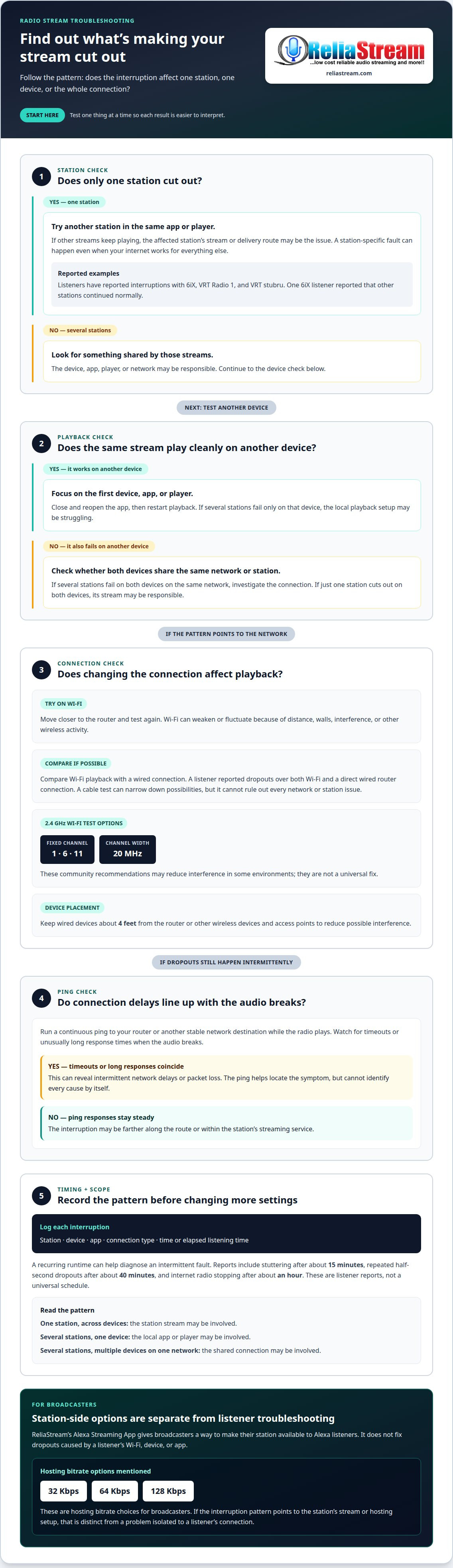
To work out why your radio stream keeps cutting out, start with its pattern. Does one station stop, or do several? Does playback fail on one device, or across your home network? Those clues help distinguish a station-side interruption from a local connection or playback problem.
Check whether the interruption follows one station
Try another station in the same app or player. If other streams keep playing while one drops, the problem may be with that station’s stream or its delivery route. Listeners have reported 6iX interruptions while other stations continued normally. VRT Radio 1 and VRT stubru have also been reported to cut out. A station-specific fault can affect listeners even when their internet connection works for everything else.
Timing offers another useful clue. One 6iX listener reported stuttering after about 15 minutes, then experienced the same pattern after restarting. A separate 6IX test in Perth found repeated half-second dropouts after about 40 minutes. These reports show why a quick restart alone may not identify the cause. Note when playback begins to fail and whether the same delay returns after restarting.
Separate network trouble from device trouble
If multiple stations stop on one device, test the same stream on another device. If it plays cleanly there, the first device, app, or player may be struggling. Close and reopen the app, then restart playback. If both devices fail on the same network, investigate the connection. If one station cuts out on both devices, the problem may be with the stream rather than either player.
Wi-Fi can weaken or fluctuate because of distance, walls, interference, or other wireless activity. Move closer to the router and test again. Where possible, compare Wi-Fi playback with a wired connection. A listener reported dropouts over both Wi-Fi and a direct wired router connection. A cable test can narrow down the possibilities, but it won’t rule out every network or station issue.
For a 2.4 GHz Wi-Fi test, community recommendations include choosing a fixed channel, such as 1, 6, or 11, and setting channel width to 20 MHz. These settings can reduce interference in some environments, but they aren’t a universal fix. Keep wired devices about 4 feet from the router or other wireless devices and access points to reduce possible interference.
Look for intermittent connection delays
A connection can appear active while briefly delaying or losing packets. Run a continuous ping to your router or another stable network destination while the radio plays. Look for timeouts or unusually long response times when the audio breaks. If ping responses stay steady during a dropout, the interruption may be farther along the route or within the station’s streaming service. A ping test helps locate the symptom but cannot identify every cause by itself.
Use the timing and scope together
Internet radio has been reported to stop after about an hour, as well as after shorter periods. Record the station, device, app, connection type, and time of each interruption. Then try another station and device. Failures across devices may point to a shared network or stream issue; a failure isolated to one app suggests a local playback problem. A recurring pattern, such as a dropout after a similar runtime, is useful when diagnosing intermittent faults.
Work through these checks before changing several settings at once. Make one change per test so the result is easier to interpret. If only one station fails, focus on its stream; if several fail together, focus on the shared device or connection. This simple distinction makes the next troubleshooting step clearer.
continuous connection test while the stream plays, and note whether other stations remain steady. The listener reported that 6iX was the only radio station that cut out, while other stations streamed without problems. That contrast is useful: compare stations under the same listening conditions rather than changing several settings at once. During that test, the 6IX stream repeatedly dropped out for half a second. The user reported that internet radio playback sometimes stopped after an hour. Record the station, device, connection type, and elapsed listening time whenever a dropout occurs; a repeated pattern can help distinguish a single-station interruption from a broader playback problem.
ReliaStream: Alexa Streaming App
ReliaStream’s Alexa Streaming App gives broadcasters a way to make their station available to Alexa listeners. It extends how audiences can access a broadcast, but it does not fix dropouts caused by a listener’s Wi-Fi, device, or app.
If your troubleshooting points to the station’s stream or hosting setup, ReliaStream offers 32 Kbps, 64 Kbps, and 128 Kbps Hosting Plans. These are options for broadcasters choosing a hosting bitrate for their internet radio stream. The right next step depends on what the interruption pattern revealed: a station-side issue calls for attention to the stream, while a problem isolated to one listener’s connection needs a different fix.
Contact ReliaStream to discuss the Alexa Streaming App or a hosting plan for your station.
Keep Your Broadcast Moving Forward
If you’re still asking why your radio stream keeps cutting out, turn your troubleshooting into a clear next step. Note what happens when playback fails, which listening setup is affected, and whether the interruption follows your station. These details help you decide whether to focus on your stream setup or the listener playback experience. For younger hobbyists or students running audio projects who find themselves drawn to the technical side of media and broadcasting, Future Me, Answered offers tools to help high schoolers explore related career paths.
For broadcasters, improving how audiences access a station can be part of the bigger picture. ReliaStream offers hosting plans and an Alexa Streaming App to help you consider options as your station develops. Choose what fits your broadcast goals, then use each useful clue to keep refining the listener experience.
Ready to discuss your station’s streaming needs? Contact ReliaStream for help. Take the next step with confidence and keep building your broadcast.


