

The bitrate isn't the whole story. AAC generally delivers higher sound quality than MP3 at the same bitrate, and AAC streaming for internet radio can use HE-AAC v2 at 32-64 kbps for talk and news. For music, the right bitrate depends on how much detail you want to preserve and how much bandwidth your listeners can use.
You already know the trade-off: richer audio takes more data to deliver. But the codec that compresses the sound is only one part of the setup. The streaming protocol determines how that audio is packaged and sent to listeners, so it also affects compatibility and delivery.
This guide explains how AAC performs at lower bitrates, what higher-bitrate and near-CD-quality streaming require, and how listener capacity affects bandwidth use. You’ll also see how HTTP/ICY and HLS fit into internet radio, and why choosing a codec and delivery method together gives you a clearer picture of sound quality and streaming demands.
Key Takeaways
- Match the codec and bitrate to your programming: speech and music place different demands on audio detail and bandwidth.
- Near-CD sound and lossless CD-quality streaming aren’t the same thing; understand the bandwidth trade-off before choosing.
- Separate codec choice from delivery protocol so you can evaluate sound compression and stream compatibility clearly.
- Compare HTTP/ICY and HLS based on how they carry audio and metadata to listeners.
- Estimate bandwidth using both stream bitrate and listener capacity, then choose a setup that fits your audience.
Lower-bitrate streaming for lofi and talk radio
Lower bitrates can make a radio stream easier to carry, especially for listeners on mobile connections. To set up an AAC stream, choose a codec and bitrate for your content, configure the encoder, connect it to a streaming server, and test playback on listener devices.
Bitrate Trade-Offs and Audio Quality
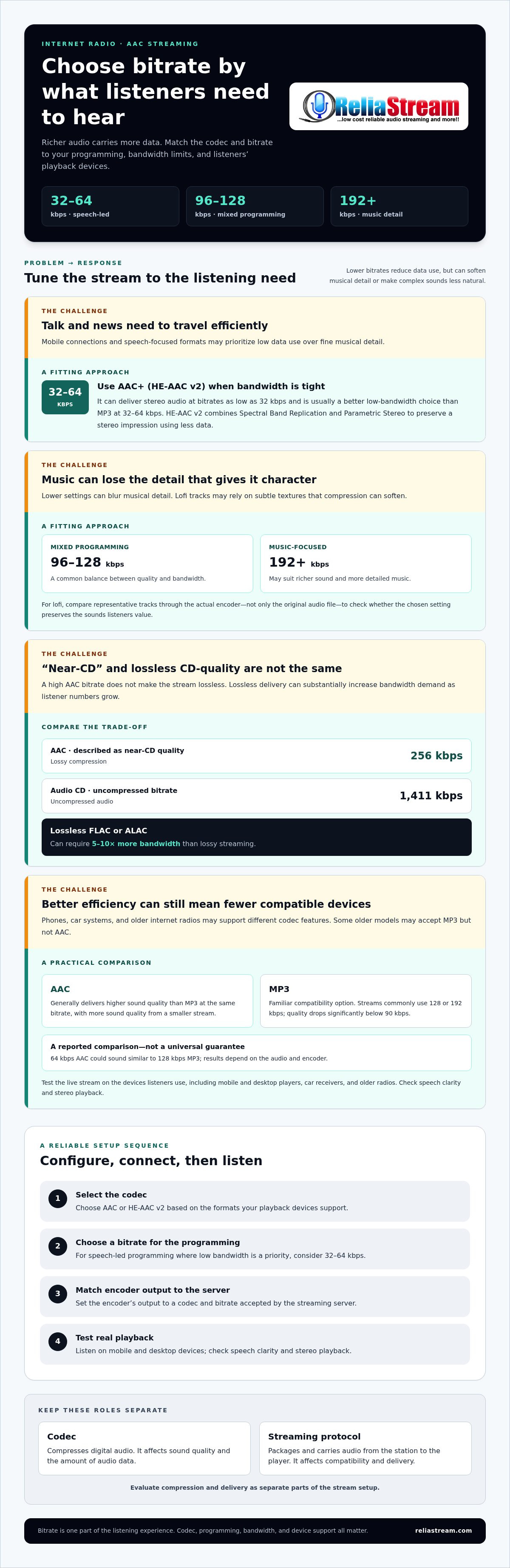
Bitrate is the amount of audio data sent each second, and it shapes sound quality and bandwidth demand. Lower settings reduce data use, but can blur musical detail or make complex sounds less natural. AAC generally sounds better than MP3 at the same bitrate. A reported comparison found 64 kbps AAC could sound similar to 128 kbps MP3, though results depend on the audio and encoder.
HE-AAC v2 for Low-Bitrate Streams
HE-AAC v2 combines Spectral Band Replication with Parametric Stereo to preserve a stereo impression using less data. It can deliver stereo audio at bitrates as low as 32 kbps, making it relevant for speech-focused radio and constrained mobile connections. At 32-64 kbps, AAC+ (HE-AAC v2) is usually a better choice than MP3 when bandwidth is tight.
This efficiency may be useful for formats where keeping data use low matters more than preserving fine musical detail. HE-AAC uses Spectral Band Replication to encode lower and mid-range frequencies, then reconstructs high frequencies during playback. Parametric Stereo sends a compressed mono signal with spatial information that a compatible decoder uses to rebuild the stereo image.
MP3 remains a familiar option, but its compatibility advantage comes with a bitrate trade-off. MP3 streams commonly use 128 or 192 kbps, while MP3 quality drops significantly below 90 kbps. For a station prioritizing broad playback support, MP3 may be useful; for lower data use, AAC can deliver more sound quality from a smaller stream.
Use this setup sequence to match the stream to your station’s programming:
- Select AAC or HE-AAC v2 in the encoder, based on the formats your playback devices support.
- Choose 32-64 kbps for speech-led programming where low bandwidth is a priority.
- Set the encoder’s output to match the stream server’s accepted codec and bitrate.
- Listen to the live stream on mobile and desktop devices, checking speech clarity and stereo playback.
Higher bitrates make sense when a format relies on detailed music, layered instruments, or broad dynamics. Mixed programming commonly balances quality and bandwidth at 96-128 kbps. Music-focused stations may choose 192 kbps or higher for richer sound, while AAC at 256 kbps is described as near-CD quality.
For a lofi station, consider the intended texture: compression can soften subtle details that give a track its character. Compare representative speech and music through the actual encoder, not just the original audio file. Listening this way reveals whether the selected bitrate preserves the sounds your audience values.
What About Full CD-Quality Internet Radio?
Full CD-quality streaming means sending lossless audio, not simply choosing a higher AAC bitrate. The trade-offs are substantial: sound quality, bandwidth demand, and device compatibility all shape the listening experience.
Compatibility Across Devices and Players
Compatibility means a device’s player can decode the stream format and play it for listeners. It matters because phones, car systems, and older internet radios may support different codec features.
Legacy radios deserve particular attention. Some older models may accept MP3 but not AAC, while newer phone software can offer more format choices. Directly testing the station stream in a phone, car receiver, desktop player, and older radio can expose playback gaps before a broadcast reaches its full audience. Directory support also varies; some online radio directories accept only AAC streams.
MP3 Limitations and AAC Efficiency
MP3 and AAC are lossy compression formats, but AAC generally delivers higher sound quality at the same bitrate. That efficiency can reduce the data carried per listener while preserving a strong listening experience. MP3 remains a familiar option for older players, so choosing AAC alone may exclude devices that lack AAC decoding.
Near-CD AAC is not the same as lossless CD-quality audio. AAC is described as near-CD quality at 256 kbps, while an audio CD’s uncompressed bitrate is 1,411 kilobits per second. Lossless FLAC or ALAC streaming can require five to ten times more bandwidth than lossy streaming. That difference affects the stream’s capacity needs as listener numbers grow.
AAC Licensing and Patent Requirements
For US internet radio, distinguish codec licensing from music rights: permission to encode audio does not itself grant the right to broadcast copyrighted songs. Codec-related requirements can depend on the encoder, decoder, and how the technology is used. Music licensing is a separate issue tied to the material in the broadcast.
So, what should a broadcaster account for? Treat the streaming format, encoding software, and music rights as separate parts of the setup. AAC does not automatically settle music permissions, and an MP3 stream does not either. Keep those responsibilities distinct when planning a station’s technical and programming arrangements.
To assess compatibility, compare AAC playback across the actual player systems your audience uses, including car and legacy radio receivers. If secured delivery is also part of your setup, an SSL Radio Link may fit that need; encryption and codec support solve different problems.
Differences between audio codecs and streaming protocols
A codec compresses digital audio; a streaming protocol carries it from the station to the player. Separating these roles helps you troubleshoot sound, bandwidth, and playback compatibility without confusing audio formats with delivery methods.
Codec Support Across Playback Devices
Codec support is a device’s ability to decode a format such as AAC or MP3, and it determines whether listeners hear the broadcast. Phones, car systems, desktop players, and internet radios can support different formats. AAC supports up to 48 audio channels for reproduction, while MP3 supports up to 5.1, though stereo is standard for broadcast use.
A player must support the stream’s codec, not just its protocol. If an older radio can open a station’s stream but cannot decode AAC, playback still fails. Test the actual audio format on the devices your audience uses, including apps and embedded players that sit between the stream and listener.
AAC and MP3 Audio Formats
AAC and MP3 are audio codecs, meaning each compresses sound into a digital format for streaming. AAC generally delivers higher sound quality than MP3 at the same bitrate, while MP3 remains a familiar choice for a wide range of playback devices. Your choice affects the data rate, audio detail, and the devices that can decode the broadcast.
Think of codec selection as a balance, not a universal winner. A station prioritizing device reach may value MP3 support; a station seeking more efficient compression may choose AAC. Higher bitrates can preserve more audio detail but increase bandwidth demand. The listener’s player still needs to recognize the chosen format.
AAC Support in Streaming Servers and Platforms
Server support means the streaming system can accept and distribute an AAC audio feed; platform support means listener software can play it. ShoutCast and IceCast are internet radio server platforms. Configure the source encoder and server for the same audio format, then ensure the listener’s player can decode it.
Which streaming servers and platforms support AAC for internet radio? ShoutCast and IceCast can distribute a stream from an AAC-configured source, while AAC-capable apps and players handle listener playback. The server carries the feed, and each playback device must decode its codec.
Protocols and codecs solve different problems. A codec shapes compression and audio quality; a protocol defines how the stream travels over a network. For example, HLS divides media into segments and uses M3U8 playlists to list segment URLs. Those playlist details describe delivery, not whether the audio inside uses AAC or MP3.
This distinction makes troubleshooting more direct. If the stream connects but produces silence, check whether the player can decode the codec. If playback stalls or segments fail to load, examine the delivery path and network conditions. Separating audio format from transport helps identify whether the issue involves bandwidth, compatibility, or the audio stream itself.
Supported internet radio protocols
A protocol carries a station’s audio stream across a network; a codec such as AAC, or Advanced Audio Coding, compresses the sound. Keep these roles separate. The protocol affects delivery and metadata, while codec support determines whether listener devices can decode the audio.
HTTP/ICY is used for internet radio streams and can carry streaming-specific headers, including song-title metadata. This allows a player to display track information during playback. The header does not determine the audio format: the stream can contain AAC or another codec, as long as the receiving player supports it.
HLS, or HTTP Live Streaming, delivers audio through media segments rather than one uninterrupted file. Its M3U8 playlist lists the segment URLs that a player requests. HLS live streams are typically divided into segments a few seconds long, so the playlist and segment delivery affect how playback is managed over a network.
The HLS specification referenced for internet radio is RFC 8216. That identifier helps broadcasters and developers discuss the same protocol rules. HLS describes how media is organized and delivered; it doesn’t itself guarantee that every device supports the AAC codec inside the stream.
MPEG-DASH also uses a manifest, called an MPD file. The MPD describes the media segments so a compatible player can locate and request them. Like HLS, DASH is a delivery method, not an audio codec. The station still needs its encoded feed to be compatible with audience devices.
Use this distinction when evaluating a streaming setup:
- Choose the audio codec according to the sound quality and data rate the station needs.
- Choose a protocol that fits the player and delivery method used by listeners.
- Check that the codec and protocol work together in the encoder, server, and listener player.
- Test song-title metadata in HTTP/ICY playback if track information matters to the broadcast.
Compatibility can fail at more than one point. A device may support HLS but not decode the AAC audio it carries. Another player may decode AAC but not handle the station’s chosen delivery method. Testing each part separately helps identify whether the issue involves encoding, protocol handling, metadata, or network delivery.
Access restrictions matter too. Streams requiring DRM, rotating tokens, or complex JavaScript sessions are not supported through the streaming layer described here. Country restrictions and credentials can also affect whether listeners can reach a station from their network. Keep delivery straightforward when broad device access is a priority.
The practical takeaway: match the codec to the player, then match the protocol to how that player receives audio. HTTP/ICY can carry song-title headers; HLS uses M3U8 playlists; MPEG-DASH uses MPD manifests. Those details shape delivery, while AAC coding shapes how frequencies and other audio information are compressed. Test the complete path, from encoder output to listener device.
How much bandwidth does AAC internet radio streaming require per listener?
Each listener uses bandwidth close to the stream’s bitrate, plus delivery overhead. Internet radio bitrates typically range from 32 kbps to 320 kbps, so a 64 kbps AAC stream sends less audio data per listener than a 128 kbps stream. The total outgoing demand rises with concurrent listeners. A simple planning formula is stream bitrate multiplied by the number of simultaneous listeners.
Codec efficiency changes the comparison. Switching from 128kbps MP3 to 64kbps AAC+ drastically reduces bandwidth consumption, while preserving a strong listening experience for many speech and music formats. At 32-64 kbps, AAC+ (HE-AAC v2) is usually a better option when bandwidth is constrained. The stream still consumes its bitrate for each listener; efficiency means more audio quality from that data rate, not zero bandwidth use.
Choose a rate that fits the programming:
- Talk and news can use 32-64 kbps AAC+ to prioritize speech intelligibility and low data use.
- Mixed programming commonly balances quality and bandwidth at 96-128 kbps.
- Music-focused radio can use 192 kbps or higher for richer sound.
These choices affect both server capacity and listeners’ connections. At a fixed bitrate, more simultaneous listeners increase the station’s outbound data demand. For a fixed audience size, a higher bitrate increases the data sent to each listener. Plan around expected listening patterns, the stream’s content, and the available delivery bandwidth.
A 128 kbps stream and a 1 mbps stream can produce substantially different bandwidth costs for broadcasters. The higher-rate stream sends more data each second to every connected listener. AAC can help reduce the rate needed for a given listening experience, but it doesn’t remove the relationship between bitrate, concurrent audience, and total delivery demand.
Listener capacity matters too. A connection must sustain the stream’s incoming data rate for smooth playback. Higher bitrates require more bandwidth and stronger listener connections. A mobile listener on a constrained connection may be better served by a lower-rate stream, while a music audience with stronger connections may benefit from a higher bitrate.
To estimate demand, multiply the selected stream bitrate by concurrent listeners, then account for protocol overhead and delivery conditions. Compare that result against the server’s capacity and the connection quality your audience is likely to have. For an AAC radio setup, explore hosting bitrate plans that align with your stream’s data rate and audience needs.
ReliaStream: 32 Kbps Hosting Plan
ReliaStream helps internet radio broadcasters host streams through tiered bitrate plans. The 32 Kbps Hosting Plan suits a station planning a low-bitrate stream, while the 64 Kbps Hosting Plan, 128 Kbps Hosting Plan, and 320 Kbps Hosting Plan provide higher bitrate options for different audio and bandwidth priorities.
Choose a hosting plan by matching the stream’s bitrate to its programming and expected listener demand. A speech-led station may prioritize lower data use; music with more detail may call for a higher bitrate. When you’re ready to put your station online, ReliaStream offers ShoutCast and IceCast hosting plans with bitrate options matched to your broadcast setup.
Visit ReliaStream’s website to explore hosting options or get in touch.
Build a Stream That Fits Your Next Audience
Your next step is to define how the station should sound and where listeners will tune in. Use that goal to guide your encoder, player compatibility, and delivery setup. For aac streaming for internet radio, the right configuration supports your programming while serving listeners’ devices and connection needs.
As your broadcast develops, keep room to adjust the hosting bitrate alongside your audio choices. ReliaStream offers a 32 Kbps Hosting Plan, 64 Kbps Hosting Plan, and 128 Kbps Hosting Plan, giving broadcasters options to match different stream requirements. Choose the starting point that suits your station’s format, then make your next decision based on how you want listeners to experience it.
Ready to plan your stream? Contact ReliaStream to discuss your stream and take the next step with confidence.
Frequently Asked Questions
How Does AAC Perform?
AAC can deliver good sound quality while sending less data than less efficient encoding. For example, speech-led programming may work at a lower bitrate than music with dense instrumentation. Evaluate representative content after encoding: compare voice clarity, cymbals, bass, and stereo placement. A setting that sounds clean for speech may still flatten subtle musical details.
What are AAC+ and HE-AAC?
AAC+ is a common name for HE-AAC, a version of AAC designed for efficient low-bitrate encoding. HE-AAC v1 uses Spectral Band Replication, while HE-AAC v2 adds Parametric Stereo for compact stereo delivery. Choose between them based on the encoder and the players your audience uses. A station built around speech has different priorities from one where stereo music detail drives the listening experience.
What are the Disadvantages to MP3?
MP3’s main drawback is that it can require a higher bitrate than AAC to reach similar perceived sound quality. Audio quality also drops significantly below 90 kbps, limiting its usefulness when bandwidth is tight. Its broad familiarity remains valuable for older players, so replacing MP3 with AAC can trade some legacy compatibility for encoding efficiency. Consider that trade-off before changing an established station stream.
What is AAC?
AAC, or Advanced Audio Coding, is a lossy digital audio format used to compress sound for storage and streaming. “Lossy” means the encoder removes audio information to reduce the amount of data, rather than preserving every original sample. AAC supports up to 48 audio channels for reproduction, though internet radio broadcasts commonly use stereo. The encoder’s settings determine the balance between file size and retained detail.
What is AAC streaming for internet radio?
AAC streaming for internet radio means encoding a station’s audio as AAC and delivering the compressed audio to listeners over a network. The station’s encoder creates the stream, a server distributes it, and a compatible player decodes it. This distinction helps diagnose problems: a working network connection does not ensure playback if the device cannot decode the selected AAC profile.
AAC vs MP3 vs HE-AAC: which codec is best for internet radio?
Choose AAC for efficient general-purpose streaming, HE-AAC for constrained bandwidth, and MP3 when legacy player support is the priority. For instance, a speech station targeting mobile listeners with limited data has different needs from a music station serving desktop players. Compare codecs using the same program material and listening devices, then select the format that best balances audience access, audio character, and bandwidth demand.
What AAC bitrates and sample rates are recommended for internet radio?
For talk and news, 32-64 kbps AAC+ can prioritize speech intelligibility and lower data use. Mixed programming often uses 96-128 kbps, while music stations may choose 192 kbps or higher for richer sound. Sample rate should suit the source audio and the encoder’s supported settings. Keep encoder and server settings aligned, then listen to the result on the devices your station targets.
Do AAC internet radio streams work in web browsers, mobile apps, and smart speakers?
AAC streams work in browsers, mobile apps, and smart speakers when the playback software supports the codec and delivery method. Browsers, apps, and smart speakers can handle formats differently, even when connecting to the same station. Test the actual stream in each target environment. Dedicated radio apps, including Roku and Alexa apps, offer another way for listeners to access a station.


