

Reliable online radio takes more than a running stream. High availability Icecast hosting combines Icecast streaming software with suitable hosting resources and an availability plan. Icecast has no built-in listener limit, but real-world capacity depends on the server and network bandwidth. The difference lies in how well the setup handles demand and interruptions.
A dropped stream can interrupt a broadcast and frustrate listeners. Choose a setup by looking at practical details: support, server configuration, bandwidth, VPS specifications, mount points, and automatic switching. This guide explains what Icecast hosting involves and how to assess these factors, so you can build a setup that fits your station and audience.
Key Takeaways
- Estimate bandwidth from stream bitrate and concurrent listeners, then compare that demand with the hosting plan’s capacity.
- Assess whether support understands Icecast-specific setup and troubleshooting, not just general server issues.
- Match VPS resources to the stream’s workload, and consider how storage, processing power, and network capacity work together.
- Use mount points to organize stream endpoints, and plan how automatic switching should respond when a source or stream becomes unavailable.
- Compare ReliaStream’s 32 Kbps, 64 Kbps, 128 Kbps, and 320 Kbps hosting plans with your station’s streaming needs.
What is Icecast Hosting?
Icecast hosting runs the Icecast streaming server on a connected host for broadcasters. A high-availability setup should be planned around listener demand and server capacity.
Bandwidth and Listener Capacity
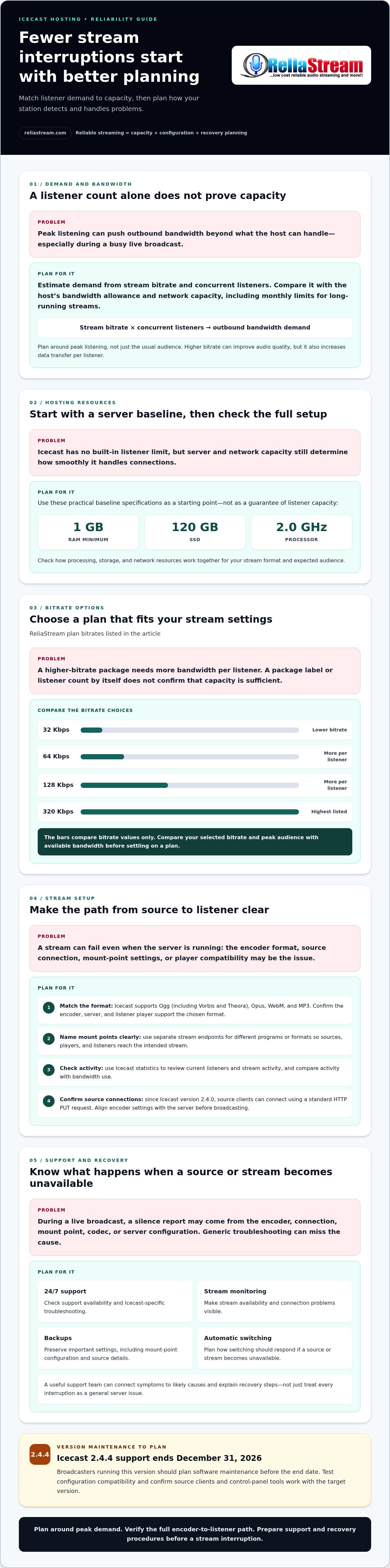
Icecast has no built-in listener limit, but server and network capacity still matter. Each listener receives the stream’s audio data, so outbound bandwidth demand rises with bitrate and the number of concurrent listeners. Plan for peak listening, not just your usual audience. A busy live broadcast can put more pressure on the connection than a quiet scheduled program.
Start with the stream bitrate and expected concurrent listeners, then estimate the total outbound data they will consume. Compare that demand with the host’s bandwidth allowance and network capacity. Monthly bandwidth limits matter for stations streaming for long periods. A higher bitrate can improve audio quality, but it also increases data transfer per listener.
Server resources affect how smoothly Icecast handles connections. A practical baseline is at least 1 GB RAM, a 120 GB SSD, and a 2.0 GHz processor. These specifications provide a starting point, not a substitute for capacity planning. Check how the host’s network, storage, and processing resources support your intended audience and stream format.
Bitrate and listener packages give stations different starting points. A lower bitrate uses less bandwidth per listener, while a higher bitrate requires more capacity. Compare package limits with your stream settings and peak audience. Don’t treat a listener count alone as proof of capacity: bitrate and available bandwidth must work together.
Broadcasting, Mount Points, and Analytics
For live broadcasting, a source client sends audio to Icecast, which distributes it to listeners. Since Icecast version 2.4.0, source clients can connect using a standard HTTP PUT request. Broadcasters should align their encoder’s stream format and connection settings with the server configuration before going live.
Mount points identify separate streams on the same Icecast server. A station might use one for its main live program and another for an alternate stream. Each point can have its own source connection and listener address. Use clear names so presenters, players, and listeners connect to the correct stream.
Listener authentication controls who can access a stream or connect as its source. Use separate credentials when the setup distinguishes broadcaster access from listener access. Icecast statistics show current listeners and stream activity. Review those figures alongside bandwidth use to spot demand changes and decide whether to adjust the bitrate or capacity.
Analytics are most useful when they inform a broadcast decision. Compare listener activity across mount points and note when audiences rise during live shows. Player activity and Icecast server statistics can help identify which streams attract attention. Together, these details help you plan capacity and align station settings with actual listening patterns.
Support availability and Icecast expertise
Choose a host with 24/7 support, Icecast-specific troubleshooting, stream monitoring, and backups. These features help identify service issues, restore configuration, and keep a radio station’s streaming setup manageable.
Icecast expertise matters because audio streaming problems can arise at different layers. A listener may report silence, but the cause could be a source-client connection, mount-point setting, encoder format, or server configuration. Support familiar with Icecast can narrow down the fault instead of treating every interruption as a generic network issue.
Before choosing a plan, consider what happens during a live broadcast. Monitoring should make stream availability and connection problems visible. Backups should preserve important server settings, including mount-point configuration and source details. Support should understand those signals and explain practical recovery steps. These capabilities help broadcasters respond with a plan rather than guesswork.
Formats and codec compatibility
Icecast supports Ogg, including Vorbis and Theora, plus Opus, WebM, and MP3 streams. Match the encoder’s output to the format your station intends to distribute. A player must also support that format; otherwise, a working server can still leave listeners unable to play audio.
Check the full path from encoder to listener. Confirm that the source client sends a codec the Icecast server accepts and the player can decode. For example, if your station uses Vorbis, test the encoder and listener player together before a scheduled broadcast. This simple workflow helps distinguish codec incompatibility from server or connection faults.
Version support and useful tools
Support for Icecast 2.4.4 ends on December 31, 2026. Broadcasters running that version should plan software maintenance before the end date, including testing configuration compatibility and confirming that source clients and control-panel tools still work with the target version.
Ask how support handles upgrade planning, configuration issues, and stream interruptions. A useful control panel shows stream status and listener activity without requiring broadcasters to inspect server logs for routine checks. Station widgets can make a stream easier to add to a website, while player links help audiences reach the broadcast on different devices.
Separate listener-facing tools from server support. An embed or player helps listeners access audio, but it doesn’t replace monitoring, backups, or technical troubleshooting. Broadcasters should know where to view stream status, how to restart a source connection, and which support channel handles an Icecast-specific fault. Clear steps reduce confusion during live programming.
Assess support by its ability to connect symptoms with causes. A useful review covers codec compatibility, version maintenance, stream monitoring, and recovery procedures. These checks show whether the hosting setup supports your station’s workflow, from encoder output to listener playback.
Hosted Icecast server setup and bandwidth
A hosted Icecast server combines streaming software, network capacity, and a source connection. An SLA should explain how uptime is measured, which exclusions apply, and what remedies are available. Network congestion, server faults, or power loss can still affect stream availability.
Bandwidth and System Requirements
Plan bandwidth around bitrate, concurrent listeners, and listening duration. One advertised streaming plan supports 128 Kbps and 100 listeners, with 500GB of bandwidth. Treat those figures as plan limits, not a universal capacity target. Your station’s demand depends on its own stream settings and audience patterns.
For server resources, a baseline recommendation is 1 GB RAM, a 120 GB SSD, and a 2.0 GHz processor. These specifications help frame a hosted or dedicated-server setup. They don’t replace network planning: a capable server can still struggle if its available bandwidth falls short during a busy broadcast.
Source clients connect the broadcaster’s encoder or playlist to Icecast. Since Icecast version 2.4.0, source clients can connect using a standard HTTP PUT request. During setup, match the client’s connection method and stream format to the server configuration. Then test the source before scheduling a live program.
Redundancy and Automatic Failover
Redundant servers provide another path if a primary server or connection fails. Automatic failover switches the stream to that alternate path when a configured failure condition occurs. To assess the design, identify which components are duplicated, how the backup receives the source, and how listeners reach the alternate stream.
A backup server alone doesn’t guarantee a seamless switch. The source feed, mount configuration, network route, and listener player must work together. Test the complete path during planned maintenance, including whether the backup receives live audio or a fallback playlist. Record who handles the switch and how normal service resumes.
Plans, Uptime, and Service Agreements
Choose plans to match stream bitrate, audience capacity, and bandwidth allowance. A basic Icecast server can stream to several hundred users; a standard server can suit several thousand users at any time. These descriptions show why listener estimates and server resources matter more than choosing a plan by label alone.
Service agreements set expectations for uptime calculations, planned maintenance, incident reporting, and remedies. Read how each term is measured and which interruptions count. According to the U.S. Environmental Protection Agency, prolonged power outages can outlast a UPS battery’s backup duration and cause downtime.
For a high-availability setup, map the full chain: source client, Icecast server, network, and listener player. Identify failure points, then decide which need backup capacity first. Dedicated servers and colocation facilities through enterprise data center providers such as 3EX Hosting may offer more control over server configuration and network reliability, while hosted plans can simplify routine setup. Choose based on your station’s workload and desired level of operational control.
Provider pricing and VPS specifications
Icecast software is free and open source, so hosting cost depends on the server used to run it. For Icecast or Shoutcast hosting, price depends on the case and is given after a quote request; key factors include bitrate, listener capacity, bandwidth, storage, and management needs.
What Shapes a Hosting Plan’s Cost?
Start with the stream’s bitrate and expected audience. Each connected listener uses outbound network capacity, so higher bitrate or greater concurrency can increase bandwidth needs. A plan built for a small internet radio audience may not suit a station with regular traffic spikes. Match the plan’s limits to your workload rather than choosing by its label.
Compare what the plan includes. ReliaStream hosting plans include access to the server, listeners, and storage, plus a choice of control panel, Free Secure Link, Free Auto DJ, and Remote DJ capability. This can simplify station management compared with a VPS that leaves more configuration work to the broadcaster. ShoutCast stations should assess the same factors, including software and listener load.
Storage allowances vary by plan, so compare them with your needs for logs, playlists, and stored media. Separate streaming requirements from file-storage needs: a station sending a live source may need a different storage profile from one keeping a large audio library online. ReliaStream plans include specified HD storage allowances alongside their bitrate options.
VPS Specifications That Matter
Assess processor capacity, memory, disk performance, and network throughput as one system. Icecast needs resources to accept source connections and distribute streams. Disk space alone won’t solve a network bottleneck, and extra processing power won’t compensate for an undersized bandwidth allowance. Compare each specification with your station’s workload.
Operating-system choice matters too. Windows may fit a broadcaster’s existing administration tools, while another setup may use a different server environment. Focus on compatibility with the control panel, source client, and maintenance workflow. Map the encoder connection and server controls before choosing a VPS configuration.
Ask how upgrades work as your audience grows. A practical plan should let you adjust bandwidth, server resources, or storage without rebuilding the station’s entire workflow. If listener demand rises during a live event, the key question is whether the hosting configuration can scale with it.
Compare the Full Cost, Not One Specification
Review recurring hosting charges alongside storage, backup needs, bandwidth limits, and management features. A lower-resource plan may suit a modest stream, while a larger audience can require more network capacity. Compare these factors together, then choose a configuration that supports your broadcast schedule and listener demand.
Keep the decision concrete: record the stream bitrate, expected audience pattern, storage use, and preferred operating system. Then compare those needs with the VPS resources and plan terms. This gives internet radio broadcasters a clearer basis for assessing costs, without treating one specification as the whole answer.
Mount points and automatic switching
Mount points give each Icecast stream its own endpoint, while switching directs listeners to an alternate source when the primary feed stops. Plan both together. A clear mount-point map helps broadcasters configure players, live sources, and fallback audio without confusing one station stream with another.
Organize Mount Points Around Your Streams
Assign a distinct mount point to each stream you want listeners to access. A station could, for example, separate its main live program from an alternate bitrate stream. Give each endpoint a clear name, then use that same address in the encoder setup, website player, and listener instructions. Consistent labels make updates easier and reduce the risk of directing listeners to the wrong feed.
Keep mount-point settings aligned with the stream’s bitrate and format. If you upgrade the encoder or change its output, update the matching source configuration and test the endpoint. A player using an old mount point may keep requesting a stream that no longer carries the intended program. Test each player after changes, including any station app or website player.
Plan the Switch, Not Just the Backup
Automatic switching needs a defined primary source, a fallback source, and a trigger for switching between them. The fallback might be a prepared playlist or another live source. Decide what listeners should hear if the main broadcast disconnects, then configure the alternate feed to use the right mount point.
A working backup source doesn’t prove that switching works. Test the full path: stop the primary source, observe the switch, and confirm that the listener’s player continues receiving audio. Then restore the primary feed and check how the system returns to it. This test reveals gaps in source setup, mount-point routing, or player behavior before a scheduled broadcast.
Internet interruptions can affect the source connection even while the Icecast server remains online. The encoder may lose its connection, or the fallback feed may point to the wrong mount point. Use a simple recovery sequence: identify the affected source, check its endpoint, and confirm the active stream in a player. Clear steps help presenters respond without changing unrelated settings.
Keep Changes Controlled
Before changing a mount point or upgrading an Icecast version, record the current endpoint and source settings. Apply the change to one stream first, then test it in the player listeners use. If the station uses AutoDJ, verify that its playlist reaches the intended fallback endpoint. A controlled test helps distinguish configuration mistakes from internet or encoder issues.
For listener access through a voice assistant, explore the Alexa Streaming App. Keep that access route distinct from the Icecast mount-point and failover configuration, then test each path separately.
ReliaStream: 32 Kbps Hosting Plan
ReliaStream’s 32 Kbps Hosting Plan gives broadcasters a starting point for a lower-bitrate stream. If your audience or audio needs call for a different setup, compare the 64 Kbps, 128 Kbps, and 320 Kbps Hosting Plans against your stream bitrate and expected listening demand. The right fit depends on the audio quality you want to deliver and the bandwidth your listeners need.
Use the criteria in this guide to decide what matters most: stream capacity, control-panel needs, mount points, and fallback arrangements. A hosting plan is one part of availability planning, not a substitute for configuring and testing the full broadcast path. Choose a bitrate that suits your station’s format and audience, then plan source and player settings around it.
Contact ReliaStream to discuss your radio hosting needs.
Build Your Next Broadcast With Confidence
Your next step is to turn availability goals into a practical station plan. Decide which listener experience matters most, then align your stream settings and hosting choice with that goal. High availability Icecast hosting works best when technical choices support the way you broadcast, not just a specification sheet.
ReliaStream offers the 32 Kbps Hosting Plan, 64 Kbps Hosting Plan, and 128 Kbps Hosting Plan, giving broadcasters bitrate options to consider for their station. Choose based on the stream quality you want and the listening demand you expect. As your programming evolves, revisit the setup so the stream continues to fit your audience and workflow.
Ready to plan your radio stream? Contact ReliaStream about Icecast hosting. Take the next step with a clear direction and keep building your station’s reach.
Frequently Asked Questions
How to get started?
Start by writing down your broadcast workflow: live shows, scheduled playlists, encoder software, and listener playback options. Then identify your current stream format and bitrate, along with the audience pattern you need to support. Decide whether you want a managed control panel or direct server administration. Once those choices are clear, configure a test stream, verify it in your player, and document the settings before moving regular programming.
What is high-availability Icecast hosting and how does it work?
High availability Icecast hosting is a streaming setup designed to keep an internet radio stream accessible when a component fails. It can use backup stream sources, separate server nodes, and routing that directs listeners to an available stream. The design matters: a backup must receive usable audio, and listeners need a working route to it. Availability depends on how these components connect, not simply on installing Icecast software.
Which Icecast hosting providers offer multi-server redundancy and failover?
Managed streaming hosts and infrastructure providers can offer multi-server redundancy when their service includes separate Icecast nodes and a configured failover route. These capabilities aren’t interchangeable: a second server without listener routing may not provide a usable backup. Look for an architecture that explains how source audio reaches the standby node and how listener connections move during an outage. Confirm that your stream configuration can use that design.
How do Icecast hosts handle automatic failover and load balancing?
Automatic failover responds to a detected fault by routing a stream or listener connection toward a backup. Load balancing distributes connections across available servers to manage demand. They solve different problems: failover focuses on continuity after a fault, while load balancing shares traffic during normal operation. A station may use either approach or both, depending on its server layout, traffic pattern, and routing configuration.
How do Icecast hosting plans compare by listener capacity, bandwidth, and audio quality?
Compare plans by separating audio settings from delivery capacity. Bitrate affects how much data each listener receives; listener capacity and bandwidth limits shape how many connections the service can support. For a fair comparison, use the same stream format and expected audience pattern for each option. Also consider whether the plan suits your player and broadcast schedule, rather than judging audio quality by the plan name alone.
How can I migrate an Icecast radio stream to a redundant hosting setup?
Prepare the move by saving your current encoder settings, mount-point names, playlist files, and player addresses. Configure the new primary and backup destinations, then send a test source to each before changing public listening links. Check that scheduled programming and live broadcasting both reach the intended stream. Once the backup route works, update player destinations during a planned change window and keep the previous configuration available for rollback.


