

TLS alone won’t secure an Icecast stream. Effective icecast security best practices combine protected source access, careful handling of forwarded headers, current software, and encrypted connections. Where possible, keep the server behind a trusted network boundary, and don’t rely on encryption as a substitute for authentication.
It’s easy to focus on the lock icon and overlook other entry points. Source credentials, administrative access, and proxy settings all affect your station’s exposure. Update choices can also influence both compatibility and security.
This guide compares practical options: forwarding client IP and protocol headers, using HTTP Basic authentication for source clients, updating Icecast, and choosing between Nginx TLS and Icecast’s built-in TLS. It also explains the trade-offs to consider when selecting a setup, so you can protect streams without adding unnecessary configuration complexity.
Key Takeaways
- Forwarded headers can help preserve connection details through a proxy, but they need to be handled deliberately.
- Separate source access from listener access, and choose authentication that fits how each client connects.
- Updating Icecast is part of a sound security routine; weigh release status and compatibility before changing versions.
- Compare Nginx and built-in TLS by where you want encryption to terminate and how much proxy configuration your setup needs.
Forwarding client IP and protocol headers
Restrict access at both the network and Icecast levels. Use firewall rules to allow only trusted addresses to reach the administrative interface, and limit listener access by IP when a stream is private. Where a reverse proxy handles incoming connections, keep Icecast off the public network.
When Icecast sits behind a proxy, forward the listener’s client IP and original protocol in headers. Otherwise, Icecast may log the proxy’s address instead of the listener’s, making connection logs less useful. Trust forwarded values only when requests pass through a proxy you control. Direct requests can include misleading header values.
Nginx can proxy Icecast traffic on port 8000. Use HTTP/1.1 between Nginx and Icecast, and preserve the request details Icecast needs. The Nginx example enables chunked transfer encoding and sets the upload body-size limit to 0. These settings support source uploads; they don’t replace authentication or connection limits.
| Option | Client IP visibility | Protocol handling | Exposure |
|---|---|---|---|
| Direct Icecast access | Icecast receives the connection directly | Clients connect to Icecast | Server port is reachable |
| Nginx reverse proxy | Forward client details | Proxy upstream with HTTP/1.1 | Firewall can limit Icecast to local access |
Choose a proxy when you want it to manage public traffic while Icecast remains on a local network. Direct access is simpler, but it exposes Icecast’s listener port to clients.
Set client, header, and source timeouts for their distinct purposes. Client timeouts clear stalled listener connections, header timeouts limit incomplete requests, and source timeouts detect disconnected encoders. Avoid settings so short that they interrupt normal buffering or a slow source connection.
Client and source limits also control load. Set listener capacity for expected audience demand, and limit source connections to the encoders you actually use. Icecast 2.5.0 changed TLS-client handling under buffer pressure, so monitor how encrypted listener connections behave during heavy traffic. A stable window of normal operation helps distinguish routine buffering from connection trouble.
HTTP Basic authentication for source clients
Give each source client a strong credential, and replace every example password before deployment. Icecast’s example configuration uses “hackme” for source, relay, and administrator authentication. Leaving this known sample password in place can expose both stream publishing and administrative access.
For an FFmpeg source client, HTTP Basic authentication is a practical option. Configure the encoder to send its username and password when connecting to Icecast. Basic authentication encodes credentials but does not encrypt them. Protect the connection with TLS, and never send credentials over an unencrypted public connection.
Keep source, relay, and administrator credentials separate. A source password lets an encoder publish audio; an administrator password protects Icecast’s management functions. Restrict the /admin location to trusted IP addresses or through firewall rules so the login page is not openly reachable from the public internet. Change any credential exposed in logs, screenshots, or shared configuration files.
Listener access should match the stream’s audience. Public stations can leave listener requests open, while private streams may require authentication for clients making GET requests. Icecast KH offers stream and user authentication options, which can separate access to a stream from access for individual users. Choose settings compatible with your audience and client software.
- Source: Require authentication for encoder connections, including FFmpeg.
- Administrator: Use a separate credential and restrict access to the admin path.
- Listeners: Add authentication when the stream isn’t intended for everyone.
Multi-factor authentication adds a check beyond a password. CISA recommends strong passwords and enabling multi-factor authentication as basic cyber hygiene. Icecast passwords alone do not provide that second factor. Where available, protect administrator access with an MFA-enabled access layer, and limit source credentials to the encoders that need them. These are core icecast security best practices, especially when the server is reachable online.
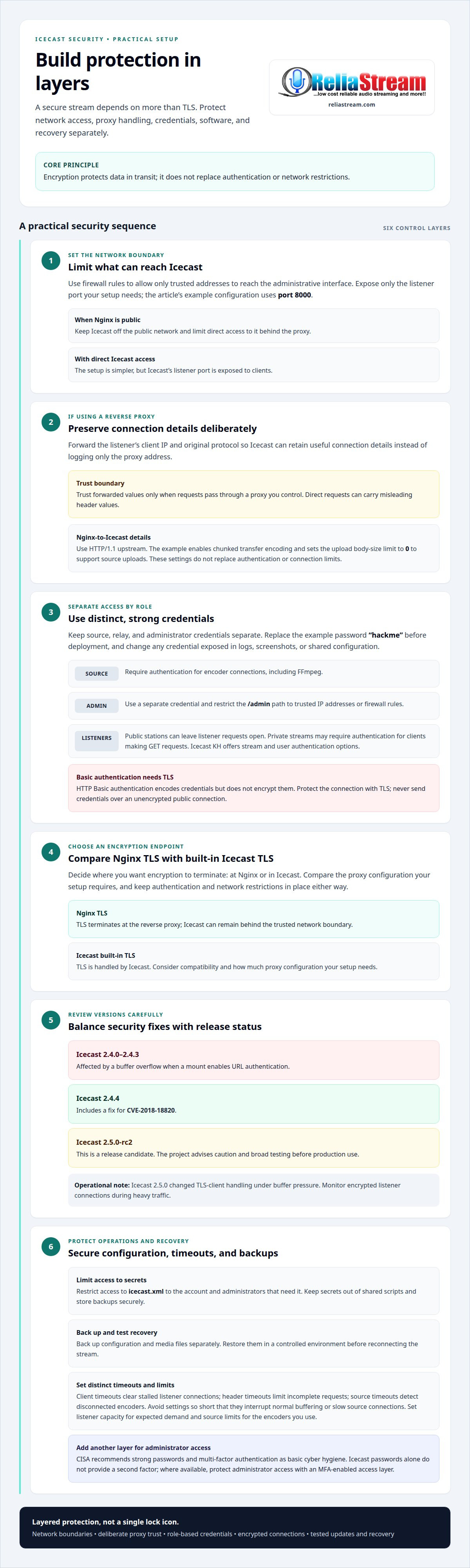
Icecast security updates
Updates matter, as do network boundaries, protected configuration, and recovery plans. Treat each as a separate control, then review them together.
Exposed Ports and Firewall Protection
Firewall rules control network reachability, unlike updates, which address software risks. Expose only the listener port your setup needs; an example Icecast configuration uses port 8000. Restrict administrative access to trusted IP addresses, and keep other ports closed to public traffic. If Nginx handles public connections, limit direct access to Icecast behind the proxy.
To decide which ports to expose, allow the listener connection your setup requires and restrict administrative access by IP or firewall rules. Don’t expose the administrative interface broadly.
Configuration Permissions and Secret Management
File permissions protect credentials at rest, rather than controlling incoming connections. Limit access to icecast.xml to the account and administrators that need it. Store backups securely, keep secrets out of shared scripts, and replace exposed credentials. Icecast 2.5.0-rc2 added file-permission checks, but it’s a release candidate; the project advises caution and broad testing before production use.
For recovery, back up configuration and media files separately, restrict access to backups, and restore them in a controlled environment before reconnecting the stream.
Version choice also matters. Icecast 2.4.0, 2.4.1, 2.4.2, and 2.4.3 are affected by a buffer overflow when a mount enables URL authentication. Icecast 2.4.4 includes a fix for CVE-2018-18820, and support for 2.4.4 is scheduled to end on December 31, 2026. Icecast 2.5.x can read 2.4.x configuration files, but Icecast 2.5.0 included no specific security fixes. Review release notes and test configuration compatibility before updating.
Logging and monitoring can reveal changes that firewall rules alone won’t explain. Icecast status information is readily available; review it alongside connection and authentication logs. Icecast KH offers four log levels. Set alerts for unexpected administrative activity, repeated failed access, or changes in service status, then investigate them against the station’s normal patterns.
Adding TLS with Nginx or Icecast
TLS encrypts traffic between listeners and the Icecast service, protecting stream data and passwords in transit. You can terminate TLS at Nginx or configure Icecast to provide TLS directly. The better fit depends on whether you already use a reverse proxy and where you want encryption to end.
With Nginx, the example configuration listens for Icecast traffic on port 443, then proxies requests to 127.0.0.1 on port 8000. Nginx handles the public TLS connection, while Icecast serves traffic behind it. This setup can keep Icecast off the public interface. Keep the proxy and upstream settings aligned, so listeners and source clients reach the intended endpoints.
A reverse proxy adds a separate configuration layer. Confirm that Nginx forwards the requests Icecast expects, including source uploads, and that the Icecast backend stays reachable from the proxy. Nginx’s example enables chunked transfer encoding and sets the upload body-size limit to 0. These settings matter for streaming requests, but they don’t replace source authentication or careful access controls.
Icecast can provide built-in TLS without a reverse proxy. Configure certificates in icecast.xml, then use Icecast’s encrypted endpoint for connections. This keeps TLS settings in Icecast rather than splitting them between Nginx and Icecast. Icecast KH also supports HTTPS access to its administrative interface, protecting admin sessions separately from listener traffic.
Choose Nginx when you want a proxy to handle public connections and TLS on port 443. Choose built-in TLS when you prefer Icecast to manage its own encrypted connections. In either design, test listener access, source publishing, and admin access after applying the configuration. TLS protects data in transit; it doesn’t make a weak password safe or restrict who can connect. For help matching secure streaming access to your setup, explore secure stream hosting.
ReliaStream
ReliaStream offers Icecast hosting plans for broadcasters who want a hosted stream instead of managing every server component themselves. The 32 Kbps, 64 Kbps, 128 Kbps, and 320 Kbps Hosting Plans give you bitrate options to consider alongside your audience and audio requirements.
Security depends on sound choices: protect source credentials, restrict administrative access, keep software current, and encrypt connections with TLS. Hosting can be a practical option when managing Icecast configuration, updates, and access controls takes time away from running your station. Match the plan’s bitrate to your streaming needs, and keep the security decisions in this guide in view.
For an Icecast hosting option, contact ReliaStream.
Make Your Next Security Decision Count
Security is not a one-time configuration task. Make it part of station operations: document why key choices were made, who is responsible for them, and what should prompt a review. This creates a clear starting point when the stream, team, or technical setup changes, and helps ensure future adjustments are deliberate rather than rushed.
The right next step depends on how much server management you want to handle yourself. If you prefer hosted service, ReliaStream offers Icecast hosting plans. If you manage your own server, use this guide’s decisions to build a consistent approach. Strong icecast security best practices help your station adapt while keeping access and protection in focus.
Want to discuss your streaming setup? Contact ReliaStream for setup help. Keep building with confidence, one considered decision at a time.
Frequently Asked Questions
What is the latest stable Icecast version, and how do I update it securely?
Icecast 2.5.0 is a release, while 2.5.0-rc2 is a release candidate. The project advises caution and broad testing before using that candidate in production. To identify the latest stable version, compare your installed build with the project’s current release notes. Before updating, back up your configuration, test it with your source encoder, then schedule the production change. Icecast 2.5.x can read Icecast 2.4.x configuration files.
How do I enable HTTPS and TLS for Icecast, including reverse proxy configuration?
Enable TLS directly in Icecast by configuring certificates in icecast.xml, or terminate TLS at Nginx. A proxy setup can accept encrypted traffic on port 443 and forward requests to 127.0.0.1:8000. Use HTTP/1.1 for the upstream connection. After changing certificates or proxy settings, test listener playback and source publishing. Icecast KH also supports HTTPS access to its administrative interface.
How can I prevent unauthorized relaying, mountpoint abuse, and denial-of-service attacks on Icecast?
Require authentication for source and relay connections, and keep those credentials separate from administrator access. Limit source and listener connections to what your station needs, and use firewall rules to restrict administrative access. For private mountpoints, apply access controls rather than relying on an obscure name. Review connection logs and Icecast status for repeated access attempts or sudden load changes, and investigate unexpected traffic patterns.
Are there known Icecast vulnerabilities or security advisories, and how can I check whether my server is affected?
Yes. CVE-2018-18820 affected Icecast 2.4.0, 2.4.1, 2.4.2, and 2.4.3 when a mount definition enabled URL authentication. Icecast 2.4.4 includes a fix. Identify your running version and inspect whether URL authentication is enabled on any mount. Support for Icecast 2.4.4 is scheduled to end on December 31, 2026, so account for that date in upgrade planning.


