

A pirate transmitter is not the only way unwanted audio can take over a station. To prevent radio stream hijacking, broadcasters need to protect the entire path, from studio audio sources and streaming credentials to backup feeds and the signal sent over the air. A weak point anywhere in that chain can let unauthorized content reach listeners, even when the main studio system is working normally.
Hijacking is easy to picture as an attack on a radio frequency, but intrusions can also involve compromised accounts, systems, or alternate audio paths. The fallout can include interrupted programming, reputational damage, and serious operational or regulatory consequences, especially if alert tones or offensive material are involved. This guide explains how pirate broadcasting differs from signal intrusion, how attackers exploit weak points, and which safeguards can reduce exposure. It also covers the role of internet radio hosting and secure streaming links, and why they cannot protect parts of the broadcast chain outside their control.
Key Takeaways
- Understand how pirate transmissions differ from intrusions that exploit a station’s broadcast or streaming systems.
- Learn why compromised backup feeds and access credentials can put unauthorized audio on air.
- Identify practical safeguards for streaming servers and encoders, from protecting access to reviewing the audio path.
- See where internet radio hosting and an Alexa streaming app can support listener access without replacing broadcast security.
Pirate radio and broadcast hijacking
Broadcast hijacking can involve an unauthorized transmitter or access to a station’s audio systems. The distinction matters: each route calls for different safeguards and responses.
Pirate Radio and Broadcast Interruption
Pirate radio is broadcasting without authorization, while a broadcast interruption replaces or disrupts a legitimate station’s signal. Both can put unexpected content before listeners, but a transmitter intrusion differs from access to a station’s internal systems. The Southern Television interruption occurred in 1977; Telewizja Solidarność experienced a signal intrusion in 1985. These cases show that unwanted broadcasts can reach audiences through different methods. In the United States, broadcasters must notify the Federal Communications Commission within 24 hours after discovering a false Emergency Alert System tone transmission.
How Internet Radio Streams Are Hijacked
Internet stream hijacking occurs when an attacker gains access to a stream source, account, encoder, or backup feed and substitutes unauthorized audio. A compromised password can expose a control panel; altered encoder settings can route audio to the wrong destination. In the United States, satellite jamming is a felony under 18 U.S.C. § 1367. After the 1986 Captain Midnight intrusion, Thomas M. MacDougall was charged under 47 U.S.C. § 301 for transmitting without a radio license.
Securing Streaming Servers and Encoders
Server and encoder security starts with limiting who can change audio sources, stream settings, and administrator access. Protect accounts with unique, hard-to-guess passwords, and limit administrative permissions to people who need them. Change credentials when access should end, and keep encoder and control-panel access separate from public stream details. Review account activity and configured destinations for changes staff do not recognize. These checks can help identify misuse before altered audio continues reaching listeners.
Secure Protocols for Radio Streaming
HTTPS and other secure streaming protocols protect data moving between compatible endpoints. Encryption helps prevent someone along the connection path from reading or altering stream traffic, while certificate checks help clients connect to the intended server. This matters when listeners access a stream over public networks. However, HTTPS cannot stop an attacker who controls a streaming account, encoder, or server from changing the source audio. Combine secure connections with protected credentials and restricted administrative access for broader protection.
Radio signal intrusion incidents
Real incidents show that intrusions can affect over-the-air signals, backup feeds, or online delivery. Understanding the differences helps stations decide what to monitor and how to respond.
Firewall and Network Security Settings
Firewall and network controls limit which systems can reach streaming servers and encoders. Allow only necessary connections to required services, and block public access to management interfaces. Separate broadcast equipment from general office networks so a compromised device cannot easily reach stream controls. Restrict administrator access to authorized accounts, and review firewall rules when systems or staff responsibilities change. These settings reduce unnecessary routes into the broadcast chain. For organizations seeking expert assistance in structuring and securing their business networks, IT specialists such as reisinformatica.com assist in hardening systems against intrusion.
Signs of a Hijacked Radio Stream
A hijacked stream can replace expected programming with unfamiliar audio, obscene language, false alert tones, or an unexpected redirect. Radio IQ’s backup audio signal was hacked on Nov. 19, carrying unauthorized material over 89.7 FM in the Richmond area. Listeners can note the time, the affected stream or station, and what changed, then report those details through the station’s established channel. A sudden interruption alone doesn’t prove an intrusion, but unauthorized content is a clear warning to investigate.
Recovering from Stream Hijacking
Recovery starts by stopping the unauthorized audio from reaching listeners. Switch to a known-good source or backup feed, then restrict access to affected accounts and systems. Review recent account activity, encoder settings, stream destinations, and administrator changes to locate the altered path. Restore trusted settings and replace exposed credentials before returning the affected system to service. In 2013, Emergency Alert System hijackings carried a zombie apocalypse message, showing why stations should treat false alert audio as an urgent incident.
Monitoring for Unauthorized Audio and Redirects
Monitoring compares what a station intends to transmit with what listeners actually receive. Keep an independent listening check on the live output, and review stream destinations and configuration changes for unfamiliar redirects. In June 2023, a hijacked message was broadcast on Russian radio stations, illustrating why monitoring should include the delivered signal, not just studio playback. An SSL Radio Link supports encrypted streaming, while audio checks help spot unauthorized content or routing changes.
How do attackers hijack internet radio streams?
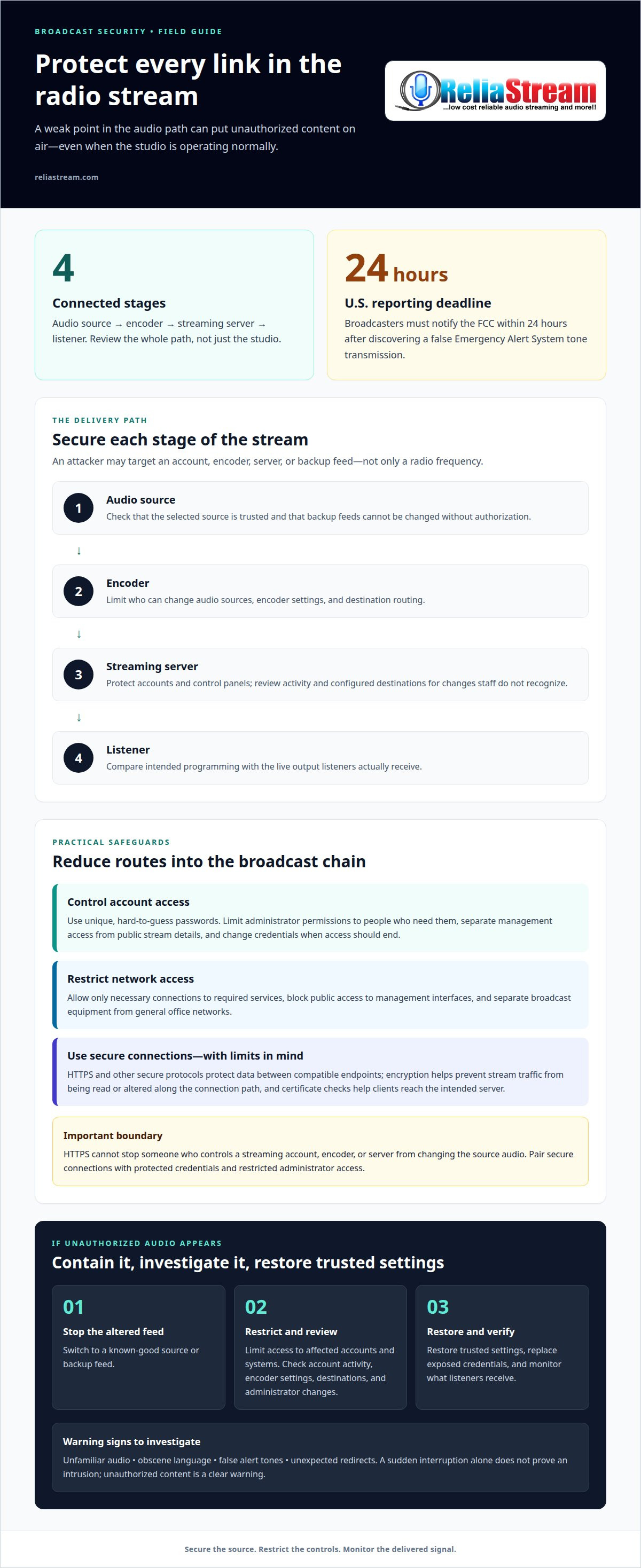
An internet radio stream moves through connected systems, from the audio source to an encoder, streaming server, and listener. An attacker may target any link in that chain rather than overpowering a broadcast frequency. For example, control of a station’s streaming account can let someone change the source audio or server settings. The result may sound like a hijacked station, even though the studio continues broadcasting normally.
Credentials are a common entry point. Reused or easy-to-guess passwords can expose a streaming control panel, particularly if former staff still have access. A compromised email account may also let an intruder reset a password and take over related services. Once inside, an attacker could change administrator details, alter stream settings, or add an unauthorized source. Separate user accounts and limited permissions make it harder for one compromised login to control every part of the broadcast.
Encoders and audio sources create another possible route. If someone changes an encoder’s destination or input, the server may distribute audio the station did not intend to send. A modified playlist can direct listeners to a different stream, while changes to a station website’s player can send visitors to an unauthorized destination. These routes matter because the studio feed may remain clean even as the audio heard by online listeners changes.
To prevent radio stream hijacking, identify which systems can alter audio, access, or routing. Map the path from studio output through encoder and server to player, including backup feeds and account recovery methods. Review unexpected configuration changes, unfamiliar administrator activity, and reports of mismatched audio. A sudden shift from scheduled programming to unrelated content may indicate an issue at the source, server, or player. Finding the affected link helps the station contain the intrusion and restore the intended stream.
In the UK, maliciously causing radio interference is a criminal offence that can carry up to two years in prison and an unlimited fine. This legal consequence underscores the seriousness of deliberate interference.
How can broadcasters secure radio streaming servers and encoders?
Begin with an inventory of every system that can change the broadcast. Document the studio output, encoder, streaming server, control panel, and backup source. Assign an owner to each component so configuration changes have a clear purpose. Separate broadcast equipment from everyday office devices where practical. If a staff laptop is compromised, that separation can make it harder to reach encoder controls or server settings.
Protect access with unique passwords, individual accounts, and only the permissions each role needs. Remove access when someone no longer manages the stream, and change credentials after suspected exposure. Keep administrator accounts separate from routine listening or production accounts. Review server access records and configuration history for unfamiliar logins, changed destinations, or new administrator accounts. These checks make unexplained changes signals to investigate, rather than surprises during a live broadcast. Similarly, for technical teams deploying autonomous tools and AI agents within their operations, maintaining local control is critical; solutions like novacortex.dev offer a self-hosted, privacy-first memory layer designed to keep sensitive workflow data secure.
Maintain server and encoder software, and apply trusted security updates through a planned process. Before changing a live configuration, save the working settings and document the change. This gives the station a known baseline for recovery if a new setting disrupts the feed. Restrict management access to approved devices and network paths. Configure firewalls to allow only the connections needed for streaming, administration, and monitoring, then remove obsolete rules.
Build a recovery routine around a known-good audio source and documented settings. Assign staff responsibility for switching away from a compromised encoder or server, restoring trusted configuration, and reviewing access before normal operation resumes. Test the fallback path during a planned maintenance window, not during a live incident. A hosting setup should fit the station’s workflow and access controls. Explore secure streaming options when reviewing how your online broadcast is delivered.
ESPN 97.5 FM in Houston was compromised during a broadcast of a Dallas Cowboys game against the Philadelphia Eagles.
Two regional radio stations were hacked in the week before November 26, 2025, broadcasting an attacker-inserted audio stream that included an actual or simulated Attention Signal and EAS alert tones, obscene language, and other inappropriate material. The FCC issued a public notice on Nov. 26 warning of a recent string of cyber intrusions against radio broadcasters. Matt “DCFLuX” Krick said a new audio streaming server for his stations logged about 90 login attempts on its first day online.
ReliaStream: Alexa Streaming App
ReliaStream’s Alexa Streaming App gives broadcasters another way to make their station available to listeners using Alexa. It can support efforts to expand how audiences access an internet radio stream, alongside the security practices covered above. Listener access and stream protection are separate needs: an app can support access, but it does not replace secure server settings, protected credentials, or encoder monitoring.
For broadcasters building or refining an online setup, ReliaStream also offers 32 Kbps, 64 Kbps, and 128 Kbps Hosting Plans. The right choice depends on your streaming needs and how you plan to deliver audio. Keep account security and audio-source controls central as you add listening options.
Contact ReliaStream to discuss the Alexa Streaming App and your broadcasting needs.
Make stream security part of your next upgrade
Broadcast security works best as an ongoing part of station operations, not a one-time configuration task. As your audience grows or your delivery setup changes, revisit who can manage the stream, how audio reaches listeners, and what your team will do if something looks wrong. A clear review routine helps keep security decisions connected to real changes in your broadcast workflow.
To prevent radio stream hijacking, consider access, routing, and monitoring together whenever you add a listening option or change a system. ReliaStream’s hosting plans support broadcasters as their online setups develop, while stream security remains an operational priority. Choose a next step that fits your station’s needs, and keep the process practical and consistent.
Contact ReliaStream to discuss stream security. Keep building a broadcast your listeners can rely on.
Frequently Asked Questions
What are the costs of secure radio streaming hosting and protection?
Costs depend on the streaming setup and are provided after a quote request. Key factors include the bitrate needed for the station’s audio, control-panel requirements, and whether custom app development is part of the project. These choices shape the hosting arrangement, while access controls and configuration reviews remain part of station operations.


