

A managed radio streaming server’s operating cost depends mainly on concurrent listeners, stream bitrate, and listening time. At 128 kbps, one listener uses 57.6 MB of data per hour; 100 listeners streaming for an hour use about 5.76 GB. More listeners or a higher bitrate means more bandwidth to deliver the same broadcast.
It’s easy to focus on the monthly hosting charge, but the real picture includes what your station needs to run and grow. This guide breaks down how listener numbers and audio quality affect data transfer, then explains how hosting, Auto DJ, recordings, and podcast publishing fit into the overall setup. You’ll get a practical way to think about the cost drivers, without treating one plan or audience size as the right fit for every broadcaster.
Key Takeaways
- Estimate bandwidth by factoring in stream quality, concurrent listeners, and listening time, not listener count alone.
- Choose between self-hosting and managed hosting by weighing server upkeep against the control and features your station needs.
- Match your streaming setup to audience demand, then consider how Auto DJ, recordings, and podcast publishing support your programming.
- Compare bitrate options to find a hosting plan that fits your broadcast’s audio goals and expected listener load.
Bitrate and listener-based bandwidth calculations
A managed radio streaming server’s listener capacity depends on bitrate and available bandwidth. Hosting plans set the resources available for concurrent streams, while uptime describes how consistently the service remains available. Actual capacity depends on the plan and stream settings.
Listener Capacity and Stream Bitrate
There isn’t one fixed listener count for every server. A software listener limit can be raised, but bandwidth is the practical constraint. Higher bitrates use more bandwidth per listener, so the same plan can serve fewer concurrent listeners at a higher bitrate. Choose a bitrate that suits your audio, then account for expected concurrent listeners and listening time.
Think of the broadcast as a separate stream delivered to each listener. Every connected browser or player uses bandwidth for as long as it receives the stream. Listeners can tune in from different locations, but each active connection adds to the total demand.
Concurrent Listener Bandwidth
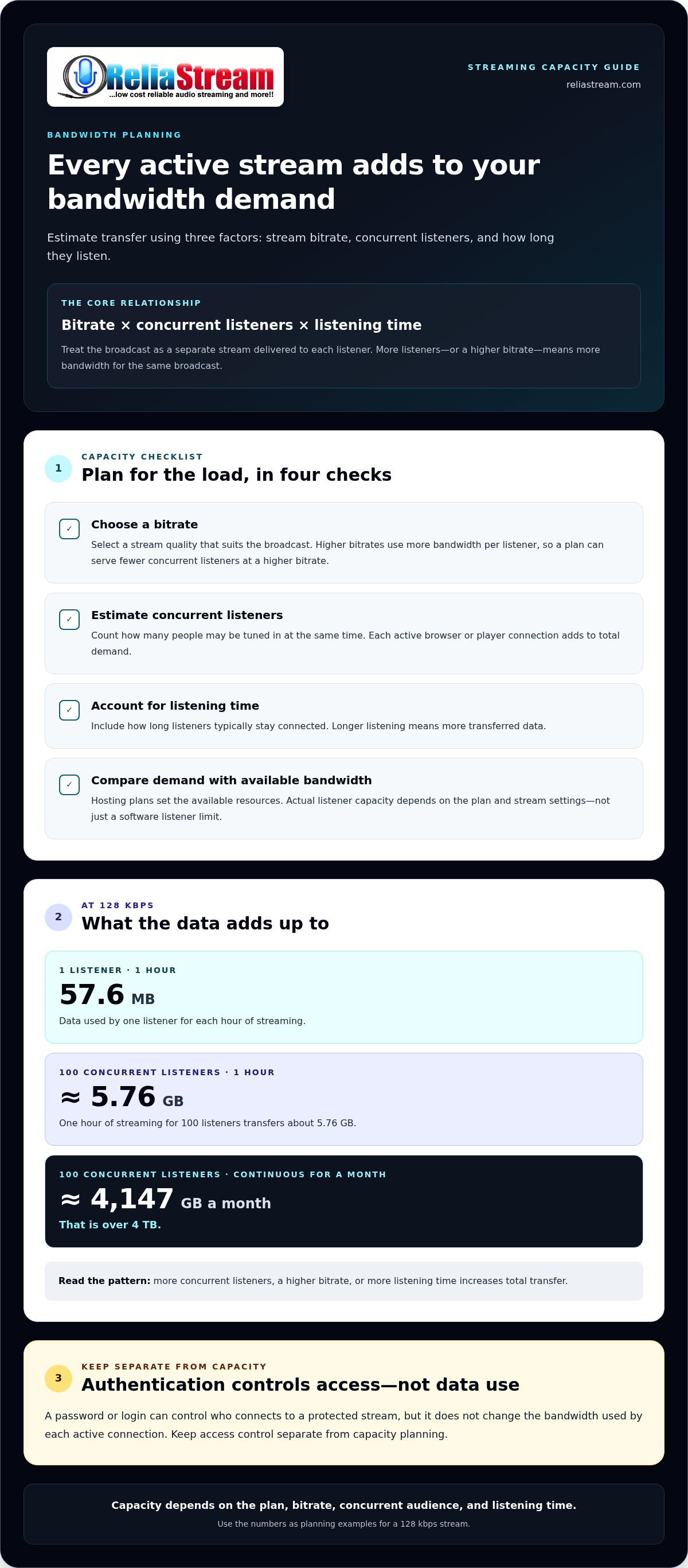
Estimate transfer by multiplying stream bitrate by concurrent listeners and listening time. At 128 kbps, one listener uses 57.6 MB per listener per hour. For 100 concurrent listeners, one hour transfers about 5.76 GB. If 100 listeners stream continuously for a month at 128 kbps, transfer reaches roughly 4,147 GB a month, or over 4 TB.
Use these steps to plan capacity:
- Choose a bitrate that suits the broadcast’s audio quality.
- Estimate how many listeners may tune in at the same time.
- Account for how long they typically listen.
- Compare the resulting demand with the server’s available bandwidth.
Listener authentication controls who can connect to a protected stream. It does not change the bandwidth used by each active connection. Keep access control separate from capacity planning: a password or login won’t reduce the data each stream consumes.
What Is Radio Server Hosting?
Radio server hosting runs the software that sends a station’s audio to connected listeners. Self-hosting means installing and maintaining the streaming software and server. Managed hosting provides the server infrastructure and takes server upkeep off the station’s hands.
Free and Paid Streaming Plans
Free, professional, and enterprise editions can differ in resources and controls. Compare listener capacity, bitrate options, control-panel features, and how much server management your station requires. A free tier may suit initial testing, while paid plans can provide resources and tools for ongoing broadcasts.
A trial lets you test a plan against your workflow before committing. Check which streaming features are included and what happens when the trial ends. Test your audio, player, and station controls so you can judge the setup in practice.
Provider and Platform Comparisons
There is no single best managed streaming provider for every United States broadcaster. Compare reliability, scalability, support, and useful features such as analytics and Auto DJ. Shared hosting can be cost-effective, but performance may be limited during high-traffic periods.
Shoutcast and Icecast are streaming software options, not bitrate settings. Both can deliver a station’s audio stream; your choice depends on software compatibility and the control tools you want to use. Consider how each platform fits your broadcast workflow.
In the United States, ASCAP, BMI, and SESAC relate to performance royalties for compositions. SoundExchange relates to licensing sound recordings. These are separate licensing areas to consider for internet radio.
Managed Server Setup
Start by choosing ShoutCast or IceCast, then select hosting that supports your stream format and expected audience. Configure the source connection, set the audio bitrate, and connect your encoder to the server. Test playback in a browser and player before sharing the stream with listeners.
Use a free plan for initial testing if it meets your needs. If a paid-plan trial is available, test the same connection and listening experience you expect to use for your station. Review its limits and trial terms before relying on it for a broadcast.
Live audio streaming for radio and other uses
Live audio hosting carries a broadcast from its source to listeners across connected devices. The infrastructure, audio format, and delivery method determine how listeners receive the stream.
Managed Live Audio Infrastructure
A managed setup connects broadcast software, a streaming server, and listeners’ playback devices. The server receives the audio source and distributes the stream, while hosting provides the resources that keep those connections moving. Shared radio hosting can be cost-effective, but performance may face limits during high-traffic periods.
For larger audiences or more control over infrastructure, dedicated streaming servers are another option. ReliaStream also offers dedicated streaming servers and reseller servers. Compare these options with shared radio hosting based on your audience demand and the level of control your broadcast needs.
Audio Codecs and Metadata
The encoder and player must support compatible audio formats. For example, check whether your chosen encoder’s MP3 or AAC output plays correctly in your station’s web player and listening apps. This compatibility step helps prevent a broadcast from reaching the server but failing at playback.
Metadata gives listeners context while audio plays. Set the station name and track information in your streaming software, then check how they appear in the browser and player. A clear station name helps audiences recognize the broadcast, while current track details make a music stream easier to follow.
HLS is another delivery method to consider for live audio. It divides a stream into media segments and uses a playlist to guide playback. Before choosing it, make sure the streaming software, hosting setup, and intended player support the same format. Test playback on each target device, including browsers and mobile apps, to catch compatibility issues before promoting the stream.
Auto DJ, recordings, and podcast publishing
Auto DJ, program recordings, and podcast episodes serve different roles in a station’s workflow. Plan how each moves from broadcast software to listeners, mobile devices, or a podcast platform.
Auto DJ for Scheduled Programming
Auto DJ plays scheduled audio through the station when a presenter isn’t sending a live broadcast. Prepare a playlist, set its running order in the control panel, and connect it to the streaming server. For an IceCast station, test the transition between live input and automated playback. Check that the stream continues and track information appears correctly in the player.
Auto DJ helps maintain scheduled programming between hosted shows, but it isn’t a recording or podcast publishing workflow. Keep playlists organized and review their order before broadcast. If your station switches from live hosting to automation, test the handoff from the encoder to Auto DJ before promoting the schedule.
Recordings and Podcast Publishing
A recording preserves a live program as an audio file for later use. Decide which shows to record, where to store the files, and who will handle editing. Review each recording for clear sound, complete segments, and accurate program details before sharing it.
Podcast publishing involves more than making a recording. Prepare an episode title and description, then upload the finished audio to a podcast platform that distributes episodes to subscribers. Keep the live stream and podcast archive distinct: the stream carries the current broadcast, while podcast episodes let listeners catch up later on their devices.
Before upgrading a station’s setup, map the full path: schedule audio in Auto DJ, capture selected programs, edit recordings, and publish chosen episodes. This makes it easier to identify which control-panel and hosting features support the workflow. Compare your requirements with radio streaming setup options as you plan the next step.
ReliaStream: 32 Kbps Hosting Plan
ReliaStream offers the 32 Kbps Hosting Plan for broadcasters choosing a lower-bitrate stream. The right bitrate depends on your audio goals and audience, so consider both before selecting a hosting plan. If your broadcast needs a different bitrate, ReliaStream also offers 64 Kbps, 128 Kbps, and 320 Kbps Hosting Plans.
Let the listening experience you want guide your choice. A lower bitrate uses less bandwidth per listener; a higher bitrate can support better audio quality. Match the plan to your station’s format and audience instead of choosing by bitrate alone.
Visit reliastream.com to explore the hosting plans or contact ReliaStream about your station’s needs.
ReliaStream offers streaming plans at 32, 64, 128, and 320 Kbps; lower bitrates use less bandwidth per listener than higher ones.
Build Your Next Broadcast Around Your Audience
Turn your station’s goals into a practical operating plan. Decide which shows need live presentation, which can run through automation, and how listeners will find your stream. Then choose a setup that supports your current workflow and can adapt as your programming develops.
A managed radio streaming server can give your broadcast a dedicated place to reach listeners without making server maintenance the center of your work. ReliaStream’s 32 Kbps, 64 Kbps, and 128 Kbps Hosting Plans provide bitrate options to consider as you shape that setup. Focus on the audio experience you want and the audience you’re building.
Ready to discuss radio hosting for your station? Contact ReliaStream about radio hosting and take the next step toward getting your broadcast on air. Keep building, keep refining, and give your audience a station worth tuning into.
Frequently Asked Questions
How much does it cost to operate an internet radio station?
Operating costs depend on streaming capacity and the tools your station needs. Budget for hosting, production equipment, audio storage, and any music licensing that applies to your programming. A station with live presenters may need different production resources from one using scheduled playlists. Separate recurring hosting costs from one-time equipment purchases to build a more useful operating budget.
What is a managed radio streaming server?
A managed radio streaming server is hosted infrastructure that distributes your station’s audio without requiring you to maintain the streaming server yourself. The host provides the server environment; you send audio from your encoder or automation software. ReliaStream supports ShoutCast V2 and IceCast V2 KH hosting, with control-panel options for broadcasters managing their streams.
What audio formats, bitrates, and streaming protocols do providers support?
Supported formats and protocols vary by streaming setup, so match your encoder’s output to the server and the player your audience uses. ShoutCast V2 and IceCast V2 KH are server options, while bitrate determines the stream’s data rate. Before launch, test the exact stream link in your website player and any listening apps to catch format or playback mismatches.
Does a managed radio streaming server include automation, AutoDJ, and storage?
Some hosting plans include Auto DJ and storage, while the amount and control-panel tools depend on the plan. ReliaStream includes Auto DJ and server storage with its plans. For a practical workflow, upload a playlist, set its order in the control panel, and test the handoff between automated playback and a live presenter before scheduling a show.
Best managed radio streaming server providers in the United States
There is no single best managed streaming provider for every United States broadcaster. Compare reliability, scalability, support, listener capacity, bitrate options, and features such as analytics and Auto DJ.
What bandwidth and uptime do radio streaming providers offer?
Bandwidth needs depend on bitrate, concurrent listeners, and listening time. At 128 kbps, 100 listeners use about 5.76 GB in an hour; uptime describes how consistently the service is available, and actual limits vary by hosting setup.


