

A station’s audience can grow faster than its hosting capacity. Scalable radio hosting for a growing audience means matching stream bitrate and simultaneous listener capacity to real demand, since both affect data transfer. Radio hosting provides the streaming server, software, and internet connection that deliver live or on-demand audio to listeners.
It’s easy to focus on the show and assume the stream will keep up. But each listener uses bandwidth, and a 128 kbps stream sent to 100 concurrent listeners transfers about 5.76 GB in one hour. The right setup helps you plan for that demand instead of letting a growing audience catch you off guard.
This guide explains what radio hosting includes, how listener capacity and data transfer affect scaling, and how shared, dedicated, and cloud hosting differ. You’ll learn how to assess an upgrade by bitrate, audience size, and the resources your station needs.
Key Takeaways
- Understand how a streaming server, control panel, and station automation work together to deliver live or scheduled audio.
- Estimate bandwidth needs by considering both stream bitrate and the number of listeners tuning in at the same time.
- Compare shared, dedicated, and cloud hosting by how each handles resources, traffic changes, and growth.
- Plan an upgrade path around your audience and bitrate needs, then explore ReliaStream’s hosting plan options.
What Is Radio Server Hosting?
Radio server hosting sends a station’s audio through streaming software, a server, and an internet connection. It can deliver live or on-demand internet radio through Shoutcast or Icecast, with a control panel for stream management, automation, secure connections, and analytics.
Audio Quality and Adaptive Playback
Audio quality depends on the stream bitrate, which affects the amount of data sent to each listener and the sound detail available. Internet radio streams can adapt audio quality to a listener’s bandwidth. Someone on a slower connection may receive lower-quality audio than someone with stronger bandwidth. Compare your intended listening experience with the bitrate sent by your encoder. Don’t assume every device receives the same quality.
Live Broadcast Configuration
Live broadcasting begins with an encoder that sends program audio to the streaming server, which distributes it to listeners. A control panel provides stream settings and management tools. Match the encoder to your chosen streaming protocol, then test its settings and internet connection before going on air. Testing helps catch connection drops or configuration mismatches before they interrupt a broadcast.
Free and Paid Hosting Plans
Compare plans by their actual resources and features, not just by labels such as free or paid. A free tier may help test a station’s workflow, while a paid plan should match its programming needs. In the United States, online-only radio doesn’t require FCC regulation, but music licenses may still be required. ASCAP, BMI, SESAC, and SoundExchange are relevant licensing organizations. A browser-based control panel can manage stream settings, and Auto DJ can keep scheduled audio playing without a live host. Compare listener capacity, data transfer, secure streaming, and whether ShoutCast or IceCast fits your encoder workflow.
Unlimited listener capacity and data transfer
“Unlimited” capacity still depends on server resources, stream bitrate, and simultaneous listeners. Plan around audience peaks rather than averages, and account for the data each stream sends.
Bandwidth and Listener Capacity
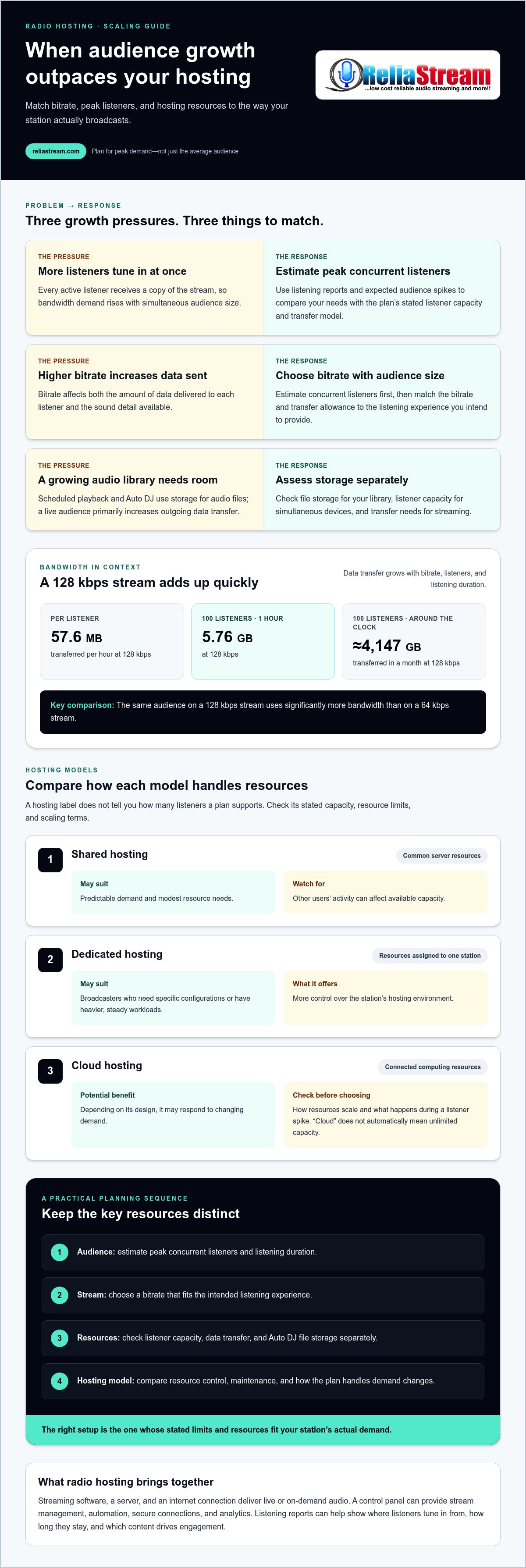
Each active listener receives a copy of the stream, so bandwidth demand rises with bitrate and simultaneous audience size. A 128 kbps stream transfers 57.6 MB per listener per hour. At 100 listeners around the clock for a month, that stream transfers roughly 4,147 GB. A 128 kbps stream with the same audience uses significantly more bandwidth than a 64 kbps stream. Estimate concurrent listeners first, then match bitrate and transfer allowances to that demand.
Listener Capacity and Storage
Listener capacity and storage address different needs. Capacity is the number of devices a server can serve at once; storage holds audio files for scheduled playback or Auto DJ. A larger library needs more file storage, while a live audience primarily increases outgoing data transfer. Assess these separately: a growing Auto DJ library needs room for its files, while a live event needs enough capacity for its simultaneous listeners.
Radio hosting can support stations with large audiences, but that doesn’t mean every plan can handle any audience size. Limits may apply to simultaneous listeners or listening hours. Review how a plan defines both, especially if a show or promotion could cause a sharp audience spike.
Use listening reports to guide planning. They can show where listeners tune in from, how long they stay, and which content drives engagement. Compare trends across shows, then adjust promotion, schedules, or bitrate choices. ShoutCast and IceCast deliver streams to listeners’ devices, and an Alexa Streaming App can provide another way to tune in.
Build your estimate from peak concurrent listeners, chosen bitrate, listening duration, and any AutoDJ file storage. Then compare those needs with the plan’s capacity and transfer model. That’s a practical starting point for Alexa streaming for radio listeners as your station expands.
Shared, dedicated, and cloud hosting
Hosting type affects how a station uses server resources, handles maintenance, and responds to changing demand. Compare resource control, automation, media storage, and how listeners access the stream online.
With self-hosted radio streaming, you manage the server, platform, configuration, and upkeep. Managed hosting takes care of server operations through a hosted service, so you can focus on broadcasting and programming.
Shared hosting puts multiple stations on common server resources. It may suit a station with predictable demand and modest needs, though other users’ activity can affect available capacity. Dedicated hosting assigns server resources to one station, giving it more control over its environment. This may suit broadcasters who need specific configurations or have heavier, steady workloads. Neither label tells you how many listeners a plan supports: check its stated capacity and resource limits.
Cloud hosting uses connected computing resources rather than relying on a single physical server. Depending on its design, it may respond to changing demand, but “cloud” doesn’t automatically mean unlimited capacity. Check how resources scale and what happens during a listener spike. For a global audience using a web player, consider access and performance alongside the server model.
Cloud-based media libraries store audio files online for playback, scheduling, or automation. This can help a station manage programming without keeping every file on a local computer. Compare storage allowance, supported file workflows, and integration with your broadcasting setup. For scheduled shows, make sure there’s a practical path from stored audio to the stream.
Cloud Plus and Pro are labels that can distinguish plan tiers, but the names alone don’t describe capacity or included resources. Compare their listener limits, storage, data transfer, and scaling terms. Price depends on the case and is given after a quote request; relevant factors include resource allocation, listener capacity, transfer, and storage.
Choose a hosting model that fits your technical resources. Self-hosting offers hands-on control but means managing the technical work yourself. If you prefer hosted infrastructure, compare shared, dedicated, and cloud options by their actual resources and how they scale.
Scalable hosting plans and upgrade paths
Plan for audience growth before a popular broadcast pushes your server beyond its capacity. Scalable radio hosting for a growing audience means choosing an upgrade path based on listener demand, stream bitrate, and your current hosting limits.
Hosting Plan Upgrade Paths
Track peak simultaneous listeners and how your audience changes across shows. Compare those patterns with your plan’s listener capacity, data transfer, and bitrate. If demand or audio requirements outgrow your setup, move to a plan with resources that fit the new workload. Planning an upgrade ahead of busy programming can help avoid a rushed change.
Bitrate tiers offer one way to match a stream to its intended audio quality. For example, hosting options may range from 32 Kbps to 320 Kbps. A higher bitrate sends more data to each listener, so weigh it alongside audience size. Don’t upgrade bitrate alone if the main pressure comes from concurrent listeners or data transfer. That’s a practical way to plan scalable radio hosting for a growing audience.
Automatic Scaling for Concurrent Listeners
Some hosting services automatically adjust server resources as simultaneous listeners increase. Check the terms for scaling triggers, resource limits, and how traffic spikes are handled. A “cloud” label alone doesn’t guarantee automatic scaling. Find out whether capacity adjusts automatically or whether you need to upgrade the plan yourself.
If your station has event-driven peaks, compare expected audience surges with the plan’s stated capacity. When automatic scaling isn’t included, choose a plan suited to anticipated peaks and decide when to upgrade. Match software and server choices to your programming and how listeners tune in, including on mobile devices.
Review analytics regularly and use actual listener patterns to guide changes. Compare peak concurrency, listening duration, and bitrate needs before switching plans. ReliaStream’s 32 Kbps, 64 Kbps, 128 Kbps, and 320 Kbps Hosting Plans provide bitrate options to consider as your station grows. Explore radio hosting plans and match your next step to your station’s audience and stream requirements.
ReliaStream: 32 Kbps Hosting Plan
ReliaStream’s 32 Kbps Hosting Plan gives broadcasters a lower-bitrate option for an internet radio stream. Choose it when that bitrate fits your audio needs and expected audience; factor in both sound quality and listener bandwidth.
As your station grows or its programming needs change, compare the 32 Kbps plan with ReliaStream’s 64 Kbps, 128 Kbps, and 320 Kbps Hosting Plans. Higher bitrates send more data per listener, so consider audience size and transfer needs alongside audio quality before moving to another tier. The right fit depends on the stream you want to deliver and the demand you’re planning for.
For a practical next step, contact ReliaStream to discuss which hosting plan fits your station’s streaming needs.
Build for the Station You Want to Become
Growth planning is about more than keeping a stream online. It’s also a chance to shape the listening experience as your programming evolves. Consider which broadcasts you want to add, how listeners will discover them, and what sound best represents your station. These choices can guide hosting decisions beyond today’s audience.
Make your next step practical: define what a better-fit hosting setup needs to support, then compare that goal with your station’s current direction. Scalable radio hosting for a growing audience should leave room for your plans without making you pay attention to server details instead of your content. Keep building, keep experimenting, and let each decision support the broadcasts you want to create.
Explore hosting options with ReliaStream, and take your station’s next step with confidence.
Frequently Asked Questions
How much does it cost to operate an internet radio station?
Operating costs depend on the station’s setup, not a single standard amount. Build a budget by listing streaming hosting, studio or remote-production tools, applicable music licensing, and audience-facing apps or website work. Separate recurring services from one-time setup expenses. This gives you a clearer view of what it takes to run your station and helps distinguish hosting capacity from the wider production budget.
What features should scalable internet radio hosting include for a growing audience?
Look for clearly defined listener capacity, data-transfer terms, and a bitrate that fits your stream. A control panel should help you manage broadcasts and scheduled programming, while analytics can reveal audience patterns. Consider secure streaming and a practical upgrade path as demand changes. Match each feature to an actual need, such as supporting a popular live show or organizing scheduled content.
How much does internet radio hosting cost in the United States at different listener and bandwidth levels?
Hosting price varies with the plan’s bitrate, concurrent listener capacity, data transfer, storage, and control-panel needs. The price depends on the case and is given after a quote request; those resource requirements shape the plan. Compare options using the same audience estimate and stream configuration. That makes it easier to understand how plan features align with your station’s expected listening demand.
How are internet radio hosting bandwidth and listener capacity calculated?
Estimate data transfer by multiplying stream bitrate by simultaneous listeners and listening time, then converting the result into data units. Use peak listeners to assess capacity, not total subscribers or monthly reach. If your station runs separate streams, include each one. Treat audio stored for scheduled playback as a separate storage requirement, not outgoing listener data.
What audio streaming formats, bitrates, and protocols work best for scalable radio hosting?
Choose an audio format supported by your encoder, streaming server, and listeners’ players. ShoutCast and IceCast are streaming platforms, while bitrate describes how much audio data the stream sends. Test the full path, from encoder output to browser or mobile playback, before broadcasting. The right configuration is one your station can deliver consistently on its intended listening devices.
How can a radio station migrate to a larger hosting plan without interrupting broadcasts?
Prepare the new setup before changing the stream listeners use. Record your current encoder settings, stream address, playlist, and scheduled programming. Configure the new plan, then test it privately with your usual player and devices. When the new stream works, update the public player or stream destination and monitor the change. Keeping the old configuration available during testing gives you a fallback if settings need adjustment.


