

A stream URL change isn’t complete just because the new address works. Moving listeners to a new stream URL means finding every place the old one appears, updating those destinations, and keeping the previous stream available until you’ve confirmed nothing vital still depends on it. If your setup allows, send the broadcast to both providers during the handover to help keep the transition smooth.
It’s easy to update the encoder but miss an app, directory, website player, or saved link that still points to the old address. Trace those uses, check for lingering connections, choose a quieter time for the switch, and decide when it’s safe to stop the old stream. This practical migration plan helps listeners stay with your station while the URL changes.
Key Takeaways
- Map every place your station’s stream address appears, so overlooked players and listings don’t leave listeners behind.
- Use a controlled test to uncover services still connecting to the previous stream.
- Plan the encoder and URL change for a quieter listening period, and consider sending audio to both providers during the transition.
- Keep the old stream available until you’ve ruled out important remaining uses, then choose the right way to retire it.
Checking for services still using the old URL
Without a redirect, a player or app still pointing to the old URL may stop connecting when that address is retired. Listeners using a saved link can lose access even while the new stream is live. When moving listeners to a new stream URL, treat the old address as active until you’ve identified the important places still using it.
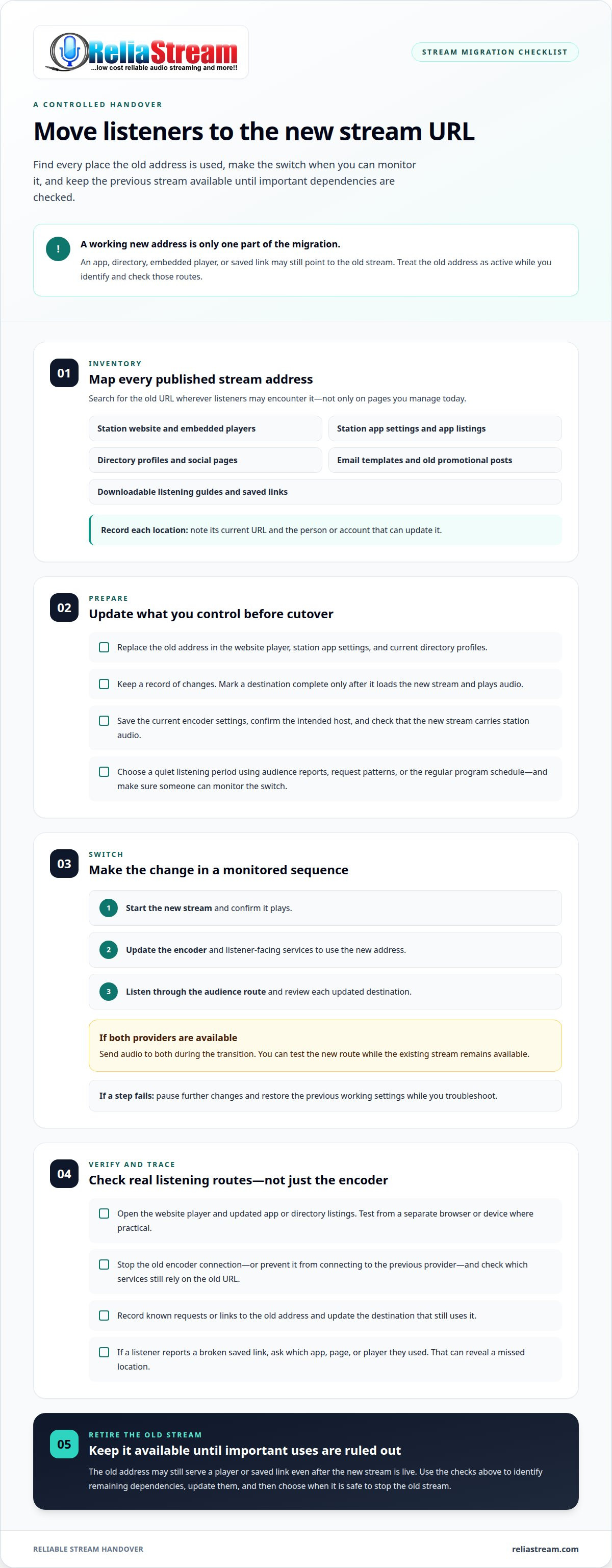
- Map every published stream address. Search your station’s website, embedded players, app listings, directory profiles, social pages, and email templates. Record each location beside its current URL and the person or account that can update it. Include old promotional posts and downloadable listening guides, not just pages you control today.
- Update the destinations you control first. Replace the old address in your website player, station app settings, and current directory profiles. Keep a simple record of each change. For example, mark the website player complete only after it loads the new stream and plays audio.
- Check the encoder’s active connection. Confirm that your broadcasting software sends audio to the intended host and that the new stream plays. Then stop the old encoder connection, or prevent it from connecting to the previous provider. Services that still depend on the old URL may become easier to identify when that stream is no longer being fed.
- Test each listener-facing route. Open the station website player and any app or directory listing you updated. Test from a separate browser or device where practical. A working encoder alone doesn’t prove every published player reaches the new stream; check the actual listening route.
- Track old-URL use before retiring it. Record any known service that continues requesting or linking to the previous address, then update that destination. If a listener reports a broken saved link, ask which app, page, or player they used. That detail can reveal a missed location and guide the next fix. This final check helps make moving listeners to a new stream URL a controlled handover, not a blind cutover.
After updating key services to use the new stream URL, stop the old encoding software or prevent it from connecting to the previous provider. Then check which services still rely on the old URL.
Scheduling the change outside peak listening times
Choose a quieter listening period for the encoder change and stream URL updates. If you can’t send the stream smoothly to both providers during the migration, make the encoder and service changes as quickly as possible, ideally outside peak listening times.
- Identify your station’s busy periods. Use audience reports, request patterns, or your regular program schedule to see when listeners are most active. A live interview, scheduled music show, or promoted event may draw more listeners than a quiet overnight slot. Pick a window that avoids those known peaks.
- Choose a window when you can monitor the switch. A low-listening period is useful only if someone can watch the encoder and test the new stream. Avoid scheduling the change during a show handoff or another task that leaves nobody available to notice a failed connection.
- Prepare the destinations before the cutover. Gather the updated stream address and list the website player, app listings, and directory profiles that need it. Save the current encoder settings before changing them. This gives you a clear reference if the new connection behaves differently than expected.
- Make the change in a controlled sequence. Start the new stream and confirm it plays, then update the encoder and listener-facing services. If your setup supports sending audio to both providers, keep both streams running during the transition. This lets you test the new route while the existing stream remains available.
- Keep the monitoring window focused. After updating the encoder, listen to the new stream through the same player or app your audience uses. Check that the station audio is present, then review each updated destination. If a step fails, pause further changes and restore the previous working settings while you troubleshoot.
- Communicate around scheduled programming. If listeners may notice a brief interruption, post a short notice on the station’s website or social channel before the change. For example, tell listeners where to find the updated player, then replace the notice once the new stream is working.
How to redirect an old stream URL to a new URL
A redirect can guide requests from the old address to the new stream, but it must work at the stream endpoint. A redirect on your station’s homepage won’t automatically change the address used by a separate audio player.
- Confirm you control the old endpoint. A redirect must be configured where requests to the previous stream URL arrive, usually through the old host or a server you manage. If that endpoint is already shut down, it can’t forward listeners. Keep it available while you set up and test the new route.
- Use a stream-level redirect, not just a webpage redirect. Configure the old stream address to respond with the new stream address. For example, a player requesting the old audio endpoint needs to receive a response that points to the new audio endpoint. Redirecting a station homepage only sends browsers to another page.
- Check compatibility with your listening destinations. Apps, directory players, and embedded website players can handle redirects differently. Test the old address through the same player your audience uses. If a player displays an error or stops instead of opening the new stream, update that listing directly with the new address.
- Keep the new endpoint stable during testing. Confirm the new stream is online and carries the correct station audio before directing old requests there. Test the redirect from a browser and a separate listening app. A browser response alone doesn’t prove an audio player can follow the route.
- Monitor the old address after the change. Review available connection logs or ask listeners to report which player they use if playback fails. For example, if a website player works but an app does not, replace the app’s saved address instead of relying on its redirect behavior. Keep the old endpoint active until important destinations work.
How long should the old stream URL remain active after migration?
- Keep the previous host running until vital uses are accounted for. Don’t cancel it just because the new stream plays from your website. A station app, directory listing, or saved player may still request the old URL. The decision depends on whether important listening routes have moved and work on the new address.
- Check the old stream after updating known destinations. Stop the encoder from sending audio to the previous provider, or prevent its connection, then look for services that still rely on the old stream. This can reveal overlooked uses. A listener-facing player that stops working after the old feed ends needs investigation before you retire the host.
- Follow up on exceptions, not just the main player. If your website player works but a station app fails, update the app’s stream address or find another way to reach its settings. Record each unresolved destination, who controls it, and what needs changing. Keep the old host active while a vital service still depends on it.
- Use a working redirect where it fits. A redirect can help requests reach the new address, but it doesn’t replace checking actual listening routes. Test it through the apps and players your audience uses. If a player doesn’t follow the redirect, update its saved URL directly before ending the old stream.
- Retire the old URL only after the evidence is clear. Confirm that the new stream is carrying audio and that key destinations use it. Review reports of failed playback and any available connection records for signs of lingering use. If nothing vital still relies on the previous URL, you can plan to cancel the old host. For help planning a reliable stream setup, explore internet radio hosting options.
Use this as the condition for ending the previous service: cancel the old streaming host only after confirming that nothing vital still uses the old stream URL. If you haven’t confirmed that, cancellation is premature. The key is that the old address is no longer in vital use, not simply that you intend to move away from it.
ReliaStream: Alexa Streaming App
ReliaStream’s Alexa Streaming App is a next step for stations that want to make listening available through Alexa. Consider it after updating your stream URL and confirming the new stream works across your key listening destinations. That keeps the migration focused: first establish the new stream, then consider an additional way for listeners to access the station.
If your station is also moving its hosting, ReliaStream offers 32 Kbps, 64 Kbps, and 128 Kbps Hosting Plans. Choose an option based on your station’s streaming setup and audience needs. The Alexa Streaming App and hosting plans address different parts of online radio, so you can focus on the option that fits your next step.
Contact ReliaStream to discuss the Alexa Streaming App or internet radio hosting options.
Make Your Next Stream Change Easier
Moving listeners to a new stream URL is also a chance to create a clearer process for future updates. Keep a record of who manages each listening destination and where its stream address is stored. The next change can then start with a map instead of a scramble.
Assign someone on your station team to maintain that record. Note the current stream endpoint, the places that depend on it, and who is responsible for each update. Pass those details along when staff or tools change. These small operational habits make future technical changes easier to manage.
If your next step involves updating your radio hosting setup, contact ReliaStream about your migration. Take the transition one decision at a time, and keep building a listening experience your audience can count on.
Frequently Asked Questions
How do you move listeners to a new radio or livestream URL?
Replace the stream source wherever listeners access it, and distinguish the direct audio link from a webpage that hosts a player. For example, a station directory may require the audio stream URL, while your website’s player uses that URL behind the scenes. Share the new listening address through your established audience channels, and make the correct link easy to identify for people using different apps.


