

A guest DJ needs an individual profile and connection credentials to access your station. Setting up guest DJ accounts for a radio station means creating a profile for each host, assigning a unique source password, activating the login, and sharing the connection details privately. Keep access individual rather than shared, so every DJ connects with their own credentials.
Bringing in a guest should add energy to your schedule, not trigger a last-minute scramble to get on air. A clear account setup gives each DJ a defined way to connect and helps you manage station access.
This guide explains how to create guest DJ profiles, set connection credentials, activate logins, and invite DJs to your station. It also covers what to review when a guest can’t connect, so you can get the account details and broadcast setup back on track.
Key Takeaways
- Give each guest DJ a separate profile and connection details so access stays organized and troubleshooting is easier.
- Activate the login before the scheduled appearance, then make sure the DJ can sign in and has the details needed to connect.
- Assign only the access rights a guest needs, such as live broadcasting, scheduling, or playlist management.
- Set expectations in the invitation, including the DJ’s role and how their live session fits into the station’s broadcast setup.
Creating individual DJ profiles and connection credentials
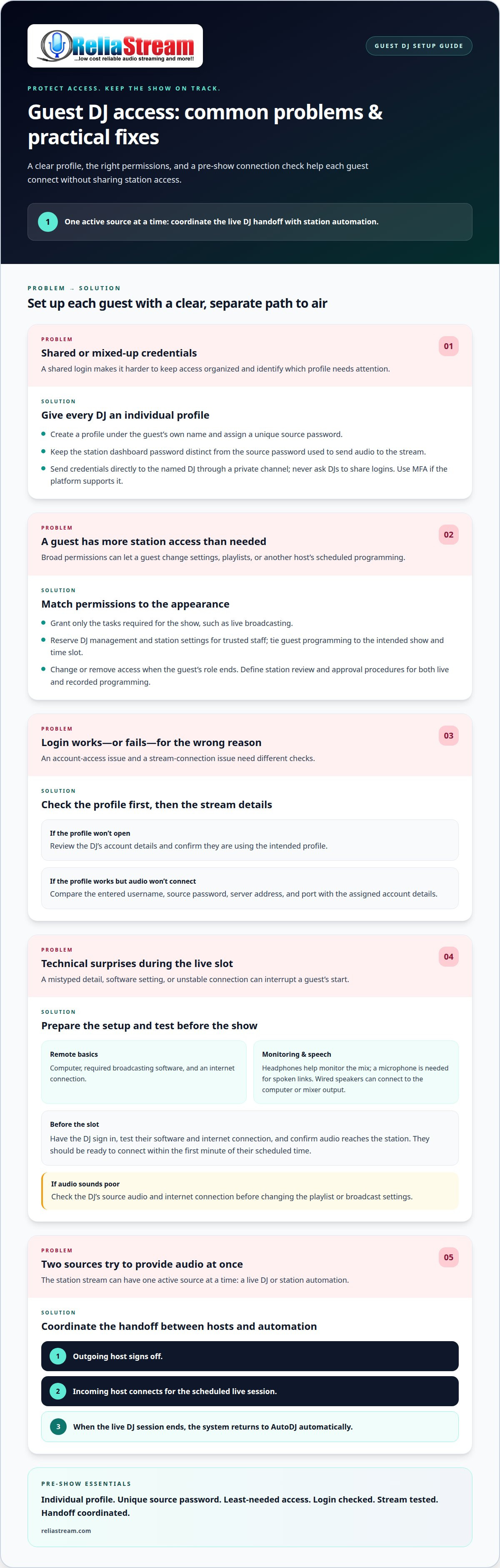
For secure remote access, create a separate DJ profile and issue unique connection credentials to each host. Give the DJ the server details and source password needed to connect, but never share another host’s login. A remote broadcast typically requires a computer, broadcasting software, and an internet connection. Wired speakers can monitor audio through the computer or mixer output.
- Create an individual profile. Add each guest under their own name in the station’s DJ or streamer account area. A separate account for every host keeps credentials distinct and makes it easier to identify which profile needs attention if a connection fails.
- Set connection credentials. Assign each DJ a unique source password, then provide the correct server or connection details. Keep the station dashboard password separate from the source password: one grants account access, while the other lets the DJ send audio to the stream.
- Share access securely. Send credentials directly to the named DJ, not in a group message or shared playlist document. Use a password manager or another private channel where practical. Enable multi-factor authentication (MFA) if the account platform supports it, and never ask DJs to share logins.
- Prepare the remote setup. Have the DJ install the station’s required broadcasting software and enter their assigned connection details. Headphones help monitor the mix, and a microphone is needed for spoken links. To use wired speakers, connect the computer or mixer audio output to them, then select that output for monitoring.
- Test and troubleshoot the stream. Ask the DJ to connect before their slot and confirm that audio reaches the station. If they can’t connect, compare the entered username, source password, server address, and port with the account details. If the stream sounds poor, check the DJ’s source audio and internet connection before changing the playlist or broadcast settings.
Before a guest’s session, confirm the individual connection credentials have been issued, with a unique source password assigned to that DJ. Keep the details associated with the correct DJ account so the DJ has their own connection credentials. If a DJ cannot connect, the station operator should check the DJ account credentials and connection details, reviewing those items together to verify the DJ is using the intended account information.
Account activation and login
- Complete the station-side setup. Add the DJ to the correct station and create their individual profile before sending login instructions. Once added, the DJ can access the station through their profile area. When setting up guest DJ accounts for radio station broadcasts, tie each profile to its intended host, especially when several DJs share a schedule or use the same broadcasting software.
- Send clear sign-in instructions. Tell the DJ which profile area to use and which login details apply. Keep dashboard access distinct from the connection details used to send audio to the stream. Don’t send another DJ’s login as a shortcut or use a shared account for multiple hosts.
- Test the login before the broadcast. Ask the guest to sign in and confirm they can reach their station profile. This helps distinguish an account-access problem from a broadcasting software issue. If the profile won’t open, review the DJ’s account details first. If the profile works but audio won’t connect, check the stream connection details.
- Schedule a connection check. Have the DJ test their software and internet connection before the live slot. They should be ready to connect within the first minute of their scheduled time. A brief pre-show test can reveal a mistyped login, software setting issue, or unstable connection before listeners hear a disruption. This is a practical final step when setting up guest DJ accounts for radio station programming.
- Confirm the handoff. A station stream can have one active source at a time, supplied by a live DJ or station automation. Coordinate the outgoing host’s sign-off with the incoming host’s login so both aren’t trying to provide audio at once. When a live DJ session ends, the system returns to AutoDJ automatically.
Guest DJ access
Set access around each guest’s show, not the whole station. Separate permissions help protect programming and keep the listener experience consistent.
-
Select a Platform for Temporary Accounts
Choose a station control panel that supports individual DJ profiles and role-based permissions. MediaCP and Centova Cast are radio control panel options, and available account controls depend on the station setup. Before inviting a guest, confirm the profile can be restricted to the tasks they need rather than granting broad access by default.
-
Review Guest DJ Access Risks
Limit access to reduce the risk of accidental changes to station settings, playlists, or scheduled programming. A guest with broad permissions could alter tracks or affect another host’s show. Assign only the rights needed for the appearance, then remove or change them when the guest’s role ends. Narrower access can prevent avoidable disruptions.
- Restrict shows and time slots. Give a guest access only to the tasks their appearance requires. For example, allow live broadcasting for a takeover, but reserve DJ management and station settings for trusted staff. Use the scheduling controls in your station setup to keep a guest’s programming tied to the intended show and slot.
- Set a compliance process. FCC requirements aren’t determined by whether a DJ uses a guest account or whether a segment is prerecorded. Define station review and approval procedures for both live and recorded programming, and make the guest’s responsibilities clear before broadcast.
- Agree on audio delivery. Ask guests to use file formats accepted by your station’s automation software, with consistent loudness and complete track metadata. Set those specifications in advance rather than assuming every guest’s files will fit the station’s playlist workflow. Include artist and track titles so programming can be identified and scheduled correctly.
Use the edit button under the DJ’s name to change access rights. Assign permissions separately: music library management lets a DJ add or modify tracks and playlists, while scheduling access lets them schedule tracks and programs. Other options include permission to add or delete DJs and manage their access rights, access to radio settings and listening links, and permission to broadcast live on the radio station.
Inviting users to a station
Onboard each guest with a clear role, show details, and connection plan. Remove their account access when their contribution ends.
- Send a focused invitation. Name the show, broadcast date, session format, and expected contribution. For example, explain whether the DJ will host a full takeover or join for an interview. Include how the station will handle the introduction and handoff so the guest understands how their segment fits the programming.
- Share the schedule and expectations. Tell the DJ when to be ready and how to reach the station’s audience. Ask guests to agree to post about their appearance beforehand. The station can also promote the guest in exchange for their social posts, giving both sides a clear promotional plan.
- Coordinate the live handoff. The outgoing host can alert the incoming DJ when they’re wrapping up in five minutes, giving the guest time to begin pre-broadcast checks. A station stream has one active source at a time, so coordinate the transition between the live DJ and station automation engine.
- Prepare a fallback session. If schedules change, record an interview, co-hosted event, or takeover in advance for later broadcast. A guest interview requires substantial host preparation. For a live event, the station host can handle spoken segments while the guest selects music and introduces songs.
- Close access after the appearance. When a guest’s role ends, remove their DJ profile or revoke its access rights. This prevents former guests from retaining permission to broadcast, change playlists, or manage other DJs. For planned absences or schedule changes, give the station two weeks’ notice where possible.
Need a reliable stream behind guest sessions? Explore radio streaming options for your station.
ReliaStream
ReliaStream provides internet radio hosting for live and automated broadcasts. Manage guest DJ profiles and access permissions through your station control panel, while hosting keeps the station’s stream available to listeners. Choose ReliaStream hosting when your station is building a guest lineup or supporting more live sessions.
Choose from the 32 Kbps Hosting Plan, 64 Kbps Hosting Plan, 128 Kbps Hosting Plan, or 320 Kbps Hosting Plan based on your station’s streaming needs. A suitable hosting setup gives guest DJs a stream to connect to, while your station retains control over profiles, credentials, and permissions.
Contact ReliaStream to discuss hosting for your radio station.
Make room for your next great show
A guest lineup can bring new voices and fresh perspectives to your station. Treat each invitation as a chance to build a stronger programming rhythm, with clear roles and reliable access that make collaboration easier for everyone involved.
Setting up guest DJ accounts for a radio station is more than a login task. It creates a repeatable way to welcome contributors while keeping control of the station’s broadcast environment. As your schedule evolves, dependable hosting supports the stream behind those live sessions.
ReliaStream offers radio hosting for stations developing their broadcasts and expanding their guest programming. If you’re planning what comes next for your station, contact ReliaStream about your station.
Keep building, invite new voices, and give every guest a smooth path to the airwaves.
Frequently Asked Questions
What permissions should a guest DJ account have at a radio station?
Give guests only the capabilities needed for their contribution, and reserve account administration for station managers. For an interview, the guest may only need to speak while a producer handles playback and live controls. For a takeover, the DJ needs permission to broadcast. Match permissions to the format, and avoid granting broader control for convenience.
How do you create a separate guest DJ account in radio automation software?
Use the software’s DJ management area to add a user, assign a profile, and set appropriate permissions. Give the profile a clear name, such as “Friday Guest Mix,” so station staff can identify its purpose in the account list. Save the profile, send login instructions privately, and test access before the scheduled broadcast.
How much does radio automation software and guest DJ access cost?
There’s no single cost for automation software and guest access; expenses depend on the software arrangement and the station’s hosting setup. For ReliaStream hosting, the price depends on the case and is given after a quote request. Cost factors include the selected bitrate and control-panel requirements. Treat hosting and software access as separate items when planning a station budget.


