

What if your stream link starts with HTTPS, yet a listener still sees a playback warning? Or an old HTTP link leaves part of the listening experience unprotected? Securing an online radio stream takes more than adding a lock icon. HTTPS and TLS encrypt the connection between a listener and the stream endpoint, but they don’t automatically protect your control-panel login, hosting settings, or every page and player that points to the stream.
That distinction matters. A warning can frustrate listeners, while confusing stream links or protocol settings can make troubleshooting feel like guesswork. A practical security check can help you spot gaps without getting lost in technical jargon.
This guide explains what HTTPS protects, what it doesn’t, and how stream links, hosting settings, and account practices work together. You’ll learn how to configure and test secure playback, reduce common causes of browser and device warnings, and choose tools that support secure broadcasting. Hosting with SSL-secured stream links and Centova Cast or MediaCP access can make secure delivery part of a broader workflow.
Key Takeaways
- When securing an online radio stream, treat the listener connection, stream settings, and account access as parts of one practical checklist.
- Understand how TLS, audio codecs, and stream formats serve different roles so you can troubleshoot playback without mixing up the settings.
- Compare HTTPS and HTTP to understand the benefits of encrypted delivery and the compatibility considerations to test.
- Follow a step-by-step process to review stream URLs and validate playback across the listening options your audience uses.
- See how ShoutCast or IceCast hosting with SSL-secured links, plus Centova Cast or MediaCP access, can fit into station management.
Why securing an online radio stream starts with the listener connection
Your broadcast can sound great, but listeners still need a dependable way to reach it. If the stream connection triggers a warning or fails to play in a browser or app, the listening experience starts with friction. That makes the listener connection a practical first step in securing an online radio stream, though it isn’t the whole security plan.
HTTPS radio streaming delivers audio over an encrypted connection between a compatible listener and the stream endpoint, helping protect data in transit without securing every part of a station’s operation. HTTPS uses Transport Layer Security (TLS) to encrypt that connection. The Transport Layer Security (TLS) protocol also secures other online communications.
Keep the boundaries clear. Connection encryption isn’t the same as listener anonymity: it doesn’t hide a listener’s identity from every website, app, or service they use. It also doesn’t protect your station’s control-panel account, the computer sending audio to the host, or your music rights. Each needs separate attention as part of a broader security routine.
What does a secure radio stream protect?
When a listener connects through HTTPS, TLS encrypts data traveling between their device and the stream endpoint. This helps make the audio connection harder to casually intercept or alter in transit. It doesn’t prevent every security problem or protect systems outside that connection.
Think of the stream link as one protected path, not a shield around the station. Use strong, unique passwords for management accounts, protect the source device, and handle music rights separately. These measures address different risks; HTTPS can’t replace them.
Why can an HTTP stream create playback friction?
Some browsers and apps restrict insecure content in secure contexts. For example, a secure website that tries to load an HTTP audio stream may encounter a browser restriction. Depending on the platform and setup, listeners might see a warning, experience playback failure, or notice no obvious issue. The behavior isn’t universal.
Using an HTTPS stream URL can reduce this compatibility friction on platforms that support it. It avoids asking a secure page or player to fetch audio over an insecure connection. But one HTTPS link doesn’t guarantee playback everywhere. The listener’s browser, app, and device all play a part, so test the actual listening routes your station uses.
Start with the connection your audience receives, while keeping its limits in view. HTTPS helps protect audio in transit and can make secure playback smoother on compatible platforms. It doesn’t make listeners anonymous, lock down station accounts, or protect the devices and rights behind your broadcast. Keeping that distinction clear helps you focus your security checks.
How HTTPS and TLS secure an online radio stream
HTTPS is HTTP carried over an encrypted TLS connection. In practice, TLS helps protect information traveling between a listener’s player and the server delivering the stream. Broadcasters often say “SSL” or “SSL radio link,” but SSL is the older name that listeners and providers still commonly use. Modern secure connections use TLS, not the deprecated SSL protocols.
A certificate helps set up the connection. It allows the listener’s browser or app to verify the server’s identity and establish encryption. That isn’t a stamp of approval on the station, its audio, or the listener’s device. TLS protects a connection between endpoints; it doesn’t make everything involved in broadcasting invulnerable.
For a deeper look at common terminology and misconceptions, explore this SSL radio streaming guide. The key takeaway: “SSL” in a stream link or service description usually refers to secure delivery using TLS.
HTTPS, TLS, and SSL: what broadcasters need to know
Think of HTTPS as the secure connection method and TLS as the protocol that encrypts and helps authenticate that connection. A valid certificate helps the player confirm it has reached the intended server. It doesn’t verify that the station account is safe, that the broadcast source is uncompromised, or that the stream’s content is trustworthy. Those require separate checks.
How stream protocols fit into secure delivery
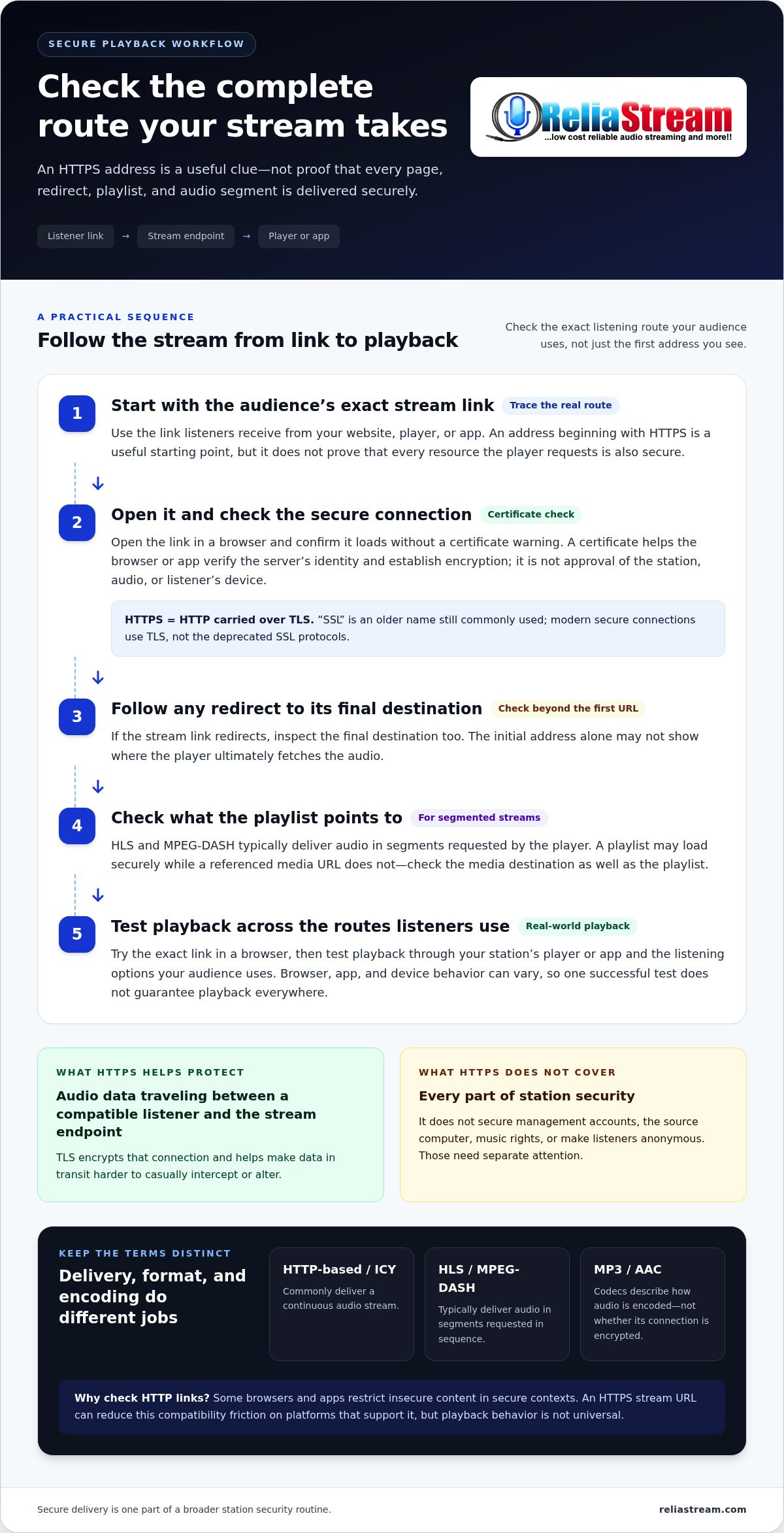
Don’t confuse the delivery method with the audio itself. HTTP-based or ICY streams commonly deliver a continuous audio stream. HLS and MPEG-DASH typically deliver audio in segments that a player requests in sequence. The codec, such as MP3 or AAC, describes how the audio is encoded, not whether its connection is encrypted.
Security depends on the actual endpoints and their configuration. An address that begins with HTTPS is a useful clue, but it doesn’t prove every resource a player requests is also delivered securely. A page, playlist, redirect, or media segment may point elsewhere. Support can also vary by source, hosting setup, and playback device, so don’t assume every app handles every format the same way.
To check the full playback route, test the exact listening link your audience uses. Open it in a browser, confirm it loads without a certificate warning, and try playback through the station’s player or app. If the link redirects, inspect the final destination too. With a segmented stream, the playlist may load securely while a referenced media URL does not. Check beyond the first address.
That’s the practical difference between knowing a stream supports HTTPS and confirming secure delivery. If you’re planning a hosting setup, ReliaStream’s SSL-secured radio links connect secure delivery with ShoutCast and IceCast hosting.
HTTPS radio streaming versus HTTP: what changes for broadcasters?
Moving from HTTP to HTTPS changes how the listener’s connection is protected, but it can also affect the work behind the scenes. Links may be stored in website players, station apps, directories, and third-party listings. Prefer a secure URL where your hosting setup and listening platforms support it, but make the switch deliberately. Compare the setup first, then test the routes your audience uses.
| What to compare | HTTP stream | HTTPS stream |
|---|---|---|
| Connection encryption | Doesn’t encrypt the connection between the listener and stream endpoint. | Uses TLS to encrypt the connection between compatible listeners and the endpoint. |
| Playback compatibility | May be restricted when loaded by a secure webpage or player. | Can reduce mixed-content friction on platforms that support the stream setup. |
| What it cannot protect | Doesn’t protect data in transit from casual interception or alteration. | Doesn’t secure weak passwords, source computers, station accounts, or every link in a playback chain. |
What HTTPS improves, and what it cannot fix
HTTPS adds encryption in transit and can help a stream work more smoothly when a secure website or player requests audio. That’s a meaningful improvement, not a magic shield. It won’t fix a weak password, protect a compromised computer sending audio, or stop unauthorized access to a management panel. It also can’t guarantee continuous playback or prevent every attack or outage.
For securing an online radio stream, treat the protocol as one part of the station’s security choices. Protect account access and source devices separately, and don’t assume the lock icon covers every asset involved in broadcasting. For broadcasters and organizations looking to strengthen their wider operational defense, managed IT and cybersecurity resources from ManagePoint can help teams stay informed on best practices.
How to compare a secure stream setup with a legacy link
Compare the full listener path, not just the address shown in a dashboard. A station may have changed its main stream URL while an older HTTP link remains embedded in a website player, saved in an app, or listed in a third-party directory. Those outdated references can keep sending listeners to the old endpoint.
- URL scheme: Identify which links begin with HTTP and which use HTTPS, including playlist or redirect destinations.
- Player destinations: Review website embeds, station apps, directories, and other places listeners launch playback.
- Station workflow: Confirm the new link works with your source and listening platforms before replacing every reference.
Plan a transition and testing period instead of making an abrupt, unverified switch. Check playback from updated player and app links, then revisit directories and older embeds. Server software is another part of the setup. This ShoutCast and IceCast comparison can help clarify how those options differ, without confusing server choice with connection encryption.
ReliaStream’s SSL-secured radio links connect HTTPS-focused delivery with ShoutCast and IceCast hosting.
How to secure and test your online radio stream
A secure link is useful only if it’s the right link, reaches the right player, and works for listeners. Treat the change like a small rollout: map where your stream is used, confirm the secure endpoint, test it, then update destinations in a controlled order. This helps prevent a URL change from becoming a playback mystery.
Before changing a live URL, check the source, hosting endpoint, exact HTTPS link, account access, redirects, audio, metadata, and every listener destination you plan to update.
- Inventory your current setup. Note the broadcasting or source software, existing stream URLs, website player embeds, station apps, directory listings, and other places listeners find the station. Record which links use HTTP and which use HTTPS. This list becomes your rollout map and helps you find older links later.
- Protect the accounts behind the stream. Use unique passwords for hosting and management accounts. Enable available account protections where supported, and remove or update access that no longer fits the people managing the station. A secure listener link doesn’t protect a panel account with weak or shared credentials.
- Confirm the hosting endpoint. In your station’s control panel, identify the stream endpoint and its secure URL. Control-panel layouts differ, so follow the current interface rather than relying on remembered menu names or instructions for another version. Confirm you have the listener-facing HTTPS link before copying it.
- Test before replacing links. Open the secure URL in current browsers and test it on mobile devices and the station players your audience uses. Confirm that audio starts and continues, metadata behaves as expected, and redirects lead to the intended secure endpoint. A URL loading successfully doesn’t always mean the full player route works.
- Update listener destinations in stages. Once the replacement link passes your tests, update website embeds, apps, and directory listings. Test each changed destination rather than assuming they all use the same link or handle it the same way. Keep your inventory nearby to track changes and find lingering legacy URLs.
- Retest after future changes. Revisit key destinations when hosting, players, or stream settings change. Review account access periodically, especially when staff or contractors stop working on the station, and remove credentials they no longer need.
Keep the scope clear: stream security protects delivery, not music licensing or content-rights responsibilities. Those remain separate parts of running a station.
For broadcasters who want SSL-secured links as part of their hosting setup, explore secure radio hosting with ReliaStream. A careful test-and-update process remains essential for securing an online radio stream and keeping listener destinations current.
Secure online radio streaming with ReliaStream hosting
A secure stream works best as part of a well-managed station workflow. ReliaStream provides ShoutCast and IceCast hosting with SSL-secured links, bringing secure delivery into the same setup broadcasters use to manage their streams. Control-panel access through Centova Cast or MediaCP supports station management, while the listener-facing link remains a distinct part of the picture. Test the exact URL in your players and destinations.
Bring secure links into your station workflow
Start with the stream link your audience will actually use. Find the SSL-secured URL associated with your hosting setup, then compare it with the links currently used in your website player, station app, and other listening destinations. Aim for a consistent handoff from the station’s setup to the player, not just a secure-looking link copied into one place.
Centova Cast or MediaCP gives broadcasters a control-panel route for station management. Protect account credentials and include the panel in your operating workflow, without assuming that control-panel access automatically secures every station account or listener destination.
Choose a hosting setup that can grow with your station
ReliaStream hosting supports bitrates from 32 Kbps to 320 Kbps. Bitrate affects how much data the stream uses and can influence the listener’s audio experience. A higher bitrate generally requires more bandwidth per listener, so consider the listening experience you want alongside bandwidth use and the devices or connections your audience relies on. Test your chosen setting in practice.
ShoutCast and IceCast are both hosting options. Neither is automatically the right fit for every station. Your existing source, management workflow, and listening destinations all matter. As you assess the setup, separate the server choice from the secure-link check. Confirm the listener URL, test playback, and update each player destination only after the replacement link works as expected.
- Stream delivery: Use the SSL-secured listener link as the address to validate.
- Station management: Keep Centova Cast or MediaCP access within your account-security routine.
- Listener experience: Check the bitrate and playback across the destinations your audience uses.
That’s the practical approach to securing an online radio stream: bring hosting, management, and playback checks together while keeping their roles clear. ReliaStream’s ShoutCast and IceCast hosting, SSL-secured links, and control-panel access give broadcasters a foundation for organizing those parts of the workflow. Test the URLs where listeners tune in.
Explore ReliaStream radio hosting and find a hosting setup for your station.
Make secure delivery part of your next station upgrade
Strong broadcasting is built through steady improvements, not a single switch. Make secure delivery part of your station’s regular workflow: track the links listeners use, review who can manage the stream, and retest playback as your setup changes. This keeps securing an online radio stream on your radar as your station grows.
If you’re ready to bring hosting and stream management together, ReliaStream offers ShoutCast and IceCast hosting with SSL-secured links, Centova Cast and MediaCP control-panel options, and bitrate plans from 32 Kbps to 320 Kbps. Choose a setup that fits your station’s current needs, then apply the same careful testing to each listener destination.
Explore ReliaStream hosting for a secure online radio stream and take your next step with confidence.
Frequently Asked Questions
Does HTTPS make an online radio stream completely secure?
No. HTTPS protects the connection between a listener and the stream endpoint, but it can’t protect every part of a broadcast setup. A secure listener link, for example, won’t prevent someone from guessing a weak station password or accessing an unprotected source computer. Treat securing an online radio stream as one layer in a broader routine: protect accounts, limit access to station tools, and maintain the devices used to broadcast.
What is the difference between SSL and TLS for radio streaming?
TLS is the modern protocol used to secure HTTPS connections; SSL is its older predecessor. The term “SSL” remains common in radio hosting and phrases such as “SSL link,” but it usually refers to a link delivered using TLS. When reviewing a stream service or technical note, focus on whether the listener’s connection is HTTPS-secured rather than assuming that “SSL” means the outdated protocol is being used.
Can listeners play an HTTPS radio stream in every browser and app?
No single URL can be assumed to work in every browser, app, or device. Playback depends on the player’s support for the stream format and how the app handles the station’s endpoint. Test the link in the actual listening options you provide. For example, a stream might play in a desktop browser but fail in an older app that expects a different format or URL structure.
How do I change my radio stream from HTTP to HTTPS without breaking playback?
First, obtain the correct secure stream URL from your hosting setup and test it without replacing the existing link. Check that playback starts and continues in your website player and station apps, and watch for unexpected redirects. Then update destinations one at a time, keeping a record of each change. If a player stops working, you can identify which link changed and restore the previous address while troubleshooting.
What happens if my radio player still uses an HTTP stream link?
It may continue to play, but the result depends on the listener’s browser, app, and how the player is embedded. A secure webpage that loads audio over HTTP may trigger a warning or block playback in some circumstances. Other listeners might notice no issue. Check for old links in saved embeds and directories too, since updating your main website player won’t automatically change URLs published elsewhere.
Does HTTPS protect my radio station's control panel and source computer?
No. HTTPS on a listener-facing stream link doesn’t automatically secure the separate connection to a control panel or protect the computer sending audio to your host. Use unique passwords for station accounts, restrict access to people who need it, and keep the source computer’s operating system and software maintained. Also use the correct secure sign-in address for management tools rather than assuming the stream URL is an account login.
Is HTTPS radio streaming the same as private or anonymous listening?
No. HTTPS secures data sent between a listener and the stream endpoint, but it doesn’t make listening anonymous. The service delivering the stream may still receive connection details, and a website or app may collect information according to its own practices. Someone listening through a station app, for example, shouldn’t assume the encrypted audio connection hides their activity from that app or the service operating it.


